


gitnexus
MCPShips with gitnexus: GitNexus indexes a codebase into a knowledge graph of symbols, calls, dependencies and execution flows. Use…
 @abhigyanpatwariInstall MCP
Ships with mcp-use: The fullstack MCP framework to develop MCP Apps for ChatGPT / Claude & MCP Servers for AI Agents.
Claude Code
> /plugin marketplace add mcp-use/mcp-use
Codex
$ codex mcp add mcp-use-docs --url https://docs.mcp-use.com/mcp
Cursor
{
  "mcpServers": {
    "mcp-use-docs": {
      "url": "https://docs.mcp-use.com/mcp"
    }
  }
}
Add it to mcp.json.
Gemini CLI
$ gemini mcp add --transport http mcp-use-docs https://docs.mcp-use.com/mcp
GitHub Copilot
$ copilot mcp add --transport http mcp-use-docs https://docs.mcp-use.com/mcp
OpenCode
{
  "mcp": {
    "mcp-use-docs": {
      "type": "remote",
      "url": "https://docs.mcp-use.com/mcp"
    }
  }
}
Add it to opencode.json.
Windsurf
{
  "mcpServers": {
    "mcp-use-docs": {
      "serverUrl": "https://docs.mcp-use.com/mcp"
    }
  }
}
Add it to mcp_config.json.
Security report
Low risk
Known flaws
Not published
Signed build
Not published
Maintained
Oct 30, 2026
Last push
Licence
MIT
Runs as
Remote
docs.mcp-use.com
Deprecated
Not published
Signals from public registries, not an audit. Checked Nov 12, 2026.

The TypeScript framework for MCP Build, test, and ship MCP servers, ChatGPT plugins, Claude connectors
Fully Typed, native Views and MCP Apps support, built-in Inspector and first class Agent experience.
Documentation · Inspector · Examples · Deploy


Note Migrating from v1? Give it to your agent:
Migrate this mcp-use project to v2 following
https://docs.mcp-use.com/v2/typescript/server/migration
Build an MCP server: https://mcp-use.com/prompt.md
npx -y create-mcp-use-app@latest
Run npm run dev in the generated project · open http://localhost:3000/mcp/inspector
The scaffold gives you the server, TypeScript configuration, development scripts, Inspector, and a React view pipeline. Start it once and the MCP endpoint also serves a client-ready landing page with its connection URL and setup instructions.
Replace its index.ts with a view-bound tool like this:
index.ts — Server entry file for tool definition and metadata
import { MCPServer } from "mcp-use";
import { z } from "zod";

const server = new MCPServer({
  name: "weather-app",
  title: "Weather App",
  version: "1.0.0",
});

const weatherInput = z.object({
  city: z.string().describe("City to look up"),
});

const weatherOutput = z.object({
  city: z.string(),
  temperature: z.number(),
  conditions: z.string(),
});

export const getWeather = server.tool(
  {
    name: "get-weather",
    title: "Get weather",
    description: "Get the current weather for a city",
    inputSchema: weatherInput,
    outputSchema: weatherOutput,
    view: { name: "weather-card" },
    annotations: {
      readOnlyHint: true,
      destructiveHint: false,
      openWorldHint: true,
    },
  },
  async ({ city }) => {
    const weather = {
      city,
      temperature: 22,
      conditions: "Sunny",
    };

    return {
      content: [
        {
          type: "text",
          text: `Weather in ${city}: ${weather.conditions}, ${weather.temperature}°C`,
        },
      ],
      structuredContent: weather,
    };
  },
);

export default server;
Create views/weather-card/view.tsx. The directory name matches view.name on the tool:
view.tsx — Return a view from your tools: React weather card
import { useCallTool, useToolContext } from "mcp-use/react";

export default function WeatherCard() {
  const { status, toolOutput, toolInput } =
    useToolContext<"get-weather">();
  const refresh = useCallTool("get-weather");

  if (status === "pending") {
    return <p>Checking the weather in {toolInput?.city ?? "your city"}…</p>;
  }
  if (status === "error") return <p>Could not load the weather.</p>;

  const weather = refresh.data?.structuredContent ?? toolOutput;

  return (
    <main style={{ padding: 24 }}>
      <h2>{weather.city}</h2>
      <p>
        {weather.temperature}°C · {weather.conditions}
      </p>
      <button
        disabled={refresh.isPending}
        onClick={() => void refresh.callTool({ city: weather.city })}
      >
        {refresh.isPending ? "Refreshing…" : "Refresh"}
      </button>
      {refresh.error && <p>{refresh.error.message}</p>}
    </main>
  );
}
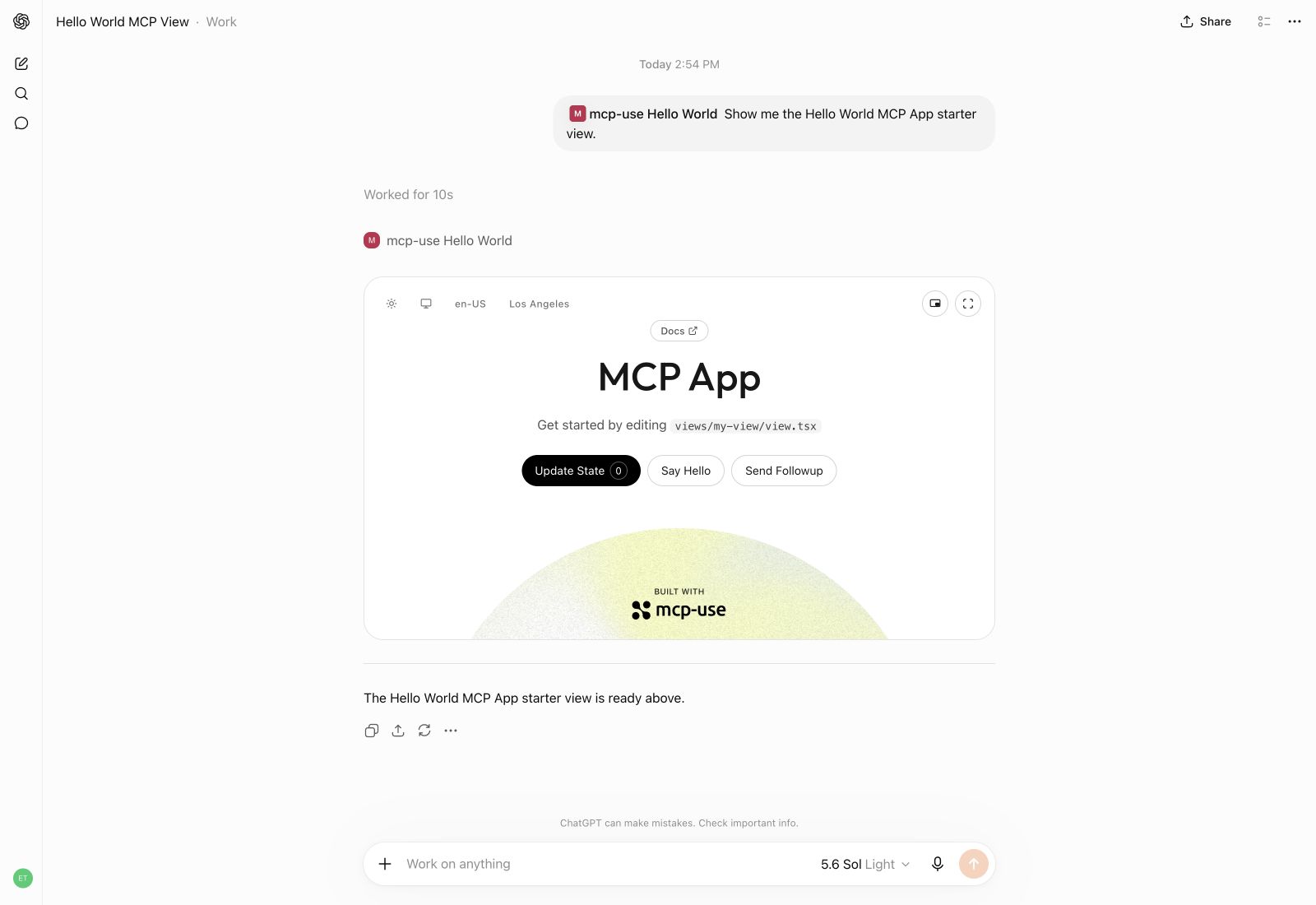
Build interactive UI experiences within ChatGPT with mcp-use.
Build ChatGPT Plugin Extensions with interactive Views that users can open alongside their conversation. Use useModelContext to let them add content from a View to the conversation, such as a book to discuss or analytics to explore.
add-book.tsx — Share a selected book with the model
import { useModelContext } from "mcp-use/react";

export default function AddBook() {
  const { add, pending, error } = useModelContext();

  async function shareBook() {
    try {
      await add("selected-book", {
        type: "text",
        title: "The Great Gatsby",
        text: "Selected book: The Great Gatsby by F. Scott Fitzgerald",
      });
    } catch (error) {
      console.error("Could not share the book", error);
    }
  }

  return (
    <>
      <button disabled={pending} onClick={shareBook}>
        {pending ? "Adding…" : "Add book to chat"}
      </button>
      {error && <p role="alert">{error.message}</p>}
    </>
  );
}
Little Bookshop
https://github.com/user-attachments/assets/2f9b56c1-f149-430e-b5b6-a258c08491e6
Manufact Analytics
https://github.com/user-attachments/assets/e488c66e-8f65-4930-8e08-711bdf12ec6e
Explore ChatGPT Plugin Extensions →
Create the production build:
npm run build
Start development mode to serve the MCP endpoint at http://localhost:3000/mcp. The Inspector is automatically available at http://localhost:3000/mcp/inspector:
npm run dev
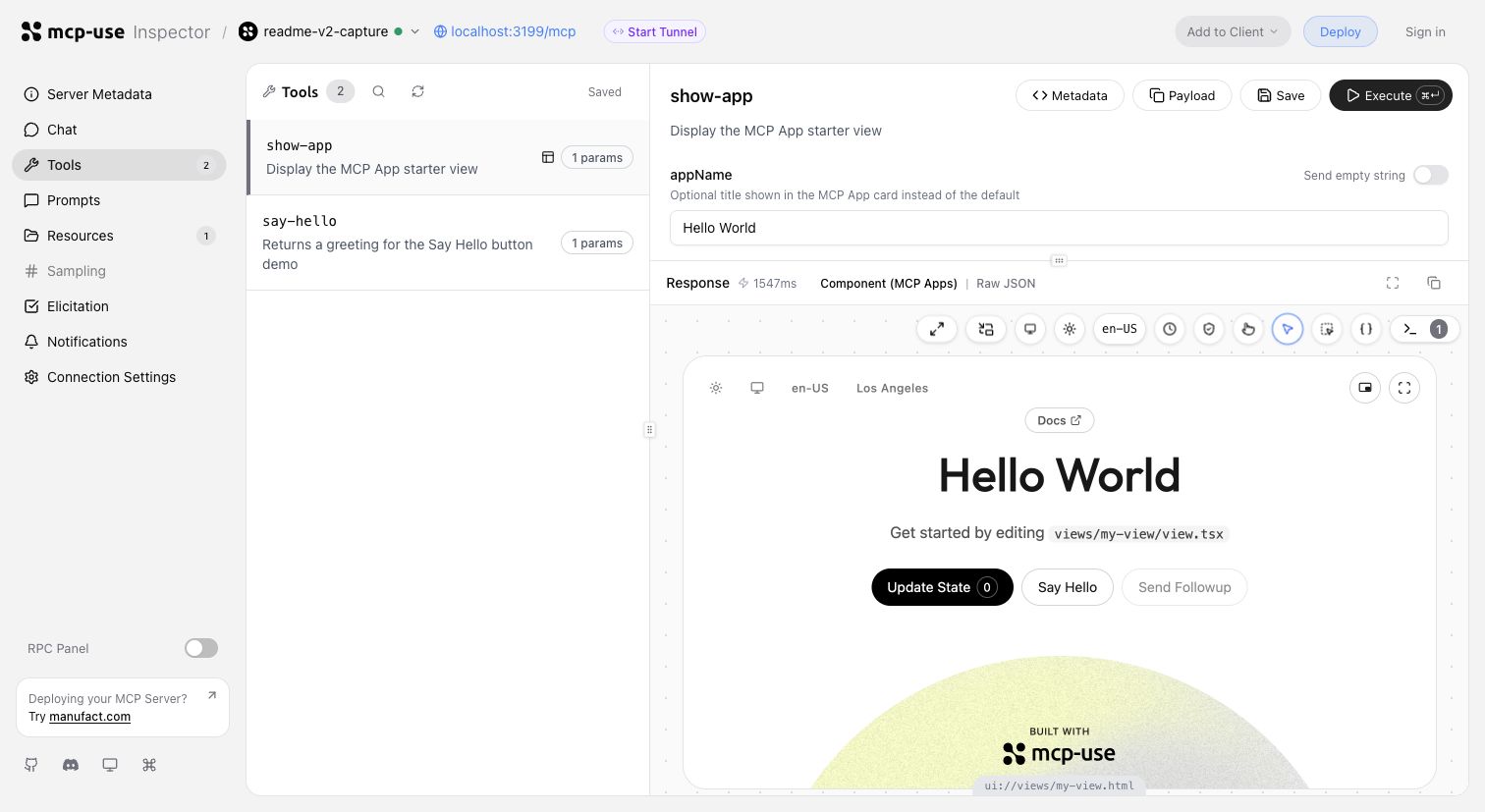
Invoke tools, validate inputs, and inspect interactive Views in the same development loop.
Start a tunnel from the Inspector UI or run mcp-use dev --tunnel to get a public URL for your local MCP server and test it with ChatGPT and Claude before deployment. Learn more about tunneling →
Inspect the same server headlessly from the terminal, invoke representative tools, and capture a View screenshot:
npm install --save-dev @mcp-use/client
npx mcp-use client connect local http://localhost:3000/mcp
npx mcp-use client local tools list
npx mcp-use client local tools call get-weather city=Tokyo
npx mcp-use screenshot \
  --server local \
  --tool get-weather \
  city=Tokyo \
  --output weather-card.png
Ship to Manufact and get observability, analytics, evals, submission readiness, and Git-based preview environments for free.
npm run deploy
Prefer to run it yourself? Follow the self-hosting guide →.
mcp-use builds on the official TypeScript SDK v2 and adds first-class Views, typed tool-to-UI contracts, an optimized stateless runtime, the Inspector, screenshot verification, agent-first CLI workflows, and deployment.

Stars on GitHub
Ships with gitnexus: GitNexus indexes a codebase into a knowledge graph of symbols, calls, dependencies and execution flows. Use…
@abhigyanpatwariInstall MCPShips with cursor-talk-to-figma-mcp: This project implements a Model Context Protocol (MCP) integration between AI agent (Cursor,…
 @grabInstall MCP
Ships with treg: OpenRouter, but for agent tools instead of models. Point an agent at one base URL with one token and it can do…
 @superdesigndevInstall MCP
