
Development
Plugin
automattic-wordpress-agent-skills
This repository contains early prototypes of Agent Skills for building WordPress themes/sites and easily sharing them with the world.

Plugin Signal39/100Fair
maintained24
capable43
documented55
adopted44
Install on Claude Code
> /plugin marketplace add Automattic/wordpress-agent-skills
Stats
113
Stars
19
Forks
Quiet
Maintenance
TypeScript
Language
6mo ago
Last commit
7mo ago
Created
Repo: Automattic/wordpress-agent-skills
What's inside
Skill(3 skills)
/site-specificationExtract comprehensive site specifications from simple descriptions. Use when analyzing a user's theme request to determine site type, audience, tone, layout requirements, and typography./design-systemsBold aesthetic direction guidance for web design. Use when making creative decisions about typography, color, motion, spatial composition, and overall visual style. Helps avoid generic "AI slop" aesthetics./wordpress-block-themingWordPress Full Site Editing (FSE) theme architecture. Use when generating theme.json, block templates, template parts, patterns, and functions.php for WordPress block themes.
README
WordPress Agent Skill Prototypes
This repository contains early prototypes of Agent Skills for building WordPress themes/sites and easily sharing them with the world. These are currently released as beta software and recommended for developers and AI enthusiasts to test and provide feedback on. The code is not production-ready and may contain bugs, security issues, and other problems. Use at your own risk.
As with all things AI, don't believe everything the model tells you.
Quick start
Claude Code
-
Install WordPress Studio and enable the CLI if you haven't already.
-
Install the Claude Code plugin using one of the options below:
Option A — via HTTPS:
claude plugin marketplace add https://github.com/Automattic/wordpress-agent-skills.git
claude plugin install create-wp-site@wordpress-agent-skills
Option B — updating an existing plugin: If you already have the plugin installed and want to get the latest changes, you can run:
claude plugin marketplace update wordpress-agent-skills claude plugin update create-wp-site@wordpress-agent-skills -
Open Claude Code in your WordPress Studio home folder (Usually
~/Studio) and run either:
- The
/quick-buildcommand to start the quick interactive workflow for generating a WordPress block theme with an index.html landing page template and deploying it to your local Studio site. Or - The
/design-sitecommand for a more in-depth interactive workflow that starts with defining a design direction and style tokens, then generating initial page layouts, followed by a full custom theme build with content pages deployed to your local Studio site.
Important - If you have images, logos, other documents related to the site design then drag the folder containing these into the Claude Code terminal window and it will use these assets as part of the theme generation process.
Claude Cowork
- Install WordPress Studio and enable the CLI and add the MCP server to your Claude Desktop (see
studio-mcp/README.mdfor details) - Install the Cowork plugin:
-
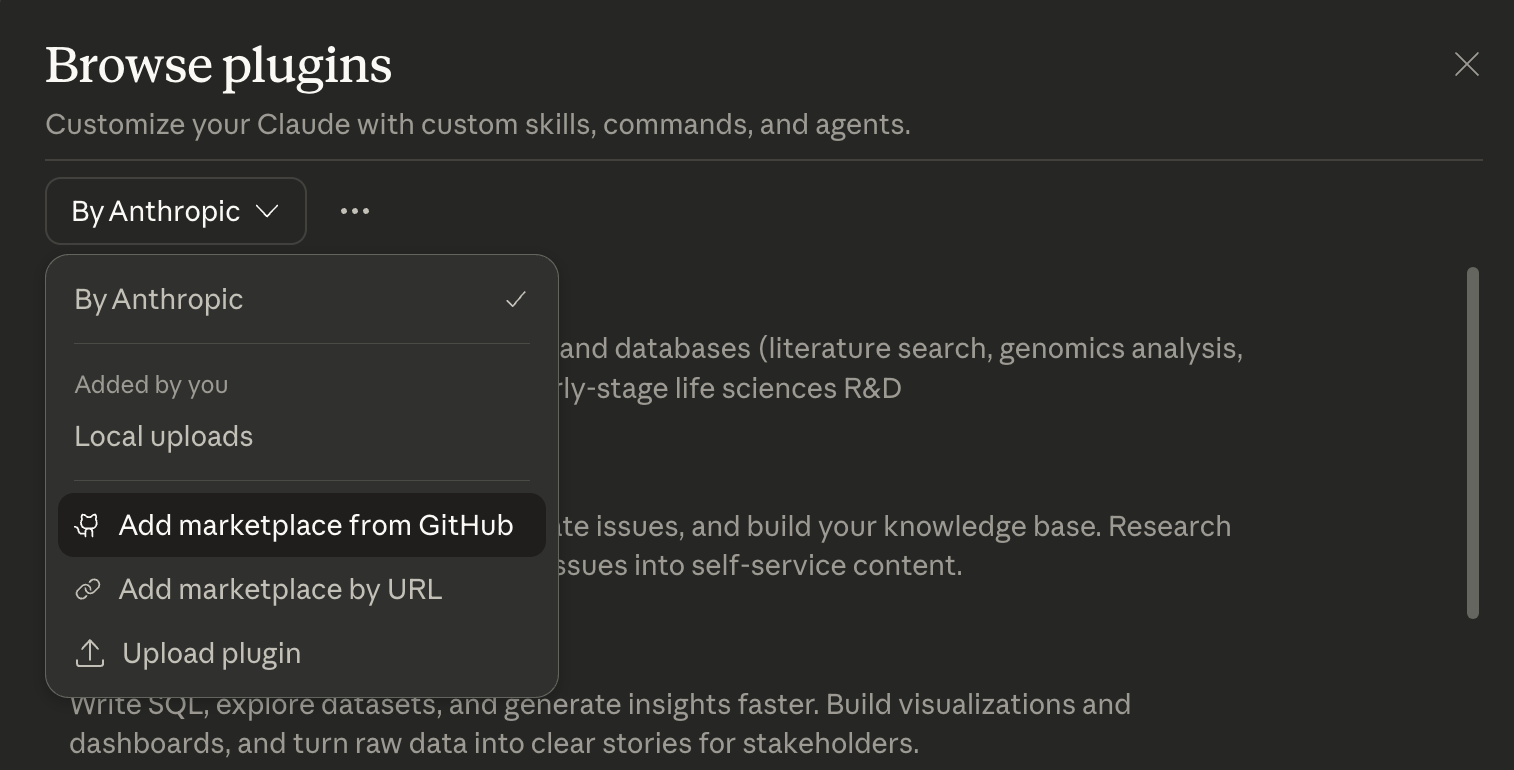
Open the plugins menu in Cowork at bottom of the left sidebar

-
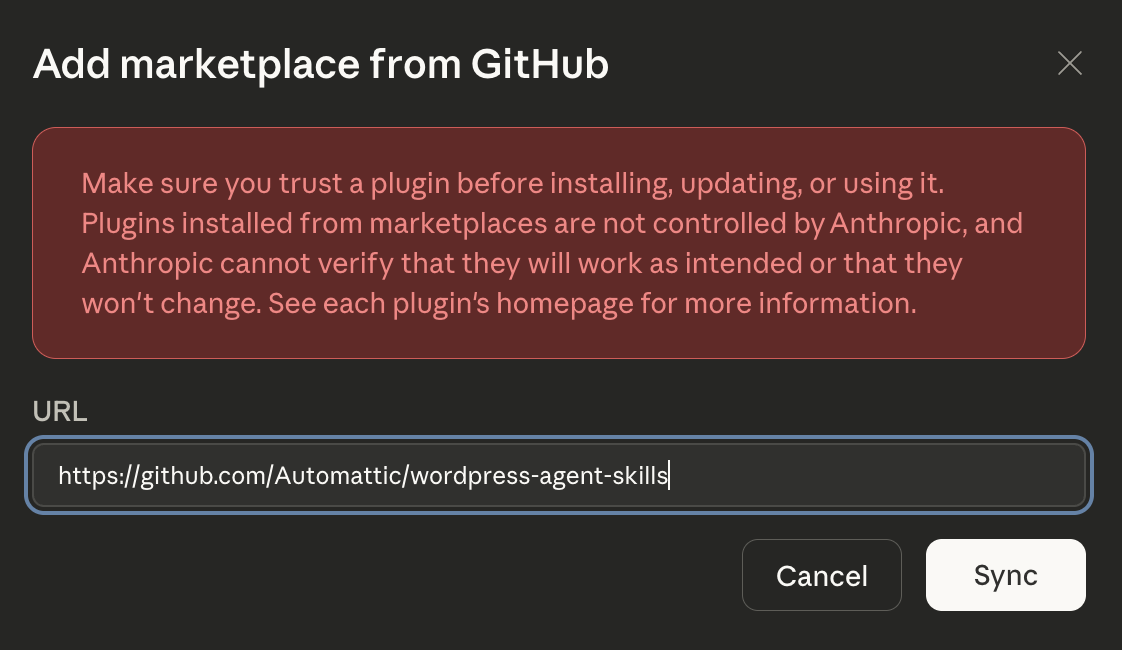
Add to marketplace from Github
-
Add link to https://github.com/Automattic/wordpress-agent-skills
-
Install
Create WP Siteplugin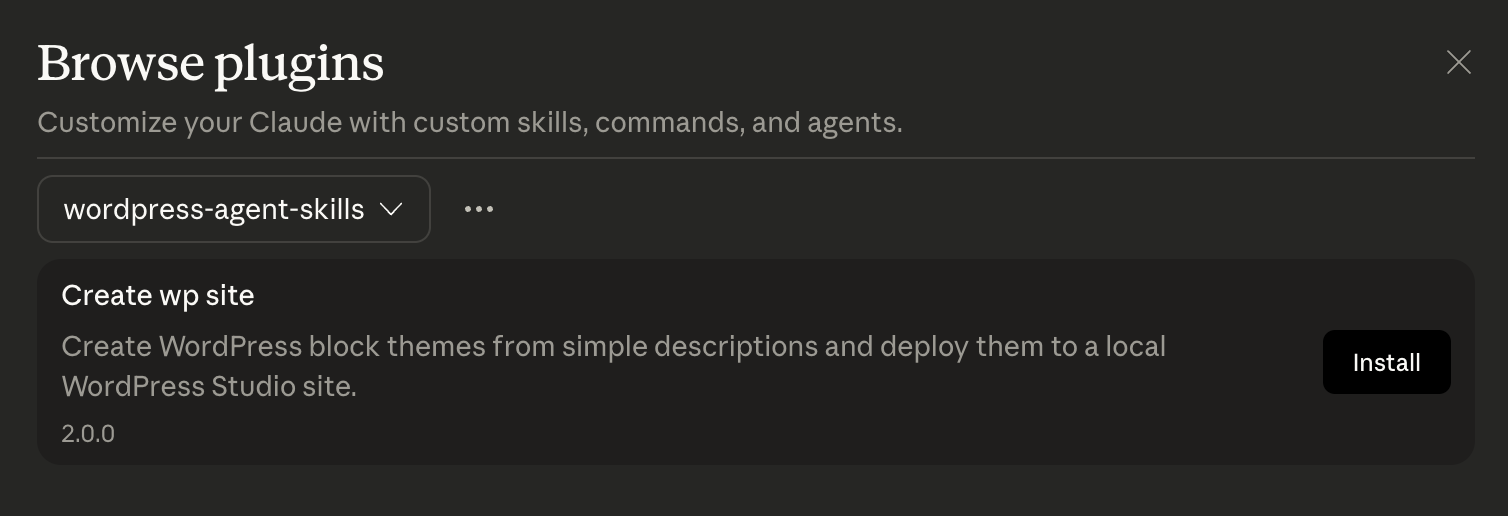
-
- In Cowork run the
/create-sitecommand to start or select it from the plugins menu
The workflow: describe your site, review specs, pick a design direction from 3 previews, then the plugin generates a full WordPress block theme and deploys it to a local Studio site.
See claude-cowork/wp-site-creator/README.md for commands, skills, and details about how to manually install the plugin from your local repo.
Studio MCP server
The MCP server gives AI assistants (Claude Desktop, Cursor, Cowork) the ability to manage local WordPress sites — create sites, write files, run WP-CLI commands, and create shareable preview links.
See studio-mcp/README.md for setup and available tools.
Disclaimer
This is early-stage experimentation. The plugins are not polished and the generated themes are not production-ready. The goal is to explore the possibilities and gather feedback on what works and what doesn't.
What's in this repo
| Directory | What it is |
|---|---|
claude-code/wp-site-creator/ | Claude Code plugin — generates WordPress block themes from a description and deploys them to a local Studio site |
claude-cowork/wp-site-creator/ | Claude Cowork plugin — generates WordPress block themes from a description and deploys them to a local Studio site |
studio-mcp/ | WordPress Studio MCP server — connects Studio to AI tools via the Model Context Protocol |
FAQS
- Why only Claude tools? The Claude Code plugin is just the start. Once the basic functionality is proven out and feedback is gathered, the next step will be to port these capabilities into other AI Agents like Codex, OpenCode, etc.
- Why the Model Context Protocol (MCP) link to Studio? The MCP link to Studio provides a quick and easy way of taking an AI created WordPress theme or site and deploying it to a local environment for viewing. Studio also provides a way to share your site with others, and to sync it to WordPress.com or Pressable. To make setup easier we will be looking at other approaches that do not require the MCP server in the near future.
File tree
FAQ
automattic-wordpress-agent-skills is a Claude Code plugin with 3 hand-picked skills for development work, indexed on Flowy. Install it with the command on its page. It includes site-specification, design-systems, wordpress-block-theming. Its skills do not fire on their own yet. Request auto-invocation to have Flowy route them as you prompt. Free and open source.
- What is automattic-wordpress-agent-skills?
- This repository contains early prototypes of Agent Skills for building WordPress themes/sites and easily sharing them with the world.
- How do I install automattic-wordpress-agent-skills?
- Run these in Claude Code: /plugin marketplace add Automattic/wordpress-agent-skills. Then prompt normally.
- Does automattic-wordpress-agent-skills auto-invoke its skills?
- Not yet. It is indexed on Flowy as a plain plugin. Request auto-invocation on its page and Flowy will route its skills for you as you prompt.
- Is automattic-wordpress-agent-skills free?
- Yes. Flowy is free and open source, with nothing gated. You can read every skill in full before you install.
Is this plugin yours?
Claim it with GitHubSubmit a pluginPromote it