

playwright
MCPDrives a real browser so the agent can open pages, click, fill forms and read what actually rendered.
 @windmill-labsInstall MCP
A node-based visual interface for building and running image generation pipelines with diffusion models.
Claude Code
> /plugin marketplace add artokun/comfyui-mcp> /plugin install comfy@comfyui-mcp
Codex
$ npx -y comfyui-mcp@latest --tunnel
Cursor
$ npx -y comfyui-mcp@latest --tunnel
Gemini CLI
$ npx -y comfyui-mcp@latest --tunnel
GitHub Copilot
$ npx -y comfyui-mcp@latest --tunnel
OpenCode
$ npx -y comfyui-mcp@latest --tunnel
Windsurf
$ npx -y comfyui-mcp@latest --tunnel
Security report
Not enough data
Known flaws
Not published
Signed build
Not published
Maintained
Oct 26, 2026
Last push
Licence
MIT
Runs as
Local process
On your machine
Deprecated
Not published
Signals from public registries, not an audit. Checked Nov 11, 2026.
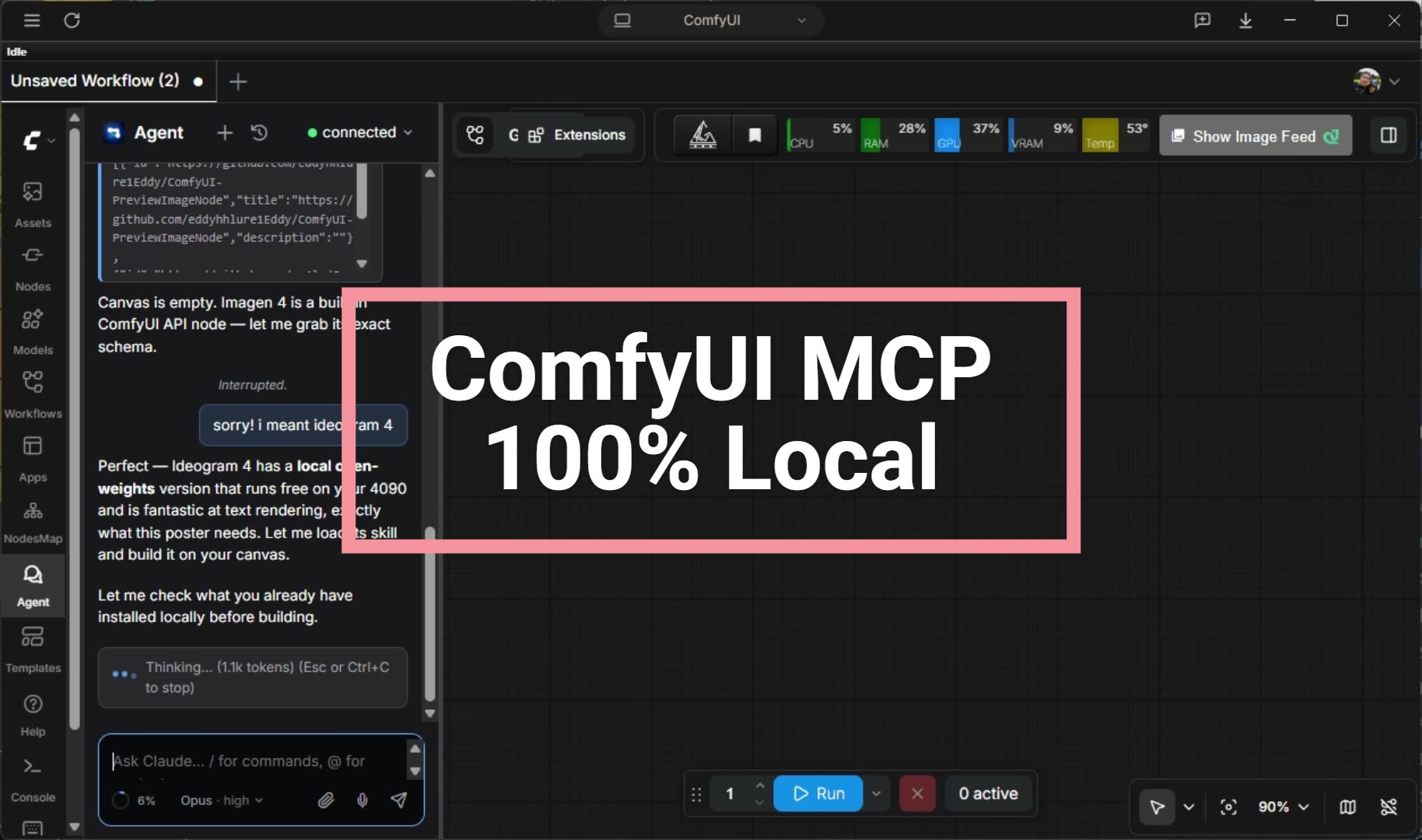
The Agent panel driving ComfyUI end to end. It reads what is installed locally, wires the graph, frees VRAM, and runs the render. Watch the 76s demo →
The local-first, agent-native control plane for ComfyUI. An MCP server plus a live sidebar agent that generates images, video and audio, authors and runs workflows, manages models and custom nodes, and edits your live ComfyUI graph in natural language. Bring whatever model you have: Claude or ChatGPT on your subscription, Gemini on your Google login, a free local model via Ollama (fully offline), or any hosted model over one API key (DeepSeek, GLM, MiMo, Kimi, GPT, Claude via OpenRouter). The tools and the panel are the same on every tier, and the built-in LLM Arena scores each model on real ComfyUI tasks so you know what yours can do. One config targets local installs, LAN, VPS, or Comfy Cloud.






Works on macOS, Linux, and Windows. Auto-detects your ComfyUI installation and port.
Stuck or have a question? Join the Discord for help, model tips, and release announcements.
38 MCP tools | 42 AI skills (Flux · WAN · LTX 2.3 video · MiniMax H3 · Qwen · Z-Image · Ideogram 4 · ERNIE · ANIMA · model registry · Civitai · node authoring · launch/perf flags) | 56 installer packs | 11 slash commands | 4 autonomous agents | 3 hooks
The plugin ships skills that grow with every release: model-specific generation guides with curated download URLs, workflow recipes, troubleshooting, and custom-node authoring. With them, Claude knows the right sampler, CFG, resolution, and model files for each architecture without trial and error.
Now available: the ComfyUI Agent Panel on ComfyUI-Manager & the Comfy Registry
An autonomous AI agent in your ComfyUI sidebar, running on Claude, ChatGPT, Gemini, or ANY local/hosted LLM (Ollama and every OpenAI-compatible endpoint). Subscriptions work with no API key; local models work with no account at all. Pick a provider and it drives your live graph: edits, spatial layout, one-shot workflow/pack loads, rewind/rollback, a pending-message tray, activity cards, multi-tab. It asks before spending paid API credits. Search
comfyui-agent-panelin ComfyUI-Manager to install. Read more →
Full documentation: comfyui-mcp.artokun.io/docs
1. Install ComfyUI (if you haven't already): ComfyUI Desktop or from source
2. Add the MCP server to your Claude Code config (~/.claude/settings.json):
{
  "mcpServers": {
    "comfyui": {
      "command": "npx",
      "args": ["-y", "comfyui-mcp"],
      "env": {
        "CIVITAI_API_TOKEN": ""
      }
    }
  }
}
3. Start using it. With ComfyUI running, ask Claude to generate an image:
> Generate an image of a sunset over mountains
Claude will find (or download) a checkpoint, build a workflow, execute it, and return the image.
Note: This runs as a standalone MCP server, so there is no need to clone this repo.
npxdownloads and runs it.
comfyui-mcp is local-first. A self-hosted ComfyUI on Mac/Linux/Windows is the primary target, and the same agent reaches remote installs (RunPod, VPS, LAN, reverse-proxied) from one config. Local-first, not local-only.
More than a bridge. Most ComfyUI MCP servers are thin connectors. They forward a prompt and hand back an image. comfyui-mcp is a full control plane. It authors and edits the graph node by node, runs and iterates on workflows, manages models and custom nodes, and ships model-specific expertise (samplers, CFG, resolutions, curated model URLs) so the agent gets it right without trial and error. If you want a minimal local relay, a lightweight server is fine. If you want an agent that operates ComfyUI, that's this project.
For Comfy Cloud users, Comfy-Org ships its own agent tooling: Comfy Cloud MCP (public beta, hosted on Comfy Cloud GPUs), the Comfy In-App Agent (private alpha, inside Comfy Cloud), and a first-party Comfy Local MCP (private test, not publicly available yet), all maintained by the Comfy team. If you don't have a GPU or you want zero setup, that's the better path; go use it.
Where this project differs is that it runs on your install and your choice of model, including a free local one via Ollama with no account and no network at all. comfyui-mcp also includes a community cloud mode (set COMFYUI_API_KEY, see Deployment modes) so a single MCP can target all three deployment shapes from one config.
Local vs. Comfy Cloud agent is a side-by-side comparison, including when Comfy Cloud is the right answer. (Statuses above are as of July 2026. Comfy-Org ships fast, so check their docs for the current state.)
To use comfyui-mcp from Claude Desktop's Custom Connectors or any remote
client, like Comfy's own cloud.comfy.org/mcp connector, run it as an
authenticated, publicly reachable Streamable-HTTP server with one flag:
npx -y comfyui-mcp@latest --tunnel
This forces the HTTP transport, generates an auth token, opens a
cloudflared quick tunnel, and prints
a ready-to-paste https://…/mcp URL + token + Claude Desktop connector snippet.
Auth accepts Authorization: Bearer <token> or X-API-Key: <token> (matching
Comfy Cloud's convention). See the
Remote / hosted connector guide
for the full walkthrough and headless usage.
Auth is opt-in. With no
COMFYUI_MCP_HTTP_TOKENset and no--tunnel, the default stdio (and plain--httpon loopback) behavior is unchanged. It stays open and local. OAuth (Comfy's browser sign-in flow) is a planned follow-up.
This package also ships as a Claude Code plugin that adds slash commands, skills, agents, and hooks on top of the MCP tools.
# In Claude Code
/plugin marketplace add artokun/comfyui-mcp
/plugin install comfy
| Command | Description |
|---|---|
/comfy:gen <prompt> | Generate an image from a text description — auto-selects checkpoint, builds workflow, returns image |
/comfy:viz <workflow> | Visualize a workflow as a Mermaid diagram with nodes grouped by category |
/comfy:node-skill <pack> | Generate a Claude skill for a custom node pack from Registry ID or GitHub URL |
/comfy:debug [prompt_id] | Diagnose why a workflow failed — reads history, logs, traces root cause, suggests fixes |
/comfy:batch <prompt, params> | Parameter sweep generation across cfg, sampler, steps, seed, etc. |
/comfy:convert <file> | Convert between UI format and API format workflows |
/comfy:install <pack> | Install a custom node pack — git clone, pip install, optional restart |
/comfy:gallery [filter] | Browse generated outputs with metadata — filter by date, count, or filename |
/comfy:compare <a vs b> | Diff two workflows side by side — shows added/removed nodes and changed parameters |
/comfy:recipe <name> <prompt> | Multi-step recipes: portrait, hires-fix, style-transfer, product-shot |
42 skills total: model-family guides (Flux, WAN, LTX 2.3, MiniMax H3, Qwen, Z-Image, Ideogram 4, ERNIE, ANIMA + anime / WAN / Z-Image LoRA training), the model-registry (curated download URLs), the civitai pairing skill, node authoring, the launch/performance-flags matrix, and the core four below. Full list on the plugin docs page.
Installer packs.
packs/bundles 13 one-command ComfyUI setups: ANIMA, Ideogram 4, LTX-2.3, ERNIE, WAN (animate / longer-videos / transparent), Qwen (image / image-edit), Z-Image (turbo / base / xy-plot) and artokun-flow (WAN Animate: replace / animate). Each is a manifest of custom nodes + model URLs + workflow that drives bothapply_manifestand generatedinstall-windows.bat/install-runpod.sh, with CI that validates every model link + payload size. Seepacks/README.md.
| Skill | Description |
|---|---|
| comfyui-core | Workflow format, node types, data flow patterns, pipeline architecture, MCP tool usage guide |
| prompt-engineering | CLIP weight syntax (word:1.3), BREAK tokens, embeddings, model-specific prompting for SD1.5/SDXL/Flux/SD3 |
| troubleshooting | Common error catalog — OOM, dtype mismatches, missing nodes, NaN tensors, black images, CUDA errors, with VRAM estimates per model |
| model-compatibility | Compatibility matrix — loaders, resolutions, CFG, samplers, ControlNets, LoRAs, and VAEs per model family (SD1.5/SDXL/Turbo/Lightning/Flux/SD3/LTXV) |
| Agent | Model | Description |
|---|---|---|
| comfy-explorer | Sonnet | Researches custom node packs — reads docs, queries /object_info, generates skill files |
| comfy-debugger | Sonnet | Autonomously diagnoses workflow failures — gathers logs + history, identifies failing node, checks models + custom nodes, proposes and optionally applies fixes |
| comfy-optimizer | Sonnet | Analyzes workflows for performance — detects redundant nodes, VRAM waste, wrong CFG/steps for model family, precision issues, suggests optimizations |
| comfy-researcher | Sonnet | Discovers and ranks ComfyUI custom node packs for a stated image-generation problem |
| Event | Trigger | Action |
|---|---|---|
| PreToolUse | enqueue_workflow | VRAM watchdog — checks GPU memory via /system_stats and warns if < 1GB free before execution |
| PreToolUse | restart_comfyui (actions stop/restart) | Save warning — prompts user to save unsaved workflow changes before stopping ComfyUI |

<img src="docs/images/demo-poster.jpg" width="760" alt="The Agent panel driving ComfyUI end to end. Click to watch the demo"> The Agent panel driving ComfyUI end to end. It reads what is installed locally, wires the graph, frees VRAM, and runs the render.
Stars on GitHub
Drives a real browser so the agent can open pages, click, fill forms and read what actually rendered.
@windmill-labsInstall MCPShips with open-computer-use: open-computer-use is an open-source Computer Use service wrapped as MCP. Any AI agent or MCP client…
 @ifurystInstall MCP

