
Development
Plugin
graphmind
Your codebase has a shape. Now your AI can see it. And remember it. GraphMind turns your codebase into a knowledge graph your AI can query, navigate, and remember.

Plugin Signal66/100Solid
maintained91
capable23
documented100
adopted50
Install
$ npx -y skills add aouicher/graphmind --agent claude-code
Stats
212
Stars
18
Forks
Active
Maintenance
Rust
Language
MIT
License
19d ago
Last commit
5mo ago
Created
Repo: aouicher/graphmind
What's inside
MCP(1 mcp)
Badges


README
graphmind
Your codebase has a shape. Now your AI can see it. And remember it.
GraphMind turns your codebase into a knowledge graph your AI can query, navigate, and remember. Ask about dead code, dependencies, or blast radius — and get answers grounded in your actual architecture.
Up to 5,700× fewer tokens than raw search (~10M tokens saved per session). Works with Claude Code, Cursor, Windsurf, Cline, Zed, Continue, and any MCP-compatible AI assistant.
Why GraphMind
Every new AI session starts from zero. Your assistant re-reads the entire codebase, re-discovers architecture, and forgets every decision you explained last time. Across multiple projects, there's zero visibility into shared dependencies.
graphmind fixes this with four layers:
- Structural graph — function-level knowledge graph per repo (AST-based, tree-sitter, 30+ languages)
- Semantic embeddings — vector search over symbols (local ONNX, OpenAI, or Voyage AI)
- Persistent memory — declarative store for decisions, patterns, conventions — survives across sessions
- Cross-project links — dependencies and relationships between registered repos
Everything runs locally. No cloud. No open ports by default. No telemetry.
Benchmark
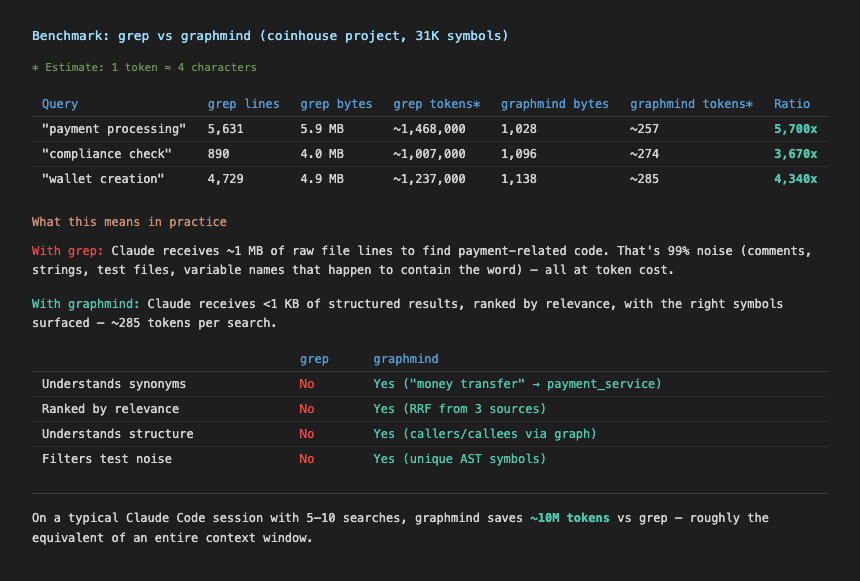
Comparison of token usage: grep -r (raw file search) vs graphmind search for the same query on a ~100k LOC codebase. graphmind returns ranked, structured results in under 300 tokens vs 1.5M+ for raw grep output.
Install
Desktop app (macOS) — recommended
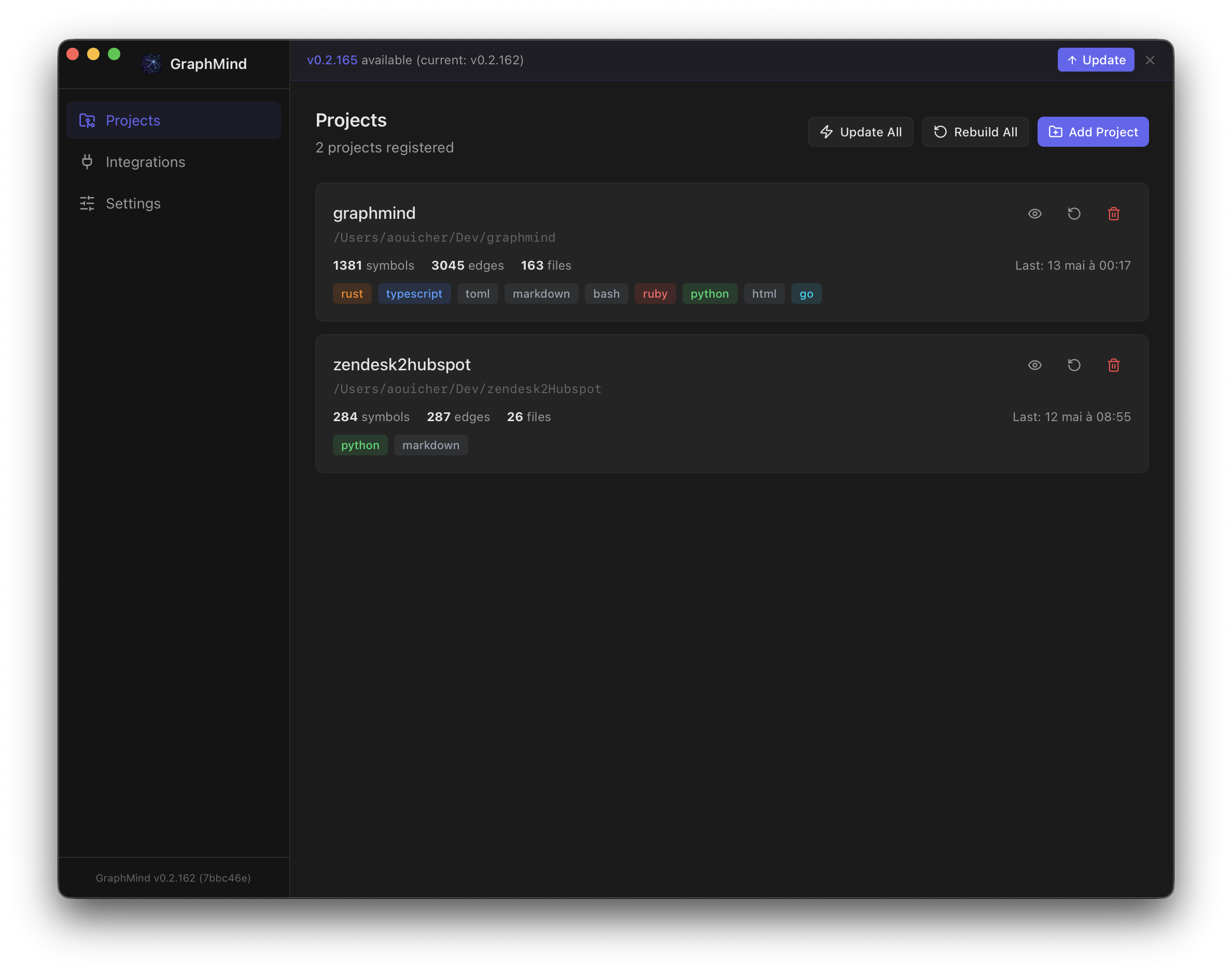
Download the .dmg from Releases. The app installs the CLI for you and runs a guided onboarding that configures MCP, hooks, skill, and embeddings — no terminal needed.
| Platform | Asset |
|---|---|
| macOS (Apple Silicon) | GraphMind-macos-arm64.dmg |
| macOS (Intel) | GraphMind-macos-x64.dmg |
Linux / Windows: CLI only — use the shell script or direct download below.
CLI — shell script (macOS/Linux)
curl -fsSL https://raw.githubusercontent.com/aouicher/graphmind/main/scripts/install.sh | bash
Then run graphmind setup once to configure Claude Code, hooks, and skill.
Homebrew (macOS/Linux)
brew install aouicher/graphmind/graphmind                # CLI
brew install --cask aouicher/graphmind/graphmind         # Desktop app (macOS only)
CLI — Linux (direct download)
curl -fsSL https://github.com/aouicher/graphmind/releases/latest/download/graphmind-cli-linux-x64 -o ~/.local/bin/graphmind
chmod +x ~/.local/bin/graphmind
From source
git clone https://github.com/aouicher/graphmind
cd graphmind
cargo build --release -p graphmind-cli
cp target/release/graphmind ~/.local/bin/
Quick Start
graphmind setup          # once — configures Claude Code, Claude Desktop, hooks, skill
cd ~/projects/myapp
graphmind init           # per project — registers, installs git hooks, builds graph
That's it. Claude Code, Claude Desktop, Cursor, and VS Code will use graphmind automatically.
graphmind setup (once, global)
Configures your machine so all AI tools can use graphmind:
- Shell PATH (
~/.zshenv,~/.zshrc,~/.bashrc) - Claude Code hooks (rewrites grep/find, injects session context, pre-fetches on prompts)
- Claude Code skill (
/gm+ 19 sub-skills) - Claude Desktop MCP (
~/Library/Application Support/Claude/claude_desktop_config.json) - Claude Code MCP (
~/.claude/settings.json) - OpenCode MCP (
~/.config/opencode/opencode.jsonc) - Cursor global MCP (
~/.cursor/mcp.json) — available in all Cursor projects - CLAUDE.md instruction block (
~/.claude/CLAUDE.md)
graphmind init (per project)
Registers and indexes a project, then writes MCP config for editors that support project-level config:
- Registers current directory in the graphmind registry
- MCP project configs — written automatically:
- Claude Code:
~/.claude.jsonunderprojects.<path>.mcpServers(local scope) - VS Code:
<project>/.vscode/mcp.json
- Claude Code:
- Git hooks (auto-rebuild on commit, impact check on push)
- Builds the code graph
cd ~/projects/api && graphmind init
cd ~/projects/web && graphmind init
cd ~/projects/lib && graphmind init
Both commands are idempotent — safe to re-run.
Manual setup (if you prefer granular control)
MCP server for Claude Code (global)
claude mcp add graphmind -- graphmind mcp
Or manually in ~/.claude/settings.json:
{
  "mcpServers": {
    "graphmind": {
      "command": "/home/user/.graphmind/bin/graphmind",
      "args": ["mcp"],
      "env": { "PATH": "/home/user/.graphmind/bin:/usr/local/bin:/usr/bin:/bin" }
    }
  }
}
MCP server for Claude Code (per project)
graphmind init writes this automatically to ~/.claude.json:
{
  "projects": {
    "/absolute/path/to/project": {
      "mcpServers": {
        "graphmind": {
          "type": "stdio",
          "command": "/home/user/.graphmind/bin/graphmind",
          "args": ["mcp"],
          "env": { "PATH": "/home/user/.graphmind/bin:/usr/local/bin:/usr/bin:/bin" }
        }
      }
    }
  }
}
MCP server for Claude Desktop
Claude Desktop does not inherit your shell PATH. Use the full path:
{
  "mcpServers": {
    "graphmind": {
      "command": "/opt/homebrew/bin/graphmind",
      "args": ["mcp"],
      "env": { "PATH": "/opt/homebrew/bin:/usr/local/bin:/usr/bin:/bin" }
    }
  }
}
Config file location:
- macOS:
~/Library/Application Support/Claude/claude_desktop_config.json - Windows:
%APPDATA%\Claude\claude_desktop_config.json
Tip: Run
which graphmindto find the correct path on your system.
MCP server for Cursor (global)
graphmind setup writes this automatically to ~/.cursor/mcp.json:
{
  "mcpServers": {
    "graphmind": {
      "command": "/home/user/.graphmind/bin/graphmind",
      "args": ["mcp"],
      "env": { "PATH": "/home/user/.graphmind/bin:/usr/local/bin:/usr/bin:/bin" }
    }
  }
}
MCP server for VS Code (per project)
graphmind init writes this automatically to <project>/.vscode/mcp.json:
{
  "servers": {
    "graphmind": {
      "type": "stdio",
      "command": "/home/user/.graphmind/bin/graphmind",
      "args": ["mcp"],
      "env": { "PATH": "/home/user/.graphmind/bin:/usr/local/bin:/usr/bin:/bin" }
    }
  }
}
Claude Code search hook
graphmind install hook-claude
Registers hooks in ~/.claude/settings.json for:
- PreToolUse — rewrites grep/find/rg to
graphmind search, provides graph results for Grep/Glob/LS tools - SessionStart — loads project context (stats, structure) at session start
- UserPromptSubmit — pre-fetches relevant graph context based on the user's prompt
- PostToolUse — enriches results with graph-aware suggestions
Built-in intelligence:
- Exhaustive search bypass — detects "find all occurrences",
grep -c, pipes towc/sortand lets them through - Cache deduplication — identical searches within 5 minutes are skipped (0 tokens cost)
- Pattern extraction — extracts meaningful search terms from grep, find, fd, rg commands and Agent prompts
Claude Code skill
graphmind install skill
CLAUDE.md sync
graphmind sync                # updates CLAUDE.md in current project
graphmind sync --all          # updates CLAUDE.md for all registered projects
Git hooks
graphmind install hook-git
Architecture
┌─────────────────────────────────────────────┐
│  Claude Code / MCP Client                    │
├─────────────────────────────────────────────┤
│  MCP Server (rmcp SDK, stdio) — 27 tools     │
│  gm_query · gm_fn · gm_file · gm_deps      │
│  gm_outline · gm_who_calls_chain · gm_dead  │
│  gm_export · gm_similar · gm_listeners      │
│  gm_memory_search · gm_cross_query          │
│  gm_status · gm_context · gm_diff_impact    │
├─────────────────────────────────────────────┤
│  Layer 1: Structural Graph (SQLite + FTS5)   │
│  Symbols · Edges · Call sites                │
├─────────────────────────────────────────────┤
│  Layer 2: Semantic Embeddings (SQLite)       │
│  Cosine search · Graph expansion · RRF      │
├─────────────────────────────────────────────┤
│  Layer 3: Semantic Memory (JSONL)            │
│  Decisions · Patterns · Conventions          │
├─────────────────────────────────────────────┤
│  Layer 4: Cross-Project Links (JSONL)        │
│  Shared symbols · Inferred relationships     │
├─────────────────────────────────────────────┤
│  Rust Core (tree-sitter + napi-rs)           │
│  Multi-language parsing · Symbol extraction  │
└─────────────────────────────────────────────┘
Search & Embeddings
graphmind search combines three retrieval strategies into a single ranked result:
graphmind search "<query>"          # hybrid search (FTS + semantic + graph)
graphmind search "<q1>; <q2>"       # multi-query with RRF ranking
graphmind search "<query>" --kind function
How search works
- FTS5 — exact text matching on symbol names, signatures, docs
- Semantic embeddings — cosine similarity finds conceptually related symbols (e.g. "money transfer" →
payment_service) - Graph expansion — top results are expanded with 1-hop callers/callees from the structural graph
Results are fused via Reciprocal Rank Fusion (RRF, k=60). Each result shows its source: [FTS], [SEM], [GRAPH], or combinations like [FTS+SEM+G].
Embedding providers
Configured in ~/.graphmind/config.json:
{
  "embedding": {
    "mode": "voyage",
    "model": "voyage-code-3",
    "api_keys": {
      "voyage": "pa-..."
    }
  }
}
| Mode | Model (default) | Notes |
|---|---|---|
local | nomic-embed-text-v1.5 (768d) | ONNX, no API key needed |
openai | text-embedding-3-small (1536d) | Supports custom openai_base_url |
voyage | voyage-code-3 (1024d) | Code-specialized, recommended |
disabled | — | No embeddings — default for new installs |
Embeddings are computed automatically during graphmind build when a provider is configured. If the model changes, the embedding index is rebuilt automatically.
OpenAI-compatible providers (Azure, proxies) can set a custom base URL:
{
  "embedding": {
    "mode": "openai",
    "model": "text-embedding-3-large",
    "openai_base_url": "https://your-proxy.example.com/v1",
    "api_keys": { "openai": "sk-..." }
  }
}
Persistent Memory
graphmind gives Claude persistent memory across sessions — not just code, but decisions, patterns, conventions, and context.
How it works
Memory is fully automatic:
- Auto-recall — at each prompt, the hook searches memory for relevant context and injects it into the conversation. No action needed.
- Auto-save — Claude proactively saves important facts (decisions, patterns, conventions, bugs, context) without asking. You'll see a brief mention of what was saved.
This works for both Claude Code (via hooks) and Claude Desktop (via MCP instructions).
What gets saved
| Type | Examples |
|---|
File tree
FAQ
graphmind is a Claude Code plugin with 1 hand-picked skill for development work, indexed on Flowy. Install it with the command on its page. It includes graphmind. Its skills do not fire on their own yet. Request auto-invocation to have Flowy route them as you prompt. Free and open source.
- What is graphmind?
- Your codebase has a shape. Now your AI can see it. And remember it. GraphMind turns your codebase into a knowledge graph your AI can query, navigate, and remember.
- How do I install graphmind?
- Run these in Claude Code: npx -y skills add aouicher/graphmind --agent claude-code. Then prompt normally.
- Does graphmind auto-invoke its skills?
- Not yet. It is indexed on Flowy as a plain plugin. Request auto-invocation on its page and Flowy will route its skills for you as you prompt.
- Is graphmind free?
- Yes. Flowy is free and open source, with nothing gated. You can read every skill in full before you install.
Is this plugin yours?
Claim it with GitHubSubmit a pluginPromote it