SWE Marketplace
A collection of Claude Code plugins for everyday software engineering and knowledge work.
Claude is already great at creating slides or charts or HTML pages, but I find that there are always adjustments and fine-tuning that I want to make for more polished results: use these style elements here, reorganize the generated HTML this way, make the chart look like this... Over many months of software development and knowledge work, these small improvements add up to days or weeks of time and loads of tokens. The knowledgeware plugin sets helpful conventions and a unified style (a "brandbook") for generated artifacts: HTML knowledge bases, charts and flow diagrams, and presentations in PowerPoint or HTML (with speaker notes, if requested).
Use research-team to run deep research on a given topic and produce template-formatted output (a technical survey, a technical rundown, a decision brief, a landscape scan, a what's-new digest or a source summary) with consistent formatting and cited sources.
More experimental tools like adv help you review your code with Claude, Codex and Gemini at once, and context-engineering helps you translate business objectives into custom agentic resources according to best practices. Plus: 49 specialist starter agent templates for languages, frameworks, clouds and databases.
Each plugin installs on its own, so feel free to add only what you'll use.


Start here
Find the row that matches what you want to do, install that plugin, and then ask Claude for something like the example.
| You want to… | Install | Then ask Claude |
|---|
| Make slide decks, knowledge-base sites or diagrams in one consistent style | knowledgeware | "Make a 6-slide HTML deck on our Q3 results in style-3" |
| Get a second and third opinion on code changes | adv | "Use the adv-review agent to review my uncommitted changes" |
| Research a topic with parallel agents and get one written report | research-team | "Use research-team to research vector database pricing" |
| Build your own agents, skills, hooks, plugins or MCP servers | context-engineering | "Help me create a skill that drafts our release notes" |
| Bring in a specialist for a language, framework, cloud or database | dev, frontend, infrastructure, databases, data, machine-learning | "Have the Terraform engineer review this module" |
| Write PRDs and project plans | product-management | "Draft a PRD for single sign-on" |
To install one, run this in Claude Code (v2.1.275 or later), with any plugin name from the table in place of knowledgeware:
/plugin install knowledgeware --marketplace andisab/swe-marketplace
Install is one command; docs/install.md covers older Claude Code versions, shells, teams, Claude Desktop, claude.ai and the Agent SDK. The catalog lists every skill, command and agent. The plugins fall into three groups: knowledgeware and research-team are the ones I maintain most actively; adv and context-engineering are experimental; the other seven are agent packs, a set of agent definitions each and nothing more.
What knowledgeware makes
The sections below show one image per skill, in the order the knowledgeware README uses; that README also holds the five styles, the brands directory, the librarian and the troubleshooting notes.
knowledgebase: sites for technical material a team references and maintains
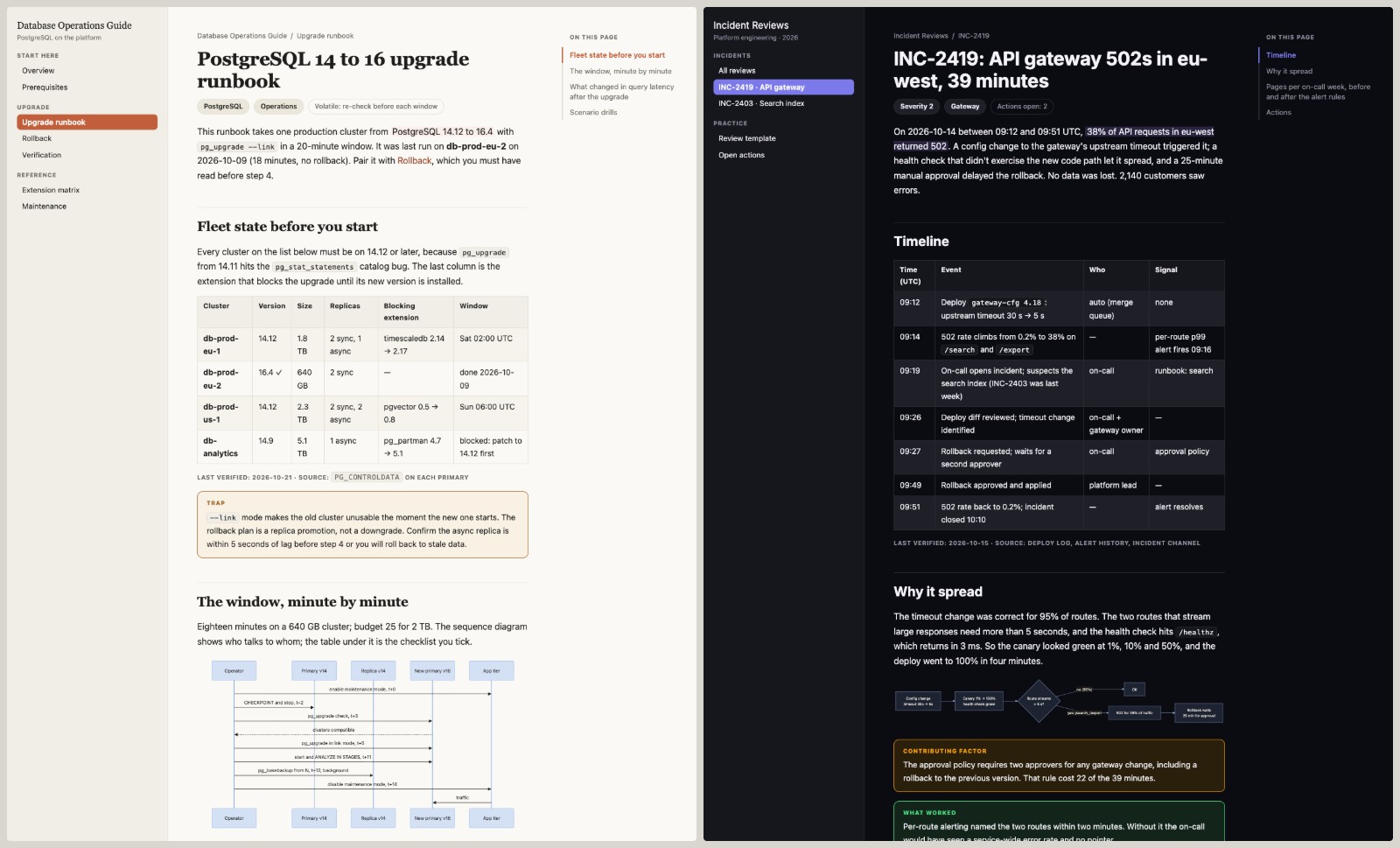
Two pages from the knowledgebase template: a PostgreSQL upgrade runbook in the default palette and an incident review in a dark one.
knowledgebase builds multi-page HTML sites for runbooks, field guides and incident reviews. A page is one HTML file with sidebar navigation, an on-page table of contents, callouts for traps and tips, Mermaid diagrams, tables, and a dated "last verified" stamp under any fact that goes stale. The dark page is the same template with its CSS variables set from another style, and nothing else changed. The plugin's librarian agent reads those stamps and re-verifies what's due.
brandware: a style registry the other skills read
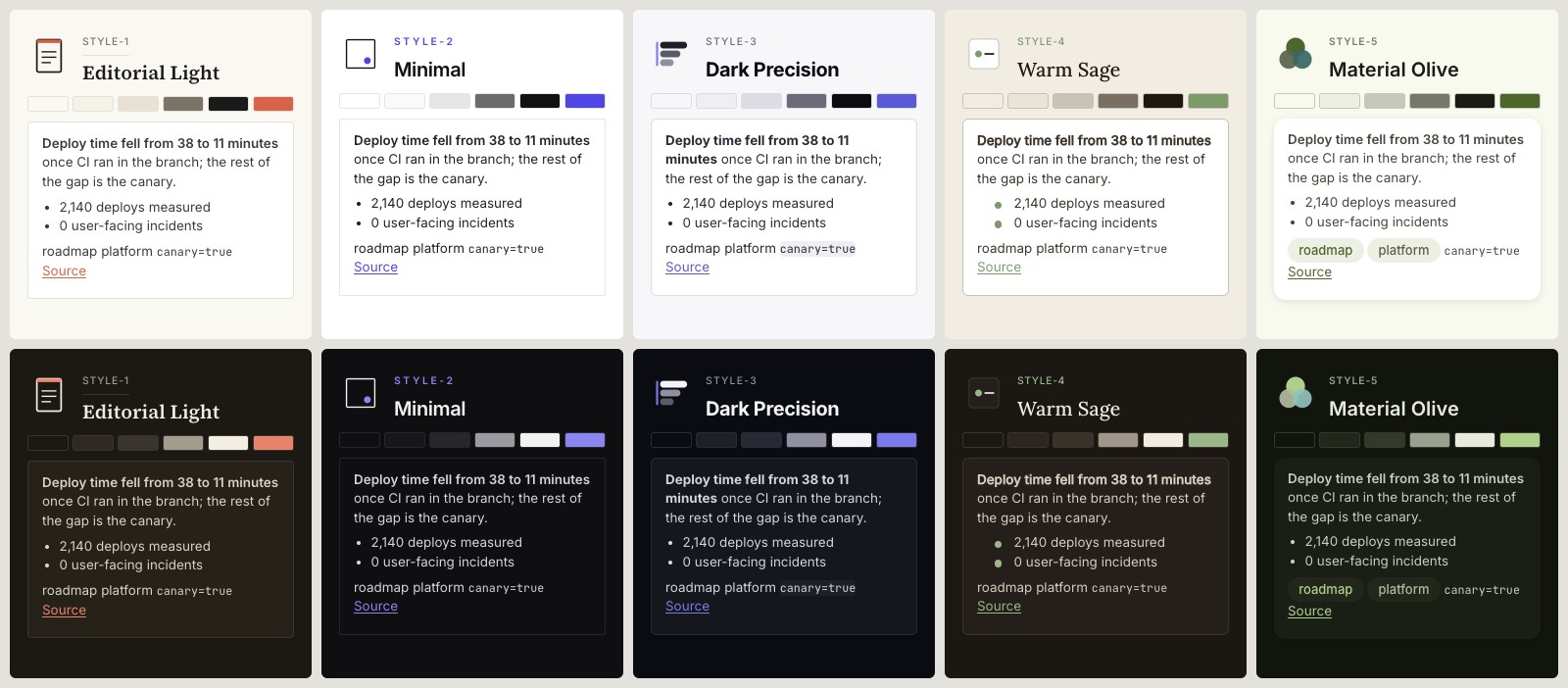
The five built-in styles in light and dark, each with its mark, palette swatches and a sample card from its own stylesheet.
A style or brand is one folder: a brandbook in Markdown that states the palette, type and layout rules, a derived token file, the marks and logos, and a stylesheet. The five styles ship with the plugin, each with a light and a dark palette. A brand of your own goes in a directory you point the plugin at, so it survives plugin updates and shadows a built-in style of the same name, and a .knowledgeware file in a repository pins the brand for that project. Decks, sites and charts then share one identity without being told twice.
chartware: charts and diagrams in three media modes
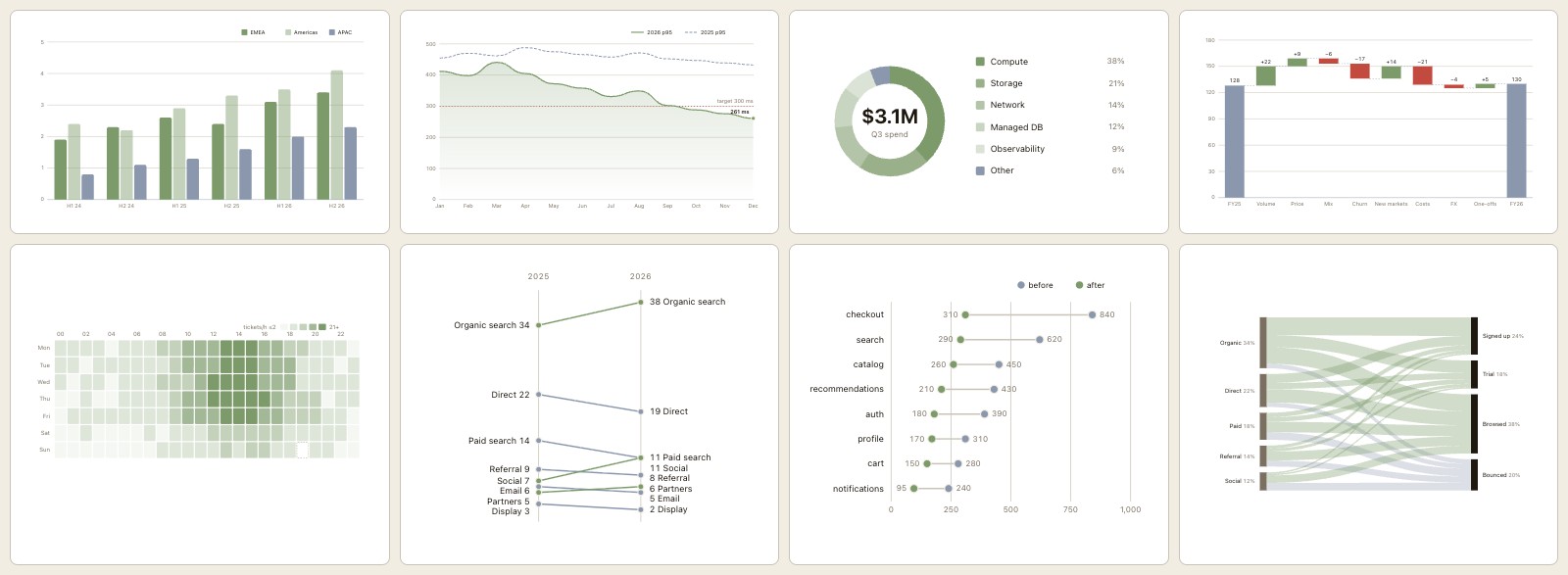
Eight of chartware's chart templates with fuller data, inlined in a page that sets the Warm Sage style: grouped bars, line and area, donut, waterfall, heatmap, slopegraph, dumbbell and Sankey.
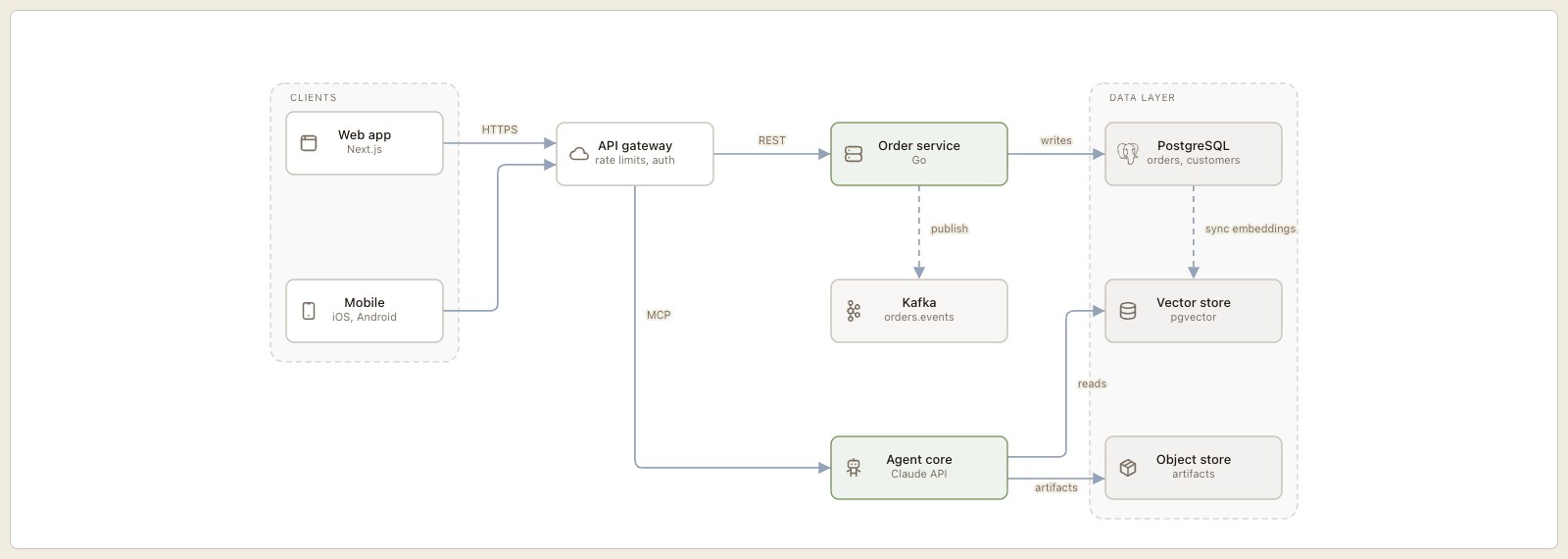
A flow diagram from the same template family: nine nodes in two groups, orthogonal edges through the gutters, icons from the sprite, and nothing the geometry lint objects to.
chartware picks the medium by fit: Mermaid for diagrams that live in Markdown, hand-authored SVG for data charts and figures that must be exact, and draw.io through its bundled MCP server for diagrams someone will keep editing. The SVG templates carry their scale math in comments and read the page's theme tokens, so a chart inlined in a knowledgebase page turns dark with the page. A geometry lint checks a diagram's routing, labels and clipping before anything is rendered, and an existing draw.io, Mermaid or Excalidraw diagram can be redrawn in any medium with a ledger of what was kept, renamed or dropped.
slideware: decks in PowerPoint or HTML
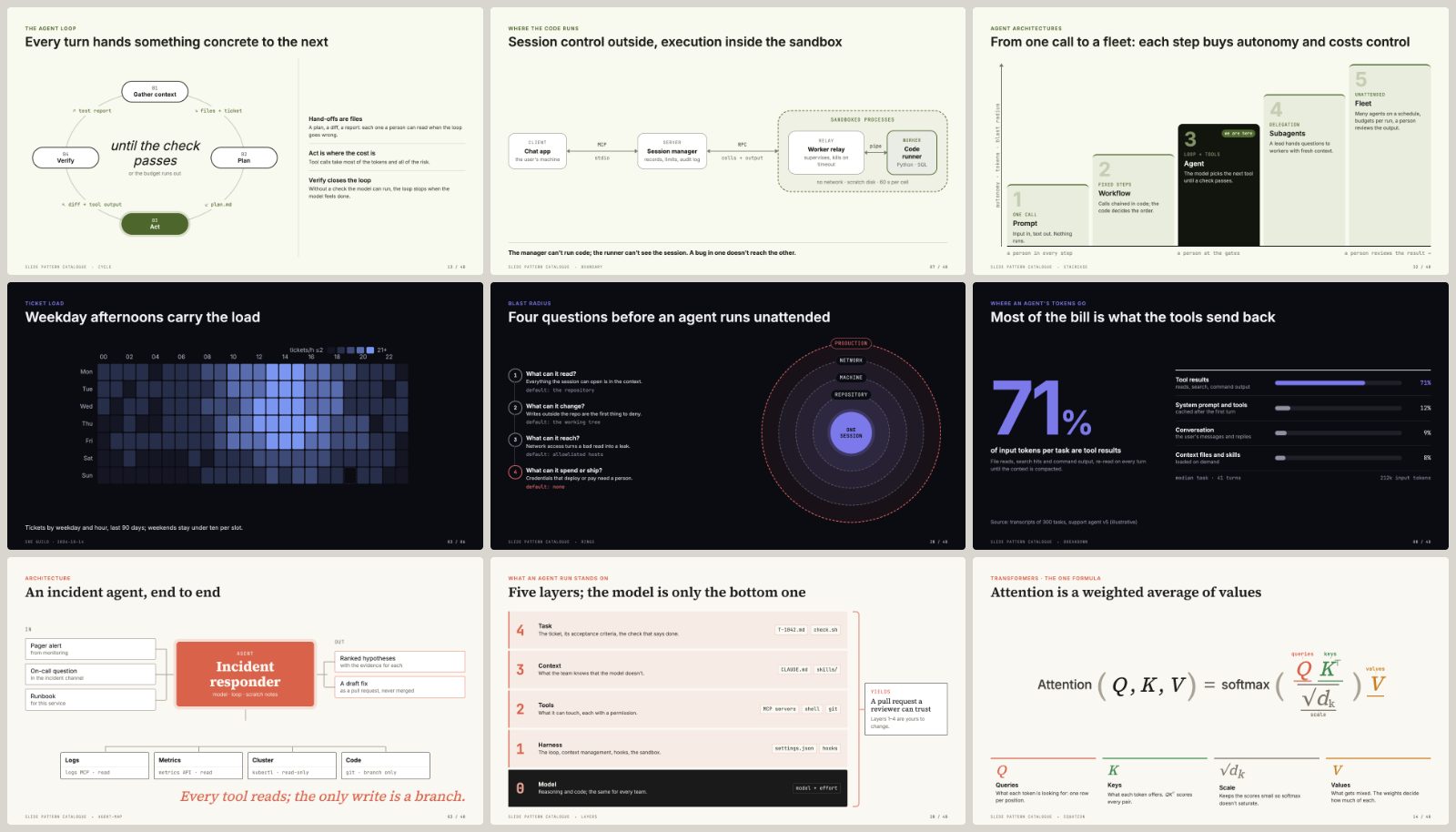
Nine HTML slides in three built-in styles, a row each. Material Olive: an agent loop with its hand-offs, a trust boundary, a staircase. Dark Precision: a chartware heatmap, blast-radius rings, a breakdown. Editorial Light: an agent system map, a layer stack, attention with labelled terms. The numbers are illustrative.
slideware builds a deck from a short outline. A PowerPoint deck is written by a pptxgenjs build script. An HTML deck is one index.html file that holds the slides, the brand and everything needed to present them, so it runs offline and travels as one file. Styles come from the shared registry, so one outline renders in any of the five built-in styles or in your brand. HTML slides build from a catalogue of 39 patterns, each a proven way to express one kind of idea, written against the brand's tokens. Beyond titles, cards and tables, it covers what technical talks need: architectures and agent loops drawn in HTML that adapt to the number of boxes, code read line by line, terminal output with a verdict, equations with labelled terms, and results that put the claim first. cli.js catalog lists them, cli.js gallery builds a deck of every example in the brand of your choice, and charts come in as chartware templates placed as figures.
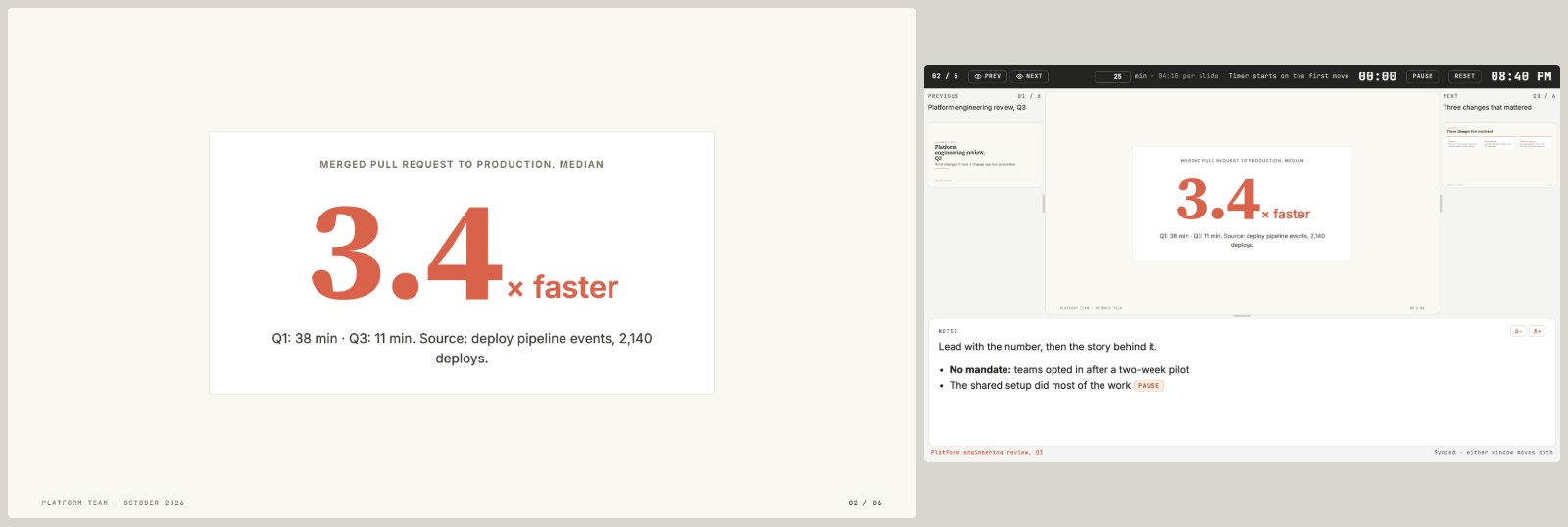
The big-number slide beside its presenter view: previous and next slides, the session timer with per-slide pacing, and the formatted speaker notes.
Press P in an HTML deck and a second window opens with this view, kept in sync with the audience window. Notes are written with each slide, with [pause] markers and bold where you want them. The pacing plan comes from the deck's total minutes or from named sessions, and the header says whether you're ahead or behind. A slide marked hidden stays out of the deck and out of the plan.
Install
In Claude Code, run this once per plugin (knowledgeware shown; the other names are in the catalog):
/plugin install knowledgeware --marketplace andisab/swe-marketplace
Confirm the marketplace the first time it asks, pick Install for you (user scope), and the plugin is active. On Claude Code older than v2.1.275, add the marketplace first with /plugin marketplace add andisab/swe-marketplace, then install with /plugin install knowledgeware@swe-marketplace.
In Claude Desktop, open Customize → Plugins → Add → Add marketplace, enter andisab/swe-marketplace, and turn on the plugins you want. Skills and commands run everywhere; agents run in Claude Code and Cowork, not in Desktop chat or claude.ai.
For updates, open /plugin → Marketplaces → swe-marketplace → Enable auto-update. adv also needs Codex CLI and Gemini CLI signed in, and knowledgeware needs Node.js; each plugin's README states what it needs and why. Shell commands, team settings, local clones, zip uploads, the Agent SDK and what runs where are in docs/install.md.
Catalog
Core plugins
The two plugins I use daily and keep current. Both carry scripts, templates and tests of their own, and their versions move the most.
| Plugin | Version | What it's for | Contents |
|---|
knowledgeware | 1.13.0 | Slide decks (PowerPoint, or HTML with a presenter view and an in-browser editor), offline HTML knowledge bases, diagrams and charts, all in one style from a shared registry. A librarian agent keeps sites and decks current. | 1 agent · 4 skills · 2 commands · 1 MCP server |
research-team | 1.3.0 | Multi-agent web research. Parallel researchers take one subtopic each, then a writer turns their notes into one report, as plain Markdown or formatted for Obsidian or Joplin. | 2 agents · 2 skills |
Experimental plugins
Both work, and both change: adv depends on the Codex and Gemini CLIs, whose flags and models change between months, and context-engineering teaches conventions that Anthropic's plugin and skill guides keep updating. Expect their interfaces to move between minor versions.


 @mattpocock


