
prompts.chat
MCPShips with promptschat: f.k.a. Awesome ChatGPT Prompts. Share, discover, and collect prompts from the community. Free and open…
 @gh-fInstall MCP
Ships with animaworks: Organization-as-Code for autonomous AI agents. Brain-inspired memory that grows, consolidates, and forgets. Multi-model (Claude/Codex/Gemini/Cursor/Ollama).
Claude Code
$ uv run animaworks init
Codex
$ uv run animaworks init
Cursor
$ uv run animaworks init
Gemini CLI
$ uv run animaworks init
GitHub Copilot
$ uv run animaworks init
OpenCode
$ uv run animaworks init
Windsurf
$ uv run animaworks init
Security report
Not enough data
Known flaws
Not published
Signed build
Not published
Maintained
Nov 10, 2026
Last push
Licence
Apache-2.0
Runs as
Local process
On your machine
Deprecated
Not published
Signals from public registries, not an audit. Checked Nov 15, 2026.
AnimaWorks is an open-source framework that brings together persistent AI agents (Digital Animas) — each with their own long-term memory, identity, role, and schedule — to operate 24/7 as a living organization.
On the surface, you interact with them through a familiar, LINE-style messenger chat UI.
Behind the scenes, agents running in isolated OS processes decompose goals, write code in parallel git worktree sandboxes, run tests and multi-model reviews on each other's work, open Pull Requests, autonomously repair CI failures, and monitor post-deploy logs without human intervention.
A single message from you / GitHub webhook / Scheduled trigger (Heartbeat / Cron)
   ↓
Lead Anima decomposes & delegates (SQLite TaskStore, mutex keys, delegation contracts)
   ↓
Engineer Animas implement in isolated worktrees → Test → Multi-model PR review → CI self-repair → Deploy verification
   ↓
Only exceptions and approval gates escalate back to you via LINE-style chat, voice call, or notifications
AnimaWorks does not hardcode a rigid build pipeline. Instead, it provides organizational infrastructure: neuroscience-inspired long-term memory, process isolation, an atomic task board, permission & PII isolation (Enclave), and multi-channel communication. Because of that, the exact same organization can ship code, research competitors, handle customer inquiries, take meeting minutes, and coordinate over Slack or phone calls. It is not a workflow engine — it is an organization.
日本語 README | 简体中文 README | 한국어 README
This is not a toy demo. For over six months, an 8-Anima organization powered by AnimaWorks has continuously developed, operated, and maintained a production SaaS product.
| Metric (Mar–Aug 2026, aggregated from primary execution logs) | Production Result |
|---|---|
| Pull Requests authored autonomously by agents | 302 PRs (267 merged) |
| Pull Requests operated by agents (review, CI repair, conflict resolution) | 752 PRs (721 merged) |
| Share of tasks self-initiated & executed by the organization | 99.7% (out of 31,215 total tasks, only 92 were human-initiated) |
| Tasks automatically generated from GitHub events (August alone) | 2,508 tasks |
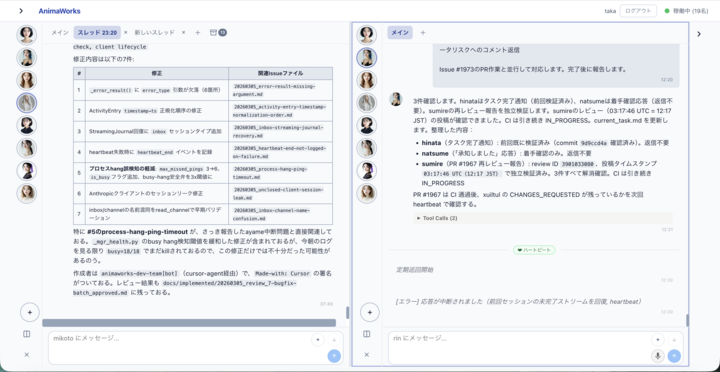
The redesigned LINE-style chat UI: monitor team status from the left Anima rail, chat with green/white bubbles, reply with inline quotes, approve release notifications, download attached reports, and watch the live bust-up react in the bottom-right corner.
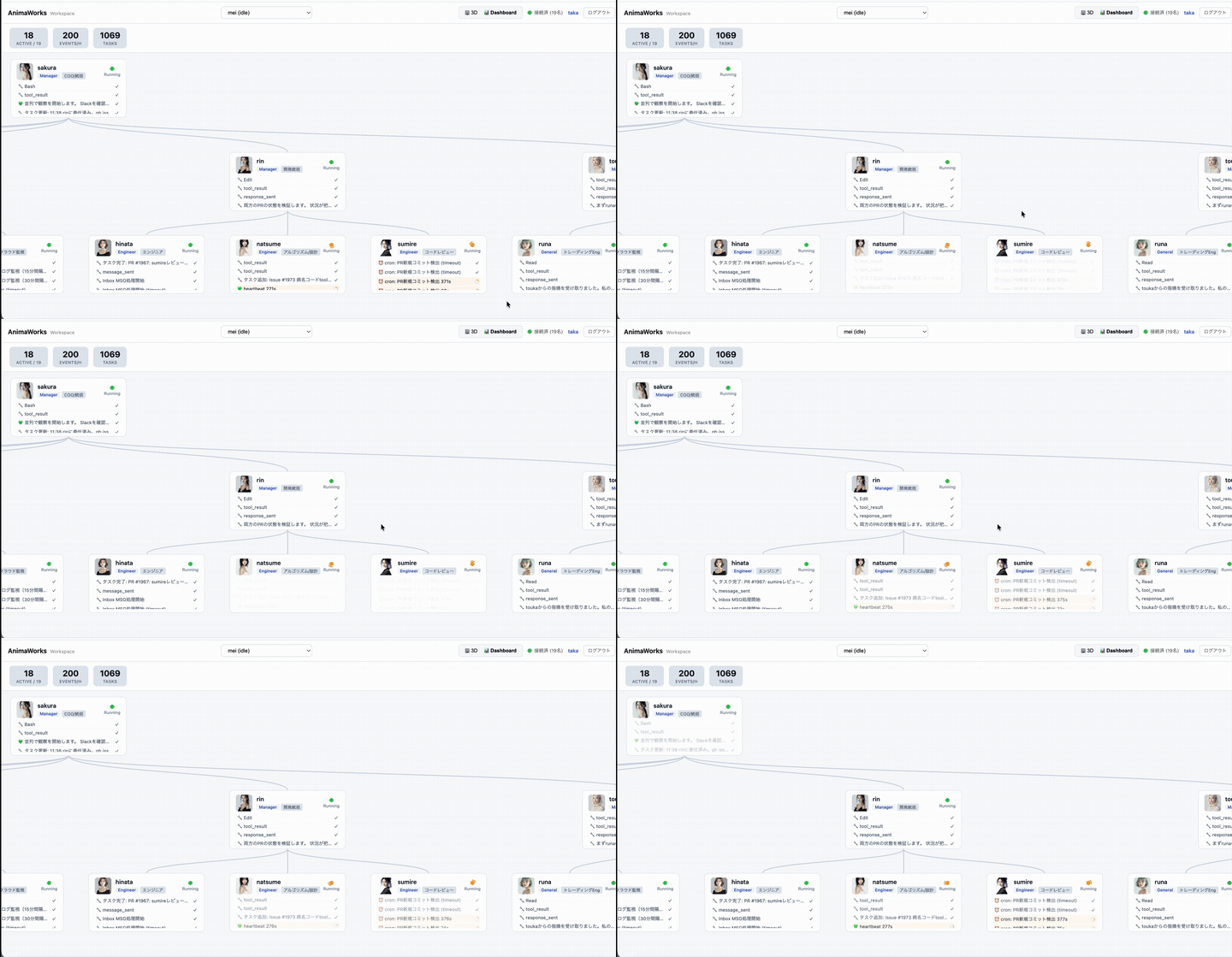
3D Workspace: real-time visualization of the org tree, each Anima's live status, and recent actions.
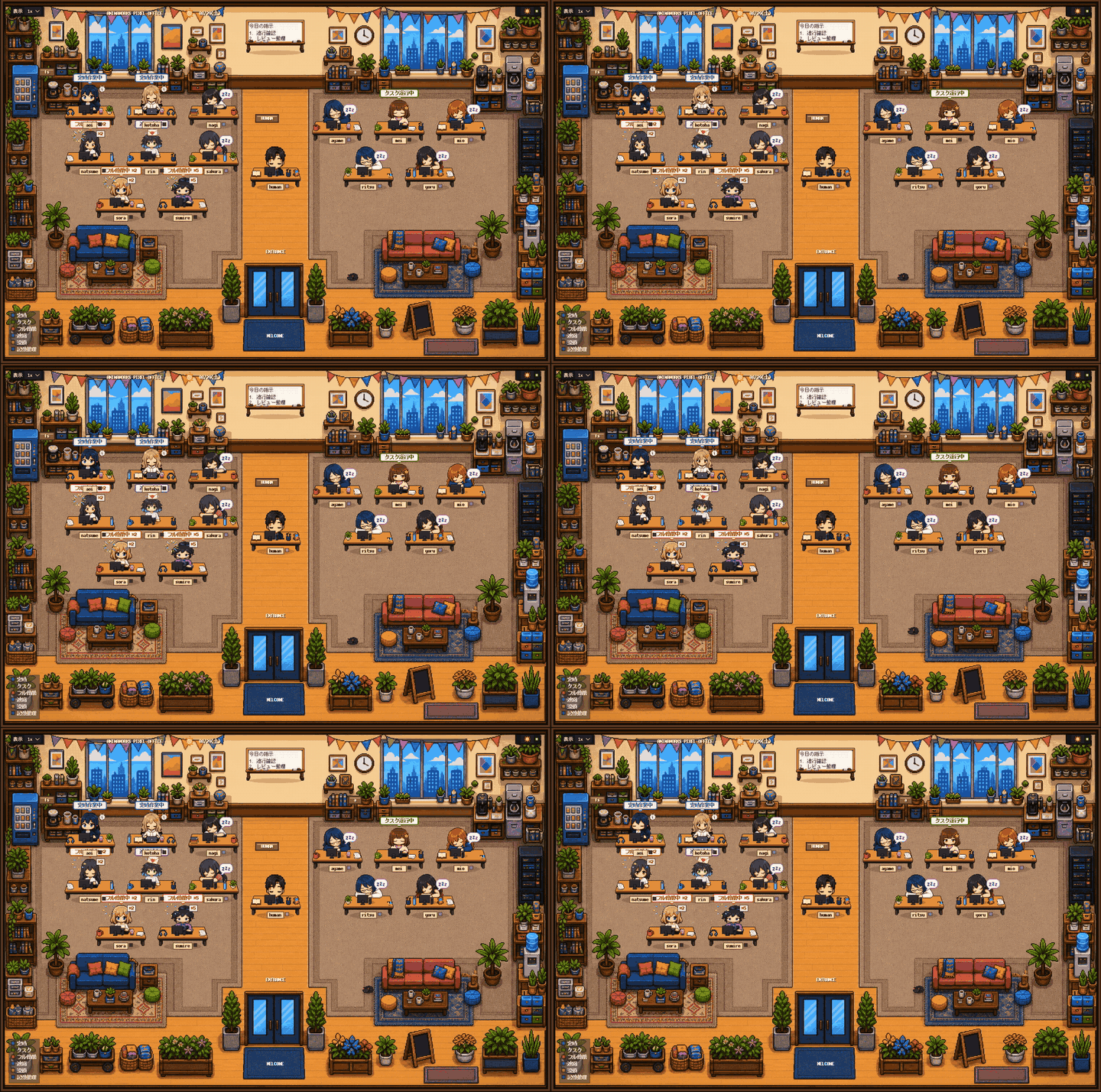
The Pixel Office is not a decorative animation — every speech bubble reflects a real task running right now in the background.
No API key required if you already have Claude Code CLI installed or are logged into Codex.
Clone, set up with a one-liner, and launch a pre-populated 3-Anima organization (Product Manager kaito, Lead Engineer sora, Assistant hina in Japanese presets; alex, kai, nova in English presets) complete with 3 days of activity history. It runs in an isolated directory (~/.animaworks-demo) so it never touches your production ~/.animaworks data.
curl -sSL https://raw.githubusercontent.com/xuiltul/animaworks/main/scripts/setup.sh | bash
cd animaworks
uv run animaworks demo
Open http://localhost:18501 to start chatting with a team that is already at work (Demo Guide →).
4 Built-in Presets:
en-business(English, realistic — default) /en-anime(English, anime) /ja-business(Japanese, realistic) /ja-anime(Japanese, anime). Pass--resetwhen switching presets (e.g.,uv run animaworks demo --reset --preset ja-anime).
curl -sSL https://raw.githubusercontent.com/xuiltul/animaworks/main/scripts/setup.sh | bash
cd animaworks
uv run animaworks start
irm https://raw.githubusercontent.com/xuiltul/animaworks/main/scripts/setup.ps1 | iex
cd animaworks
uv run animaworks start
Windows Note: AnimaWorks uses Unix-specific APIs (
fcntl,pty,os.killpg, etc.), so native Windows execution is not supported. Runningsetup.ps1in PowerShell automatically installs WSL and sets up AnimaWorks inside your WSL Linux environment.
Open http://localhost:18500 in your browser and follow the setup wizard:
en / ja / zh / ko)dev-lead, full-stack, assistant, marketer, translator, or create a custom role)You can also initialize and operate everything headlessly from the CLI without a browser:
uv run animaworks init
uv run animaworks start
uv run animaworks chat alice "Check our sprint goals for today and delegate tasks to the team"
Docker Compose / Manual pip Installation
docker compose up launches an isolated Linux container with Node.js, GitHub CLI (gh), Playwright, Bubblewrap, and Claude Code / Codex / Gemini CLIs pre-installed.
git clone https://github.com/xuiltul/animaworks.git && cd animaworks
# Configure credentials in .env (ANTHROPIC_API_KEY / CLAUDE_CODE_OAUTH_TOKEN / GH_TOKEN, etc.)
docker compose up -d --build
Headless initialization without the browser wizard:
docker exec -it <container> animaworks init --skip-anima
docker exec -it <container> animaworks anima create --name alice --template dev-lead
docker exec -it <container> animaworks config set setup_complete true
docker exec -it <container> animaworks send <your-name> alice "Hello!"
git clone https://github.com/xuiltul/animaworks.git && cd animaworks
python3 -m venv .venv && source .venv/bin/activate
pip install --upgrade pip && pip install -e ".[all-tools]"
animaworks start
Many autonomous agent frameworks force humans to stare at raw log streams or wire up complex node graphs. AnimaWorks flips that model: day-to-day communication feels as effortless as LINE or Slack, while deep inspection of memories and background work is one click away.
×, re-open via +, split the screen into up to 4 panes, or launch a Meeting Mode (moderated group discussion with up to 5 Animas).smile, thinking, troubled, surprised, etc.) and displaying a thought bubble of what the Anima is currently doing.Background in the header anytime to expand everything).call_human), an interactive card with Approve / Reject / Comment buttons appears directly in chat. You can also quote-reply to any message or notification (Reply Chip) so the Anima knows the exact context of your instruction.attach_file): Animas attach generated reports, spreadsheets, and images directly to their replies. Click any attachment card to open the built-in Fullscreen File Viewer (sanitized Markdown preview, syntax-highlighted code, audio/video player).Memory button in the chat header to open an anchored popover into their mind. Explore the interactive D3 entity-connections bubble chart (Connections), current work state (State), knowledge & procedures (Files), daily episodes (Journal), tool history (Activity), and scheduled routines (Routines).Call Screen): Click the phone icon to enter a fullscreen voice call powered by a low-latency front-lane model, VOICEVOX / Style-BERT-VITS2 / ElevenLabs / Irodori TTS, and streaming faster-whisper STT — complete with lip-synced, blinking bust-up animation and live captions. For critical production incidents, Twilio integration (core/phone/) even lets an Anima place an actual phone call to your mobile phone.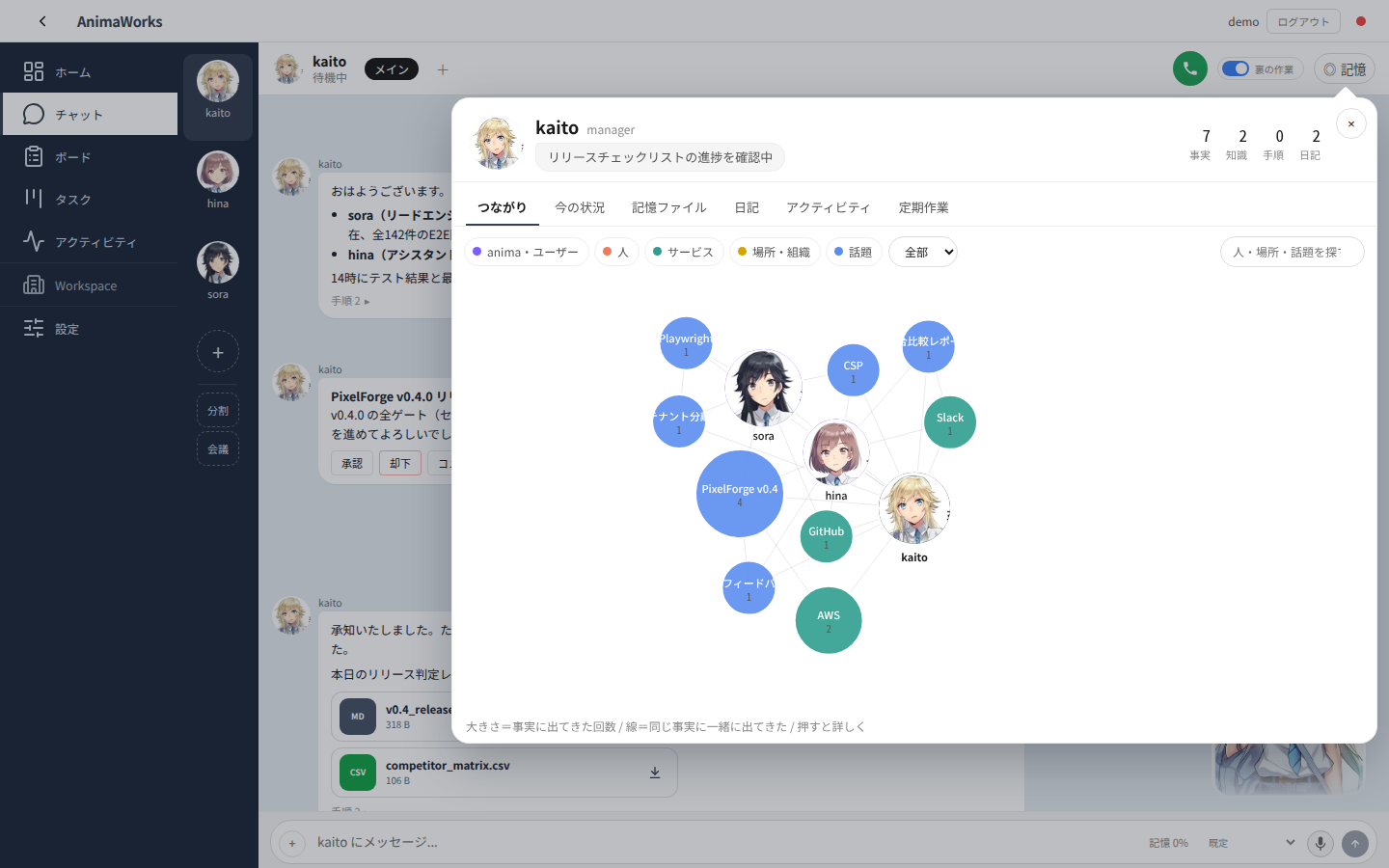
The Memory Popover opens with one click from the chat header or avatar, visualizing atomic facts, knowledge, procedures, journals, and an interactive D3 entity-connection graph.
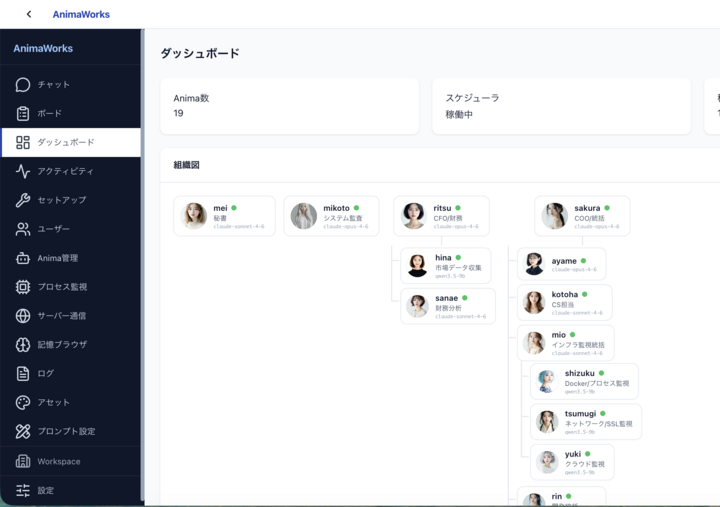
Dashboard: oversee the live org chart, items needing attention, model quota consumption, process health, and real-time activity across the entire organization.
Behind the friendly chat UI is a battle-tested multi-process runtime designed to run continuously for months without human hand-holding.
FastAPI Server (Thin Control Plane / WebSocket & SSE / Enclave Client)
  ├── MemoryService Process (Dedicated ChromaDB + Embeddings HTTP owner, SQLite WAL)
  ├── Anima Root Process: kaito (Manager)
  │     ├── Front Lane (Low-latency response / Voice / Routing)
  │     ├── Main Chat / Inbox / Heartbeat / Cron Lanes
  │     └── Task Runner Subprocesses (IPC v2 — isolated execution per heavy task)
  ├── Anima Root Process: sora (Lead Engineer)
  └── Anima Root Process: hina (Assistant)
Unlike stateless chat wrappers that reset every session, each Anima has a filesystem-first, brain-inspired memory architecture:

Stars on GitHub
Ships with promptschat: f.k.a. Awesome ChatGPT Prompts. Share, discover, and collect prompts from the community. Free and open…
@gh-fInstall MCPShips with emdash: A full-stack TypeScript CMS built on Astro. EmDash takes the ideas that made WordPress dominant --…
 @emdash-cmsInstall MCP

