
Education
Plugin
edulab
A collection of education skills that turn academic problems into interactive lesson web pages and narrated explainer videos.

Plugin Signal74/100Solid
maintained95
capable34
documented100
adopted67
Install on Claude Code
> /plugin marketplace add wy51ai/edulab> /plugin install edulab@edulab
Stats
1,376
Stars
281
Forks
Active
Maintenance
HTML
Language
Apache-2.0
License
10d ago
Last commit
4mo ago
Created
14h ago
Added
Repo: wy51ai/edulab
What's inside
Skill(4 skills)
/edu-analytic-geometry把一道解析几何题解成一个自包含的交互教学网页:左栏题面 + 动态控制台(一个 可变参数滑块驱动实时重算的几何量 + 理论范围/定值指示),中栏 KaTeX 分步解析,右栏 2D Canvas 动态几何画板(椭圆/双曲线/抛物线/圆 + 动直线/动点 + 向量 + 标注 + 画笔涂鸦)。 支持三入口——给定文字题、随机出题、上传题目图片识别后解题。覆盖求标准方程、弦长、向量 数量积范围/定值、三角形面积最值、定点、定值(斜率之积)、轨迹、离心率等题型,统一"设含参 直线 x=my+c + 联立 + 韦达 + 换元/常数分离",并由 sympy/edu-chem-reaction把一个化学反应做成自包含的微观 3D 交互演示网页:左/上为 Three.js 可交互分子动画 (拖滑块看断键·成键·原子重组,分步高亮),右为 KaTeX 反应方程 + 分步讲解 + 原子守恒计数 + 可选能量-反应进程曲线。支持三入口——给定文字反应/方程、随机出题、上传图片识别后演示。 覆盖燃烧、化合/分解/置换/复分解、氧化还原(电子转移可视化)、有机机理(酯化等含催化剂·过渡态)。 统一由 sympy 精确驱动:自动配平方程、校验原子守恒与原子映射、推导键的断/成,答案与几何同源一致。/edu-math-videoUse when asked to make an explainer / walkthrough video (讲解视频、解题视频、例题精讲、微课) for a math problem (数学题, geometry, algebra, functions, motion/行程 problems), from a problem screenshot or text, with Chinese voice-over (GLM-TTS / 智谱 TTS), bilingual zh+en subtitles and hand-drawn canvas/edu-solid-geometry把一道立体几何题解成一个自包含的交互教学网页:左侧 MathJax 分步解析, 右侧 Three.js 可交互 3D 模型(分步高亮 + 镜头切换)。支持三种入口——给定文字题目、 随机出题、上传题目图片识别后解题。覆盖正方体/长方体、棱锥/棱柱、圆柱/圆锥上的线面角、 二面角、异面直线夹角、点到平面距离、体积等题型,统一用"建系+向量法",并由 sympy 精确 计算驱动(答案、3D 坐标、步骤数值同源一致)。其他 agent 也可调用本技能生成此类网页。 触发词:立体几何, 线面角, 二面角, 异面直线, 点到平面距离, 正四棱锥, 正方体求角,
README
edulab
简体中文 · English
A collection of education skills that turn academic problems into interactive lesson web pages and narrated explainer videos.
Install
Recommended — install with skills in one command:
npx skills add wy51ai/edulab
To update to the latest version later:
npx skills update
Note:
npx skills updateonly refreshes skills you've already installed — it does not pull in skills newly added to the repo. When this repo gains a new skill (e.g. a newedu-*), runnpx skills add wy51ai/edulabagain to install it.
Or use it as a Claude Code plugin marketplace:
/plugin marketplace add wy51ai/edulab
/plugin install edulab
Once installed, the skills activate on their trigger words, and can also be invoked manually.
Skill: edu-solid-geometry
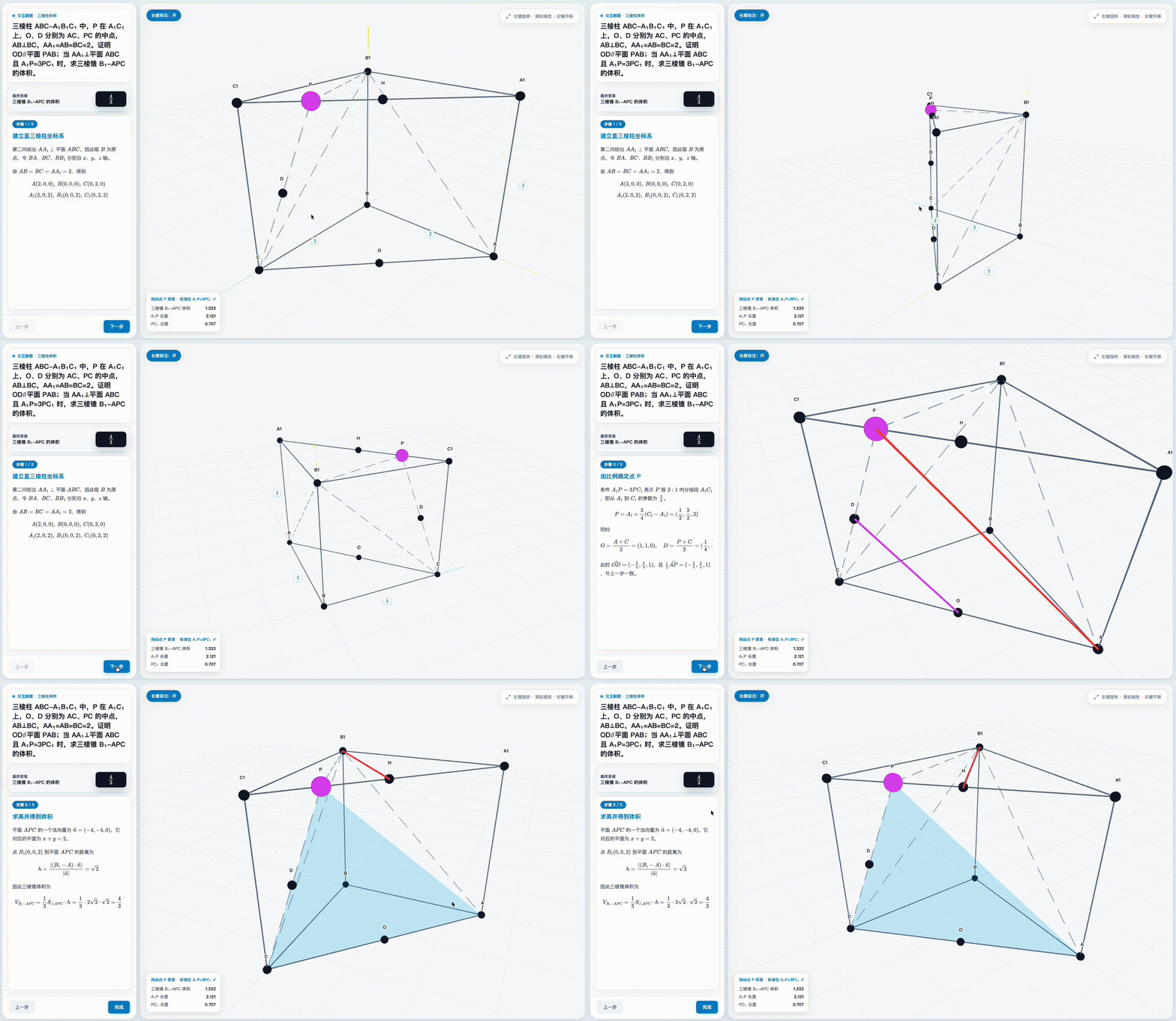
Solves one solid geometry problem into a self-contained interactive lesson page. Three entry points:
| Entry point | What it does |
|---|---|
| Text problem | Extracts the statement and solves directly |
| Image upload | Reads the problem from the image via vision, echoes it back for confirmation, then solves |
| Random problem | Solves with random parameters; re-rolls if the answer isn't clean |
Problem types covered: line-plane angle, dihedral angle, angle between skew lines, point-to-plane distance, volume, and more — on cubes / cuboids, pyramids / prisms, cylinders / cones. All solved uniformly via the "coordinate system + vector method."
Trigger words: solid geometry, line-plane angle, dihedral angle, angle between skew lines, distance to plane, interactive geometry solution page; 立体几何、线面角、二面角、异面直线、点到平面距离、正四棱锥、解这道几何题、随机出一道立体几何题、这张图里的立体几何题, etc.
Dependency
The compute core lib/geometry_kernel.py depends on sympy. Use any python3 that can import sympy:
python3 -m pip install sympy # if sympy is missing
Generate from the command line (without Claude)
cd skills/edu-solid-geometry
python3 scripts/generate.py cube   ./cube.html     # cube · line-plane angle
python3 scripts/generate.py box    ./box.html      # cuboid · volume
python3 scripts/generate.py random 7 ./random.html # random problem (seed=7)
python3 lib/geometry_kernel.py                     # kernel built-in self-check
If you don't pass an output path, it writes to the current working directory (cwd).
Skill: edu-analytic-geometry
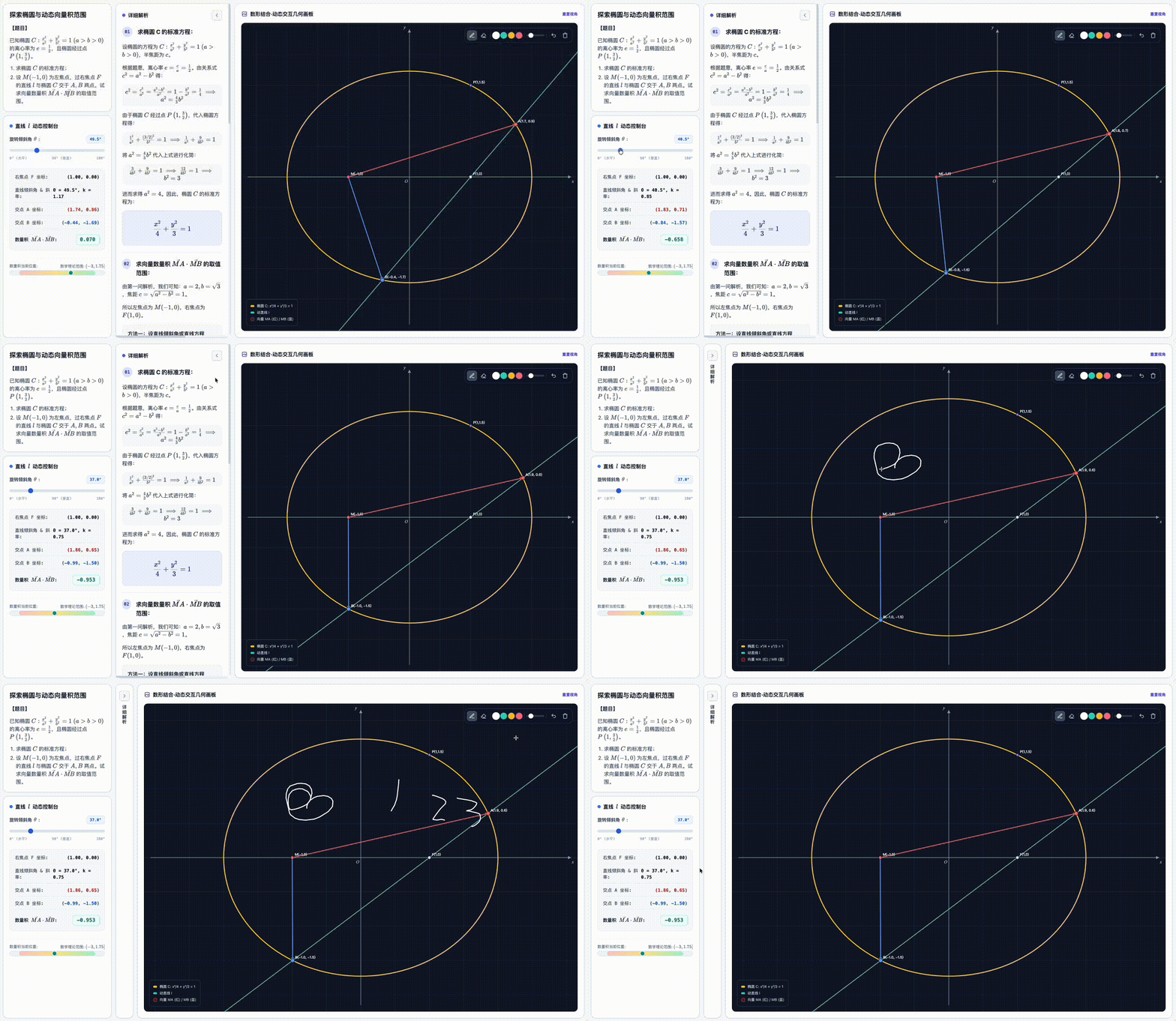
Solves one analytic geometry (conic sections) problem into a self-contained interactive lesson page. Same three entry points as above (text / image / random). Built on a 2D Canvas board + KaTeX with a generic, data-driven interactive engine: a parameter slider drives derived constructions (line∩conic, point-on-conic, central reflection, tangent…) and live readouts, with a theoretical-range bar or a fixed-value indicator.
Problem types covered: standard equation, chord length, dot-product range / fixed value, triangle-area extremum, fixed point, fixed value (slope product), locus, tangent, eccentricity — on ellipses / hyperbolas / parabolas / circles. All solved uniformly via "parametrized line x = my + c + system + Vieta's formulas + substitution."
A correctness note baked into the kernel: open/closed interval endpoints are decided by whether a real line attains them, so the boxed answer always matches what the interactive tool shows (e.g. the ellipse
MA·MBrange is the closed[-3, 7/4]— slide θ to 0° and you read exactly −3).
Trigger words: analytic geometry, conic sections, ellipse, hyperbola, parabola, chord length, dot product range, fixed point, fixed value, locus, eccentricity, interactive analytic geometry solution page; 解析几何、圆锥曲线、椭圆、双曲线、抛物线、焦点弦、向量数量积取值范围、定点问题、定值问题、斜率之积、三角形面积最值、轨迹方程、离心率, etc.
Dependency
The compute core lib/analytic_kernel.py depends on sympy (same as above).
Generate from the command line (without Claude)
cd skills/edu-analytic-geometry
python3 scripts/generate.py list                          # list registered problem types
python3 scripts/generate.py ellipse_dot_range ./sol.html  # ellipse · MA·MB range [-3, 7/4]
python3 scripts/generate.py parabola_dot_const ./sol.html # parabola focal chord · OA·OB ≡ -3
python3 scripts/generate.py all ./out_dir                 # all registered types
python3 lib/analytic_kernel.py                            # kernel built-in self-check
Like above, no output path → writes to the current working directory (cwd).
Skill: edu-chem-reaction

Turns one chemical reaction into a self-contained microscopic 3D demonstration page: an interactive Three.js molecular animation (drag the slider to watch bonds break / form and atoms recombine, with step highlighting) next to the KaTeX equation, step-by-step narration, an atom-conservation counter, and an optional energy–reaction-coordinate curve. Same three entry points (text / image / random).
Two engines, auto-selected — one renderer with two per-frame position resolvers, sharing the bond-diff drawing, labels, overlays and UI:
| Engine | For | Emphasizes |
|---|---|---|
| morph | combustion, combination / decomposition / displacement, redox | atoms fly to new partners — atom conservation & recombination |
| mechanism | organic mechanisms (esterification…) with catalyst · transition state · leaving groups | rigid fragments move through keyframes — the mechanism |
sympy-driven correctness: auto-balances the equation (integer coefficients from the matrix null space), validates the atom map (a bijection between reactant and product atoms) and conservation, and derives which bonds break / form from the before↔after difference — equation, geometry and counters all share one source.
Hybrid geometry: a built-in VSEPR molecule library by default; if RDKit is installed it can build conformers from SMILES (never installs it automatically).
Reactions covered: methane / hydrogen combustion, water electrolysis, Na + Cl₂ redox (with an electron-transfer overlay), glucose aerobic oxidation, and the esterification mechanism — spanning junior-high basics, senior inorganic redox, and organic mechanisms.
Trigger words: chemistry reaction, microscopic / molecular animation, combustion, electrolysis, redox electron transfer, esterification mechanism, bond breaking and forming, atom conservation, balance equation, interactive chemistry reaction page; 化学反应、微观演示、分子动画、燃烧、电解水、氧化还原、电子转移、酯化反应、断键成键、原子守恒、化学方程式配平 etc.
Dependency
The compute core lib/reaction_kernel.py depends on sympy (same as above). RDKit is optional — used only if already installed, never installed automatically.
Generate from the command line (without Claude)
cd skills/edu-chem-reaction
python3 scripts/generate.py list                            # list registered reactions
python3 scripts/generate.py combustion_ch4 ./reaction.html  # methane combustion (morph · flame)
python3 scripts/generate.py esterification ./reaction.html  # esterification (mechanism · catalyst)
python3 scripts/generate.py random 7 ./random.html          # random reaction (seed=7)
python3 lib/reaction_kernel.py                              # kernel built-in self-check
Like above, no output path → writes to the current working directory (cwd).
Skill: edu-math-video

Turns one math problem (geometry, algebra, functions, motion problems…) into a 16:9 1920×1080 explainer MP4: Chinese voice-over (Zhipu GLM-TTS), bilingual zh + en subtitles (.srt too), and hand-drawn notebook-style canvas animation driven by the narration timeline. Input is a problem screenshot or plain text.
The picture explains the step: every narration line gets a "point → move → keep" action on the figure (equal segments slide onto each other, congruent triangles overlay, the 3D camera tweens to a top view, a cone unrolls into a sector…) — timed by S.at(k, f) (a fraction into line k), never by hard-coded seconds. A motion check rejects static lines.
Pipeline (one folder per video, created in the user's current directory):
script.json ──build_audio.py──► timeline.json + mix.wav + <name>.srt   (GLM-TTS + synthesized music)
anim.js + engine.js ──node render.mjs video──► <name>.mp4              (Playwright + ffmpeg, 30 fps)
Guard rails: the first scene shows the original problem with each condition boxed as it is read; tts text must be speakable Chinese (no digits / math symbols); polyphones are pinned (长[cháng], shared pron.json lexicon) and --check must report 0 before any paid TTS call; a free --preview + contact-sheet review comes before real audio; --asr transcribes the audio back to catch misread letters.
Trigger words: math explainer video, walkthrough video, problem-solving video, micro-lesson; 讲解视频、解题视频、例题精讲、微课 etc.
Dependency
- Python 3 with
numpy requests pypinyin pillow; Node.js 18+ withplaywright+ffmpeg-static(installed once in the workspace —scripts/new_video.shwrites thepackage.json); Google Chrome or Playwright Chromium. - A Zhipu
GLM_API_KEYprovided by you, in~/.config/math-problem-video/.env(seereference/glm-tts-setup.md). - No key? It falls back automatically (
TTS_ENGINE=auto): edge-tts if installed (free neural voices, needs internet), else macOSsay(offline, robotic). Force one withTTS_ENGINE=glm|edge|say.
Run the pipeline by hand (without Claude)
bash skills/edu-math-video/scripts/new_video.sh "$PWD" my_problem   # scaffold from template/
bash skills/edu-math-video/scripts/setup_check.sh my_problem        # must print ALL OK
cd my_problem
python3 build_audio.py --check                                      # script + pronunciation lint (free)
python3 build_audio.py --preview && node render.mjs motion && node render.mjs stills auto
python3 build_audio.py && node render.mjs video 6                   # real TTS, then render (6 = parallel pages)
How it works
- Get a problem spec — normalize all three entry points into a structured description (body type and dimensions, given conditions, the quantity asked, language).
- Exact kernel computation — sympy computes exact coordinates, key vectors, normals, the final answer, and every intermediate value (as LaTeX strings). Never by hand.
- Assemble and inject the template — feed the
lesson/steps/modeldata into the data-driven templatetemplate/lesson.html; 3D vertex coordinates come fromkernel.to_three(...), sharing the same source as the solution. - Self-check — kernel answer == answer card == final value shown in the last step; a local static server + preview check confirms no console errors and correct formula/highlight rendering.
- Deliver — the finished page is written to the user's current working directory, named like
solution-<short-description>.html.
Project structure
File tree
FAQ
edulab is a Claude Code plugin with 4 hand-picked skills for education work, indexed on Flowy. Install it with the command on its page. It includes edu-analytic-geometry, edu-chem-reaction, edu-math-video. Its skills do not fire on their own yet. Request auto-invocation to have Flowy route them as you prompt. Free and open source.
- What is edulab?
- A collection of education skills that turn academic problems into interactive lesson web pages and narrated explainer videos.
- How do I install edulab?
- Run these in Claude Code: /plugin marketplace add wy51ai/edulab then /plugin install edulab@edulab. Then prompt normally.
- Does edulab auto-invoke its skills?
- Not yet. It is indexed on Flowy as a plain plugin. Request auto-invocation on its page and Flowy will route its skills for you as you prompt.
- Is edulab free?
- Yes. Flowy is free and open source, with nothing gated. You can read every skill in full before you install.
Is this plugin yours?
Claim it with GitHubSubmit a pluginPromote it