
promptschat
Gives Claude Code access to the prompts.chat library, letting you search, retrieve and improve AI prompt templates, and find and install Agent Skills from its registry.
2 skills2 agents2 commands1 MCP+3+2+2+2+1+1+1+1175k
 @gh-f
Turns a short idea into a structured, copy-paste-ready image generation prompt for posters, UI mockups, ads, editorial layouts, game art, logos and infographics. Works with any major image model.
Claude Code
> /plugin marketplace add veryCoolTimo/imagegen-skills> /plugin install imagegen-skills@imagegen
Codex
$ npx skills add veryCoolTimo/imagegen-skills -a codex
Cursor
$ npx skills add veryCoolTimo/imagegen-skills -a cursor
Gemini CLI
$ npx skills add veryCoolTimo/imagegen-skills -a gemini-cli
GitHub Copilot
$ copilot plugin marketplace add veryCoolTimo/imagegen-skills$ copilot plugin install imagegen-skills@imagegen
OpenCode
$ npx skills add veryCoolTimo/imagegen-skills -a opencode
Windsurf
$ npx skills add veryCoolTimo/imagegen-skills -a windsurf
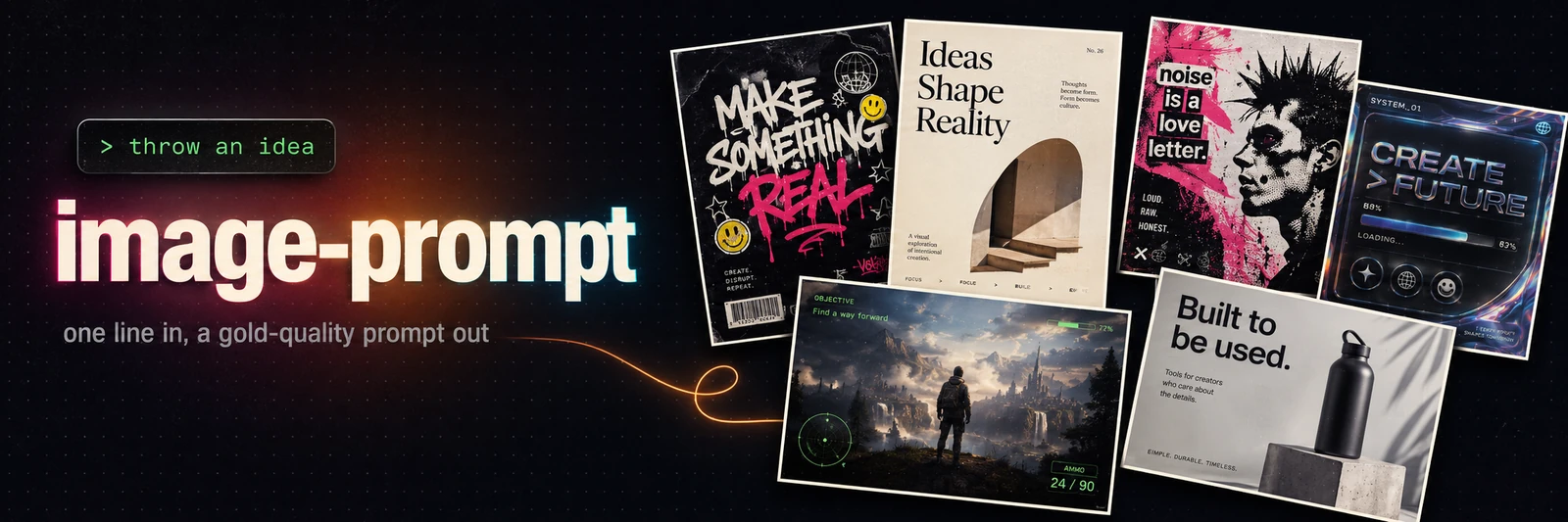


One line in, a gold-quality image prompt out. image-prompt turns a short idea into a
structured, copy-paste-ready prompt for any major image model: posters, landing and UI mockups,
ads, editorial, game art, logos, infographics. You supply the idea; the skill builds the whole
prompt. Press c to copy.
No prompt-engineering required.
imgpreset:v1:… code.Claude Code, plugin marketplace (recommended)
/plugin marketplace add veryCoolTimo/imagegen-skills
/plugin install imagegen-skills@imagegen
Claude Code, manual (clone + symlink)
git clone git@github.com:veryCoolTimo/imagegen-skills.git
cd imagegen-skills
ln -s "$(pwd)/skills/image-prompt" ~/.claude/skills/image-prompt
Restart Claude Code so it discovers the skill. It also works on claude.ai and Claude Desktop: import the repository from the Skills panel. The skill produces text only, so no keys or dependencies are needed (generation is a separate opt-in, see below).
Describe what you want, in any language:
сделай крутой промт для постера панк-выставки в Берлине, лимитированный тираж
landing hero for a specialty coffee delivery app, warm and minimal
game screenshot of a viking longship raid at dawn, AAA fidelity, for Midjourney
инфографика про наш продукт, в стиле антропик, через nano banana pro
I want a poster — help me with the style
put me on a movie one-sheet as an aquatic superhero (I'll attach my photo)
You get the finished prompt in a copyable block plus a one-line assumptions note (archetype, size, quality, brand, model). Redirect with a single sentence: "make it 9:16", "darker palette", "another variant".
Default target is gpt-image-2. The core builder is model-agnostic: each model is one adapter
file under references/models/, so the same idea renders correctly per target. Just name a
model and the skill switches adapters.
| Model | Best for |
|---|---|
| gpt-image-2 (default; + gpt-image-1 / 1.5) | all-round #1: quality, editing, text, photoreal |
| Nano Banana Pro (Gemini 3 Pro Image) | best legible text, up to 4K, factual infographics (Search grounding) |
| Midjourney V8.1 / V7 | aesthetics, creative posters |
| FLUX.2 | open / local, hex + typography + editing |
| Recraft V4 Pro | brand / typography / vector / logos, editable SVG |
| Ideogram v4 | in-image text specialist |
| Reve 2.0 | prompt adherence + layout / element editing |
| universal | rich natural-language prompt for any / unknown tool |
Found a look you love? Save it as a private preset and reuse it on any future idea.
save this style as neon-noir
A preset captures the style layer only (background, palette, fonts, motifs, mood, finish);
content still comes from each new idea. Presets live per-user at
~/.claude/image-prompt/presets/<name>.md, private to your machine and never committed. Reuse:
a poster for a coffee shop, in the neon-noir style
Share a preset with anyone, no hosting or accounts: export preset neon-noir returns a
self-contained imgpreset:v1:… code (gzip + base64). Whoever runs import preset <code> gets
the exact preset. Manage with "list my presets", "update", "delete".
By default the skill only writes the prompt. If you ask it to generate and a provider API
key is set, it renders the PNG via scripts/generate.py and saves it into the project.
Supported providers (key in an env var, never committed):
openai · openrouter (universal — one key, many models) · gemini (Nano Banana Pro) ·
ideogram · recraft · bfl (FLUX.2) · reve. Midjourney has no API, so it stays prompt-only.
python3 scripts/generate.py --provider openrouter --prompt-file prompt.txt \
    --model google/gemini-3-pro-image --aspect 16:9 --resolution 2K --out out.png
Generation is opt-in and paid; the skill confirms before spending.
idea → detect archetype → expand to the nine blocks → format for the target model → output
The nine blocks: concept line · canvas and background · named composition zones · subject detail · typography (literal copy + real fonts) · hex palette · font role map · mood cluster · finish and quality tag. Photoreal and game-screenshot ideas use a labeled-block variant (scene, subject, lighting, camera, HUD, technical). Each model adapter changes only the rendering, not the content.
imagegen-skills/
├── README.md
├── LICENSE                          # MIT
├── .claude-plugin/                  # plugin.json + marketplace.json (powers the marketplace install)
├── assets/                          # banner + the prompt used to make it
├── scripts/generate.py             # optional: render a prompt via a provider API (opt-in)
└── skills/image-prompt/
    ├── SKILL.md                    # trigger, workflow, presets, style menu, edit, output
    └── references/
        ├── anatomy.md              # the nine-block skeleton
        ├── archetypes.md           # templates + default size/quality per archetype
        ├── fonts-palettes.md       # font library by vibe + hex palette discipline
        ├── styles.md               # built-in style menu (repertoire to pick from)
        ├── edit-remix.md           # edit/remix workflow templates
        ├── generation.md           # how the optional generate step calls provider APIs
        ├── gold-examples.md        # curated reference prompts, grows over time
        └── models/                 # one adapter per model (distilled from each model's best docs)
            ├── gpt-image-2.md      # + gpt-image-1 / 1.5 family
            ├── gemini.md           # Nano Banana Pro (Gemini 3 Pro Image)
            ├── midjourney.md
            ├── flux.md
            ├── recraft.md
            ├── ideogram.md
            ├── reve.md
            └── universal.md
Private, per-user data (style presets, your UI reference library) lives under
~/.claude/image-prompt/ and is never committed.
references/gold-examples.md with a Teaches: tag.references/models/<name>.md; the workflow stays unchanged.references/styles.md, or save a private preset and share the code.MIT
Stars on GitHub
Gives Claude Code access to the prompts.chat library, letting you search, retrieve and improve AI prompt templates, and find and install Agent Skills from its registry.
@gh-fA Claude Code skill for generating editable PPTX presentations and slides from a workflow, with reusable brand, style, layout, and deck workspaces, native charts, speaker notes, and template filling.
 @hugohe3
Gives AI agents control over Word, Excel and PowerPoint files, with skills for building .docx reports, academic papers, Excel dashboards and Morph-style animated slides.
 @iofficeai
A skill that builds animation-rich HTML presentations from scratch or converts PowerPoint files to web slides. Useful for anyone turning a deck into a web presentation.
 @zarazhangrui
Turns a short idea into a structured, copy-paste-ready image generation prompt for posters, UI mockups, ads, editorial layouts, game art, logos and infographics. Works with any major image model. Install it with the command on its page. It includes image-prompt. Its skills do not fire on their own yet. Free and open source.
Is this plugin yours?
Claim it with GitHubSubmit a pluginPromote it