Documentation • Integrations • Cookbook • Benchmarks • Paper • Hindsight Cloud







What is Hindsight?
Hindsight™ is an agent memory system built to create smarter agents that learn over time. Most agent memory systems focus on recalling conversation history. Hindsight is focused on making agents that learn, not just remember.
It eliminates the shortcomings of alternative techniques such as RAG and knowledge graph and delivers state-of-the-art performance on long term memory tasks.
🆕 Introducing Hindsight Models: decision, rerank and embedding models built for agent memory. Open weights on Hugging Face, or hosted on Hindsight Inference. Read the post →
Contents
- Memory Performance & Accuracy
- Quick Start — server · clients · platforms · embedded
- Adding Hindsight to Your Agent — LLM Wrapper · integrations · coding agents · MCP
- Core Concepts — memory types · retain / recall / reflect · observations · mental models & knowledge pages · decision models · banks
- Use Cases
- Running in Production
- Resources
Memory Performance & Accuracy
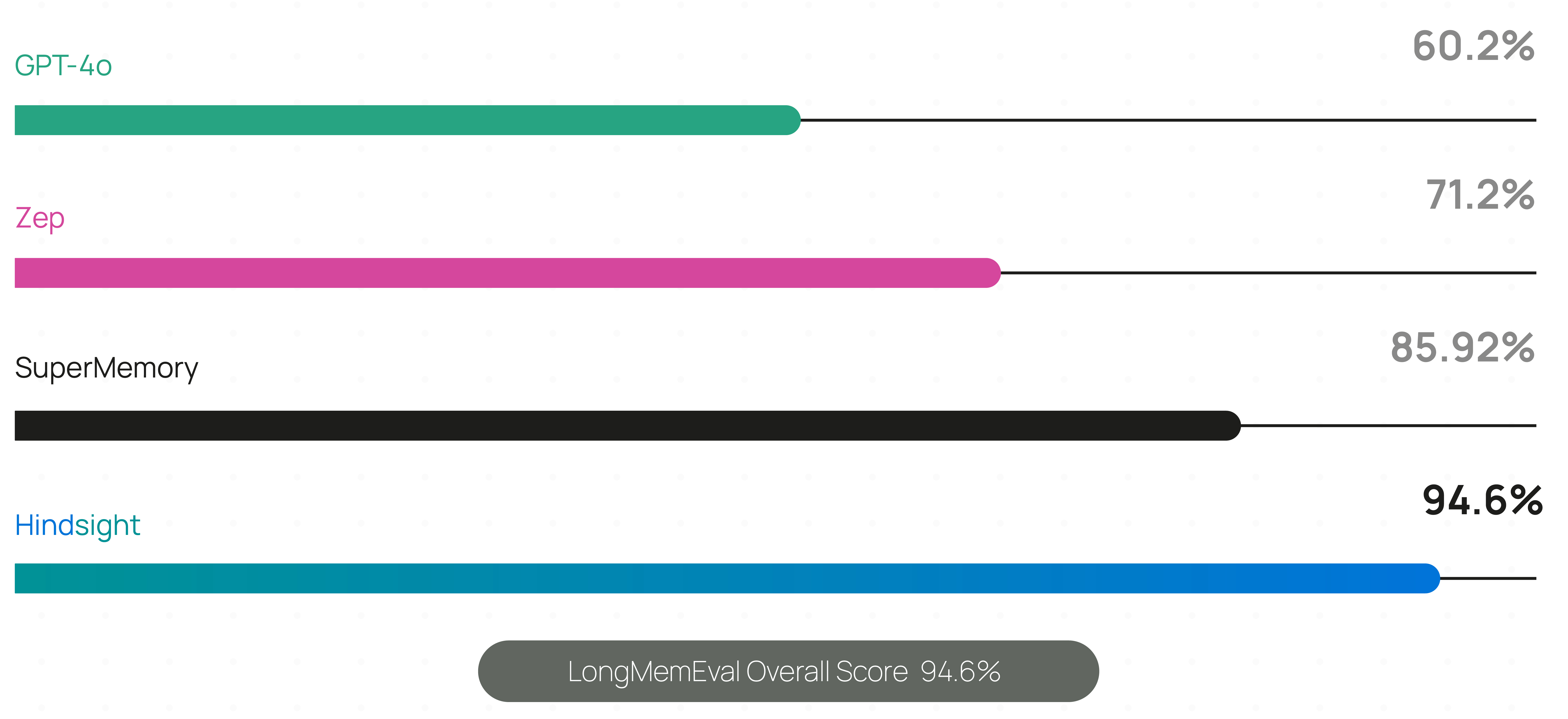
Hindsight is the most accurate agent memory system ever tested according to benchmark performance. It has achieved state-of-the-art performance on the LongMemEval benchmark, widely used to assess memory system performance across a variety of conversational AI scenarios. The current reported performance of Hindsight and other agent memory solutions as of January 2026 is shown here:
Live, continuously updated results — including per-model accuracy, latency and cost — are published at benchmarks.hindsight.vectorize.io.
The benchmark performance data for Hindsight has been independently reproduced by research collaborators at the Virginia Tech Sanghani Center for Artificial Intelligence and Data Analytics and The Washington Post. Other scores are self-reported by software vendors.
Hindsight is being used in production at Fortune 500 enterprises and by a growing number of AI startups.
🤖 Using a coding agent? Install the Hindsight documentation skill for instant access to docs while you code:
npx skills add https://github.com/vectorize-io/hindsight --skill hindsight-docs
Works with Claude Code, Cursor, and other AI coding assistants.
Quick Start
1. Start a server
Docker (recommended)
export OPENAI_API_KEY=sk-xxx

docker run -it --pull always --name hindsight --restart unless-stopped -p 8888:8888 -p 9999:9999 \
  -e HINDSIGHT_API_LLM_API_KEY=$OPENAI_API_KEY \
  -v hindsight-data:/home/hindsight/.pg0 \
  ghcr.io/vectorize-io/hindsight:latest
API: http://localhost:8888
UI: http://localhost:9999
Hindsight works with 25+ LLM providers via HINDSIGHT_API_LLM_PROVIDER — hosted (openai, anthropic, gemini, groq, bedrock, vertexai, minimax, deepseek, atlas, meta, …), fully local (ollama, lmstudio, llamacpp), any OpenAI-compatible endpoint, and gateways (litellm, litellmrouter) that reach the rest. Existing subscriptions work too: openai-codex (ChatGPT Plus/Pro), claude-code (Claude Pro/Max), cursor (Cursor) and github-copilot (GitHub Copilot) need no API key. See supported models.
Docker (external PostgreSQL)
export OPENAI_API_KEY=sk-xxx
export HINDSIGHT_DB_PASSWORD=choose-a-password
cd docker/docker-compose
docker compose up
Oracle AI Database is also supported for enterprise deployments with full feature parity. See the storage documentation for details.
Bare metal (pip)
pip install hindsight-api
export HINDSIGHT_API_LLM_API_KEY=sk-xxx

hindsight-api
Kubernetes (Helm)
helm install hindsight oci://ghcr.io/vectorize-io/charts/hindsight \
  --set api.llm.provider=openai \
  --set api.llm.apiKey=sk-xxx \
  --set postgresql.enabled=true
Managed (no server)
Hindsight Cloud is the hosted option: managed infrastructure that scales automatically, plus a dashboard, backups, team collaboration and a 99.9% uptime SLA. Billing is usage-based with free credits to start — no fixed monthly or per-seat fee. Point any client at https://api.hindsight.vectorize.io with your API key and skip the deployment entirely.
Compare self-hosted, Cloud and Enterprise → · Sign up →
All options, including Windows and air-gapped setups, are covered in the installation guide.
2. Connect a client
pip install hindsight-client -U                                  # Python
npm install @vectorize-io/hindsight-client                        # Node.js / TypeScript
go get github.com/vectorize-io/hindsight/hindsight-clients/go     # Go
curl -fsSL https://hindsight.vectorize.io/get-cli | bash          # CLI
Python
from hindsight_client import Hindsight

client = Hindsight(base_url="http://localhost:8888")

# Retain: Store information
client.retain(bank_id="my-bank", content="Alice works at Google as a software engineer")

# Recall: Search memories
client.recall(bank_id="my-bank", query="What does Alice do?")

# Reflect: Generate disposition-aware response
client.reflect(bank_id="my-bank", query="Tell me about Alice")
Node.js / TypeScript
const { HindsightClient } = require('@vectorize-io/hindsight-client');

const main = async () => {
  const client = new HindsightClient({ baseUrl: 'http://localhost:8888' });

  await client.retain('my-bank', 'Alice loves hiking in Yosemite');

  const results = await client.recall('my-bank', 'What does Alice like?');
  console.log(results);
}

main();
Full reference: Python · Node.js · Go · CLI · REST API
Supported Platforms
| Platform | Docker | Bare Metal (pip) | Embedded DB (pg0) |
|---|
| Linux (x86_64, ARM64) | ✅ | ✅ | ✅ |
| macOS (Apple Silicon / arm64) | ✅ | ✅ | ✅ |
| macOS (Intel / x86_64) | ✅ | ⚠️ | ✅ |
| Windows (x86_64) | ✅ | ✅ | ✅ |
⚠️ Intel Macs: use hindsight-all-slim — see the installation guide for details.
Python Embedded (no server required)
pip install hindsight-all -U
On Intel (x86_64) Macs, install hindsight-all-slim instead — see Supported Platforms.
import os
from hindsight import HindsightServer, HindsightClient

with HindsightServer(
    llm_provider="openai",
    llm_model="gpt-5-mini",
    llm_api_key=os.environ["OPENAI_API_KEY"]
) as server:
    client = HindsightClient(base_url=server.url)
    client.retain(bank_id="my-bank", content="Alice works at Google")
    results = client.recall(bank_id="my-bank", query="Where does Alice work?")
A Node.js equivalent and a daemon CLI are also available.
Adding Hindsight to Your Agent
LLM Wrapper (2 lines of code)
The easiest way to add memory to an existing agent is the LLM Wrapper. Swap your LLM client for a wrapped one — memories are then stored and retrieved automatically on every call, with no other changes to your code.
pip install hindsight-litellm
from openai import OpenAI
from hindsight_litellm import wrap_openai

# Wrap your existing LLM client and you're done.
# Defaults to Hindsight Cloud; pass hindsight_api_url for a self-hosted server.
client = wrap_openai(
    OpenAI(),
    bank_id="user-123",
    hindsight_api_url="http://localhost:8888",
)

# Hindsight recalls relevant memories before the call
# and retains the conversation after it.
response = client.chat.completions.create(
    model="gpt-5-mini",
    messages=[{"role": "user", "content": "What do you know about me?"}],
)
wrap_anthropic() does the same for the Anthropic SDK, and every setting — bank, recall budget, fact types, reflect instead of recall — can be overridden per call with hindsight_* kwargs. LiteLLM sits underneath, so the same integration covers 100+ models. See the LiteLLM integration.
If you need explicit control over when memories are stored and recalled, use the SDKs or REST API directly instead.
Integrations
60+ integrations — most need no code changes.



 @thedotmack