



promptschat
Gives Claude Code access to the prompts.chat library, letting you search, retrieve and improve AI prompt templates, and find and install Agent Skills from its registry.
2 skills2 agents2 commands1 MCP+3+2+2+2+1+1+1+1175k
 @gh-f
Turns a story, script or concept into a finished video by handling the scriptwriting, storyboard images, video clips and voice-over on a shared canvas. Run it from your coding agent so the whole production stays organized in one local workspace.
Auto-invoked ships a router so the right skill fires automatically as you prompt. No remembering which skill to call.
Normal is the plain upstream plugin, installed as-is. You invoke its skills yourself.
Claude Code
The plugin> /plugin marketplace add utopai-research/pai-code> /plugin install pai-pro@pai-proAuto-invocation> /plugin marketplace add flowy-sh/flowy-core> /plugin install flowy-core> /plugin install flowy-pai-pro
Codex
$ npx skills add utopai-research/pai-code -a codex
Cursor
$ npx skills add utopai-research/pai-code -a cursor
Gemini CLI
$ npx skills add utopai-research/pai-code -a gemini-cli
GitHub Copilot
$ copilot plugin marketplace add utopai-research/pai-code$ copilot plugin install pai-pro@pai-pro
OpenCode
$ npx skills add utopai-research/pai-code -a opencode
Windsurf
$ npx skills add utopai-research/pai-code -a windsurf
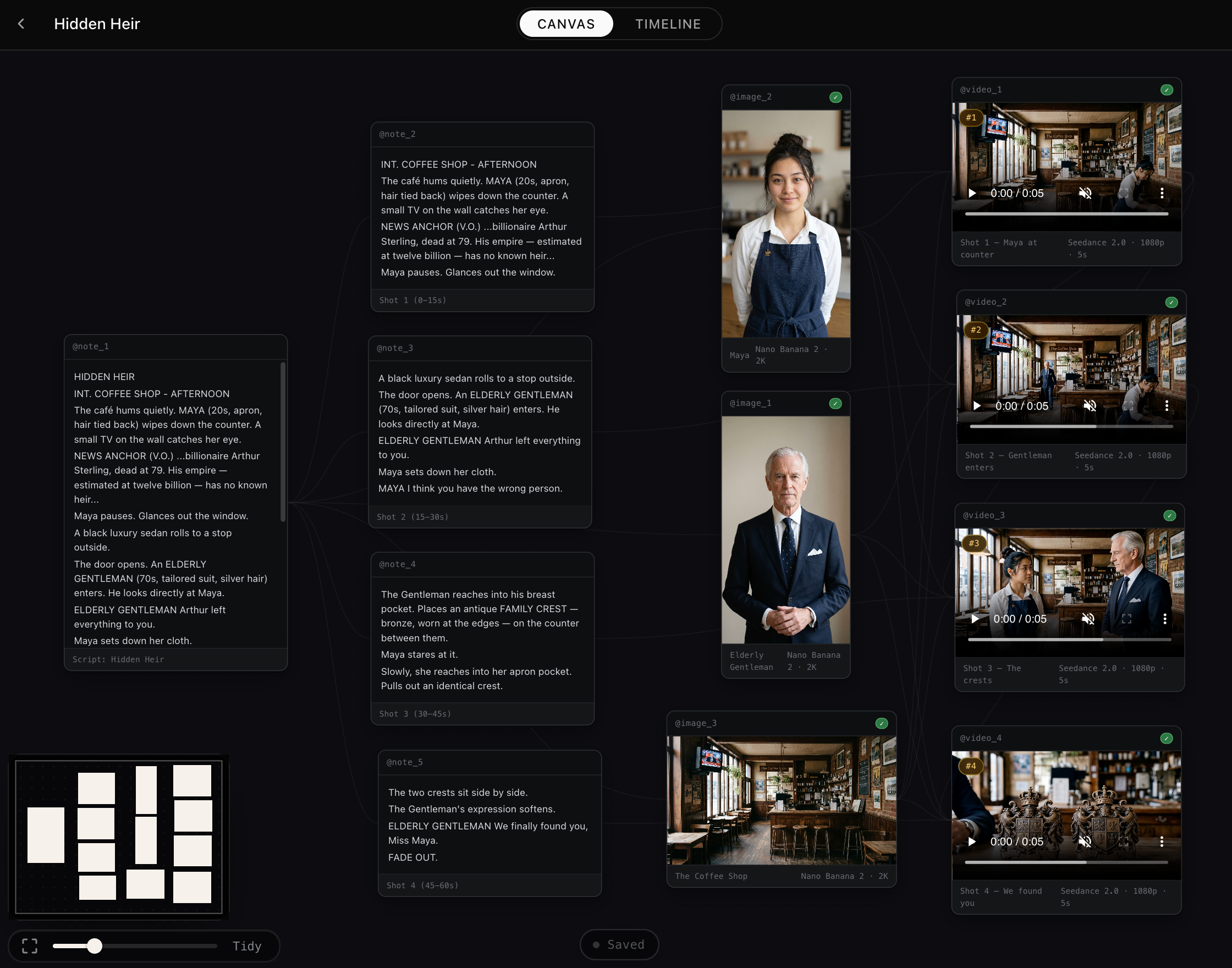
The local AI filmmaking studio, driven from your coding agent.


PAI-Pro is a local-first AI filmmaking workspace built around four things:
Use Claude Code or Codex to install PAI-Pro for you. Paste this into your agent:
Clone
https://github.com/Utopai-Research/pai-pro, read the setup docs in README.md and docs/setup.md, then install PAI-Pro for my current agent. Ask me for myPAI_KEY, use Docker unless I ask for local development, and start the app when setup is complete.
| Choose | Commands |
|---|---|
 Codex (default) | Docker: ./scripts/docker-start.shLocal: if ports are busy, run ./scripts/stop.sh first; then ./scripts/setup and ./scripts/start.sh |
 Claude Code | Docker: PAI_DEFAULT_AGENT_ID=claude ./scripts/docker-start.shLocal: if ports are busy, run ./scripts/stop.sh first; then ./scripts/setup --agent claude and PAI_DEFAULT_AGENT_ID=claude ./scripts/start.sh |
Either way, a project's agent can be changed at any time from the control in the terminal panel's header — the choice above only sets what a new project starts with.
Open Docker at http://localhost:7588 or local at http://localhost:7443.
PAI_KEY gives each production one service for image, image pro, video, voice, and 4K upscaling, without separate provider keys for each step. Use the PAI Pro Developer Platform to manage keys, tasks, balance, and credits. It also supports less restrictive video moderation via asset preupload and helps support this project. Paid generations are staged first; for BYOK and exact payloads, see API Service.
| Capability | Quality | Time | # of references | Estimated price |
|---|---|---|---|---|
generate_image | Great | ~10-30s | 16 imgs | $0.11 / $0.16 / $0.23 for 1K / 2K / 4K |
generate_image_pro | Best | ~3-6 min | 32 imgs | $0.26 / $0.45 / $0.77 for 1K / 2K / 4K |
generate_video | Best | ~3-6 min | 9 imgs / 3 vids / 3 auds | $0.11/s / $0.23/s / $0.57/s for 480p / 720p / 1080p |
upscaler | Best | 1-min example: ~4-8 min landed | 1 video | 1-min example: $1.35 for 1080p->4K, $2.35 for 720p->4K |
generate_voice | Good | ~5-15s | N/A | $0.01 per 500 input characters, rounded up |
PAI-Pro is released under the PAI PRO Sustainable Use License, which permits personal use, non-commercial research, and internal business use. Commercial use of PAI-Pro Skills or enterprise-designated source code/Skills requires an explicit agreement; enterprise licenses are available.
Stars on GitHub
Gives Claude Code access to the prompts.chat library, letting you search, retrieve and improve AI prompt templates, and find and install Agent Skills from its registry.
@gh-fA Claude Code skill for generating editable PPTX presentations and slides from a workflow, with reusable brand, style, layout, and deck workspaces, native charts, speaker notes, and template filling.
 @hugohe3
Gives AI agents control over Word, Excel and PowerPoint files, with skills for building .docx reports, academic papers, Excel dashboards and Morph-style animated slides.
 @iofficeai
A skill that builds animation-rich HTML presentations from scratch or converts PowerPoint files to web slides. Useful for anyone turning a deck into a web presentation.
 @zarazhangrui
Install it once and the right skill fires as you prompt, with no slash command to remember. It is listed on Flowy in the Content category. It includes groups-compose, image-compose, script-compose. Free and open source.
Is this plugin yours?
Claim it with GitHubSubmit a pluginPromote it