SwarmVault
Languages: English | 简体中文 | 日本語




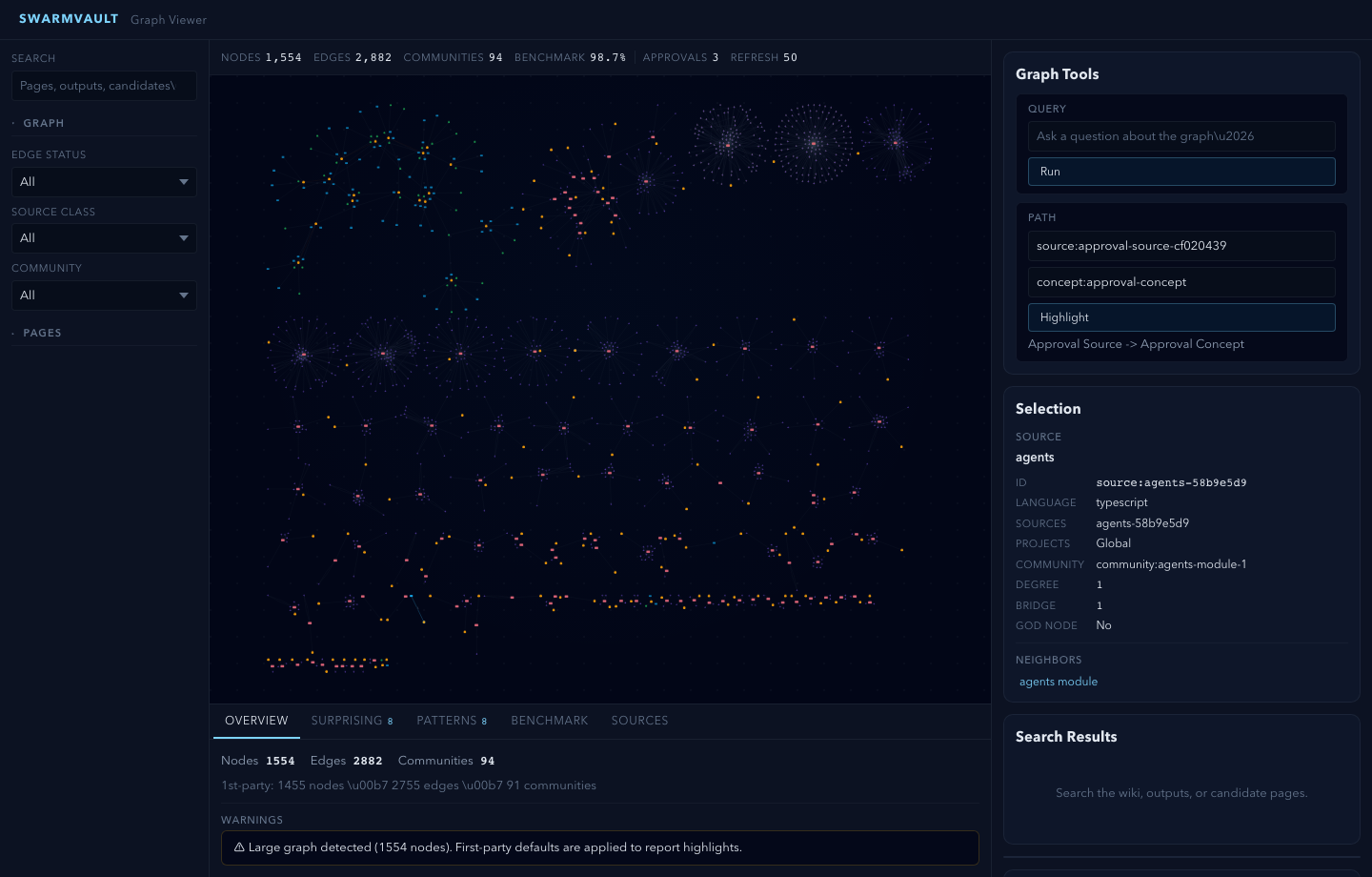
The local-first LLM Wiki, knowledge graph builder, and RAG knowledge base for AI agents. SwarmVault turns docs, code, transcripts, notes, and URLs into a durable markdown wiki plus a local graph you can inspect, query, and hand to agents. Start with one command, then learn the deeper graph, review, context-pack, and automation workflows when you need them.
Documentation on the website is currently English-first. If wording drifts between translations, README.md is the canonical source.
Try It in 30 Seconds
npm install -g @swarmvaultai/cli
swarmvault quickstart ./your-repo
quickstart initializes a vault in the current directory, ingests a local file, directory, or public GitHub repo, compiles the wiki and graph, writes share artifacts, and opens the local graph viewer. It is the beginner-friendly alias for swarmvault scan.
No repo handy?
swarmvault demo
After your first compile, the most useful next commands are:
swarmvault next
swarmvault query "What are the key concepts?"
swarmvault graph serve
swarmvault doctor
swarmvault candidate list
Not sure what state the vault is in? swarmvault next is read-only and tells you whether to initialize, ingest, compile, query, review, or refresh.
No API keys are required for the first run. The built-in heuristic provider runs locally and offline.
What you get on disk:
raw/ - immutable copies of ingested materialwiki/ - generated markdown pages, saved outputs, graph reports, context packs, and task notesstate/graph.json - the machine-readable knowledge graphstate/retrieval/ - local search indexwiki/graph/share-card.md, wiki/graph/share-card.svg, and wiki/graph/share-kit/ - copyable and visual first-run summaries
Three-Layer Architecture
SwarmVault uses three layers, following the pattern described by Andrej Karpathy:
- Raw sources (
raw/) — your curated collection of source documents. Books, articles, papers, transcripts, code, images, datasets. These are immutable: SwarmVault reads from them but never modifies them.
- The wiki (
wiki/) — LLM-generated and human-authored markdown. Source summaries, entity pages, concept pages, cross-references, dashboards, and outputs. The wiki is the persistent, compounding artifact.
- The schema (
swarmvault.schema.md) — defines how the wiki is structured, what conventions to follow, and what matters in your domain. You and the LLM co-evolve this over time.
In the tradition of Vannevar Bush's Memex (1945) — a personal, curated knowledge store with associative trails between documents — SwarmVault treats the connections between sources as valuable as the sources themselves. The part Bush couldn't solve was who does the maintenance. The LLM handles that.
Turn books, articles, notes, transcripts, mail exports, calendars, datasets, slide decks, screenshots, URLs, and code into a persistent knowledge vault with a knowledge graph, local search, dashboards, and reviewable artifacts that stay on disk. Use it for personal knowledge management, research deep-dives, book companions, code documentation, business intelligence, or any domain where you accumulate knowledge over time and want it organized rather than scattered.
SwarmVault turns the LLM Wiki pattern into a local toolchain with graph navigation, search, review, automation, and optional model-backed synthesis. You can also start with just the standalone schema template — zero install, any LLM agent — and graduate to the full CLI when you outgrow it.
Why SwarmVault
If you liked Karpathy's LLM Wiki gist, SwarmVault is the production-grade version. Here's how it addresses the most common concerns from the community:
"Won't hallucinations compound?" — Every edge is tagged extracted, inferred, or ambiguous. Contradiction detection flags conflicting claims. compile --approve stages all changes into reviewable approval bundles. New concepts land in wiki/candidates/ first. lint --conflicts audits for contradictions on demand.
"Does it scale past 100 pages?" — Yes. Hybrid search merges SQLite full-text with semantic embeddings, so queries work without fitting every page into context. compile --max-tokens trims output to fit bounded windows. Graph navigation (graph query, graph path, graph explain, graph callers) lets you traverse rather than search.
"Is it just for personal use?" — Git-backed workflows (--commit), watch mode with git hooks, scheduled automation, and an MCP server make it usable for teams. Agent integrations cover direct-rule targets plus the extended skill-bundle roster.
"Do I need API keys?" — No. The built-in heuristic provider is fully offline. For sharper extraction, pair with a free local LLM via Ollama. Cloud providers are optional.
From Gist to Production
| Karpathy's Gist | SwarmVault |
|---|
| Three-layer architecture | described | implemented |
| Ingest / query / lint | manual | CLI commands |
| One-command setup | — | swarmvault quickstart |
| Typed knowledge graph | — | yes |
| Interactive graph viewer | — | yes |
| Visual + post-ready share kit | — | yes |
| Agent-ready context packs | — | yes |
| Agent task ledger | — | yes |
| Vault doctor + workbench | — | yes |
| 30+ input formats | — | yes |
| Code-aware (tree-sitter AST) | — | yes |
| Offline / no API keys | — | yes |
| Contradiction detection | mentioned | automatic |
| Approval queues | — | yes |
| Agent integrations | — | yes |
| Neo4j / graph export | — | yes |
| MCP server | — | yes |
| Watch mode + git hooks | — | yes |
| Hybrid search + rerank | index.md | SQLite FTS + embeddings |
Install
Desktop App (no Node.js required)
Download the desktop app for macOS, Windows, or Linux — bundles its own runtime:
Download Desktop App | GitHub Releases
CLI
SwarmVault requires Node >=24.
npm install -g @swarmvaultai/cli
Verify the install:
swarmvault --version
Update to the latest published release:
npm install -g @swarmvaultai/cli@latest
The global CLI already includes the graph viewer workflow and MCP server flow. End users do not need to install @swarmvaultai/viewer separately.
Quickstart
Fast Path
Run this from an empty folder or a scratch folder where you want the vault artifacts to live:
mkdir my-vault
cd my-vault
swarmvault quickstart ../your-repo
swarmvault next
That is the easiest path for a new user. It does the same work as swarmvault scan: initialize the vault, ingest a local file, directory, or public GitHub repo, compile the wiki and graph, write share artifacts, and open the graph viewer unless you pass --no-serve or --no-viz. Interactive runs show bounded ingest progress on stderr, including the active file, so large PDFs and document folders do not look silent while extraction runs.
my-vault/
├── swarmvault.schema.md       user-editable vault instructions
├── raw/                       immutable source files and localized assets
├── wiki/                      compiled wiki: sources, concepts, entities, code, outputs, graph
├── state/                     graph.json, retrieval/, embeddings, sessions, approvals
├── .obsidian/                 optional Obsidian workspace config
└── agent/                     generated agent-facing helpers
If you want to keep generated artifacts outside the source tree, run with SWARMVAULT_OUT=.swarmvault-out. swarmvault.config.json and swarmvault.schema.md stay in the project root; raw/, wiki/, state/, agent/, and inbox/ resolve under the output directory.
Learn The Main Loop
Once the fast path makes sense, the same workflow can be run step by step:
swarmvault init --obsidian --profile personal-research
swarmvault ingest ./src --repo-root .
swarmvault ingest ./meeting.srt --guide
swarmvault add https://arxiv.org/abs/2401.12345
swarmvault compile
swarmvault next
swarmvault query "What is the auth flow?"
swarmvault graph serve
Use swarmvault source add https://github.com/karpathy/micrograd, swarmvault source add https://example.com/docs/getting-started, swarmvault source list, swarmvault source reload --all, and swarmvault source session transcript-or-session-id when the same repo, folder, or docs hub should stay registered and refreshable. For public GitHub repos, swarmvault clone https://github.com/owner/repo --no-viz and swarmvault source add https://github.com/owner/repo --branch main --checkout-dir .swarmvault-checkouts/repo are the reusable checkout paths.
Common Next Commands
| Goal | Command |
|---|
| See the best next command for this folder | swarmvault next |
| Run the beginner path without opening the viewer | swarmvault quickstart ./path --no-serve |
| Use the older concise alias | swarmvault scan ./path --no-viz |
| Inspect graph freshness | swarmvault graph status ./src or swarmvault check-update ./src |
| Refresh code-derived graph artifacts | swarmvault update ./src |
| Recompute graph communities | swarmvault graph cluster or swarmvault cluster-only |
| Print graph counts and validate exports | swarmvault graph stats and swarmvault graph validate --strict |
| Share the first-run summary | swarmvault graph share --post, swarmvault graph share --svg ./share-card.svg, or swarmvault graph share --bundle ./share-kit |
| Export for agents or other tools | swarmvault export ai --out ./exports/ai |
| Build bounded agent context | swarmvault context build "Implement the auth refactor" --target ./src --budget 8000 |
| Record task history | swarmvault task start "Implement the auth refactor" --target ./src --agent codex |
| Keep a conversation over the vault | swarmvault chat "How should the next agent use this vault?" |
| Open health and repair guidance | swarmvault doctor --repair |
| Build graph exports | swarmvault graph export --report ./exports/report.html, swarmvault graph export --callflow ./exports/callflow.html, swarmvault graph export --obsidian ./exports/graph-vault, or swarmvault graph export --neo4j ./exports/graph.cypher |
| Merge or inspect source/module trees | swarmvault tree --output ./exports/tree.html and swarmvault merge-graphs ./exports/graph.json ./other-graph.json --out ./exports/merged-graph.json |
| Push graph data to Neo4j | swarmvault graph push neo4j --dry-run |

 @swarmclawai