
ig-audience-insights
Read your Instagram niche and profile from real data via Apify, no login. Scan a hashtag for the posts traveling now (likes,…
 @sergebulaevInstall Skill
Generate a weekly Instagram content plan from a theme, audience, and content pillars. Produces a per-day mix of Reels, carousels, single images, and stories, each with a hook formula, angle, posting time, and primary goal, plus a weekly saves-and-shares goal (the 2026 lever), a
Claude Code
$ npx -y skills add sergebulaev/instagram-skills --skill ig-content-planner --agent claude-code
Codex
$ npx skills add sergebulaev/instagram-skills --skill ig-content-planner -a codex -y
Cursor
$ npx skills add sergebulaev/instagram-skills --skill ig-content-planner -a cursor -y
Gemini CLI
$ npx skills add sergebulaev/instagram-skills --skill ig-content-planner -a gemini-cli -y
GitHub Copilot
$ npx skills add sergebulaev/instagram-skills --skill ig-content-planner -a github-copilot -y
OpenCode
$ npx skills add sergebulaev/instagram-skills --skill ig-content-planner -a opencode -y
Windsurf
$ npx skills add sergebulaev/instagram-skills --skill ig-content-planner -a windsurf -y
name: ig-content-planner
description: "Generate a weekly Instagram content plan from a theme, audience, and content pillars. Produces a per-day mix of Reels, carousels, single images, and stories, each with a hook formula, angle, posting time, and primary goal, plus a weekly saves-and-shares goal (the 2026 lever), a story cadence, and a balance check across saves, shares, comments, and follows. Use to plan a week instead of ad-hoc posting. Not for drafting one caption (use ig-caption-writer) or one carousel (use ig-carousel-planner)."
Produce a weekly Instagram plan built around a pillar discipline and the format mix Instagram rewards: Reels for reach, carousels for saves, stories for the relationship. The plan sets a weekly saves-and-shares goal, because sends per reach and saves are the 2026 levers.
20% Engagement / 10% Promotion
A markdown plan with:
| Day | Format | Pillar | Formula | 1-line angle | Goal | Time | |---|---|---|---|---|---|---| | Mon | Reel | Educational | IG9 Pattern-Interrupt | "you post Reels at the worst time" | shares | 12:00 PM | | Tue | Carousel | Educational | IG5 Listicle | "7 portfolio mistakes" | saves | 11:30 AM | | Wed | Story set | Engagement | poll + question | "which layout wins?" | comments | 7:00 PM | | Thu | Carousel | Story | IG6 Before/After | "my first $0 to first $4k" | follows | 11:00 AM | | Fri | Single image | Engagement | IG3 Relatable | "opening Canva for one graphic" | comments | 1:00 PM | | Sat | Reel | Educational | IG10 How-I Teardown | "how I edit a Reel in 20 min" | saves | 10:00 AM | | Sun | Story set | Promotion | reshare + link | "course doors open" | follows | 6:00 PM |
(The skill fills real angles from the theme. Stories run daily underneath the feed posts.)
Default heuristic: at least 3 of the week's feed posts are save-bait formats (IG1, IG5, IG6, IG8, IG10) and at least 2 are send-bait (IG2, IG7, IG9).
least one reshare of a recent feed post (a send-equivalent signal that pushes the post to followers who missed it).
Every formula earns a primary signal. A week that is all save-bait or all relatable reads as engineered. Spread the goals:
| Goal | Formulas | Weekly target | |---|---|---| | Saves | IG1, IG5, IG6, IG8, IG10 | at least 3 (the headline lever) | | Shares | IG2, IG7, IG9 | at least 2 | | Comments | IG3, IG4 | at least 1 | | Follows | IG4, IG6, IG8 | at least 1 |
beats a daily dump of filler. Do not pad to hit a count.
right surface for the job.
reaches a fresh non-follower audience.
Check the user's own insights when available.
| Pillar | Preferred formulas | |---|---| | Educational | IG5 Listicle, IG8 Framework, IG10 How-I Reel, IG1 Number-First | | Story | IG4 Confession, IG6 Before/After | | Engagement | IG3 Relatable, IG9 Pattern-Interrupt Reel, story stickers | | Promotion | IG6 (results that imply the product), IG1 (your own data) |
1. Gather inputs. Ask for theme, audience, pillar preferences if not provided. 2. Validate the pillar mix sums to 100%; warn if any pillar is over 50%. 3. For each day, pick: format (Reel/carousel/image/story), pillar, formula (do not over-repeat), angle, posting time (audience timezone), goal. 4. Set the weekly saves + shares goal and the daily story cadence. 5. Run the weekly balance check and the goal-mix check; flag anything missing. 6. Return as markdown, plus optional JSON for import.
See `references/example-week.md` for a filled-in 7-day plan.
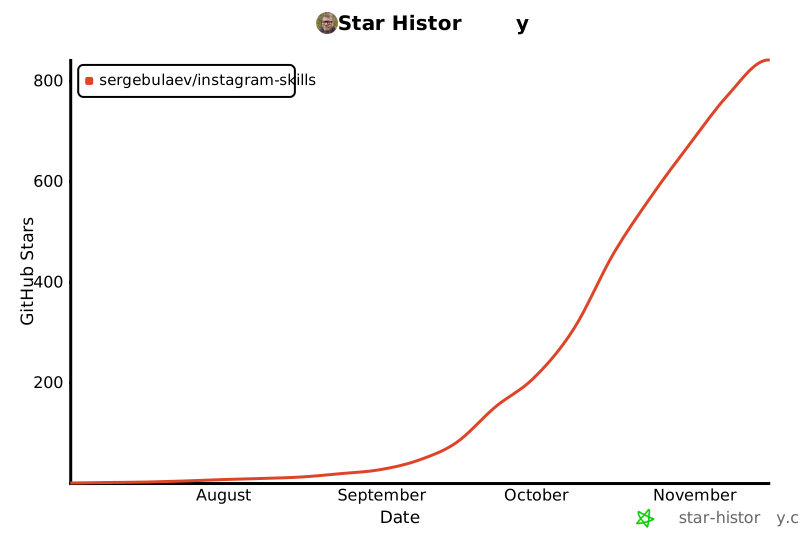
Part of the linkedin-skills family (400+ stars). Same voice engine and approve-before-publish flow, now for Instagram. Also available for X · YouTube · TikTok · Threads · Facebook. 9 skills that turn Claude Code and Codex into your Instagram content team.
Stars on GitHub
Read your Instagram niche and profile from real data via Apify, no login. Scan a hashtag for the posts traveling now (likes,…
@sergebulaevInstall SkillDraft an Instagram caption with the hook in the first 125 characters, a skimmable body, and one clear CTA, using a 2026 hook…
@sergebulaevInstall SkillPlan an Instagram carousel slide by slide, up to 10 slides, with a hook slide that opens a loop, value slides that front-load the…
@sergebulaevInstall SkillBuild a sized Instagram hashtag set for a post using the 2026 reality that 3 to 5 well-chosen tags beat 30 random ones. Sizes…
@sergebulaevInstall SkillReverse-engineer the hook from a viral Instagram Reel or carousel, given a URL or a pasted caption. Identifies which of the 10…
@sergebulaevInstall SkillRemove the AI tells readers react to in an Instagram caption or carousel slide: 2026 vocabulary by density, reveal bridges,…
@sergebulaevInstall SkillActivates when the user asks about AI prompts, needs prompt templates, wants to search for prompts, or mentions prompts.chat. Use…
 @gh-fInstall Skill
AI-driven presentation workflow for generating editable PPTX decks and slides, reconstructing page visuals, creating reusable…
 @hugohe3Install Skill
Use this skill when the user wants a .pptx with smooth cross-slide animation — PowerPoint Morph transitions, Keynote-style…
 @iofficeaiInstall Skill
Create stunning, animation-rich HTML presentations from scratch or by converting PowerPoint files. Use when the user wants to…
 @zarazhangruiInstall Skill