
Content
Plugin
claude2figma
Design System compliance for AI-generated Figma designs. 4 skills, 3-step preflight, zero raw values. Quick start: Clone, copy skills to .claude/skills/, paste your Figma URL into CLAUDE.md, say "let's start". Full install guide below.

Plugin Signal52/100Fair
maintained41
capable34
documented100
adopted49
Install on Claude Code
> /plugin marketplace add senlindesign/claude2figma> /plugin install claude2figma@claude2figma
What's inside
Skill(4 skills)
/component-rulesTriggers when building any UI element in Figma — 'create a card', 'build a nav', 'add a section', 'make a component'. Enforces library-first component lookup, correct Auto Layout structure, and semantic node naming. For visual property binding (colors, text styles, spacing/figma-preflightTriggers on 'let's start', 'begin', 'preflight', 'start the session', or when a Figma file URL is first shared. Verifies MCP connection, reads CLAUDE.md, audits connected libraries, and loads a Token Map of all Styles and Variables — required before any design work./figma-style-bindingTriggers on any visual property change in Figma — creating text, setting colors, adjusting spacing/padding/gap/radius. Enforces that ALL values bind to Figma Styles or Variables, never hardcoded. Includes post-write QA verification./reference-interpreterTriggers when user shares a screenshot, image, URL, or design description — or says 'analyze this', 'make a brief', 'interpret this reference'. Outputs a structured Design Brief mapping visual intent to design system tokens. Waits for 'confirmed' before designing.
Badges



README
Claude Code to Figma
Design System compliance for AI-generated Figma designs. 4 skills, 3-step preflight, zero raw values.
Quick start: Clone, copy skills to
.claude/skills/, paste your Figma URL intoCLAUDE.md, say "let's start". Full install guide below.
Why?
AI can write to Figma now. But without guidance, it builds everything from scratch — hardcoded hex colors, arbitrary font sizes, raw spacing values. The result looks right but is completely disconnected from your Design System. Every color is a magic number. Every component is a one-off. Your design tokens might as well not exist.
cc2figma fixes this with 4 Claude Code Skills that enforce Design System compliance at every step:
- Components are Instances of your Master Components, not rebuilt from scratch
- Colors, fonts, spacing, and radii bind to Variables and Styles, not raw values
- Every write to Figma is automatically verified for token compliance
Before & After
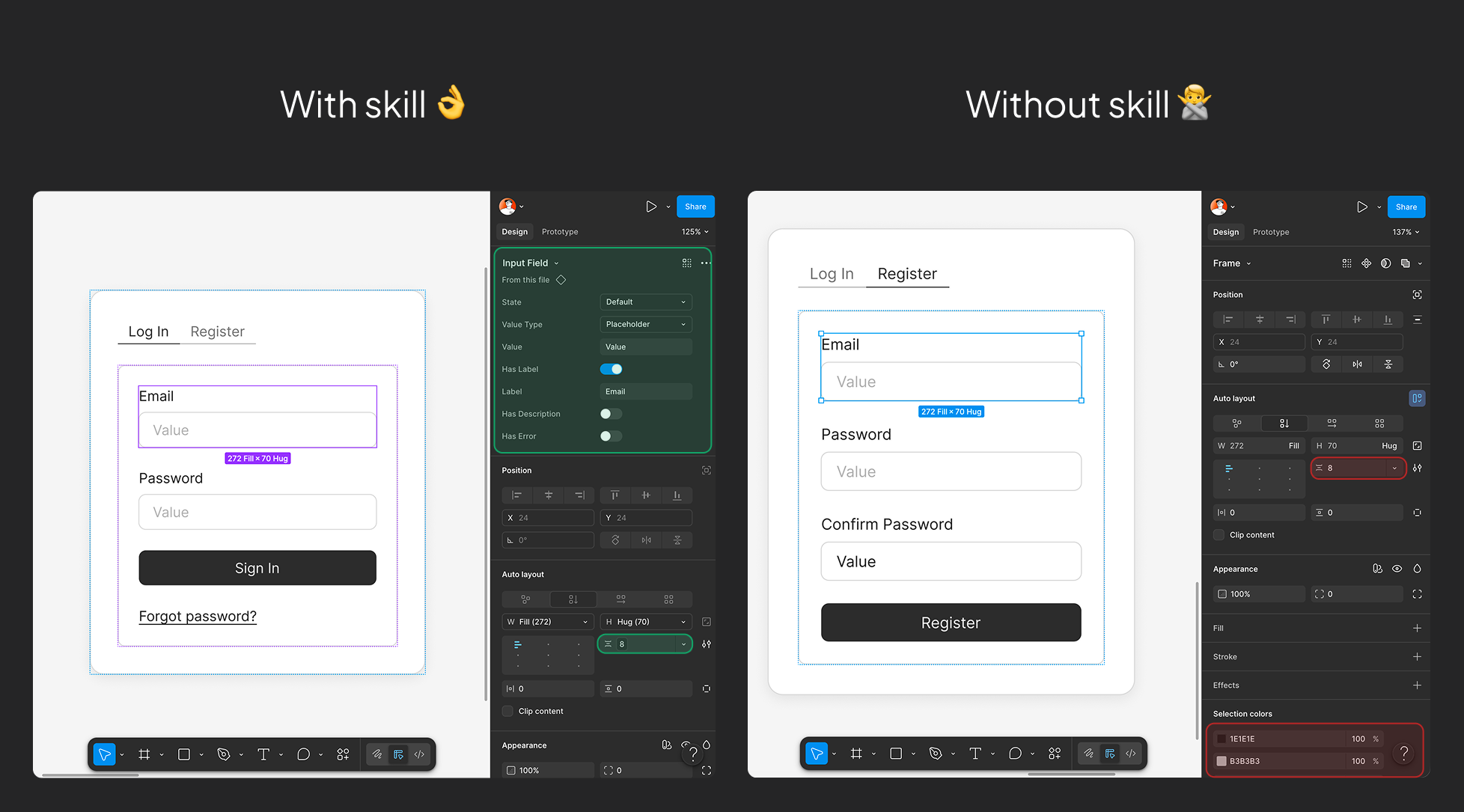
With Skills: Master Component Instances, all visual values bound to Design System Variables and Styles. Without Skills: Hardcoded colors, arbitrary spacing, components built from scratch — looks right, but zero Design System connection.
Preflight System
Before every design session, a 3-step parallel check ensures everything is connected:
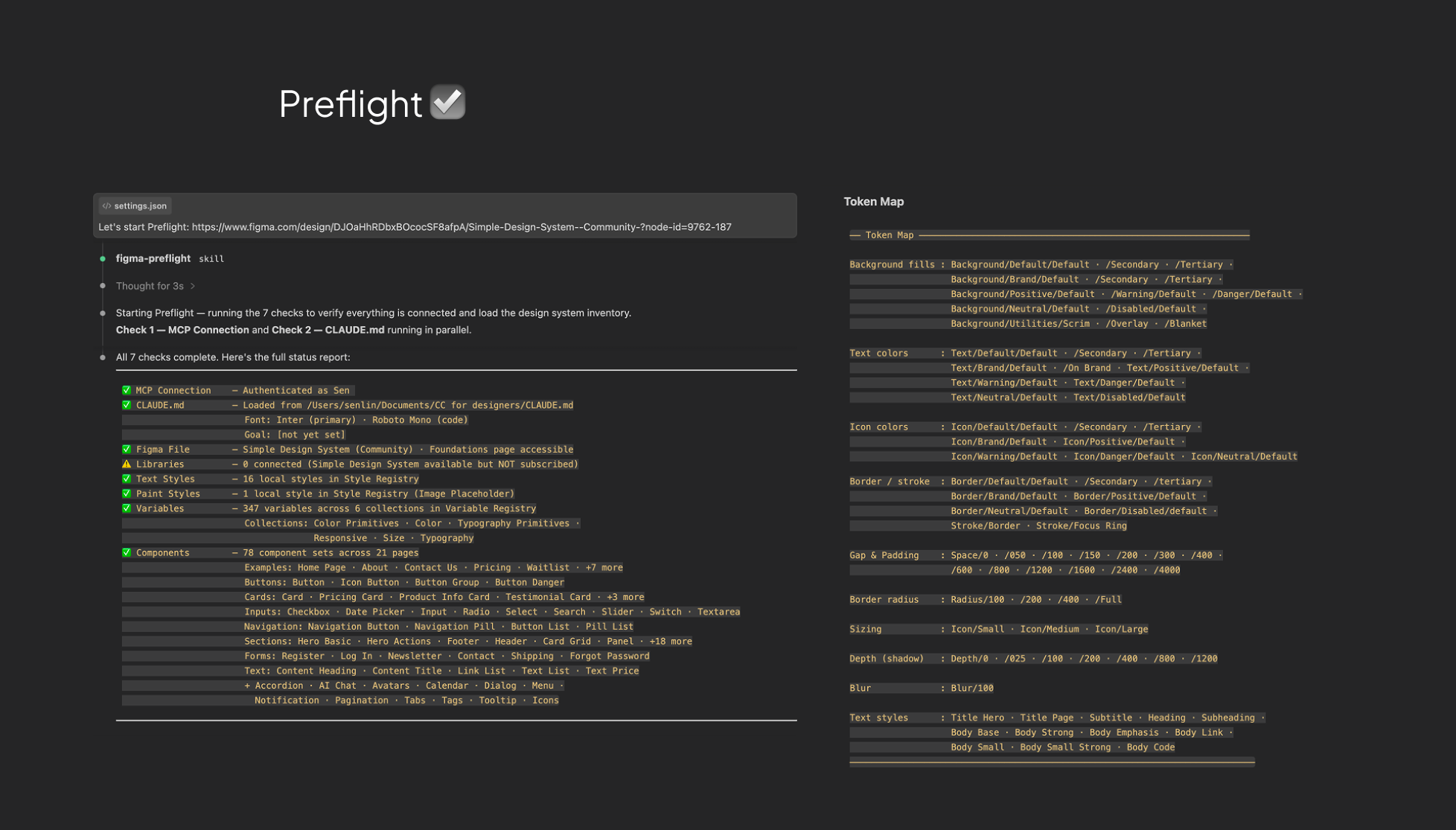
MCP connection, file permissions, libraries, styles, variables, and components — all verified in parallel before a single node is created.
Usage Examples
Say "let's start" to run preflight, then describe what you want:
You: Build a login page with email and password fields
Claude: [searches DS for Form, Input, Button components]
        [creates Instances, binds all tokens]
        [takes screenshot for verification]

You: Add a registration form next to it with a confirm password field
Claude: [reuses same DS components, adds new section]
        [QA verifies all bindings automatically]

You: Here's a screenshot of the dashboard we need
Claude: [analyzes reference, outputs structured Design Brief]
        [builds section by section, verifying after each step]
Every interaction follows the same loop: search DS → create Instances → bind tokens → verify.
What's Included
4 Skills
| Skill | Trigger | What it does |
|---|---|---|
figma-preflight | "let's start", first Figma URL | 3-step parallel check + Token Map + Component Registry |
component-rules | Any UI construction task | Library-first lookup, Auto Layout, semantic naming |
figma-style-binding | Any color, font, or spacing operation | Enforce Variable / Style binding + post-write QA verification |
reference-interpreter | Share screenshot, URL, or description | Output structured Design Brief before building |
How They Work Together
"let's start"
    |
    v
① preflight ─── one-time setup, load Token Map + Component Registry
    |
    v
② reference-interpreter ─── optional: screenshot / reference → Design Brief → user confirms
    |
    v
┌→ ③ component-rules ─── search Library, use Instances
│       |
│  ④ figma-style-binding ─── bind every value to a token, then auto-verify
│       |
└── next section (loop until done)
Good For / Not For
| Good For | Not For |
|---|---|
| Building pages from an existing Design System | Creating a Design System from scratch |
| Describing UI in natural language, Claude builds it in Figma | Pixel-perfect illustration or icon drawing |
| Working in a DS file or a file with a linked DS library | Free-form design without a Design System |
| Ensuring 100% token compliance in design output | FigJam / whiteboard workflows |
Installation
Prerequisites
- Claude Code (CLI / Desktop / VS Code)
- Figma MCP Server installed and authenticated
- A Figma file with a Design System (locally defined or linked via Library)
Install
# 1. Clone the repo
git clone https://github.com/senlindesign/cc2figma.git

# 2. Copy skills to your project
cp -r cc2figma/.claude/skills/* your-project/.claude/skills/

# 3. Copy config
cp cc2figma/.claude/settings.json your-project/.claude/settings.json

# 4. Copy CLAUDE.md template
cp cc2figma/CLAUDE.md.template your-project/CLAUDE.md
Configure CLAUDE.md
Open CLAUDE.md and paste your Figma file URL:
# Figma Design Project

- **Figma file:** <https://www.figma.com/design/YOUR_FILE_KEY/...>
- **Fonts:** [leave blank — Preflight auto-detects from your DS]
- **Session goal:** [what are we designing today?]

## Rules

1. Every visual value must bind to a Style or Variable.
2. Always search connected libraries before building any component from scratch.
3. Never start designing before the Design Brief is confirmed.
Then say "let's start" in Claude Code. Preflight handles the rest.
Supported Scenarios
| Scenario | How It Works |
|---|---|
| Working in a DS file directly | Preflight reads all local Styles, Variables, and Components. Full token binding. |
| New file with a linked DS library | Component Instances inherit all token bindings from masters automatically. Library variables can be imported for new frames. |
Directory Structure
your-project/
├── CLAUDE.md                          # Project config (Figma URL, fonts, rules)
└── .claude/
    ├── settings.json                  # Permissions + QA Hook
    └── skills/
        ├── figma-preflight/           # 3-step parallel check + Token Map + Component Registry
        ├── component-rules/           # Library-first, Auto Layout, naming
        ├── figma-style-binding/       # Color / Text / Spacing binding + QA verification
        └── reference-interpreter/     # Reference → Design Brief
Known Limitations
| Limitation | Workaround |
|---|---|
| Doubly-nested Instances can't be directly modified | detachInstance() on the outer instance first |
getLocalVariablesAsync() can't see library variables | Instances inherit tokens automatically; use importVariableByKeyAsync for new frames |
Invalid variant values in setProperties roll back the entire script | Read componentPropertyDefinitions to confirm valid values first |
Contributing
Issues and PRs are welcome. If you have a Figma design workflow that could benefit from a new Skill, describe it in an Issue.
MIT © 2025 Sen Lin
File tree
FAQ
claude2figma is a Claude Code plugin with 4 hand-picked skills for content work, indexed on Flowy. Install it with the command on its page. It includes component-rules, figma-preflight, figma-style-binding. Its skills do not fire on their own yet. Request auto-invocation to have Flowy route them as you prompt. Free and open source.
- What is claude2figma?
- Design System compliance for AI-generated Figma designs. 4 skills, 3-step preflight, zero raw values. Quick start: Clone, copy skills to .claude/skills/, paste your Figma URL into CLAUDE.md, say "let's start". Full install guide below.
- How do I install claude2figma?
- Run these in Claude Code: /plugin marketplace add senlindesign/claude2figma then /plugin install claude2figma@claude2figma. Then prompt normally.
- Does claude2figma auto-invoke its skills?
- Not yet. It is indexed on Flowy as a plain plugin. Request auto-invocation on its page and Flowy will route its skills for you as you prompt.
- Is claude2figma free?
- Yes. Flowy is free and open source, with nothing gated. You can read every skill in full before you install.
Is this plugin yours?
Claim it with GitHubSubmit a pluginPromote it