
Development
Plugin
shinkaevolve
ShinkaEvolve: Towards Open-Ended and Sample-Efficient Program Evolution 🧬

Plugin Signal70/100Solid
maintained85
capable34
documented100
adopted67
Install
$ npx -y skills add sakanaai/shinkaevolve --agent claude-code
What's inside
Skill(4 skills)
/shinka-convertConvert an existing codebase in the current working directory into a ShinkaEvolve task directory by snapshotting the relevant code, adding evolve blocks, and generating `evaluate.py` plus Shinka runner/config files. Use when the user wants to optimize existing code with Shinka/shinka-inspectLoad top-performing Shinka programs into agent context using `shinka.utils.load_programs_to_df`, and emit a compact Markdown bundle for iteration planning./shinka-runRun existing ShinkaEvolve tasks with the `shinka_run` CLI from a task directory (`evaluate.py` + `initial.<ext>`). Use when an agent needs to launch async evolution runs quickly with required `--results_dir`, generation count, and strict namespaced keyword overrides./shinka-setupCreate ShinkaEvolve task scaffolds from a target directory and task description, producing `evaluate.py` and `initial.<ext>` (multi-language). Use when asked to set up new ShinkaEvolve tasks, evaluation harnesses, or baseline programs for ShinkaEvolve.
Badges

README
shinka is a framework that combines Large Language Models (LLMs) with evolutionary algorithms to drive scientific discovery. By leveraging the creative capabilities of LLMs and the optimization power of evolutionary search, shinka enables automated exploration and improvement of scientific code. The system is inspired by the AI Scientist, AlphaEvolve and the Darwin Goedel Machine: It maintains a population of programs that evolve over generations, with an ensemble of LLMs acting as intelligent mutation operators that suggest code improvements.
May 2026 Update: Added Headless CLI-backed mutation models for subscription-backed agent usage. Use model strings such as headless/codex@gpt-5.5?effort=high or headless/claude. Check the example for more detail.
Apr 2026 Update: Added the new documentation website with guides for getting started, configuration, async evolution, local models, WebUI usage, and agentic workflows.
Mar 2026 Update: Refactored API and unified runner ShinkaEvolveRunner (replacing EvolutionRunner and AsyncEvolutionRunner). You can now install shinka via PyPI and uv: pip install shinka-evolve.
Feb 2026 Update: Added agent skills for using shinka within coding agents (Claude Code, Codex, etc.) for new task generation (shinka-setup), converting your repo (shinka-convert), evolution (shinka-run), and result inspection (shinka-inspect). Install them via npx:
npx skills add SakanaAI/ShinkaEvolve --skill '*' -a claude-code -a codex -y
Jan 2026 Update: ShinkaEvolve was accepted at ICLR 2026 and we released an update with new features.
Nov 2025 Update: Rob gave several public talks about our ShinkaEvolve effort (Official, AutoML Seminar).
Oct 2025 Update ShinkaEvolve supported Team Unagi in winning the ICFP 2025 Programming Contest.
The framework supports parallel evaluation of candidates locally or on a Slurm cluster. It maintains an archive of successful solutions, enabling knowledge transfer between different evolutionary islands. shinka is particularly well-suited for scientific tasks where there is a verifier available and the goal is to optimize performance metrics while maintaining code correctness and readability.
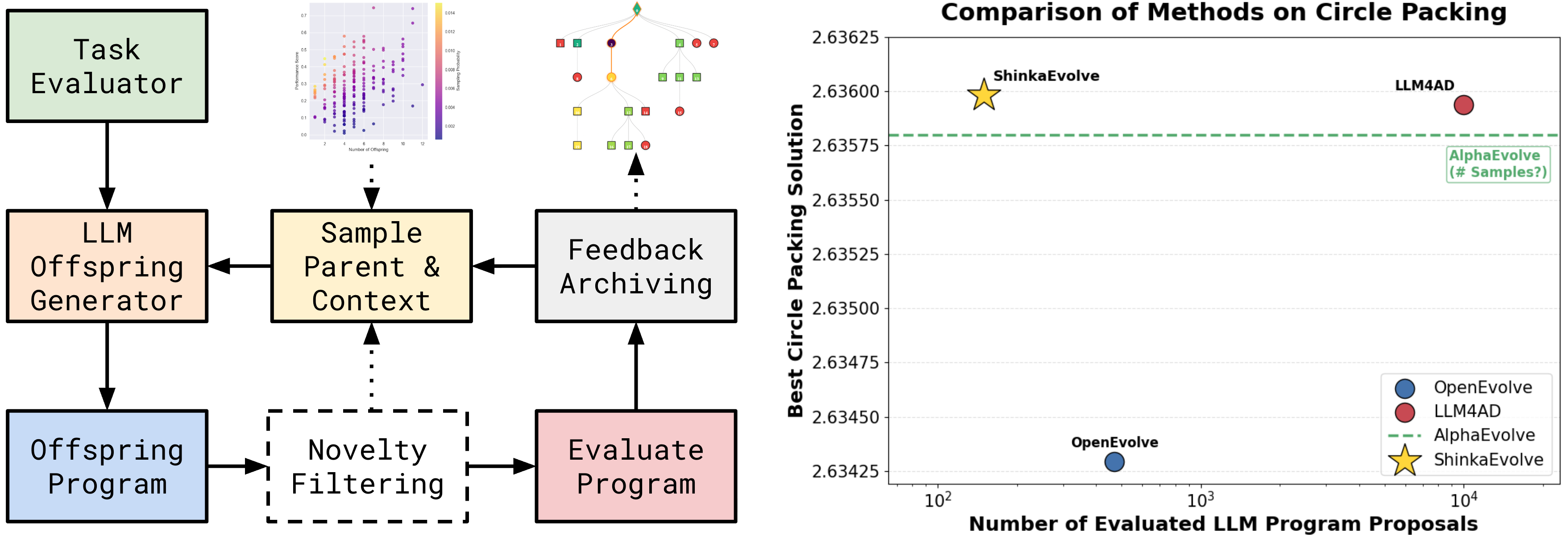
Documentation 📝
| Guide | Description | What You'll Learn |
|---|---|---|
| 🚀 First steps | Installation, basic usage, and examples | Setup, first evolution run, core concepts |
| 📓 Tutorial | Interactive walkthrough of Shinka | Hands-on examples, config, best practices |
| ⚙️ Config | Comprehensive config reference | All config options & advanced features |
| 🎨 WebUI | Interactive visualization and monitoring | Real-time tracking, result analysis, debugging |
| ⚡ Async Evo | High-perf. throughput (5-10x speedup) | Concurrent processing, proposal/eval tuning |
| 🧠 Local Models | How to use local LLMs and embeddings with Shinka | Running open-source models & integration tips |
| 🤖 Agentic Use | Run Shinka with Claude/Codex skills | CLI install, skill placement, setup/run workflows |
Installation & Quick Start 🚀
# Install from PyPI
pip install shinka-evolve

# Or with uv
uv pip install shinka-evolve

# Run your first evolution experiment
shinka_launch variant=circle_packing_example
The distribution name is shinka-evolve; Python imports stay import shinka.
shinka_launch still supports the original shorthand group overrides:
shinka_launch variant=circle_packing_example
shinka_launch task=novelty_generator database=island_small
Built-in Hydra presets ship inside the package under shinka/configs/. To add your own presets from a PyPI install without cloning the repo, place them in your own config directory and pass --config-dir:
mkdir -p ~/my-shinka-configs/variant
$EDITOR ~/my-shinka-configs/variant/my_variant.yaml
shinka_launch --config-dir ~/my-shinka-configs variant=my_variant
For development installs from source:
git clone https://github.com/SakanaAI/ShinkaEvolve
cd ShinkaEvolve
uv venv --python 3.11
source .venv/bin/activate  # On Windows: .venv\Scripts\activate
uv pip install -e .
For detailed installation instructions and usage examples, see the Getting Started Guide.
Examples 📖
| Example | Description | Environment Setup |
|---|---|---|
| ⭕ Circle Packing | Optimize circle packing to maximize radii. | LocalJobConfig |
| 🎮 Game 2048 | Optimize a policy for the Game of 2048. | LocalJobConfig |
| ∑ Julia Prime Counting | Optimize a Julia solver for prime-count queries. | LocalJobConfig |
| 🔥 Fortran Heat Diffusion | Optimize a compiled Fortran stencil solver. | LocalJobConfig |
| 🧮 Wolfram GCD Sum | Optimize a Wolfram Language GCD-sum solver. | LocalJobConfig |
| ✨ Novelty Generator | Generate creative, surprising outputs (e.g., ASCII art). | LocalJobConfig |
| ∿ Sine Approx Headless | Evolve a bounded sine approximation using Headless subscription-backed mutation calls. | LocalJobConfig |
| ⚡ RTLLM PPA | Evolve Verilog RTL for power/performance/area under a fixed spec (RTLLM v2.0). Requires iverilog + yosys + OpenSTA. | LocalJobConfig |
shinka Run with Python API 🐍
For the simplest setup with default settings, you only need to specify the evaluation program:
from shinka.core import ShinkaEvolveRunner, EvolutionConfig
from shinka.database import DatabaseConfig
from shinka.launch import LocalJobConfig, SlurmCondaJobConfig, SlurmDockerJobConfig

# Minimal - only specify what's required
job_conf = LocalJobConfig(eval_program_path="evaluate.py")
# Or source a uv/venv environment per job:
# job_conf = LocalJobConfig(
#     eval_program_path="evaluate.py",
#     activate_script=".venv/bin/activate",
# )
# Or run evaluations on SLURM:
# job_conf = SlurmCondaJobConfig(
#     eval_program_path="evaluate.py",
#     partition="gpu",
#     time="01:00:00",
#     cpus=1,
#     gpus=1,
#     mem="8G",
#     conda_env="shinka",
# )
# Or run evaluations in a Docker container on SLURM:
# job_conf = SlurmDockerJobConfig(
#     eval_program_path="evaluate.py",
#     image="ubuntu:latest",
#     partition="gpu",
#     time="01:00:00",
#     cpus=1,
#     gpus=1,
#     mem="8G",
# )
db_conf = DatabaseConfig()
evo_conf = EvolutionConfig(init_program_path="initial.py")

runner = ShinkaEvolveRunner(
    evo_config=evo_conf,
    job_config=job_conf,
    db_config=db_conf,
    max_evaluation_jobs=2,
    max_proposal_jobs=3,  # modest oversubscription when proposal generation is slower than eval
    max_db_workers=4,
)
runner.run()
Live model pricing
Shinka refreshes supported model metadata and token prices from
models.dev when a new run starts. Requests use HTTP
cache validation, then fall back to the last validated user-cache response or
the packaged snapshot when offline. The exact catalog used by a run is written
to pricing_snapshot.json in its results directory and reused when that run is
resumed.
Set SHINKA_PRICING_MODE=offline to skip the network check, or
SHINKA_PRICING_MODE=required to fail startup when live pricing cannot be
validated. Run shinka_models --verbose to inspect catalog provenance and the
models available for configured provider credentials.
Weights & Biases logging
Install the optional W&B integration and enable it for a run:
pip install 'shinka-evolve[wandb]'

# Authenticate online runs. In CI, provide this through a secret manager.
export WANDB_API_KEY=<your-api-key>

shinka_run --task-dir examples/circle_packing \
  --results_dir results/circle_wandb \
  --num_generations 20 \
  --set evo.enable_wandb_logging=true \
  --set evo.wandb_project=shinka-evolve
W&B logging is additive: the existing SQLite database and WebUI logging remain
enabled. Population and island snapshots use the monotonic
population/evaluated_count axis for counts, correctness, scores, cumulative
cost/*, and cumulative timing/*_total. Raw evaluated candidates use
score/individual and individual/* fields without binding those events to a
generation step. Administrative island copies remain in population/table counts
but are excluded from evaluated count, candidate history, and costs. The final
population is available as population/final_table, without program code or
embeddings. Resuming the same results directory reuses its persisted W&B run ID
File tree
FAQ
shinkaevolve is a Claude Code plugin with 4 hand-picked skills for development work, indexed on Flowy. Install it with the command on its page. It includes shinka-convert, shinka-inspect, shinka-run. Its skills do not fire on their own yet. Request auto-invocation to have Flowy route them as you prompt. Free and open source.
- What is shinkaevolve?
- ShinkaEvolve: Towards Open-Ended and Sample-Efficient Program Evolution 🧬
- How do I install shinkaevolve?
- Run these in Claude Code: npx -y skills add sakanaai/shinkaevolve --agent claude-code. Then prompt normally.
- Does shinkaevolve auto-invoke its skills?
- Not yet. It is indexed on Flowy as a plain plugin. Request auto-invocation on its page and Flowy will route its skills for you as you prompt.
- Is shinkaevolve free?
- Yes. Flowy is free and open source, with nothing gated. You can read every skill in full before you install.
Is this plugin yours?
Claim it with GitHubSubmit a pluginPromote it