
Machine Learning
Plugin
ovrtx
ovrtx is a C and Python library for embedding Omniverse RTX sensor simulation and visualization directly into applications.

Plugin Signal85/100Strong
maintained98
capable77
documented100
adopted51
Install
$ npx -y skills add nvidia-omniverse/ovrtx --agent claude-code
Stats
237
Stars
38
Forks
Active
Maintenance
Python
Language
5d ago
Last commit
10mo ago
Created
2h ago
Added
In this plugin
- application-flow
- async-operations
- attribute-bindings
- binding-materials
- camera-outputs-rt2
- cloning-prims
- configuring-lidar-sensors
- configuring-radar-sensors
- cuda-interop
- error-handling
- interpreting-lidar-pointclouds
- interpreting-radar-pointclouds
- loading-usd
- mapping-attributes
- nonvisual-materials
- picking-selection
- project-setup-c
- project-setup-python
- reading-attributes
- reading-render-output
- reading-sensor-pointclouds
- render-product-device-pinning
- render-settings
- renderer-creation
- semantic-labels
- sliced-rendering
- spg
- stage-queries
- status-queries
- stepping-and-rendering
- string-handling
- update-0-4-to-0-5
- update-0-5-to-0-6
- update-0_2-0_3
- update-0_3-0_4-c
- update-0_3-0_4-python
- warmup
- writing-attributes
- writing-transforms
What's inside
Skill(39 skills)
/application-flowHigh-level overview of a typical ovrtx application lifecycle. Use when user asks how to structure an ovrtx program, what the main steps are, or how the pieces fit together./async-operationsAsynchronous operation patterns including polling, timeouts, and non-blocking workflows. Use when user asks about async rendering, non-blocking operations, polling, timeouts, or parallel rendering./attribute-bindingsReplacing persistent ovrtx attribute bindings with reusable ovstage queries for repeated writes or maps. Use when user asks about persistent bindings, repeated writes, efficient animation loops, bind_attribute, or updating transforms every frame with caller-owned tensors.
- /binding-materials
- /camera-outputs-rt2
- /cloning-prims
- /configuring-lidar-sensors
- /configuring-radar-sensors
- /cuda-interop
- /error-handling
- /interpreting-lidar-pointclouds
- /interpreting-radar-pointclouds
- /loading-usd
- /mapping-attributes
- /nonvisual-materials
- /picking-selection
- /project-setup-c
- /project-setup-python
- /reading-attributes
- /reading-render-output
- /reading-sensor-pointclouds
- /render-product-device-pinning
- /render-settings
- /renderer-creation
- /semantic-labels
- /sliced-rendering
- /spg
- /stage-queries
- /status-queries
- /stepping-and-rendering
- /string-handling
- /update-0-4-to-0-5
- /update-0-5-to-0-6
- /update-0_2-0_3
- /update-0_3-0_4-c
- /update-0_3-0_4-python
- /warmup
- /writing-attributes
- /writing-transforms
Badges


README
NVIDIA ovrtx
ovrtx is a C and Python library for embedding Omniverse RTX sensor simulation and visualization directly into applications.
ovrtx is best suited for developers looking to build applications, tools or workflows that need real-time, physically accurate camera, lidar, radar, and other sensor simulation for Physical AI, targeting robotics learning, synthetic data generation, and industrial and design workflows.
ovrtx integrates with the NVIDIA Omniverse ovstage library. ovstage supports loading of USD data to a runtime representation, manages the runtime scene data, ordinal-keyed simulation steps, and change detection. See Packaging and Dependencies for how the two libraries relate.
[!NOTE] ovrtx is currently pre-release software.
To get started with ovrtx follow the instructions below for the included Python and C/C++ examples.
- Get started in Python
- Get started in C
Sources live under examples/ and are the source of truth for the code snippets referenced by the ovrtx skills — see the examples index.
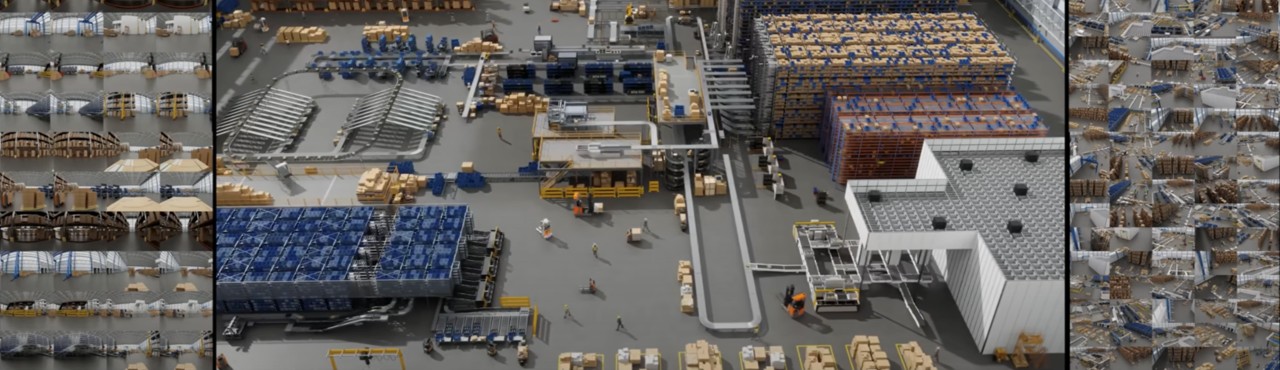
High-level Feature Set
- Physically accurate simulation of cameras, lidar, radar, and other sensors.
- Scalable simulation performance from reinforcement learning in-the-loop with tens of thousands of frames per second, through real-time, photorealistic, interactive viewport and navigation, to offline predictive rendering.
- Support for loading USD scene description via ovstage. Compatibility with OpenUSD allows interchange with a vast ecosystem of content creation, CAD and simulation tools.
- Easy integration with Python simulation and AI ecosystem.
Packaging and Dependencies
ovrtx is distributed as a C package (.zip file) available in the Releases page in this repo, and as Python wheels available via pypi.org. These packages include a number of pre-packaged dependencies.
The C package contains ovrtx-build-info.json at its root, and the wheel contains the same file under its ovrtx/
package directory. This schema-versioned file is passive diagnostic metadata for offline inspection: it records the
package build's version, build number, Git branch/hash, and build location. Deployment does not use it as an executable
identity check. ovrtx_get_build_info() and, after creating a Renderer, ovrtx.get_build_info() report the identity
of the OVRTX loader library that exports the API. The C query is safe before ovrtx_initialize(); the Python query
intentionally stays inside the Renderer-managed native-library lifecycle. Normal packages build the loader and runtime
together. If an application deliberately selects a different runtime with binary_package_root_path, runtime startup
logs and crash metadata report that runtime's identity.
In addition to these pre-packaged dependencies, two other dependencies are noted here:
- ovrtx uses the NVIDIA ovstage library, introduced in ovrtx 0.4, to own the runtime scene.
- ovstage is optional only for standalone compatibility mode. The renderer-owned scene APIs that mode uses have been deprecated since ovrtx 0.4, and scene ownership will transition entirely to ovstage in a future release.
- To ease the migration to ovstage, you can take advantage of the agent-friendly migration skills for ovrtx 0.3 to 0.4 for C and for Python, and for ovrtx 0.4 to 0.5.
- on Windows, ovrtx depends on Microsoft's VC runtime redistributable libraries, with a minimum version of 14.38 (as included in Visual Studio 2022 17.8).
- These libraries can be installed by an end user (using the linked Microsoft resources) or can be included by an application.
- The use of this version of the MSVC runtime libraries makes our binaries compatible with the vcruntime140.dll pre-packaged in Python distributions for Windows as old as Python 3.11. Older Python versions include older vcruntime140.dll, and are therefore not guaranteed to work.
System requirements
- C/C++:
- The ovrtx library has a C11-compatible interface. It can be loaded dynamically or by statically linking to the
ovrtx-staticloader library, which requires linking to the C++ stdlib. - The example code requires a C++17 compiler and CMake 3.16+ (
find_package(ovrtx)fails on older versions); building the whole example set through the top-levelexamples/c/CMakeLists.txtneeds 3.18. The examples use cmake to fetch the prebuilt ovrtx and ovstage packages from their GitHub.com release pages.
- The ovrtx library has a C11-compatible interface. It can be loaded dynamically or by statically linking to the
- Python:
- Python 3.10–3.13 versions are supported. On Windows, use Python 3.11 or newer (see the VC runtime note under Packaging and Dependencies).
- The examples use uv to resolve the
ovrtxwheel.
- CUDA-capable environment for GPU-resident data paths; CPU payload paths are also part of the API surface.
- DLPack-compatible tensor data for CPU/GPU interchange.
Network hosts
Installing and running the examples reaches the following hosts. If you are behind a restrictive firewall or proxy, allow outbound HTTPS to all of them:
pypi.organdfiles.pythonhosted.org— the public PyPI index and CDN thatuv add ovrtx ovstage/pip install ovrtx ovstagereach to resolve project metadata and download the wheels.pypi.nvidia.com— theovrtxPyPI entry is an sdist stub that fetches the platform binary from this host at install time.ovstageis fully published to PyPI (binary wheels onfiles.pythonhosted.org) and does not reach this host.github.comand the GitHub release CDN (objects.githubusercontent.com) — used bycmakeFetchContentin the C examples to download the ovrtx and ovstage release archives, and to clone this repository.omniverse-content-production.s3.us-west-2.amazonaws.com— hosts the sample USD scenes loaded at runtime by the Python examples (for example, the robot scene used byexamples/python/minimal/main.py).
Getting Started in Python
ovrtx and ovstage Python wheels are distributed on PyPI. We recommend using uv to install both packages:
uv add ovrtx ovstage
pip also works:
pip install ovrtx ovstage
ovstage is optional only when maintaining standalone compatibility code, which uses the deprecated renderer-owned scene APIs. See Packaging and Dependencies.
All the examples in this repository contain pyproject.toml files that are tested with uv. See System requirements for supported Python versions.
If installation fails, first verify that you are using a supported Python version and that your environment can reach PyPI. If you need a specific release artifact, GitHub Releases also contain Python wheels that can be installed explicitly.
To get started with the repository examples, first clone this repository and run the minimal example with uv:
git clone https://github.com/NVIDIA-Omniverse/ovrtx.git
cd ovrtx/examples/python/minimal
uv run main.py --png
See the Python minimal example documentation for more information on environment setup and prerequisites.
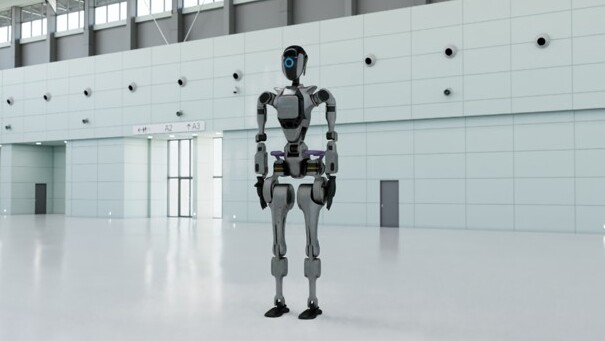
The minimal example shows how to create the renderer, load an OpenUSD scene and render a single image, copying the results back to the CPU for display.
The first step from a newly built application will block for 1-2 minutes while shaders are compiled and cached.
Getting Started in C/C++
The C/C++ examples require CMake 3.16 or newer and a development environment. On Windows this is provided by Visual Studio 2022 17.8 or newer, which is the oldest release shipping the VC runtime 14.38 that ovrtx requires (see the dependency note above).
On Linux (Ubuntu):
sudo apt-get install build-essential cmake
To get started, first clone this repository:
git clone https://github.com/NVIDIA-Omniverse/ovrtx.git
cd ovrtx/examples/c/minimal
Then configure, build, and run the minimal example for your platform.
On Windows:
cmake -B build
cmake --build build --config Release
.\build\static\Release\minimal.exe
On Linux:
cmake -B build -DCMAKE_BUILD_TYPE=Release
cmake --build build
./build/static/minimal
See the C minimal example documentation for more information on environment setup and prerequisites.
The minimal example shows how to create the renderer, load an OpenUSD scene and render a single image, copying the results back to the CPU for writing out as a PNG.
The resulting image will be written to ./out.png and can be inspected with any image viewer.
The first step from a newly built application will block for 1-2 minutes while shaders are compiled and cached.
Examples
Further examples using both the C and Python APIs are available in the examples directory. See the individual examples for building and usage instructions.
Releases
The Releases page of this repository contains binary builds for the official releases of the ovrtx C library and also includes corresponding Python wheels. PyPI is the recommended consumption path for Python users.
These binaries are provided for the supported platforms:
- Windows x86_64
- Linux x86_64
- Linux aarch64
The libraries require a compatible NVIDIA RTX-capable GPU with a compatible NVIDIA driver on the system to be able to initialize correctly. Supported hardware and driver versions are listed in Hardware & Driver Requirements.
Testing
Tests live under tests/docs/ in three independent suites: Python, C, and USD validation.
Stage ownership in tests: Stage-owning Python documentation tests request an attached ovstage fixture, with focused compatibility coverage for deprecated renderer wrappers. C documentation tests remain on deprecated standalone renderer stage APIs. USD validation tests do not exercise either stage-ownership model.
Python tests (GPU required)
cd tests/docs/python

# Run the full suite
uv run pytest -v

# Run a single test
uv run pytest test_base.py::test_base -v
uv run pytest test_base.py::test_bind_material -v
C tests (GPU required)
Pinned SDK build limitation: The standard ovrtx_docs_tests target does
not currently compile with the fallback ovrtx package pinned in
examples/c/cmake/ovrtx.cmake. The existing test_support_api.cpp requires
ovrtx_get_config(), which that SDK does not provide. See the C documentation test build notes
for the affected commands, validation scope, and SDK selection instructions.
File tree
FAQ
ovrtx is a Claude Code plugin with 39 hand-picked skills, indexed on Flowy in the Machine Learning category. Install it with the command on its page. It includes application-flow, async-operations, attribute-bindings. Its skills do not fire on their own yet. Request auto-invocation to have Flowy route them as you prompt. Free and open source.
- What is ovrtx?
- ovrtx is a C and Python library for embedding Omniverse RTX sensor simulation and visualization directly into applications.
- How do I install ovrtx?
- Run these in Claude Code: npx -y skills add nvidia-omniverse/ovrtx --agent claude-code. Then prompt normally.
- Does ovrtx auto-invoke its skills?
- Not yet. It is indexed on Flowy as a plain plugin. Request auto-invocation on its page and Flowy will route its skills for you as you prompt.
- Is ovrtx free?
- Yes. Flowy is free and open source, with nothing gated. You can read every skill in full before you install.
Is this plugin yours?
Claim it with GitHubSubmit a pluginPromote it