Home Assistant Manager - Claude Code Skill
Expert-level Home Assistant configuration management with efficient deployment workflows, remote CLI access, automation verification, and comprehensive Lovelace dashboard development.



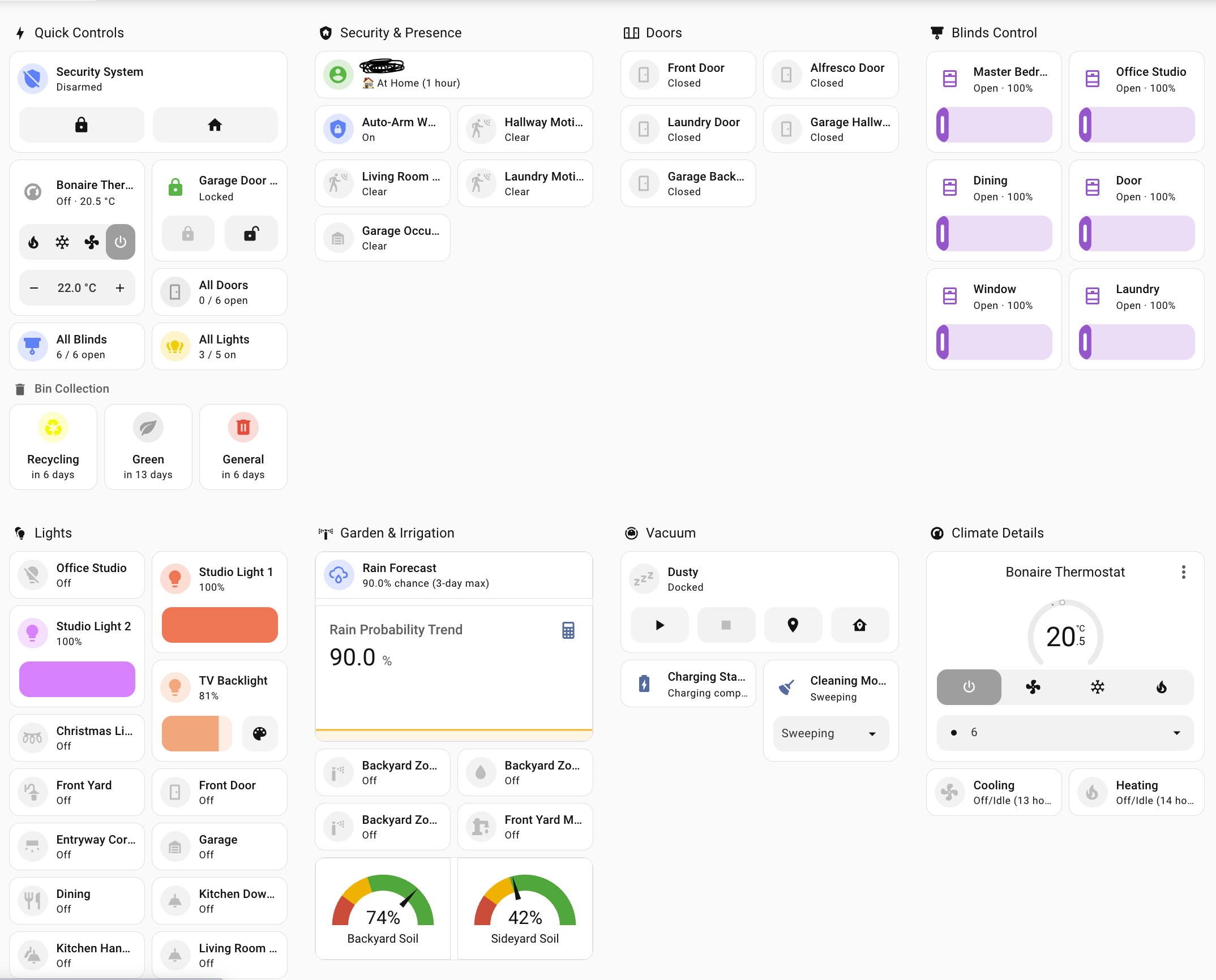
Example tablet-optimized dashboard built using this skill - touch-friendly controls, color-coded status, and responsive grid layout
🎬 See It In Action
Quick Skill Check
Verify Claude can see and use this skill:
Shows Claude recognizing the skill and loading Home Assistant expertise
Full Workflow Demo
Watch the complete workflow in action - end to end (3x speed):
Complete automation development cycle including deployment, testing, log analysis, and git workflow
🚀 What This Skill Does
This Claude Code skill transforms Claude into a Home Assistant expert that helps you:
Configuration Management
- Rapid Development Workflow: Deploy changes via
scp for instant testing, commit to git when stable
- Smart Reload vs Restart: Automatically determines whether to reload or restart based on change type
- Configuration Validation: Always validates before applying changes to prevent downtime
- Remote CLI Access: Seamlessly manages HA instances via SSH and
hass-cli
Automation Development
- Modern Syntax by Default: Writes current (2024.10+) automation YAML —
triggers:/conditions:/actions:, action: not service: — instead of the deprecated syntax LLMs tend to emit
- Complete Verification Protocol: Automatically tests automations by triggering manually and checking logs and traces — including the
automation.trigger-skips-conditions gotcha
- Blueprints & Modes: Knows blueprint structure/usage and when an automation needs
mode: restart vs single
- Error Detection: Identifies template errors, type mismatches, and execution failures
- Log Analysis Patterns: Knows what success and error indicators to look for
- Iterative Fix Workflow: Guides through debugging and re-testing cycles
Lovelace Dashboard Development
- Tablet Optimization: Creates touch-friendly dashboards optimized for specific screen sizes (7", 11", 13")
- Card Type Expertise: Knows when to use Mushroom cards, Tile cards, Panel vs Sections views
- Template Patterns: Provides ready-to-use Jinja2 templates for common use cases:
- Door/window counting with color coding
- Conditional display based on time/state
- Multi-condition status indicators
- Common Pitfall Solutions: Solves dashboard registration, auto-entities failures, template type errors
- Real-World Examples: Includes working examples from production tablet dashboards
Workflow Optimization
- Git + scp Hybrid: Uses git for version control, scp for rapid iteration
- No Restart for Dashboards: Deploys dashboard changes with just browser refresh
- Context7 Integration: Leverages official HA documentation via MCP when available
- Deployment Decision Tree: Guides through the optimal workflow based on change type
🆚 How Is This Different From an HA MCP Server?
They solve different problems, and they compose:
- MCP servers (the official
mcp_server integration or community ha-mcp) give Claude live tools — read entity state, call services, control devices. They don't teach Claude how to work on your config.
- This skill encodes the procedure and judgment: the git/scp deploy pipeline, reload-vs-restart decisions, validate-before-restart discipline, the verify-from-logs-and-traces loop, template type-safety rules, dashboard storage-cache gotchas, and modern automation syntax.
Without the skill, an MCP-equipped Claude can flip your lights but will still happily restart HA on an unvalidated config or write deprecated automation YAML. Without MCP, the skill falls back to SSH/hass-cli. Together is best: the skill explicitly prefers MCP tools for live state and service calls when available.
📦 Installation
Prerequisites
- Claude Code installed and configured
- Home Assistant instance with:
- SSH access enabled
- Git repository connected to
/config directory
- Local tools:
hass-cli installed (pipx install homeassistant-cli)- SSH key authentication configured
- Environment variables set:
HASS_SERVER, HASS_TOKEN
Install the Skill
Option 1: Claude Code plugin marketplace (recommended)
This repo is also a self-hosted plugin marketplace, so you can install it with two slash commands — no manual cloning required:
/plugin marketplace add komal-SkyNET/claude-skill-homeassistant
/plugin install home-assistant-manager@claude-skill-homeassistant
Run these from anywhere — they install the plugin (and its skill) globally for Claude Code, so it's available whenever you open a Home Assistant config repo. Update later with /plugin marketplace update claude-skill-homeassistant followed by /plugin update home-assistant-manager.
Option 2: Clone into your Home Assistant config repository
cd /path/to/your/homeassistant/config
mkdir -p .claude/skills
cd .claude/skills
git clone git@github.com:komal-SkyNET/claude-skill-homeassistant.git home-assistant-manager-repo
ln -s home-assistant-manager-repo/skills/home-assistant-manager home-assistant-manager
Option 3: Download and extract
cd /path/to/your/homeassistant/config
mkdir -p .claude/skills/home-assistant-manager
cd .claude/skills/home-assistant-manager
curl -L https://github.com/komal-SkyNET/claude-skill-homeassistant/archive/main.tar.gz | tar xz --strip-components=2 claude-skill-homeassistant-main/skills/home-assistant-manager
Verify Installation
After installing via the plugin marketplace, run /plugin to confirm home-assistant-manager is listed and enabled. With the manual options, the skill should appear when you start Claude Code in your Home Assistant repository. Either way, Claude will automatically load the skill and apply the expertise.
🎯 Usage Examples
Example 1: Create a New Automation
User: "Create an automation that sends a notification when the front door
       is left open for more than 5 minutes"

Claude: [Uses skill to]:
1. Create automation YAML with proper syntax
2. Deploy via scp for testing
3. Reload automations (no restart needed)
4. Manually trigger to test
5. Check logs for execution
6. Verify notification received
7. Commit to git when working
Example 2: Build a Tablet Dashboard
User: "Create a dashboard for my 11-inch tablet in the living room
       with lights, thermostat, and door status"

Claude: [Uses skill to]:
1. Create new dashboard file in .storage/
2. Register in lovelace_dashboards
3. Use 3-column grid layout (optimal for 11")
4. Add Mushroom cards for touch-friendly controls
5. Create template card with door counting
6. Deploy via scp for instant preview
7. Iterate on layout based on feedback
8. Commit when finalized
Example 3: Debug a Template Error
User: "My automation has a TypeError about comparing str and int"

Claude: [Uses skill to]:
1. Check logs for exact error message
2. Identify template needs | int filter
3. Fix the template syntax
4. Deploy via scp
5. Trigger manually to verify
6. Check logs confirm no errors
7. Commit the fix
🏗️ Skill Architecture
This skill provides expertise in three core areas:
1. Remote Access Patterns
hass-cli commands with environment variables- SSH-based
ha CLI commands
- Log analysis and error detection
- State verification
2. Deployment Workflows
- Git workflow: For final, tested changes
- scp workflow: For rapid iteration (dashboards, testing)
- Reload vs Restart: Smart decision making
- Verification protocols: Always check outcomes
3. Dashboard Development
- View types: Panel (full-screen) vs Sections (organized)
- Card types: Mushroom, Tile, Template, Auto-entities
- Template patterns: Jinja2 snippets for common use cases
- Debugging: JSON validation, template testing, entity verification
🤝 Contributing
We welcome contributions from the Home Assistant community! This skill has been developed through real-world usage and we want to keep improving it.
What to Contribute
🎯 Focus on Home Assistant-specific expertise:
✅ GOOD contributions:
- New template patterns for common use cases
- Solutions to specific HA configuration pitfalls
- Dashboard card examples for different devices
- Integration-specific deployment workflows
- Automation verification patterns
- Log analysis patterns for specific errors
❌ AVOID generic contributions:
- General git workflows (unless HA-specific)
- Generic Python/YAML best practices
- Non-HA development workflows
Contribution Guidelines
1. Template Pattern Contributions
Add to the "Common Template Patterns" section:
**Your Pattern Name:**
```jinja2
{% set entities = [...] %}
{{ your_template_logic }}
Use case: Explain when to use this
Example output: Show what it produces
#### 2. Dashboard Card Examples

Add to "Real-World Examples":

```markdown
### Your Card Name
```json
{
  "type": "...",
  ...
}
Best for: Device type, use case
Features: What makes this example useful
#### 3. Pitfall Solutions

Add to "Common Pitfalls":

```markdown
**Problem X: Brief description**
- **Symptom:** What the user sees
- **Cause:** Root cause explanation
- **Fix:** Step-by-step solution
4. Workflow Improvements
If proposing workflow changes:
- Explain the problem with current workflow
- Provide specific HA scenario where it applies
- Show before/after comparison
- Include verification steps
How to Submit
- Fork the repository
- Create a feature branch:
git checkout -b feature/your-contribution-name
- Make your changes to
skills/home-assistant-manager/SKILL.md
- Test thoroughly in your own HA environment
- Update README.md if adding new capabilities
- Submit a Pull Request with:
- Clear description of what you're adding
- Example usage scenario
- Verification that it works in real HA setup
Contribution Review Process
PRs are reviewed for:
- ✅ HA-specific value: Does it solve a real HA problem?
- ✅ Accuracy: Is the information correct and up-to-date?
- ✅ Clarity: Is it well-documented and easy to understand?
- ✅ Tested: Has it been verified in a real HA environment?
📚 Repository Structure
claude-skill-homeassistant/
├── .claude-plugin/
│   ├── plugin.json       # Plugin manifest
│   └── marketplace.json  # Self-hosted marketplace listing this plugin
├── skills/
│   └── home-assistant-manager/
│       ├── SKILL.md              # Main skill content with YAML frontmatter
│       ├── dashboard.png
│       └── reference/
│           ├── automations.md    # Modern syntax, modes, blueprints, traces — on demand
│           └── dashboards.md     # Lovelace deep-dive, loaded on demand
├── README.md              # This file
└── LICENSE                # MIT License
This repo doubles as a Claude Code plugin and a self-hosted marketplace (see Installation), and the skill itself follows the official Claude skills specification:
SKILL.md contains YAML frontmatter with name and description- Content organized in logical sections
- Includes examples, patterns, and workflows


 @n8n-io


