Kandev
Manage and run tasks in parallel. Orchestrate agents. Review changes. Ship value.
Features | Workflows | Run as a Service | Mobile Access | Debug Logs | Roadmap | Contributing | Architecture | Discord
See screenshots
What
Kandev is a powerful tool for power users who want deeper control over how AI agents work: customize workflows, agent profiles, runtimes, prompts, and review gates to match your process.
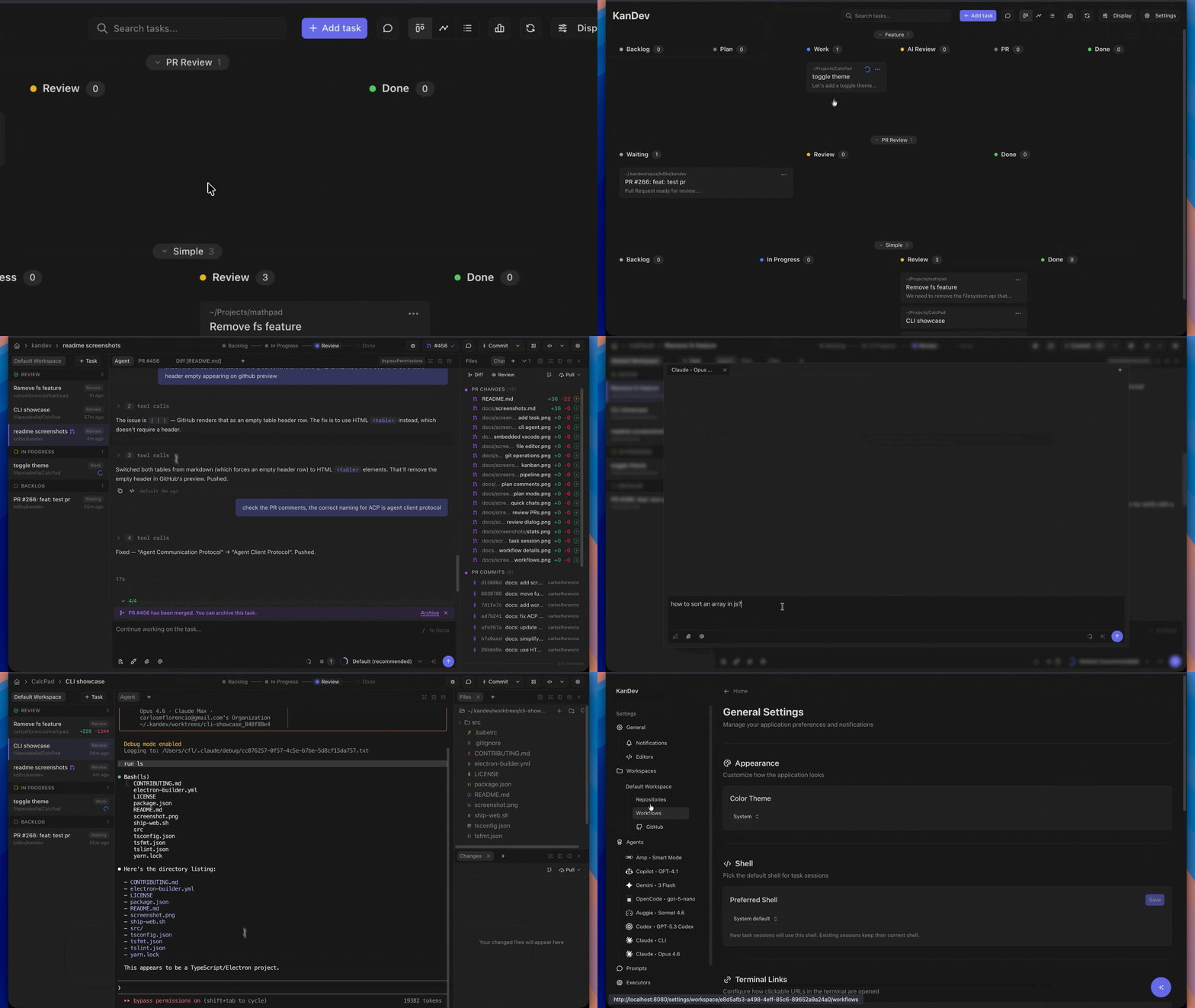
Organize work across kanban and pipeline views with opinionated workflows and execute multiple tasks in parallel. Assign agents from any provider, and review their output in an integrated workspace - file editor, file tree, terminal, browser preview, and git changes in one place. Terminal agent TUIs are great for running agents, but reviewing and iterating on changes there doesn't scale.
Run it locally or self-host it on your own infrastructure. Use the mobile remote-access guide to connect through Tailscale, Cloudflare Tunnel, or another private VPN.
Open source, multi-provider, no telemetry, not tied to any cloud.
Distribution
Kandev is distributed as a native Go binary for each supported platform. The
compiled web frontend is embedded in that binary. The binary serves the web UI
and API, so the application server does not need Node.js, a separate web
server, or a frontend build at runtime.
Homebrew, Scoop, release archives, and the desktop app run this native binary
directly. The npm/npx package adds a small Node.js platform selector, so Node.js
is required to launch Kandev through npm/npx but not by the application server.
Release bundles also include agentctl helpers for task environments.
Vision
Humans stay in control. Define tasks, build agentic workflows with gates, review every change, decide what ships.
- Review-first - Humans support production systems. We need to understand (yet) and trust the code that gets deployed.
- Your workflow - Every team is different, and not every developer uses AI the same way. Define workflows once, share them across the team, and give everyone a consistent process for working with agents - regardless of experience level.
- Remote agents - Running multiple agents on a large codebase can quickly saturate a local machine. The goal is a single control plane: offload execution to servers, orchestrate from anywhere, including your phone.
Features
- Multi-agent support - Claude Code, Codex, GitHub Copilot, Gemini CLI, Amp, Auggie, OpenCode, Cursor, Devin, Qwen, Factory Droid, iFlow, Kilocode, Pi, Kimi, AWS Kiro, Qoder, Trae, Oh My Pi, Grok, Hermes, Antigravity
- Parallel task execution – start and manage multiple tasks from different sources simultaneously, boosting productivity with AI agents
- Integrated workspace - Built-in terminal, code editor with LSP, git changes panel, embedded vscode and chat in one IDE-like view
- Kanban task management - Drag-and-drop boards, columns, and workflow automation
- Agentic workflows - Multi-step pipelines that mix-and-match agents per step - for example, Claude Code Opus to design a plan, GitHub Copilot Sonnet to implement it, and Codex GPT 5.4 to review the changes. See docs/workflow-tips.md
- Automations - Trigger agent tasks on schedules or webhooks, with configurable run destinations, context, and concurrency
- Sub-tasks - Agents can spawn sub-tasks that resume from the parent task's session. Useful for splitting a task that has grown too big, or producing several PRs from the same starting point.
- CLI passthrough - Drop into raw agent CLI mode for direct terminal interaction with agents that support it, leveraging their full native TUI
- Workspace isolation - Git worktrees prevent concurrent agents from conflicting
- Multi-repository tasks - Span a single task across multiple repositories, with one worktree per repo, per-repo branches, per-repo PRs, and per-repo grouping in the Changes panel and review dialog
- Flexible runtimes - Run agents as local processes, in isolated Docker containers, on remote servers via SSH, or in cloud executors like sprites.dev
- Runtime settings - Executor profiles, secrets, custom prompts, utility agents, and resource metrics are configurable from Settings
- Task-agent MCP - Agents can create subtasks, target sibling repos, attach extra branches for multiple PRs, message other tasks, read conversations, and inspect related tasks
- External MCP - Manage Kandev from outside coding agents over streamable HTTP or SSE, with copyable config snippets for popular agent CLIs
- Plugin marketplace and management - Browse, install, update, enable, disable, and configure plugins from Settings, including MCP Explorer and the Bitbucket plugin
- Workflow portability - Export and import workflows as portable YAML across workspaces or Kandev installs
- Session management - Resume and review agent conversations
- Shareable task snapshots - Publish redacted task conversation snapshots as secret GitHub Gists, with preview and revoke controls
- Stats - Track your productivity with stats on the completed tasks, agent turns, etc
See docs/features.md for the full feature inventory, including settings, secrets, custom prompts, and MCP task capabilities.
In progress: Office mode
Office mode is an experimental autonomy layer for persistent agent teams, disabled by default in production. It includes agent roles and permissions, dashboards, inbox/approvals, routines, task delegation, skills, memory, cost tracking, budgets, and workspace config sync. The Office guide covers explicit enablement, setup, and evaluation of the current implementation; Office is not yet a stable production contract.
Integrations




Connect Kandev to GitHub, GitLab, Jira, Linear, Sentry, and Azure DevOps to pull issues into the kanban, link tasks to PRs, and surface review activity inline. Bitbucket support is available through the Bitbucket plugin.
Supported Agent CLIs
| Agent | Package / command |
|---|
| Claude Code | @agentclientprotocol/claude-agent-acp |
| Codex | @agentclientprotocol/codex-acp |
| Codex app server | @openai/codex (experimental; enable in System > Feature Toggles) |
| GitHub Copilot | @github/copilot |
| Gemini CLI | @google/gemini-cli |
| Amp | amp-acp |
| Auggie | @augmentcode/auggie |
| OpenCode | v2: @opencode/cli; existing v1: opencode-ai |
| Cursor | cursor-agent (requires Cursor Pro) |
| Devin | devin (install Devin CLI from Devin Desktop or standalone installer) |
| Qwen | @qwen-code/qwen-code |
| Factory Droid | droid |
| iFlow (beta) | @iflow-ai/iflow-cli |
| Kilocode | @kilocode/cli |
| Pi | ACP adapter: pi-acp; CLI passthrough: pi |
| Kimi | kimi (install Kimi CLI from Moonshot AI) |
| Kiro | kiro-cli-chat (install Kiro CLI from AWS) |
| Qoder | qodercli (install Qoder CLI) |
| Trae | traecli (install Trae IDE CLI) |
| Oh My Pi | omp (install @oh-my-pi/pi-coding-agent with Bun) |
| Grok | grok (install @xai-official/grok with npm) |
| Hermes | hermes (install with the official Hermes installer) |
| Antigravity | agy_acp_server.par / .exe (no automated install; download from the ACP registry, extract both archive entries into one directory, and put that directory on PATH) |
Most structured agent integrations communicate via ACP (Agent Client Protocol). Codex app-server is a separate experimental native integration. CLI Passthrough mode is available when an integration provides a passthrough command. If your agent isn't supported yet, open an issue or submit a PR with the integration. See Adding a New Agent CLI for a step-by-step guide.
Managed npm runtimes have reviewed defaults. To fetch a selected upstream
release, use Update agent in Settings > Agents. Kandev refreshes its
advertised models and modes for future sessions without restarting active
sessions. Background notices cover enabled, available registered runtimes, with optional automatic
updates for supported managed installations and manual guidance for external CLIs.
See Agents and Profiles.
Fresh OpenCode installs use managed v2 (@opencode/cli). Existing v1
selections remain on opencode-ai until you choose the explicit migration
action. Kandev leaves a separately installed opencode CLI unchanged.
Bring your own TUI agents
Kandev can run any agent CLI as a TUI inside a terminal, even when it does not speak ACP. Add the command in agent profile settings and the task starts that agent inside a PTY terminal. CLI passthrough keeps the agent's native terminal UX available while still giving Kandev task tracking, worktrees, review, and session management.
Supported Executors
| Executor | Description |
|---|
| Local Process | Runs the agent as a local process on the host machine |
| Docker | Runs the agent in an isolated Docker container |
| Kubernetes | Runs each task session in an administrator-configured Pod with managed, existing, or disposable workspace storage |
| SSH | Runs the agent on a remote server over SSH |
| Sprites | Runs the agent in a remote cloud environment via sprites.dev |
Executors support profiles for reusable runtime configuration: prepare scripts, environment variables, credentials, and settings. On shared instances, private executor ownership limits compute and profile access to the owner and configuration administrators. Worktree-based tasks can also attach multiple repositories or multiple branches from the same repository, which lets one task produce several PRs when the work needs it.
Quick Start
Homebrew (macOS, Linux)
brew install kdlbs/kandev/kandev
kandev
Scoop (Windows)
scoop bucket add kandev https://github.com/kdlbs/scoop-kandev
scoop install kandev
kandev


 @n8n-io