Open Carrusel
Chat with Claude. Design Instagram carousels. Export pixel-perfect PNGs.
Local-first. Open source. One command to start.





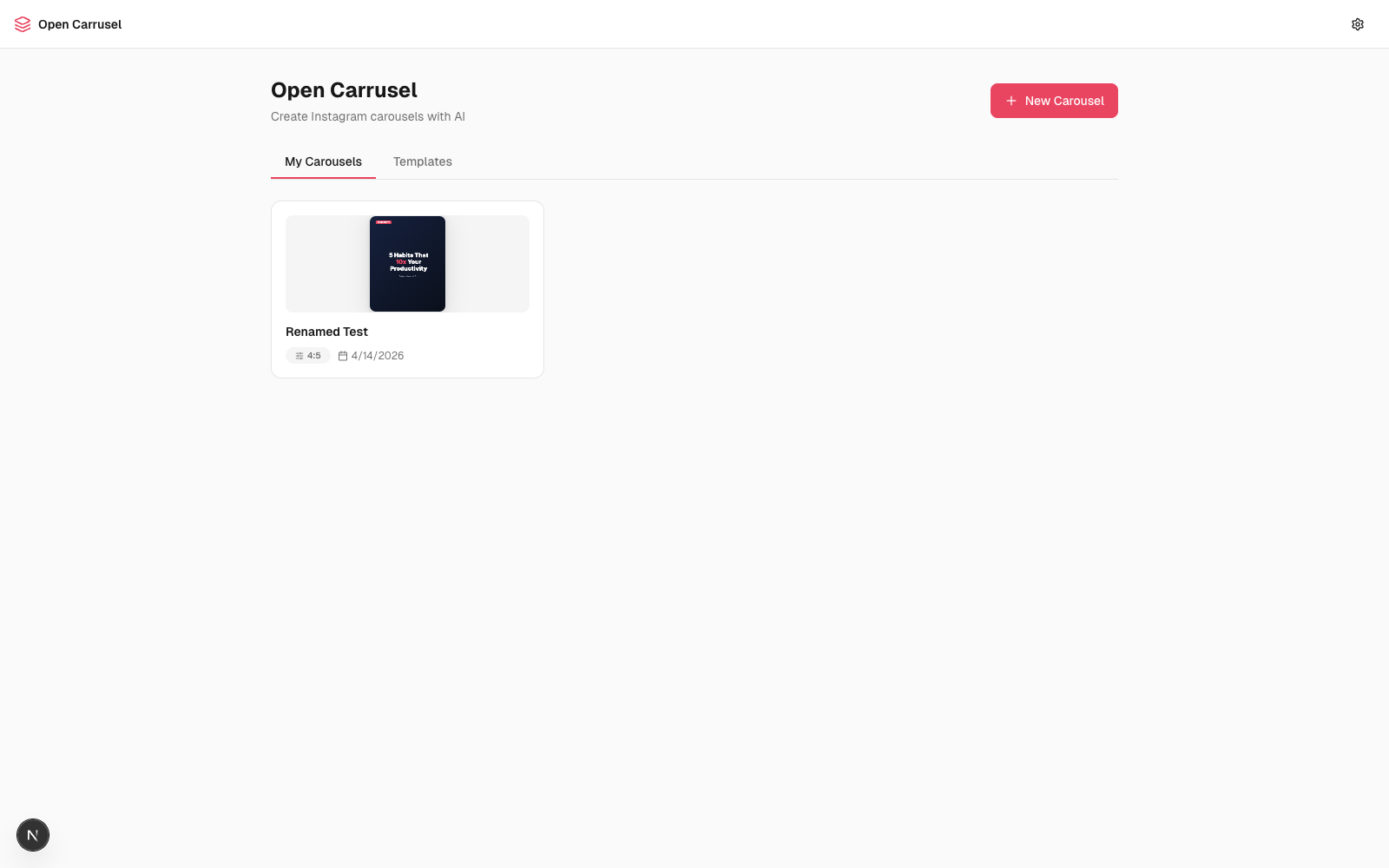
Table of contents
- Why Open Carrusel
- See it in action
- Quickstart (60 seconds)
- What you can do
- How the AI agent works
- Slash commands
- Architecture
- Tech stack
- Project structure
- Configuration
- Troubleshooting
- Roadmap
- Contributing
- Acknowledgments
- About the maker
- License
✨ Why Open Carrusel
Designing Instagram carousels eats hours. You either:
- Pay $20–60/month for a closed-source tool that limits how creative you can get
- Wrestle Canva templates that everyone else also uses
- Hand-craft slides in Figma and lose your weekend
Open Carrusel takes a different bet. You chat with Claude — the same model many designers already trust — and it generates real HTML/CSS slides that get screenshotted to PNGs at exact Instagram dimensions. Slides are unique, on-brand, and pixel-perfect. Everything runs on your laptop. Nothing is sent to a cloud you don't control.
It's open source under MIT. Fork it, tweak the system prompt, ship your own variant. No accounts. No subscriptions. No vendor lock-in.
🎬 See it in action
Dashboard — your carousels, templates, and one-click export.
Editor — chat panel (left), live preview (center), drag-reorderable filmstrip (bottom).
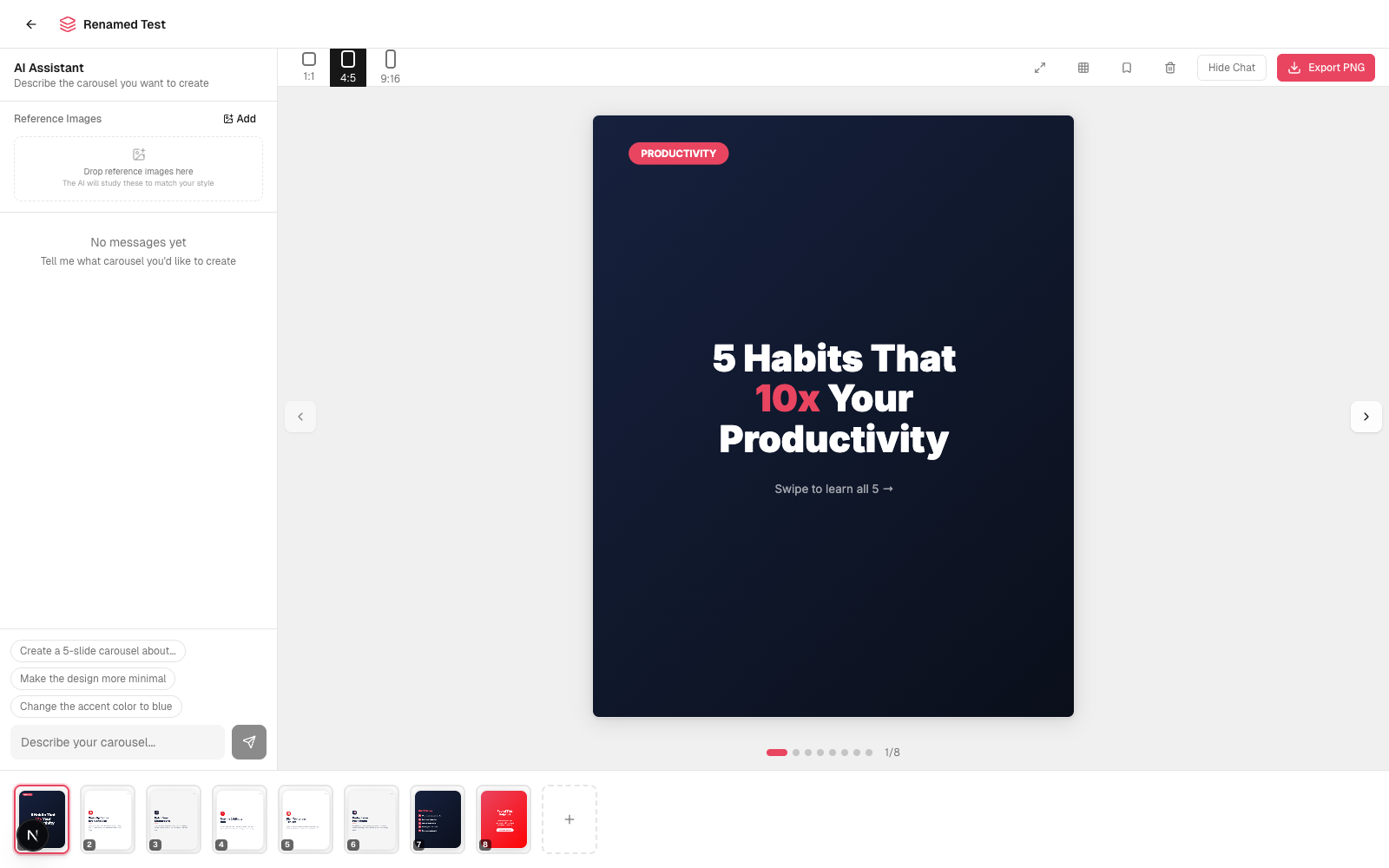
The slides shown above were generated by chatting with Claude. No templates, no copy-paste — every layout, color, and font choice came from a conversation.
🚀 Quickstart (60 seconds)
First run takes 1–2 minutes (Puppeteer downloads ~300 MB of Chromium for PNG export). After that, every launch is seconds.
One-command path (recommended)
- Install Claude Code and authenticate.
- Clone and open the repo in Claude Code:
git clone https://github.com/Hainrixz/open-carrusel.git
cd open-carrusel
claude
- In the Claude Code prompt, type:
/start
That's it. Dependencies install, the dev server starts, your browser opens. Now design carousels by chatting.
Manual path (if you don't use Claude Code)
git clone https://github.com/Hainrixz/open-carrusel.git
cd open-carrusel
npm run setup        # installs deps + seeds /data/
npm run dev          # starts http://localhost:3000
You won't get the AI chat without Claude Code installed (the in-app agent shells out to the claude CLI), but the editor and export still work for static slides.
🧰 What you can do
- Three-panel editor designed for flow: chat (left), live preview (center), drag-reorderable slide filmstrip (bottom).
- Generate slides by chatting: "Make me a 5-slide carousel about productivity habits — bold sans-serif, dark mode, accent red." Watch them stream in.
- Iterate per slide: "Make slide 3 more minimal", "Change the accent to teal", "Swap the hook for something punchier."
- Three Instagram aspect ratios ready to go: 1:1 (1080×1080), 4:5 (1080×1350), 9:16 (1080×1920).
- Brand config — name, color palette, fonts, logo, style keywords. Claude reads it before every generation so output stays on-brand.
- Templates — save any carousel as a template, reuse it for the next one.
- Reference images — drop in screenshots of carousels you love. Claude studies them to match style.
- Drag to reorder slides via dnd-kit. Undo per-slide if a tweak goes sideways (version history per slide).
- Safe-zone overlay to verify nothing important crops behind Instagram's UI.
- Fullscreen preview for the final review.
- One-click export — Puppeteer screenshots each slide HTML at the exact pixel dimensions Instagram expects, zips them, downloads.
- Captions + hashtags generator built into the editor.
- All local — slides, brand, uploads, exports all live in
/data/ and /public/uploads/. Nothing is sent to a cloud you don't control. The only network call is when Claude Code talks to Anthropic.
💬 How the AI agent works
The in-app agent is the Claude CLI spawned as a subprocess from /api/chat with --allowedTools Bash WebFetch. Messages stream back to the browser via Server-Sent Events.
When you ask for a slide, Claude:
- Reads your brand config + active carousel state from the system prompt
- Writes the slide as a complete HTML/CSS string
- POSTs it to
/api/carousels/[id]/slides via curl (using its Bash tool)
- The new slide appears in your filmstrip seconds later
Example chat
You    > Create a 5-slide carousel about “3 morning habits that
         actually move the needle.” Punchy, dark mode, accent red,
         portrait 4:5.

Claude > Coming up. I'll build a hook slide, three habit slides,
         and a CTA. Working...
         [streams 5 HTML slides into the filmstrip]

You    > Slide 3 — the headline is too long. Cut it in half and
         move the icon to the top.

Claude > Done.
         [updates that slide; you can /undo if you preferred the old one]
How the slides become PNGs
Slides are stored as body-level HTML (no <html>/<head>/<!DOCTYPE>). The shared function wrapSlideHtml() in src/lib/slide-html.ts wraps that body into a full document — adding font loading, dimension constraints, and box-sizing reset — and serves it both:
- to a sandboxed
<iframe> for live preview in the editor
- to Puppeteer (headless Chromium) for export, screenshot at exact Instagram pixel dimensions, zipped, downloaded
Because the same wrap function feeds both paths, what you see is exactly what you export. No surprises.
🛠 Slash commands
Type these inside Claude Code:
| Command | What it does |
|---|
/start [port] | Install + seed + run + open browser. Idempotent — re-running on a healthy install is seconds. |
/stop [port] | Kill the dev server. Defaults to :3000, accepts a port arg matching /start. |
/reset | Wipe local carousels, templates, brand config, uploads, exports — and re-seed defaults. Asks first. |
/doctor | Run setup diagnostics: Node version, Claude CLI on PATH, deps installed, data files seeded, port free. |
You can also run them outside Claude Code:
npm run setup     # equivalent to /start (skips the browser-open + background server bits)
npm run dev       # start the dev server
npm run build     # production build
npm run doctor    # run scripts/doctor.mjs (works pre-`npm install`)
🏗 Architecture
flowchart LR
  U(["Browser :3000"])
  C["Chat Panel"]
  P["Slide Preview<br/>(sandboxed iframe)"]
  F["Filmstrip<br/>(dnd-kit)"]
  API["/api/chat<br/>SSE streaming/"]
  CCLI["Claude CLI<br/>subprocess"]
  SLIDES["/api/carousels/.../slides/"]
  DATA[("/data/*.json<br/>async-mutex<br/>atomic writes")]
  EXP["/api/.../export/"]
  PUP["Puppeteer<br/>(headless Chromium)"]
  ZIP{{"ZIP of PNGs"}}

  U --> C & P & F
  C -- "POST chat" --> API
  API -- "spawn" --> CCLI
  CCLI -. "SSE" .-> API
  API -. "SSE" .-> C
  CCLI -- "curl POST slide HTML" --> SLIDES
  SLIDES <--> DATA
  P <--> SLIDES
  F <--> SLIDES
  U -- "Export" --> EXP
  EXP --> PUP
  PUP --> ZIP
  ZIP --> U
Why these choices:
- Local-first, single-user. The whole app is a localhost web app talking to local files. No cloud, no auth, no database.
- Claude CLI as the agent. Lets us reuse the user's existing Claude Code authentication, capabilities, and context. The subprocess gets
Bash (to curl the slide-write endpoints) and WebFetch (for research while designing).
- Slides as HTML. Claude already writes great HTML/CSS — way more flexible than canvas, way easier to debug than a JSON DSL. The same HTML powers preview and export, so what you see is what you ship.
- Sandboxed iframes. No
<script> tags allowed (enforced by the iframe sandbox="" attribute). Slides can't run code or escape their box.
- JSON file storage with async-mutex + atomic writes. No SQLite, no Postgres. Reads and writes go through
src/lib/data.ts with proper locking, and writes are tmp-file + rename to avoid torn JSON.
For more, see CLAUDE.md — the architecture doc tuned for AI assistants working on this codebase.
📦 Tech stack
📁 Project structure

 @hainrixz