Construction Skills for Claude Code
Open-source skills that give Claude Code the working knowledge of a Project Engineer. Split drawings, parse specs, extract schedules, tabulate and evaluate bids, review submittals, draft RFIs, generate subcontracts, and more — directly from your terminal or IDE.
The skills ship as a Claude Code plugin named construction and work on Windows, macOS and Linux.
Prerequisites
| Windows | macOS | Linux |
|---|
| Claude Code | ✓ | ✓ | ✓ |
| Shell for the skills' commands | Git for Windows (Git Bash) | built in | built in |
| Python 3.10 or newer | python.org installer (the py launcher is fine) | python.org or Homebrew — Apple's built-in python3 is 3.9, too old | your distribution's python3 (3.10+) with venv |
git | included in Git for Windows | xcode-select --install or Homebrew | your package manager |
You also need your construction project documents (drawings, specs, bids, etc.).
Setup
Install the plugin one of two ways. Both work the same on every OS; on Windows, run the commands in Git Bash.
Option A — clone into your skills directory (recommended)
# Available in every project
git clone https://github.com/dleerdefi/claude-code-construction ~/.claude/skills/construction
cd ~/.claude/skills/construction && ./setup

# Or for one project only: run from your project folder
git clone https://github.com/dleerdefi/claude-code-construction .claude/skills/construction
.claude/skills/construction/setup
Claude Code loads the clone as the construction plugin in new sessions (or run /reload-plugins in an open one). ./setup creates the Python environment and removes skill links left by older versions. Update later with git pull in the clone.
Option B — install from the marketplace
Inside Claude Code:
/plugin marketplace add dleerdefi/claude-code-construction
/plugin install construction@construction-skills
No separate marketplace is needed: this repository is the marketplace. The Python environment is created automatically the first time a skill runs a script (about a minute). Updates arrive when a new version is released; turn on auto-update under /plugin → Marketplaces.
Start using skills
Open Claude Code in your project folder and run:
/construction:project-setup
This inventories your project files, classifies document types, and adds construction context to your project's CLAUDE.md (run /init first if you don't have one).
Upgrading from an earlier version? Pull the update and re-run ./setup once to clean up the old per-skill links. Remove the @~/.claude/skills/construction/.claude/skills/CLAUDE.md line from your project's CLAUDE.md: that guide now ships as the construction-guide skill.
To check that everything works on your machine, follow Validating your install.
Skills
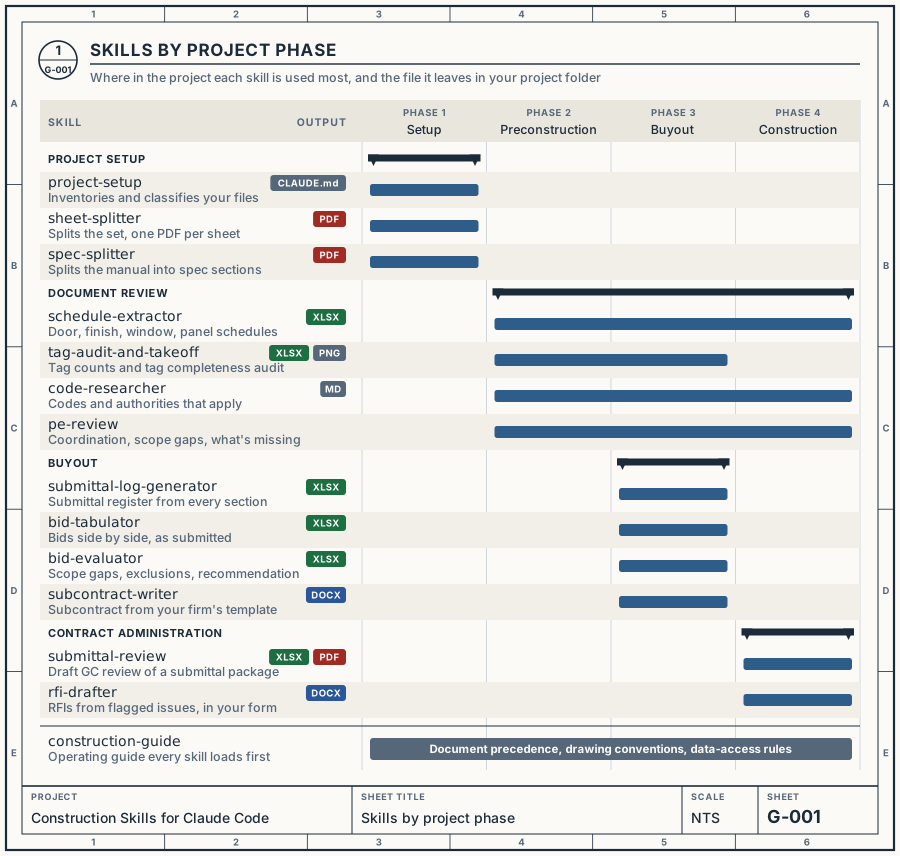
Each bar marks where in the project a skill does most of its work, and the tag beside its name is the kind of file it leaves in your project folder.
| Command | What it does |
|---|
/construction:project-setup | Inventory project files, classify documents, establish context |
/construction:sheet-splitter | Split a bound drawing set PDF into individual sheet PDFs |
/construction:spec-splitter | Split a bound project manual into individual spec section PDFs + text |
/construction:schedule-extractor | Extract door, finish, window, or panel schedules to Excel |
/construction:submittal-log-generator | Parse every spec section and generate a submittal register in Excel |
/construction:bid-tabulator | Tabulate multiple subcontractor bids into a comparison spreadsheet |
/construction:bid-evaluator | Evaluate tabulated bids — scope gaps, risk scoring, award recommendation |
/construction:code-researcher | Research applicable building codes, standards, and jurisdiction requirements |
/construction:subcontract-writer | Generate a scope-specific subcontract from your firm's template |
/construction:rfi-drafter | Draft RFIs and review the issues other skills have flagged |
/construction:submittal-review | Review a submittal against specs, drawings, code questions and trade coordination, with trade routing, a completeness gate and a draft GC review |
/construction:pe-review | Review drawings, specs, submittals or RFIs with Project Engineer judgment |
/construction:tag-audit-and-takeoff | Count tagged elements across sheets and audit tag completeness |
/construction:construction-guide | Operating guide Claude loads before working with your documents (data-access rules, conventions, document precedence) |
Type /construction: in Claude Code to list every skill. Claude also runs them on its own when your request matches.
How the skills work together
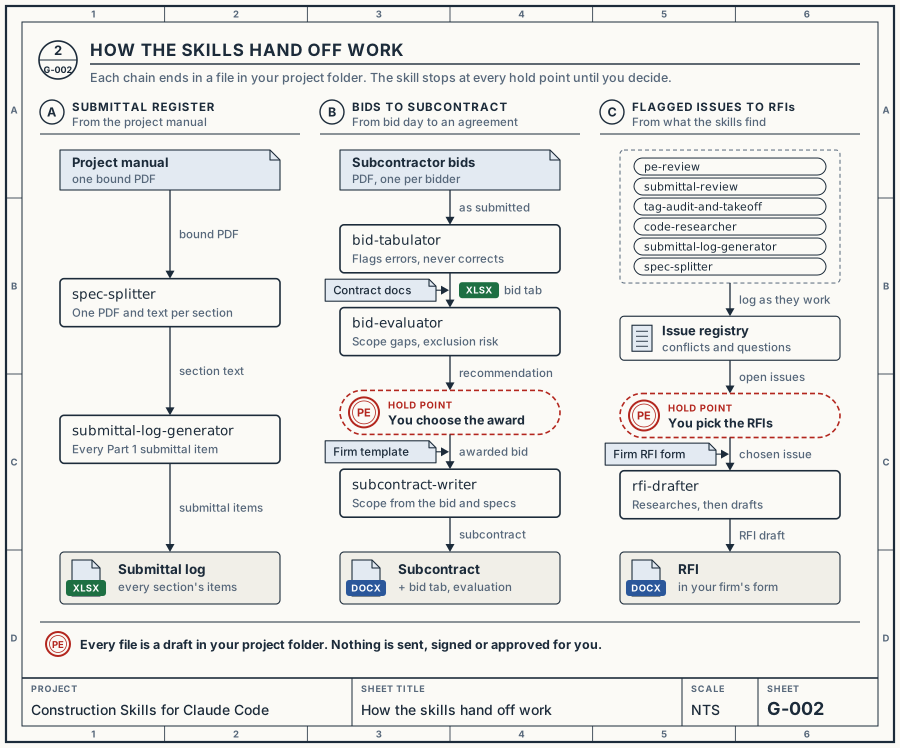
One skill's output is the next one's input, so a bid tab feeds the evaluation and an issue logged during a review becomes an RFI later. Where the work needs your decision, such as an award or which issues to send, the skill stops and waits for you.
Inside a submittal review
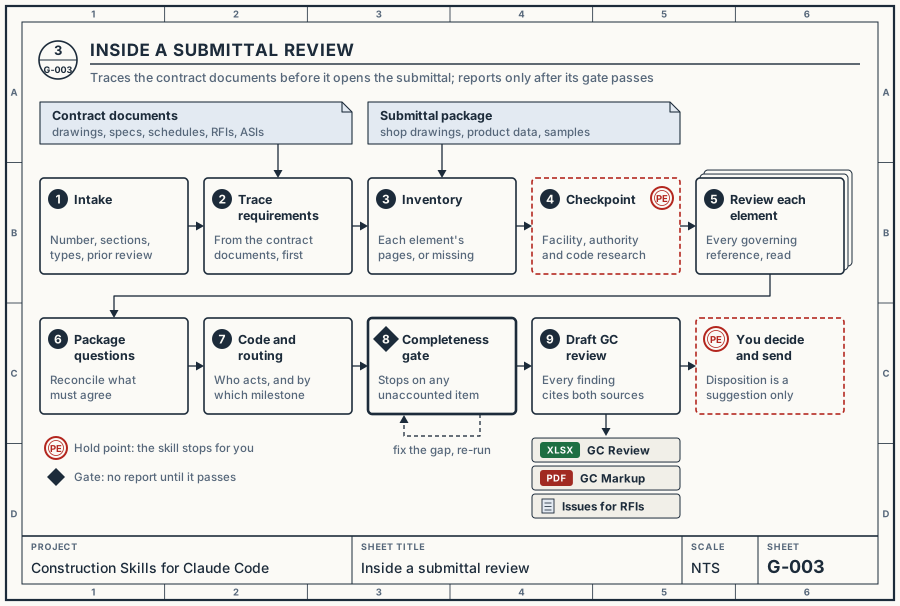
The review lists what the contract documents require before it looks at the submittal, so a missing item shows up as a finding instead of going unnoticed. Its completeness gate must pass before it writes the draft GC review.
Tested with
Tested in Claude Code with Claude Opus 5.5 and Claude Sonnet 5.5 on Windows and macOS.
Every skill has an eval case that passed on Windows with Sonnet through the eval harness (one run each, 2026-10-02 to 2026-10-04); see the eval suite README for what each case checks and the suite's known issues.
Test documents
The evals run on the plans and specifications of Sanibel Fire and Rescue Station 172 (Sanibel, Florida; 100% Construction Documents, January 2024), which are publicly available. To run the real-document cases yourself, download the two folders and place the PDFs under evals/test_docs/SANIBEL FIRE AND RESCUE STATION 172/:
Running Evals has the file list, where each goes, and the commands. Without the downloads the real-document cases are skipped, not failed.
Found a problem? Open an issue with your OS, model, and the skill's output.
Output
Deliverables — Excel workbooks, Word documents, split sheet and spec PDFs, reports — are saved in your project folder where you can open them, and each skill tells you where. Skills keep their working data (extraction progress, extracted spec text, the issue registry) in a hidden .construction/skills/ folder that you don't need to open. In AgentCM projects, .construction/ also holds AgentCM's data, which skills read but never write.
Documentation
Requirements
Python dependencies are installed into an isolated venv at ~/.construction-skills/venv/, by ./setup or automatically on first use, and re-synced whenever requirements.txt changes. No manual activation needed — all scripts run through bin/construction-python.
Packages: pdfplumber, pymupdf, openpyxl, Pillow, PyYAML, python-docx, fpdf2, and claude-agent-sdk (used only by the eval harness)
License
MIT
Made with 👷 by dleerdefi


 @n8n-io


