

promptschat
Gives Claude Code access to the prompts.chat library, letting you search, retrieve and improve AI prompt templates, and find and install Agent Skills from its registry.
2 skills2 agents2 commands1 MCP+3+2+2+2+1+1+1+1175k
 @gh-f
Tell Claude Code what video you want, it writes the script, generates the voiceover, music, and visuals, and renders the MP4.
Claude Code
$ npx -y skills add digitalsamba/claude-code-video-toolkit --agent claude-code
Codex
$ npx skills add digitalsamba/claude-code-video-toolkit -a codex
Cursor
$ npx skills add digitalsamba/claude-code-video-toolkit -a cursor
Gemini CLI
$ npx skills add digitalsamba/claude-code-video-toolkit -a gemini-cli
GitHub Copilot
$ npx skills add digitalsamba/claude-code-video-toolkit -a github-copilot
OpenCode
$ npx skills add digitalsamba/claude-code-video-toolkit -a opencode
Windsurf
$ npx skills add digitalsamba/claude-code-video-toolkit -a windsurf




Tell Claude Code what video you want — it writes the script, generates the voiceover, music, and visuals, and renders the MP4. An AI-native video production workspace: the skills, commands, templates, and tools your AI agent needs to take a video from concept to final render, on open-source models that cost cents (voiceover ~$0.01, AI video clips ~$0.23).
Every frame below was generated in this workspace — click to watch.
Made by an agent, start to finishOne Discord message to Lugh. He wrote the script, chose the shots, narrated it in his own cloned voice, and the bot posted the finished MP4 23 minutes later. tools/video_job.py, four LTX-2 clips, one Ideogram diagram card, $0.47. |
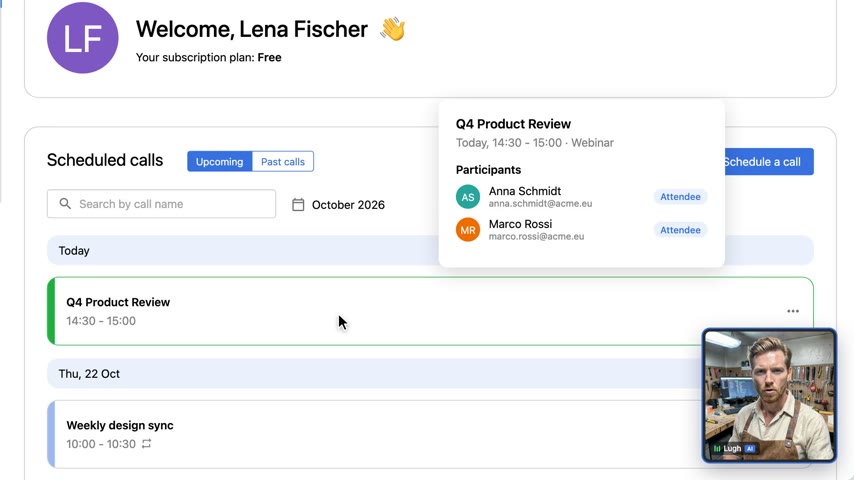 | |
| Release-notes videoproduct UI rebuilt from source,no screen recording | Product demoscripted cursor and camera,AI narrator tile |
 |  |  |
| Super Bowl-style launch adLTX-2 animated cameo,dramatic AI announcer | AI hallucinations explainer9:16 short — Ideogram 4 cards,cloned voice, burned captions | "Why is the sky blue?"52s vertical short,~$0.80 in generation |
More in the showcase table below.
git clone https://github.com/digitalsamba/claude-code-video-toolkit.git
cd claude-code-video-toolkit
uv sync   # Optional: AI voiceover, image gen, music, moviepy examples
claude    # Open Claude Code in the toolkit
Python dependencies are managed with uv —
uv synccreates.venv/and installs everything from the lockfile in seconds. No uv yet?curl -LsSf https://astral.sh/uv/install.sh | sh(macOS/Linux) orpowershell -c "irm https://astral.sh/uv/install.ps1 | iex"(Windows).
Then in Claude Code:
/setup                    # Configure cloud GPU, storage, voice (~5 min, mostly free)
/video                    # Create your first video
That's it. /setup walks you through everything interactively — cloud GPU provider, file transfer, voice config. /video creates a project from a template and guides you through the whole workflow.
What's free: The toolkit leans heavily on open-source AI models — voiceovers (Qwen3-TTS), image generation (FLUX.2), music (ACE-Step), and more. You deploy them to your own cloud GPU account and run them at cost. Cloudflare R2 has a generous free tier (10GB, zero egress), and Modal gives $30/month free compute on the Starter plan — more than enough for a few 5-minute videos a month.
Requirements: Node.js 18+ and Claude Code. uv recommended for the AI tools (it installs Python 3.10+ for you). FFmpeg optional.
Want to skip setup and just render something?
cd examples/hello-world && npm install && npm run renderNo API keys needed — outputs an MP4 immediately.
I've spent months painstakingly putting this toolkit together and plan to keep iterating on it. AI makes things easier, but hard work still has huge value. Every video I create is a chance for improvement — every skill, template, tool, and workflow here has been refined through that cycle. It would be wonderful if others wanted to get involved with that: use it, refine it, and feed back into the repo via an issue or PR what you learn.
My own use case is fairly specific: creating sprint review videos for the AI mobile development arm of Digital Samba. But the idea behind this project is a reusable toolkit for using Claude Code to autonomously generate any kind of "explainer" style video — product demos, walkthroughs, presentations, whatever you need. Autonomous video creation is a lofty ideal for such a subjective field, but we can try :)
What makes this work is that Claude Code is fantastically resourceful and flexible — give it the framing and tooling that this toolkit provides and it will adapt it to create templates and videos based on your prompting. The skills, templates, and tools here are building blocks. Claude Code is the builder. You are the director, editor, and designer.
If you're getting started, run
/setupthen/videoand let Claude Code guide you. Or start with/templateto create a template for your own use case.Cloud GPU — I recommend Modal for running the toolkit's AI tools. The Starter plan gives you $30/month free compute, which is more than enough. RunPod is also supported as an alternative. Run
/setupto deploy the tools you need.My motto: Be brave. Experiment. And please share any videos you create or ideas you have back with the project — it helps me keep improving this toolkit for everyone.
Claude Code has deep knowledge in:
| Skill | Description |
|---|---|
| remotion | React-based video framework — compositions, animations, rendering |
| elevenlabs | AI audio — text-to-speech, voice cloning, music, sound effects |
| ffmpeg | Media processing — format conversion, compression, resizing |
| playwright-recording | Browser automation — record demos as video |
| frontend-design | Visual design refinement for distinctive, production-grade aesthetics |
| qwen-edit | AI image editing — prompting patterns and best practices |
| ideogram4 | AI image generation with best-in-class in-image text — title cards, thumbnails, exact brand colors |
| acestep | AI music generation — prompts, lyrics, scene presets, video integration |
| ltx2 | AI video generation — text-to-video, image-to-video clips, prompting guide |
| moviepy | Python video composition — overlay text on LTX-2/SadTalker output, build.py-style projects |
| runpod | Cloud GPU — setup, Docker images, endpoint management, costs |
The always-current catalog of skills, commands, tools, and templates lives in
_internal/toolkit-registry.json.
| Command | Description |
|---|---|
/setup | First-time setup — cloud GPU, file transfer, voice, prerequisites |
/video | Video projects — list, resume, or create new |
/scene-review | Scene-by-scene review in Remotion Studio |
/design | Focused design refinement session for a scene |
/brand | Brand profiles — list, edit, or create new |
/template | List available templates or create new ones |
/skills | List installed skills or create new ones |
/contribute | Share improvements — issues, PRs, examples |
/record-demo | Record browser interactions with Playwright |
/generate-voiceover | Generate AI voiceover from a script |
/redub | Redub existing video with a different voice |
/voice-clone | Record, test, and save a cloned voice to a brand |
/thumbnail | Generate a YouTube thumbnail with Ideogram 4 (hook phrase + brand colours) |
/publish | Publish a finished video to YouTube (metadata auto-filled from project.json) |
/versions | Check dependency versions and toolkit updates |
Note: After creating or modifying commands/skills, restart Claude Code to load changes.
Pre-built video structures in templates/:
See examples/ for finished projects you can learn from (newest first — scroll down to watch the toolkit evolve in reverse):
| Date | Demo | Description |
|---|---|---|
| 2026-11-01 | the-agent-handoff | 57s showcase an agent made unattended from one Discord message: Lugh wrote the script and the shot list, video_job.py voiced it with his clone, generated four LTX-2 clips and a diagram card, built and QC'd it, and the Discord bot posted the link when it went live; $0.47, the fourth take after three pipeline fixes (docs/agent-video-jobs.md) |
| 2026-10-28 | ds-release-650 | 87s release-notes video built from the ds-release-notes template: six items across the room and account center, Lugh's cloned voice made livelier with voice_prosody.py, checked with qc.py --render --layout (templates/ds-release-notes) |
| 2026-10-21 | ds-release-649 | Release-notes video with no screen recording: three product UIs rebuilt from their source code, driven by a scripted cursor and camera, narrated by Lugh (examples/ds-release-649) |
| 2026-10-21 | ds-free-schedule-demo | 26s synthetic product demo of scheduling a call, with a SoulX talking-head narrator tile (examples/ds-free-schedule-demo) |
| 2026-06-09 | hallucinations-short | 3:41 vertical explainer on AI hallucinations — Ideogram 4 cards, LTX-2 b-roll, burned karaoke captions, Qwen3-TTS voice clone (reference sample from Pixabay) |
| 2026-06-09 | sky-blue-short | 52s "Why is the sky blue?" — concept-explainer-short template showcase (examples/sky-blue-short), stock Qwen3-TTS voice |
| 2026-04-08 | q2-townhall-stars | GitHub star history time-lapse with animated chart and deadpan-to-excited commentary |
Stars on GitHub
See 12 claude-code-video-toolkit alternatives
Gives Claude Code access to the prompts.chat library, letting you search, retrieve and improve AI prompt templates, and find and install Agent Skills from its registry.
@gh-fA Claude Code skill for generating editable PPTX presentations and slides from a workflow, with reusable brand, style, layout, and deck workspaces, native charts, speaker notes, and template filling.
 @hugohe3
Gives AI agents control over Word, Excel and PowerPoint files, with skills for building .docx reports, academic papers, Excel dashboards and Morph-style animated slides.
 @iofficeai
A skill that builds animation-rich HTML presentations from scratch or converts PowerPoint files to web slides. Useful for anyone turning a deck into a web presentation.
 @zarazhangrui
Tell Claude Code what video you want, it writes the script, generates the voiceover, music, and visuals, and renders the MP4. Install it with the command on its page. It includes acestep, elevenlabs, ffmpeg. Its skills do not fire on their own yet. Free and open source.
Is this plugin yours?
Claim it with GitHubSubmit a pluginPromote it