


openclaw
Skills for the OpenClaw personal AI assistant, covering browser automation, routing requests to coding agents, presenting canvas widgets, running apps on temporary machines, and sharing diffs.
78 skills394k
 @steipete
Your coding agents, one team, and proof for every step. Coordinate Claude Code, Codex and Cursor with shared tasks, independent reviews and a local dashboard. Free and open source, MIT licence, no account, everything runs on your machine.
Claude Code
> /plugin marketplace add dagoSte/squadra> /plugin install squadra@squadra
Codex
$ npx skills add dagoSte/squadra -a codex
Cursor
$ npx skills add dagoSte/squadra -a cursor
Gemini CLI
$ npx skills add dagoSte/squadra -a gemini-cli
GitHub Copilot
$ copilot plugin marketplace add dagoSte/squadra$ copilot plugin install squadra@squadra
OpenCode
$ npx skills add dagoSte/squadra -a opencode
Windsurf
$ npx skills add dagoSte/squadra -a windsurf

Your coding agents, one team — and proof for every step.
Coordinate Claude Code, Codex and Cursor with shared tasks, independent reviews and a local dashboard.
Free and open source — MIT licence, no account, everything runs on your machine.
Version 3.15.1 · Python 3.12+ · macOS / POSIX
Overview · Install · First steps · Prompts · Dashboard · Plugins · Commands · Guides · What's new · Community · Sponsor









What the security scan covers.
Squadra helps several windows of coding agents work on one project as a team: one coordinates, others build, and a window that did not write the code reviews it. Assignments, decisions, executed checks and review reports stay in one shared registry on your computer.
Use it when work spans several agent sessions and you need to see who owns each task, which code was checked and what still needs a decision. Each window can work in its own checkout while sharing the same record.
| Part | What it does |
|---|---|
| Skill | Gives the agents the coordination workflow to follow. |
| CLI | Records tasks, messages, checks and decisions. |
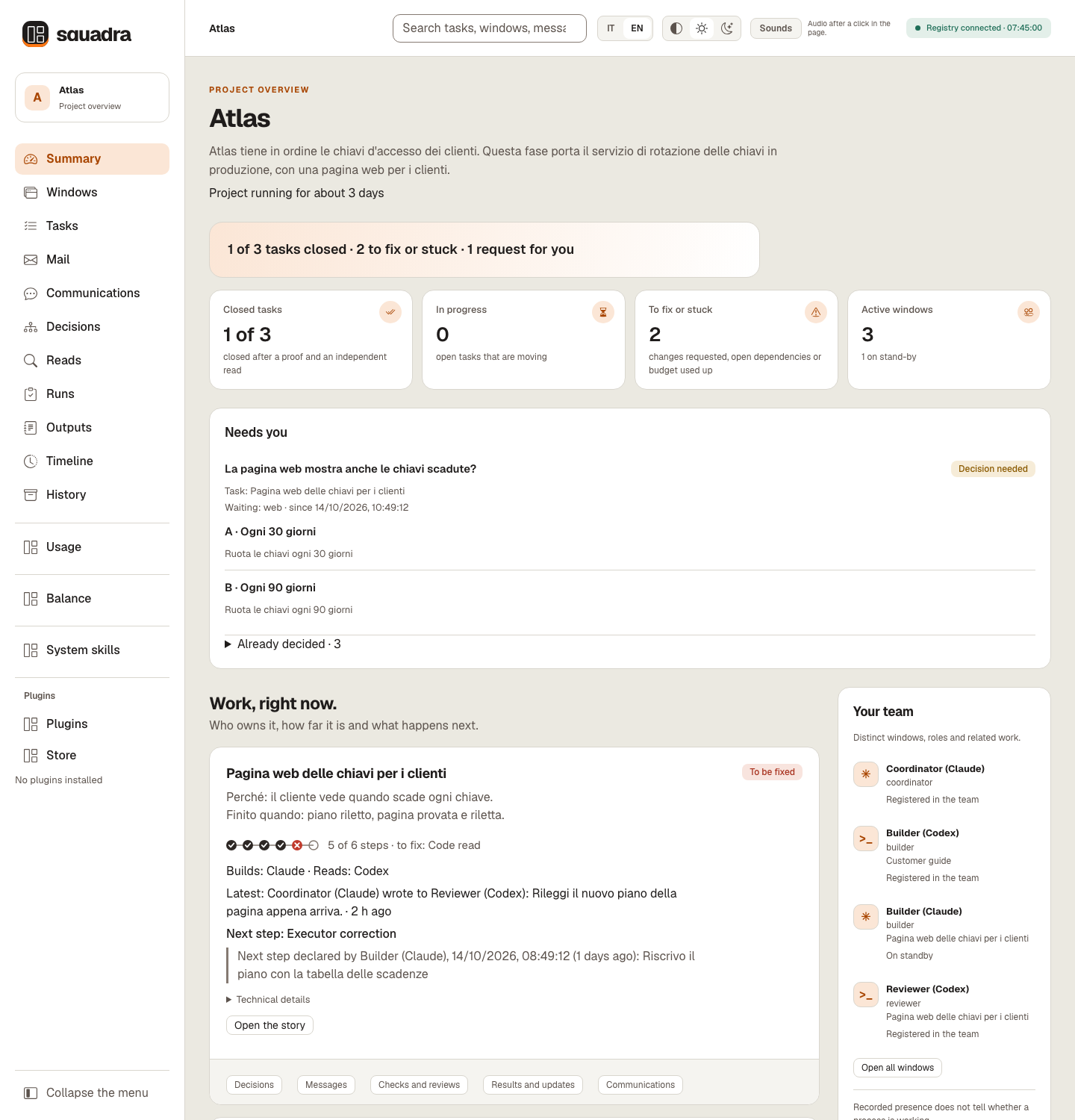
| Dashboard | Shows progress, evidence and requests for your input. |
Team setup: start with a Claude coordinator, then join your Codex, Claude or interactive Cursor windows. The team rules explain the roles and limits.
The Summary on a synthetic Atlas registry (Italian, dark theme). Recorded texts such as briefs, the owner's words and messages stay as written, here in Italian. The examples contain no customer data and do not measure model quality.
Watch the 80-second tour — turn the sound on in the player:
Each new window first asks whether to enable automatic model and effort selection. Turn it on or off from the CLI; role aliases share the choice and a replacement session asks again.
squadra models --actor builder
squadra models --actor builder --auto on
squadra models --actor builder --auto off
With automatic selection enabled, small work bounded by a valid light-route contract can use the economy profile; complex or uncertain work and independent reviews use the quality profile. Profiles are configurable. The CLI shows the requested model, effort and reason for the selection or fallback; existing proof, review, permission and budget rules still apply.
This applies to new turns managed by squadra run. An interactive session already running keeps its settings. The Windows, Usage and Balance views show observed client model/effort with source and time, separately from requested settings and token totals. These are client settings, not a measurement of cognitive work or model quality. Commands, profiles and limits.
Requirements: Python 3.12+, Git and a browser for the dashboard. The runtime uses the Python standard library; Node.js is required for selftest. macOS / POSIX is the tested environment. Full requirements and platform limits.
Install it with one sentence. Paste this into Claude Code, Codex or Cursor:
Install Squadra by following https://github.com/dagoSte/squadra/blob/main/SETUP.md: show me the plan first, wait for my yes, then install it and check that it works.
The agent checks what you already have, shows each command with what it changes and how to undo it, waits for your yes, installs and runs a one-second check.
One act stays with you: /reload-plugins in Claude Code, or a new session in Codex or Cursor.
Other installation methods: plugin or standalone command
In Claude Code:
/plugin marketplace add dagoSte/squadra
/plugin install squadra@squadra
In a terminal, for Codex:
codex plugin marketplace add dagoSte/squadra
codex plugin add squadra@squadra
The plugin brings the skill, its scripts, references and dashboard. It does not put the squadra shell command on your PATH: agents run python3 <skill folder>/scripts/squadra.py, also for the instructions Squadra prints, such as squadra ack …. To have the squadra command itself, use the standalone installer below instead of the plugin. Use either the plugin or the standalone installer, not both, so the skill is not registered twice.
squadra command)git clone https://github.com/dagoSte/squadra.git
cd squadra
python3 -B scripts/install.py \
--backup "$HOME/.local/state/squadra/install-backup-001"
export PATH="$HOME/.local/bin:$PATH"
squadra --version
Install from a clean, committed checkout with a new backup directory each time; the installer keeps your previous skills and launcher, so you can roll back: python3 -B scripts/install.py --undo <backup folder> restores the earlier skills and keeps the backup. The export PATH line lasts for that terminal only: add it to your shell profile (for example ~/.zshrc or ~/.bashrc) so new terminals find squadra. Without installing, run python3 -B scripts/squadra.py <command>. Details and rollback.
Updating an existing installation
With /plugin. In Claude Code, run /plugin marketplace update squadra, then /plugin update squadra@squadra, then restart Claude Code. For Codex, run codex plugin marketplace upgrade, then codex plugin add squadra@squadra again.
With the standalone installer. From 3.6.1 on, releases keep their history: run git pull, then the installer again, with a new backup folder each time. A checkout of 3.6.0 or earlier needs git fetch origin and git reset --hard origin/main instead, which discards any local edit in that checkout.
git pull
python3 -B scripts/install.py \
  --backup "$HOME/.local/state/squadra/install-backup-002"
squadra --version
Every release raises the version number, except a refresh that adds to a release under the same number, as 3.10.2 did on 17 October 2026. Plugins installed from the Store keep their version until squadra plugin install <name> runs again from the new release (Plugins bundled in your release). Open windows keep the version they read until they restart, and a running squad keeps its protocol until you switch it explicitly.
Updating to 3.13.x: reclaim the space you already have. Nothing is compacted or deleted at update or at opening. After updating every window, tell the coordinator «Use squadra to compact the storage of the registry at /path/to/registry»: it previews storage adopt (checkpoints and saves made before 3.13), storage compact (shared bytes, legacy candidates sealed read-only, nothing deleted) and storage purge --dry-run, and applies each step only on your word. doctor --resume proposes the same sentence when there is space to reclaim.
Updating to 3.11.1: upgrade every window together and reinstall bundled plugins. replace, wait, access probe, ready and onboarding settings write journal format 4, which 3.11.0 and older clients refuse instead of ignoring it.
Updating to 3.11.0: upgrade every window and reinstall bundled plugins before creating new tasks or reassigning reads. New tasks use frozen delivery and journal format 3; older clients refuse it. Historical tasks retain their previous behavior. The installer also adds the migliora skill.
Updating from 3.10.3 or 3.10.2 to 3.10.4: the registry stays as it is.
check or close. Tasks recorded before the update keep closing as before.squadra plugin install <name> again, as after every release.Updating from 3.10.1 to 3.10.2: the registry stays as it is.
to-forward and plan) back to their defaults. And removing a leaked file with a recorded decision makes a 3.10.1 window's full audit and dashboard fail on the missing file, so update every window before you remove one.squadra plugin install <name> again, as after every release.Updating from 3.10.0 or earlier to 3.10.1: less repeated history work, and every window must move together.
Stars on GitHub
Skills for the OpenClaw personal AI assistant, covering browser automation, routing requests to coding agents, presenting canvas widgets, running apps on temporary machines, and sharing diffs.
@steipeteGives Claude Code users skills to drive Orca-managed worktrees, terminals and the embedded browser through the orca CLI, plus Jira and Linear ticket work and inline HTML chat visuals. Covers chart, table and mockup output.
 @stablyai
Orchestrates teams of AI agents to run work like a company, with a Node.js server and React UI. Adds skills for delegating tasks, following up on results, reviewing team status, and managing Paperclip tasks from Hermes.
 @paperclipai
Organizes your AI agents for round-the-clock operation, with tools to hire, schedule and report on your agent team. Lets you oversee the agents without staying online yourself.
 @lobehub
Your coding agents, one team, and proof for every step. Coordinate Claude Code, Codex and Cursor with shared tasks, independent reviews and a local dashboard. Free and open source, MIT licence, no account, everything runs on your machine. Install it with the command on its page. It includes squadra. Its skills do not fire on their own yet. Free and open source.
Is this plugin yours?
Claim it with GitHubSubmit a pluginPromote it