
Content
Plugin
screenstudio-alt
screenstudio-alt — an open-source headless Screen Studio alternative (Claude Code skill): auto-zoom, idle speed-up, vertical export.

Plugin Signal43/100Fair
maintained59
capable14
documented75
adopted20
Install on Claude Code
> /plugin marketplace add connerkward/screenstudio-alt-skill> /plugin install screenstudio-alt@screenstudio-alt
What's inside
README
A headless, open-source Screen Studio alternative — turn a raw screen recording into a polished demo from the command line (or your coding agent).



You record your screen as usual. screenstudio-alt does the rest — auto-zoom on clicks, fast-forward of idle time, keystroke chips, a smoothed cursor, and 9:16 vertical export — then hands you an mp4 (or an FCPXML for Resolve / Final Cut / Premiere). No GUI to click through, no subscription.
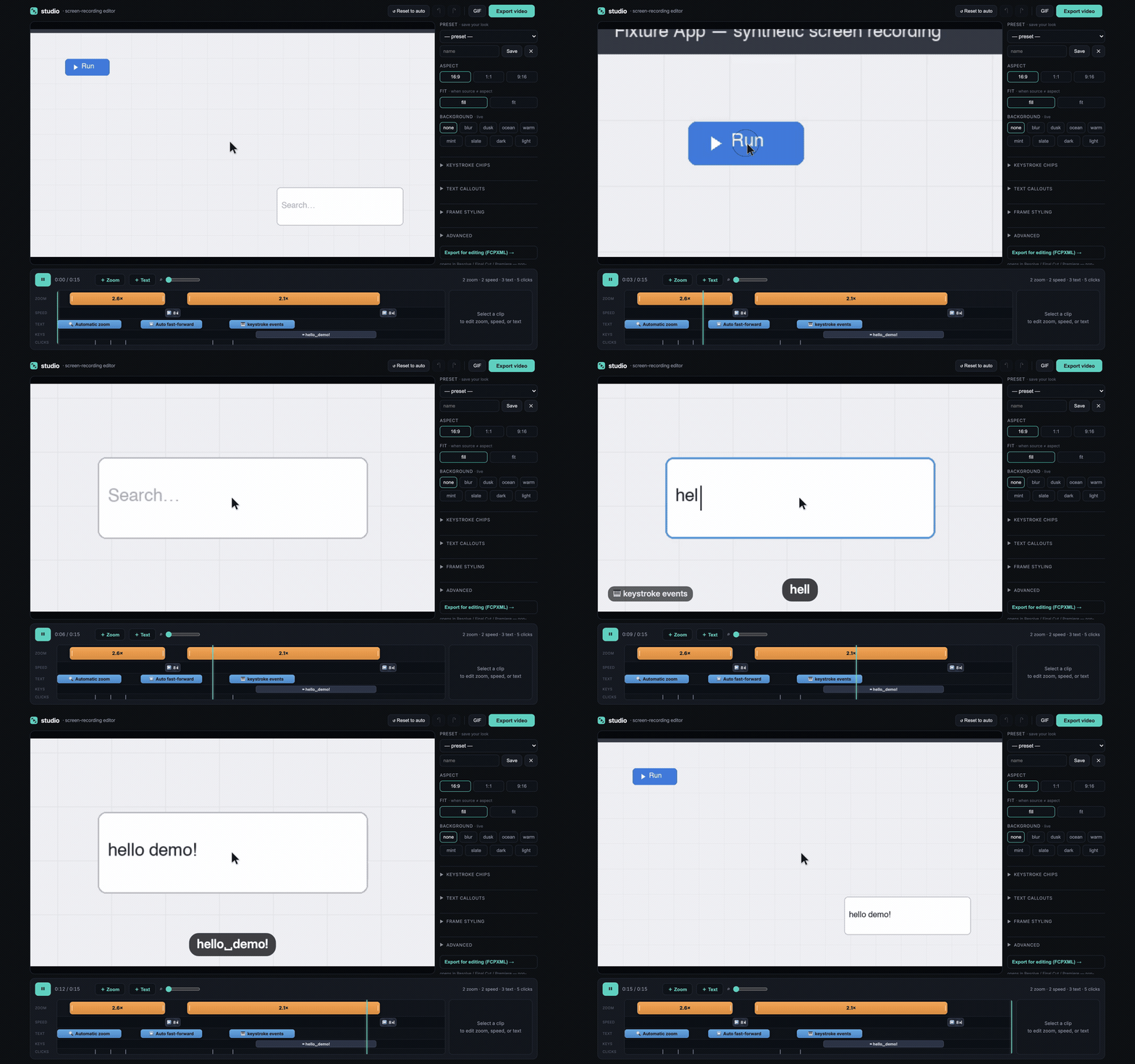
The editor: a raw recording (the "Run" button + search box) auto-zoomed on clicks, idle time fast-forwarded (8×), and keystrokes (hello_demo!) rendered as chips — all detected automatically, then tweakable on the timeline.
What it does
- 🔍 Auto-zoom onto clicks and typing bursts — eased, and crisp (re-samples the original frames, so zooms stay sharp)
- ⏩ Idle speed-up — dead time is compressed automatically; a playing animation is never sped up
- ⌨️ Keystroke chips rendered like real typing
- 🖱️ Smoothed cursor + click ripple + a real click sound
- 🏷️ Text callouts — screen-fixed labels that auto-flip light/dark to stay legible on any background and sit at the edges, off your content
- 📱 9:16 vertical that follows the action — plus 16:9 / 1:1
- 🛠️ Local timeline editor (drag zoom regions, retime idle spans) + multi-clip sequencing
- 🎞️ FCPXML export to Resolve / Final Cut / Premiere
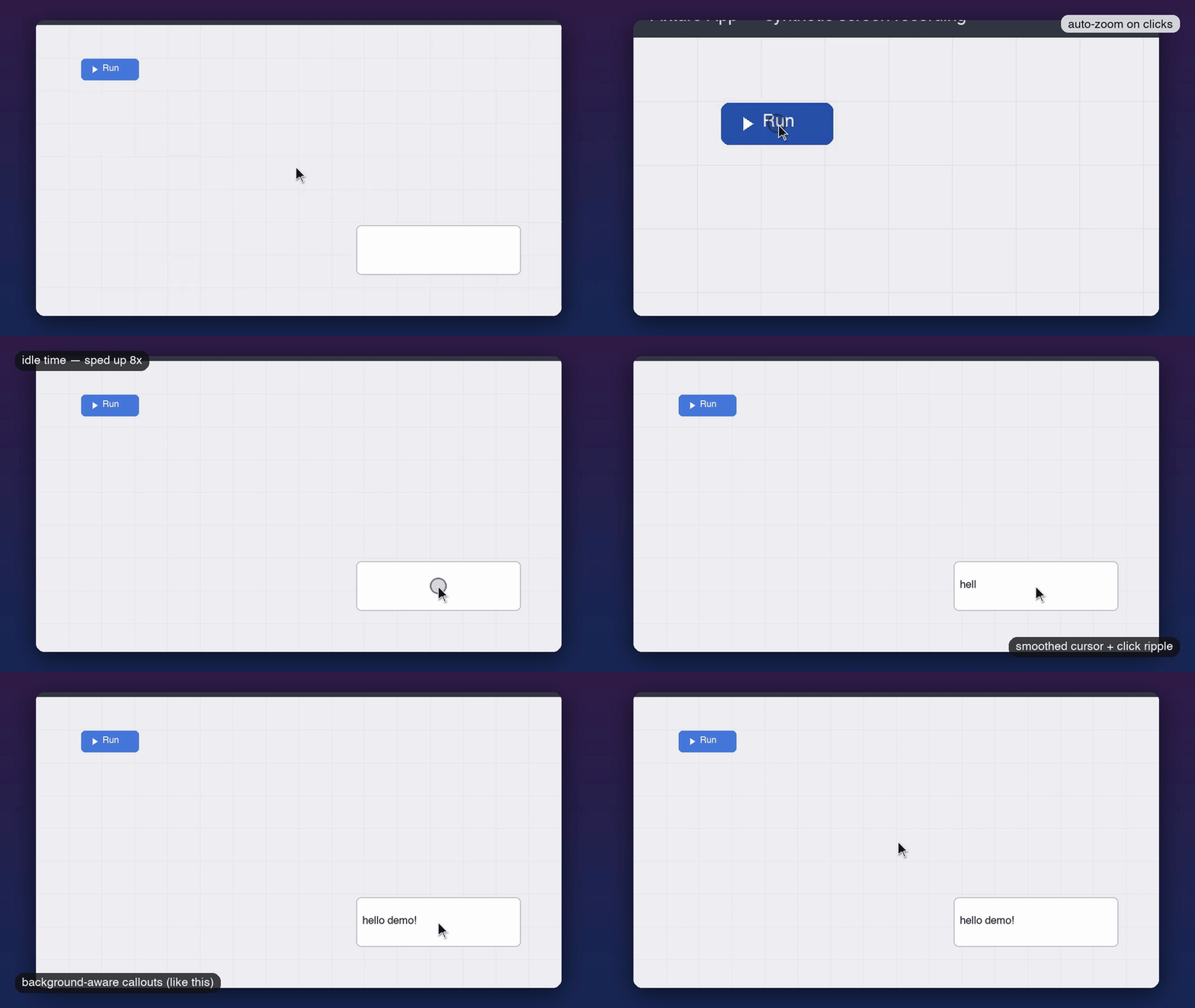
One render pass on the same clip: auto-zoom, idle speed-up, smoothed cursor + click ripple, a framed backdrop, and background-aware callouts.
🥚 Easter egg: pass a BPM and it'll beat-cut your clips onto the music grid for a synced reel — a one-flag add, because the whole tool is scriptable.
Quickstart
It's a Claude Code skill — tell your coding agent to add screenstudio-alt and it installs and drives the whole thing. Or add it directly:
/plugin marketplace add connerkward/screenstudio-alternative-skill
pip install -r requirements.txt && brew install ffmpeg
swiftc -O src/events-log.swift -o src/events-log        # one time

# record (the logger captures clicks/keys/cursor; auto-zoom needs this — it can't be recovered from pixels)
./src/events-log demo.events.jsonl & LOGGER=$!
screencapture -v -V 30 demo.mov ; kill $LOGGER

# polish: auto-zoom + idle speed-up + keystroke chips + vertical export
python3 src/polish.py demo.mov --events demo.events.jsonl --speedup --zoom --keys --vertical
--speedup alone works on any existing recording (no events needed). Prefer a GUI?
python3 src/studio.py demo.mov opens the local timeline editor shown above. Full internals →
docs/ARCHITECTURE.md.
Why / vs Screen Studio
Screen Studio by Adam Pietrasiak is a gorgeous, beloved macOS app — that you click through, on a paid subscription. screenstudio-alt does the same signature effects headless and free.
| 🆓 screenstudio-alt | 💎 Screen Studio | |
|---|---|---|
| 💰 Price | Free, open-source (MIT) | Paid subscription ($9–20/mo; paywalled on export) |
| 🖥️ Interface | CLI + local web editor | Polished native GUI |
| 🔍 Auto-zoom on clicks | ✅ | ✅ |
| ⏩ Idle speed-up | ✅ | ✅ |
| ⌨️ Keystroke chips | ✅ | ✅ |
| 🖱️ Smoothed cursor | ✅ | ✅ |
| 📱 9:16 vertical | ✅ | ✅ |
| 🏷️ Text callouts (bg + location aware) | ✅ | ❌ |
| 🎬 FCPXML handoff | ✅ | ➖ partial |
| 🤖 Headless · scriptable · CI · agent-driven | ✅ | ❌ |
| ✨ GUI polish & ease-of-use | rougher | best-in-class |
Honest: if you want a polished native app and don't mind paying, Screen Studio is excellent — buy it. If you want to automate demo polish for free, or have a coding agent make demos, use this.
Lineage: in the spirit of VHS by Charm — scriptable, reproducible demos — but for full screen recordings, not just the terminal.
License
MIT © Conner K Ward
🧭 ckw-skills — part of Conner K. Ward's collection of Claude Code skills & MCP servers.
File tree
FAQ
screenstudio-alt is a Claude Code plugin with 1 hand-picked skill for content work, indexed on Flowy. Install it with the command on its page. It includes screenstudio-alt-skill. Its skills do not fire on their own yet. Request auto-invocation to have Flowy route them as you prompt. Free and open source.
- What is screenstudio-alt?
- screenstudio-alt — an open-source headless Screen Studio alternative (Claude Code skill): auto-zoom, idle speed-up, vertical export.
- How do I install screenstudio-alt?
- Run these in Claude Code: /plugin marketplace add connerkward/screenstudio-alt-skill then /plugin install screenstudio-alt@screenstudio-alt. Then prompt normally.
- Does screenstudio-alt auto-invoke its skills?
- Not yet. It is indexed on Flowy as a plain plugin. Request auto-invocation on its page and Flowy will route its skills for you as you prompt.
- Is screenstudio-alt free?
- Yes. Flowy is free and open source, with nothing gated. You can read every skill in full before you install.
Is this plugin yours?
Claim it with GitHubSubmit a pluginPromote it