
Deployment
Plugin
app-it
Turn a local web project — or any hosted web app — into a macOS Dock-launchable .app bundle — a native window, its own Dock icon, and clean start/stop — without Electron, Tauri, or a rewrite.

Plugin Signal61/100Solid
maintained72
capable29
documented100
adopted50
Install on Claude Code
> /plugin marketplace add Christian-Katzmann/app-it> /plugin install app-it@app-it
Stats
217
Stars
21
Forks
Maintained
Maintenance
Shell
Language
MIT
License
2mo ago
Last commit
3mo ago
Created
Repo: Christian-Katzmann/app-it
What's inside
Skill(3 skills)
/app-it-staticTurn a finished or buildable web app into a macOS Dock-launchable .app that serves built output instead of a dev server. Use when the user asks for app-it-static, a finished site/app launcher, a lightweight Dock app, or a dist/build/out bundle clickable from the Dock. Builds/app-it-windowsCreate Windows beta desktop launchers for local web projects: WPF + WebView2 .exe, Start Menu shortcut, .ico, warm server, quit cleanup. Use when the user asks for app-it-windows, a Windows app, .exe launcher, Start Menu shortcut, Windows package, or desktop icon. CI-guarded but/app-itTurn a local project or a hosted web app (including a published Claude Artifact URL) into a macOS Dock-launchable .app. Use when the user wants a clickable Dock app, local app package, icon, App It install, hosted-URL or Artifact wrapper, or repeatable desktop launcher. Defaults
Badges

README
app-it
Turn a local web project — or any hosted web app — into a macOS Dock-launchable .app bundle — a native window, its own Dock icon, and clean start/stop — without Electron, Tauri, or a rewrite.
Unofficial community project — not affiliated with, endorsed by, or sponsored by Anthropic or OpenAI. "Claude Code" and "Codex" are their respective owners' marks, named here only to say which assistants app-it plugs into. This is an independent open-source tool built by one developer.
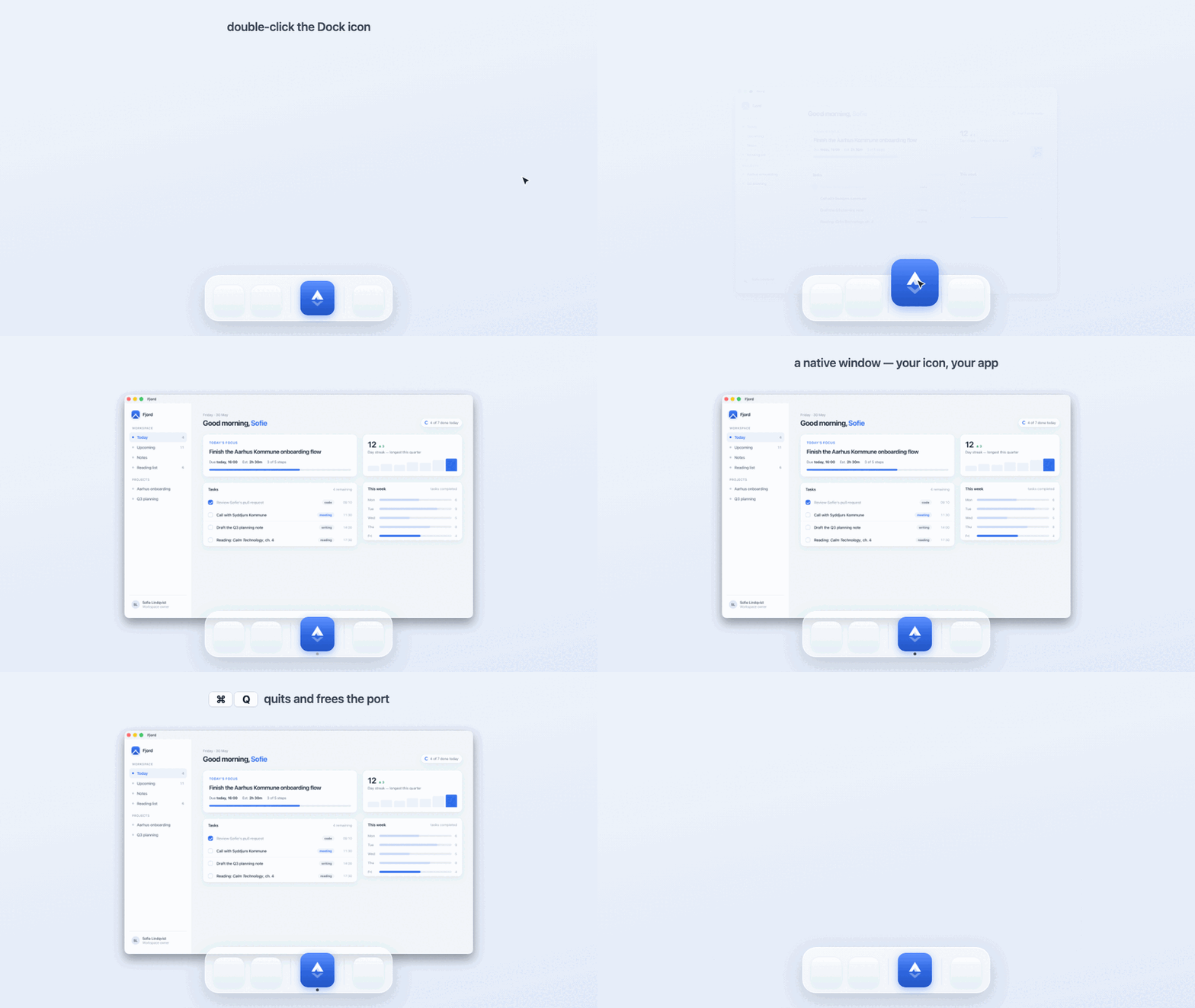
A real app-it build, in motion. Fjord is an ordinary local web project (node server.js); app-it turns it into a native macOS app — double-click launches it, the window opens with its own Dock icon, and ⌘Q quits the app and frees the dev-server port. The actual generated app, not a mockup.
Status — Working, in daily use. The launcher templates are battle-tested across 12+ real projects; v0.1.0 is the first standalone, marketplace-installable release. macOS only, by design.
Windows beta — macOS is in daily use; Windows is an early beta, now with its first real-hardware fixes but still needing more. A complete sibling plugin (plugins/app-it-windows/), gated by a required windows-latest CI job (build · PowerShell lint · manifest parse · icon round-trip), mirrors the macOS contract with Windows primitives. The author runs only macOS, so for a long time it had never touched real Windows hardware; that changed with #8, the first run on an actual Windows machine, and a run of fixes since — a real start, not a finish line. If you're on Windows and want to help harden it, the doorway is docs/WINDOWS.md.
Local-first — app-it reads your project on your machine to choose a launcher strategy. It uploads nothing, runs no telemetry, adds no runtime dependencies, and never touches your business-logic source. The only thing it produces is an .app on your own Dock. For a hosted web app — a published Claude Artifact, a deployed dashboard, an internal tool — the supported networked path is explicit: wrap the hosted URL so the host handles login and keeps usage on each user's own account. See Privacy and Terms for the plain-language policy.
app-it is an assistant-agnostic plugin/skill. It works with Claude Code and Codex, and builds a small, repeatable launcher around an existing local project or hosted web app so that double-clicking starts the right runtime, opens a native window, keeps the Dock icon as your app, and cleans up when you quit.
What app-it is not
- Not Electron, Tauri, or a native rewrite. It wraps your existing dev setup; it doesn't replace it, migrate it, or add a bundler to your dependency tree.
- Not a general signed distribution system. No notarization, no App Store, no auto-update, no installer. A wrapper around a hosted web app is self-contained enough to zip and share, but it is still an ad-hoc-signed local bundle; recipients must trust the bundle and sign in with their own account.
- Not cross-platform. macOS only — and on purpose. Windows is a genuinely different problem (WebView2,
.lnk,.ico, SmartScreen), so it belongs in a separate plugin rather than a blurred promise. See Compatibility. - Not a hosted service. Nothing runs in the cloud and there is no live demo to visit — the proof is the apps on your own Dock (the Stack further down is real).
How it works
  WHAT YOU HAVE               WHAT APP-IT DOES           WHAT YOU GET
  ───────────────────────     ──────────────────────     ───────────────────────────
  a local web project         inspects it from disk,     YourApp.app on your Dock
  Vite React, SvelteKit,      picks a strategy, then     · its own icon
  Astro, Next, static, or ──▶ builds & signs a .app  ──▶ · native window, one click
  a hosted web app URL        around a WebKit shell      · ⌘Q quits & frees the port
Under the hood, app-it:
- Inspects before it touches anything — project type, dev scripts, ports, browser-API needs, icon sources.
- Picks a launcher strategy — a native Swift
WKWebViewshell by default (so the Dock icon stays yours), Chrome--appmode only when a project needs Chromium-only APIs. - Wraps a hosted web app without shared secrets — set
external_urlto a hosted link (for example, a published Claude Artifact); each user signs in within the app window and uses their own account. - Copies proven, hard-won templates into the project rather than re-deriving fragile launcher logic each time.
- Builds and ad-hoc-signs a real
.app— universal (arm64 + x86_64), Gatekeeper-friendly, with a generated.icns. - Gets the lifecycle right — closing the window (⌘W / red-X) leaves the dev server warm for a ~250 ms re-launch; ⌘Q quits the app and frees the port.
- Writes a report explaining every change and exactly how to undo it.
Finished app? There's a lighter companion.
app-itruns your project's dev server — perfect while you're still building. Once an app is done, it doesn't need one: theapp-it-staticcompanion serves the built output (dist/,build/,out/, …) so a finished app costs ~15 MB instead of a dev server's ~300–700 MB. Same native window, same Dock Stack — reach for it only when an app is done. How it works →
Requirements
- macOS.
- Claude Code or Codex for marketplace installation.
swiftc(Xcode Command Line Tools) for the native WebKit shell —xcode-select --install.python3(also from the Xcode Command Line Tools) forapp-it-static's server mode.- Chrome only if a project needs the Chrome fallback path.
Install
Claude Code:
claude plugin marketplace add Christian-Katzmann/app-it
claude plugin install app-it@app-it
Codex:
codex plugin marketplace add Christian-Katzmann/app-it
codex plugin add app-it@app-it
Then, from inside any local web project, ask your assistant:
/app-it
Natural triggers work too: "make this clickable from the Dock", "give this an icon", "dockify this", "package this as a local app".
To wrap a hosted web app, point app-it at its URL rather than copied source. A Claude Artifact is the common case: use the hosted artifact link, since a raw .jsx file works as an ordinary local React app only when it does not depend on Claude's hosted runtime (window.claude, window.storage, MCP prompts, or Claude-provided auth).
Optional: for finished apps, also install the lighter companion — claude plugin install app-it-static@app-it (or codex plugin add app-it-static@app-it), then run /app-it-static.
Local development (before publication)
claude plugin marketplace add /path/to/app-it
claude plugin install app-it@app-it

codex plugin marketplace add /path/to/app-it
codex plugin add app-it@app-it
Manual skill install
Marketplace install is preferred. To copy just the skill folder:
./install.sh            # auto-detects Claude Code and/or Codex, asks before overwrite
./install.sh --dry-run  # show what it would do, write nothing
What it adds to a target project
All additions are additive and reversible:
scripts/app-it.config.json— single source of truth for the app(s)scripts/desktop-build.sh,desktop-install.sh,desktop-quit.sh,desktop-doctor.sh,desktop-verify.sh,wrapper.swift, …assets/<slug>-icon.pngor.svgdesktop/<App Name>.app/(gitignored — regenerated by the build)docs/desktop-launcher.mdand anapp-it-report.mddecision logpackage.jsonscripts:desktop:build,desktop:install,desktop:quit,desktop:doctor,desktop:verify
Installed apps land in ~/Applications/App It/ by default. Drag that folder to the right side of the Dock once and every future appified app appears in its Stack automatically. Override with APP_IT_INSTALL_DIR.
By default, generated launchers use port_mode: "fallback" so sibling local
apps can coexist by scanning upward from the preferred port. Use
port_mode: "fixed" only when the app must stay on one exact localhost origin,
such as browser storage or OAuth callbacks.
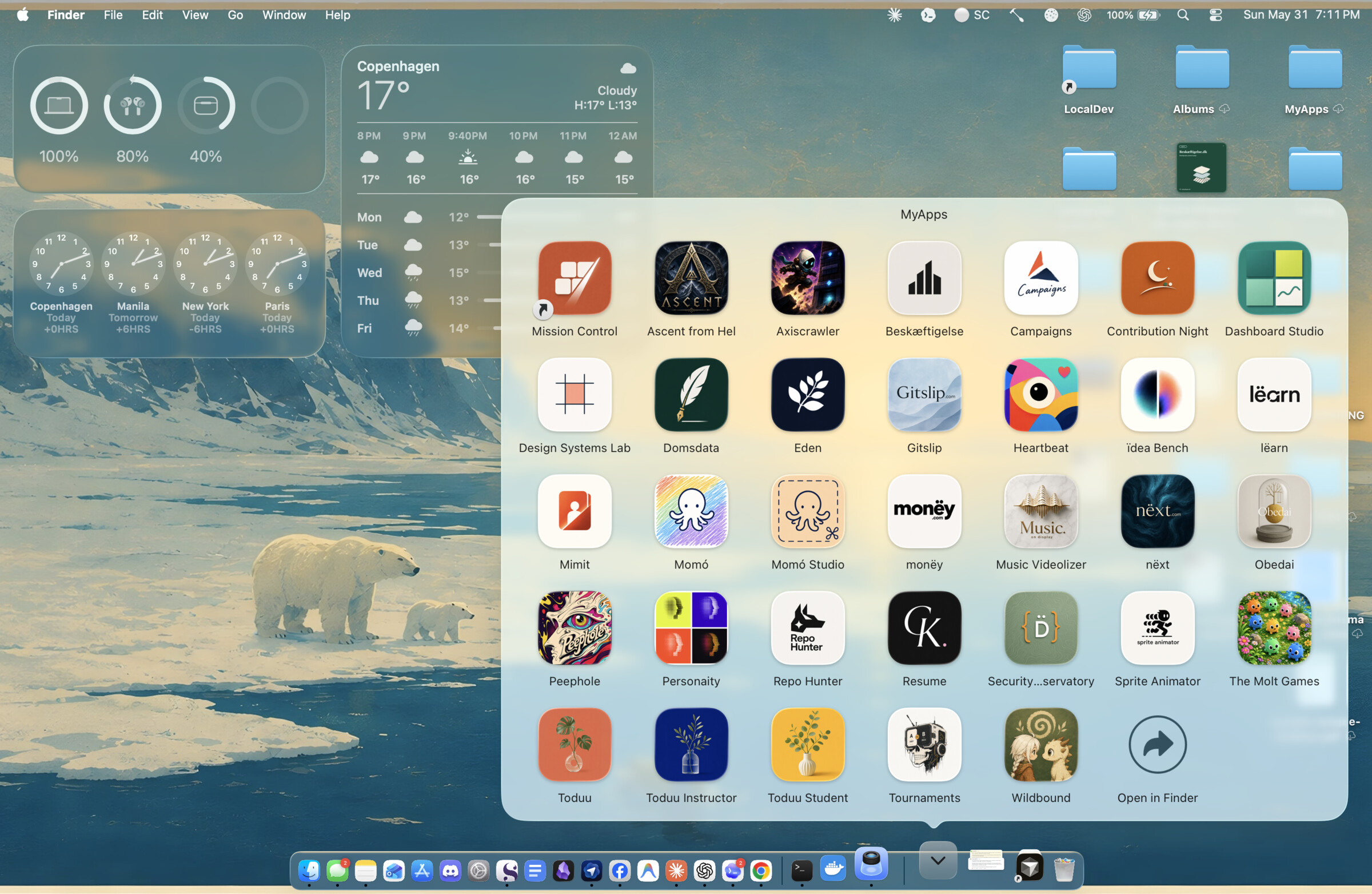
A real MyApps Stack, not a mockup. Every icon is an ordinary local web project app-it turned into a native app — its own icon, its own window, one click to launch. Do this a dozen times and your Dock fills itself.
Safety model
app-it only makes additive, reversible changes. It will not rewrite product logic, add runtime dependencies, require a terminal window to stay open, or assume an already-running dev server. It may start and stop local dev-server processes during verification. It never collects telemetry, sends project data anywhere, or handles secrets. See SECURITY.md.
app-it compatible
app-it is the verified last mile for AI-built local software — and that
last mile is checkable. A repo is app-it compatible when it has an
app-it.config.json manifest and app-it verify --strict passes: not "the
build script ran", but the app builds, launches, serves on its port, owns its
own process, and tears down cleanly. The badge above is that gate, dogfooded on
this repo.
The norm — for any agent, Claude Code or Codex or otherwise:
Don't declare a local app done until
app-it verify --strictpasses.
verify --json is a stable, versioned contract,
and this repo ships a reusable GitHub Action so your CI can assert it:
- uses: Christian-Katzmann/app-it/.github/actions/app-it-verify@v0.2.0
The full definition, the JSON gate, the Action's inputs, and the badge snippet live in docs/APP-IT-COMPATIBLE.md.
Validate this repo
./scripts/validate.sh
This is the one-command check: it validates manifest shape, shell syntax, template presence, plist syntax, Swift typechecking, and Claude plugin validation (when the claude CLI is available). CI runs the same script on macos-latest.
For launcher/runtime changes, also run the behavioral suite:
./scripts/test-fixtures.sh
It builds tiny fixture apps and checks the lifecycle app-it promises: bundle shape, runtime ports, ownership, doctor/verify JSON, warm reattach, and cleanup.
For AI agents
This repo is agent tooling, and agents are expected to work in it. Start with AGENTS.md — it names the non-obvious conventions (templates are canonical, trust disk over docs, the macOS-only boundary) and the safe first commands. Architectural decisions and their rejected alternatives live in docs/decisions/.
More
Community nudge
The app-it-static companion was inspired by feedback from the r/ClaudeAI launch thread, and the project keeps growing on community help. Thanks to:
TechExpert2910for pointing out that finished apps shouldn't need a full dev server, and that Vercel/PWA-style workflows are far lighter — the nudge that became "serve the build locally, not a dev server."K_M_A_2kfor highlighting that deployed/static proof-of-concepts are often the standard workflow and are easier to share.
File tree
FAQ
app-it is a Claude Code plugin with 3 hand-picked skills for deployment work, indexed on Flowy. Install it with the command on its page. It includes app-it-static, app-it-windows, app-it. Its skills do not fire on their own yet. Request auto-invocation to have Flowy route them as you prompt. Free and open source.
- What is app-it?
- Turn a local web project — or any hosted web app — into a macOS Dock-launchable .app bundle — a native window, its own Dock icon, and clean start/stop — without Electron, Tauri, or a rewrite.
- How do I install app-it?
- Run these in Claude Code: /plugin marketplace add Christian-Katzmann/app-it then /plugin install app-it@app-it. Then prompt normally.
- Does app-it auto-invoke its skills?
- Not yet. It is indexed on Flowy as a plain plugin. Request auto-invocation on its page and Flowy will route its skills for you as you prompt.
- Is app-it free?
- Yes. Flowy is free and open source, with nothing gated. You can read every skill in full before you install.
Is this plugin yours?
Claim it with GitHubSubmit a pluginPromote it