
Auto-invoked
Data
MCP
hevy
A workout tracking app for logging exercises, sets and reps and monitoring gym progress over time.
Claude Code
$ claude mcp add --transport http hevy https://mcp.hevy-mcp.dev/mcp
Codex
$ codex mcp add hevy --url https://mcp.hevy-mcp.dev/mcp
Cursor
{
  "mcpServers": {
    "hevy": {
      "url": "https://mcp.hevy-mcp.dev/mcp"
    }
  }
}
Add it to mcp.json.
Gemini CLI
$ gemini mcp add --transport http hevy https://mcp.hevy-mcp.dev/mcp
GitHub Copilot
$ copilot mcp add --transport http hevy https://mcp.hevy-mcp.dev/mcp
OpenCode
{
  "mcp": {
    "hevy": {
      "type": "remote",
      "url": "https://mcp.hevy-mcp.dev/mcp"
    }
  }
}
Add it to opencode.json.
Windsurf
{
  "mcpServers": {
    "hevy": {
      "serverUrl": "https://mcp.hevy-mcp.dev/mcp"
    }
  }
}
Add it to mcp_config.json.
Security report
Found
Low risk
Known flaws
Not published
Signed build
Not published
Maintained
Oct 30, 2026
Last push
Licence
MIT
Runs as
Remote
mcp.hevy-mcp.dev
Deprecated
Not published
Signals from public registries, not an audit. Checked Nov 14, 2026.
hevy-mcp README
Hevy MCP Server
Talk to your Hevy workout data from Claude, Cursor, Codex, and other MCP clients.





Connect to the hosted MCP · Use the Hevy CLI · Watch the 18-second demo · Explore all 23 tools · Documentation
Hevy CLI
Prefer the terminal? The separate
@chrisdoc/hevy-cli
package reads workouts, routines, exercises, and body measurements directly
from the Hevy API, and can create or update those resources with explicit
confirmation. Deletion is not supported.
npm install -g @chrisdoc/hevy-cli
export HEVY_API_KEY=your-hevy-api-key

hevy workouts list --page-size 10
hevy summary --weeks 4
Add --json to any command for scripts and pipelines. The CLI is a standalone
Hevy API client, not an MCP wrapper. See
packages/cli/README.md for the full command
reference, pagination behavior, and exit codes.
hevy-mcp is an open-source Model Context Protocol (MCP)
server for the Hevy fitness and workout tracking
app. It lets AI assistants read, analyze, create, and update your Hevy workouts,
routines, exercise templates, and body measurements through authenticated Hevy
API requests.
The Node stdio/HTTP adapter and Cloudflare Worker share the same MCP tools. See deployment modes to choose a transport, or architecture for workspace ownership, runtime scopes, and supported embedding APIs.
A Hevy API key, available with Hevy PRO, is required.
See it in action
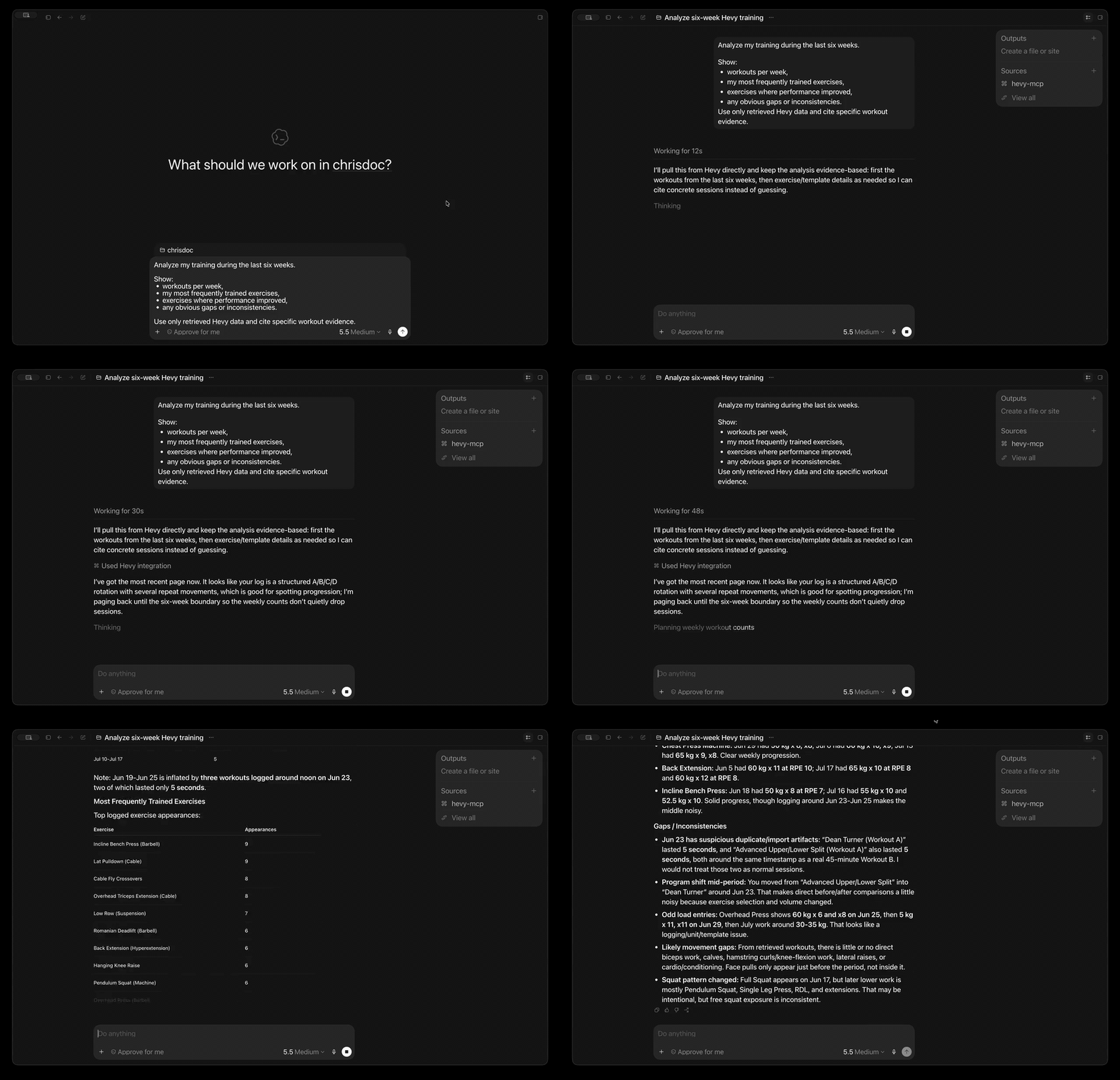
In the demo, the assistant retrieves real Hevy data and answers a multi-part training question with evidence from the user's workout history.
What can you do with it?
- Analyze training progress: summarize 1-12 weeks of workouts and body measurements in one tool call.
- Ask questions in plain language: find recent sessions, frequently trained exercises, consistency gaps, routine details, or exercise history.
- Plan and log training: create or update workouts, routines, routine folders, custom exercises, and body measurements.
- Search without huge responses: discover routines and exercise templates with compact, AI-friendly results.
- Connect from your preferred MCP client: use the hosted Streamable HTTP endpoint or run locally with Codex, Claude Desktop, Cursor, and other clients.
- Start without installing anything: connect directly to the production Cloudflare Worker—no Node.js, package download, or Docker container required.
- Keep local control when you want it: run the same server with
npx,bunx, or the official Docker image.
Try asking:
Analyze my training over the last six weeks. Show workouts per week, my most frequently trained exercises, any obvious gaps or inconsistencies, and cite the workout evidence you used.
Find my push-day routine and show its exercises and sets.
Compare my recent body measurements with my training consistency.
Create a completed workout from my saved routine. Ask me for any missing set results before writing it to Hevy.
Claude integration
The repository includes a Claude plugin that connects to the hosted OAuth-enabled MCP endpoint without embedding a user's Hevy API key.
Claude.ai and Claude Desktop
In Claude, open Settings → Connectors → Add custom connector and enter:
https://mcp.hevy-mcp.dev/mcp
Complete the OAuth flow and enter the Hevy API key when prompted. The same remote endpoint can be used by Claude Desktop and other clients that support remote MCP connectors.
Claude Code and Cowork
The Claude plugin is defined by .claude-plugin/plugin.json
and .mcp.json. Install it from this public repository or from
the Claude Plugin Directory after publication. It adds the hosted Hevy MCP
connector and the Hevy workout skill.
See the privacy policy for the hosted service's data handling details.
Quick start
1. Get your Hevy API key
Create an API key in Hevy's API settings, then keep it somewhere secure. API access currently requires a Hevy PRO subscription.
2. Connect hevy-mcp to your client
The hosted Cloudflare endpoint is the fastest way to start. It runs remotely, so your client does not need Node.js, Bun, Docker, or a local server process.
Connect to the hosted endpoint
Production URL:
https://mcp.hevy-mcp.dev/mcp
The endpoint uses Streamable HTTP. Send your Hevy API key as a bearer token on every request.
Codex
Codex CLI, the Codex desktop app, and the IDE extension share the same MCP configuration. Make your Hevy API key available in the environment that starts Codex, then add the hosted server:
export HEVY_API_KEY=your-hevy-api-key
codex mcp add hevy \
  --url https://mcp.hevy-mcp.dev/mcp \
  --bearer-token-env-var HEVY_API_KEY
Codex stores the environment variable name, not the key itself, in its MCP
configuration. Restart Codex or begin a new session, then run codex mcp list
to verify the server is configured.
Other Streamable HTTP clients
Clients that accept a remote MCP URL and fixed headers commonly use this shape:
{
	"mcpServers": {
		"hevy": {
			"url": "https://mcp.hevy-mcp.dev/mcp",
			"headers": {
				"Authorization": "Bearer your-hevy-api-key"
			}
		}
	}
}
Exact configuration keys vary by client. The hosted server requires support for
Streamable HTTP and a fixed Authorization header.
Important Treat the bearer value like a password. The Worker validates it with Hevy for each request, does not store it, and forwards it to Hevy only as the required
api-keyheader.
Run locally instead
Choose local stdio if you prefer to run the server on your own machine or your client cannot attach a fixed authorization header to remote MCP requests.
Codex
codex mcp add hevy \
  --env HEVY_API_KEY=your-hevy-api-key \
  -- npx -y hevy-mcp
Claude Desktop or Cursor
Add this mcpServers entry to your client configuration:
{
	"mcpServers": {
		"hevy": {
			"command": "npx",
			"args": ["-y", "hevy-mcp"],
			"env": {
				"HEVY_API_KEY": "your-hevy-api-key"
			}
		}
	}
}
Google Antigravity
There are two ways to configure the Hevy MCP server for Google Antigravity (agy):
Option A: Automatic Plugin Installation (Recommended)
This utilizes the built-in plugin system:
The plugin reads the repository-root mcp_config.json to start the local
stdio server. That configuration intentionally contains no API key; the server
inherits HEVY_API_KEY from the host environment as described below. This is
separate from the manual, user-global configuration described below and from
the repository's .mcp.json, which configures hosted HTTP/OAuth.
-
Install the plugin:
agy plugin install https://github.com/chrisdoc/hevy-mcp -
Provide the
HEVY_API_KEYin your host shell environment so the CLI child process can inherit it:- Persistent: Save the environment variable
HEVY_API_KEYin your system/shell configurations:- macOS / Linux: Add it to your shell profile configurations (e.g.,
~/.zshrcor~/.bashrc):export HEVY_API_KEY="your-actual-api-key" - Windows: Add it to your User or System Environment Variables. In PowerShell, you can run:
[Environment]::SetEnvironmentVariable("HEVY_API_KEY", "your-actual-api-key", "User")
- macOS / Linux: Add it to your shell profile configurations (e.g.,
- Temporary (Session-only): If you do not want to persist the key, export it in your active terminal session before running
agy:export HEVY_API_KEY="your-actual-api-key"
- Persistent: Save the environment variable
Option B: Manual Configuration (No Plugin)
If you prefer configuring it statically via the global configuration file:
-
Open your global MCP configuration file:
- Location:
~/.gemini/config/mcp_config.json
- Location:
-
Add the
hevyconfiguration block under themcpServerskey. Make sure to merge this entry with any existing servers you have configured rather than replacing the entire file contents:{ "mcpServers": { "hevy": { "command": "npx", "args": ["-y", "hevy-mcp"], "env": { "HEVY_API_KEY": "your-actual-api-key" } } } }
Common local configuration locations:
- Claude Desktop on macOS:
~/Library/Application Support/Claude/claude_desktop_config.json - Claude Desktop on Windows:
%APPDATA%\Claude\claude_desktop_config.json - Cursor:
~/.cursor/mcp.json
Restart or reconnect the client after saving the file.
Any stdio MCP client
Configure your client to launch this command with HEVY_API_KEY in the child
process environment:
npx -y hevy-mcp
npx requires Node.js 20 or newer. Restart or reconnect your client after
saving its configuration.
Use bunx instead
Requires Bun:
{
	"mcpServers": {
		"hevy": {
			"command": "bunx",
			"args": ["hevy-mcp@latest"],
			"env": {
				"HEVY_API_KEY": "your-hevy-api-key"
			}
		}
	}
}
Use Docker instead
Official images support linux/amd64 and linux/arm64. Keep stdin open with
-i because the container runs the stdio MCP server:
export HEVY_API_KEY=your-hevy-api-key
docker run -i --rm -e HEVY_API_KEY ghcr.io/chrisdoc/hevy-mcp:latest
For an MCP client, store the key in a protected environment file and configure the client to launch Docker:
{
	"mcpServers": {
		"hevy": {
			"command": "docker",
			"args": [
				"run",
				"-i",
				"--rm",
				"--env-file",
				"/absolute/path/to/hevy-mcp.env",
				"ghcr.io/chrisdoc/hevy-mcp:latest"
			]
		}
	}
}
Pin an exact image tag such as ghcr.io/chrisdoc/hevy-mcp:X.Y.Z when you need
reproducible upgrades.
You can also add the npm server to supported clients with
add-mcp:
npx add-mcp hevy-mcp --env "HEVY_API_KEY=your-hevy-api-key"
3. Ask your first question
Try one of these after restarting or reconnecting your MCP client:
Stats
539
Stars
96
Forks
Active
Maintenance
TypeScript
Language
MIT
License
Last commit
Created

Ships withhevy-mcp
Talk to your Hevy workout data from Claude, Cursor, Codex, and other MCP clients. Connect to the hosted MCP · Use the Hevy CLI · Watch the 18-second demo · Explore all 23 tools · Documentation
5292 skills1 MCP
Stars on GitHub
Momentum
- stars in total
- 529
More MCP servers from other plugins.


Auto-invoked
agentmemory
MCPShips with agentmemory: #1 Persistent memory for AI coding agents based on real-world benchmarks
 @rohitg00Install MCP
skill-seekers
MCPShips with skill-seekers: 🧠 The data layer for AI systems. Skill Seekers turns documentation sites, GitHub repos, PDFs, videos,…
 @yusufkaraaslanInstall MCP
Questions about hevy.
- Which coding agents can use hevy?
- hevy works in any agent that reads an MCP config file: Claude Code, Codex, Cursor, Gemini CLI, GitHub Copilot, OpenCode and Windsurf. Each agent reads it from its own file; this page names the file for each one.
- How do I add hevy to Claude Code?
- Run this in your terminal: claude mcp add --transport http hevy https://mcp.hevy-mcp.dev/mcp
- Is hevy safe to install?
- Low risk. Signals from public registries, not an audit.