




promptschat
Gives Claude Code access to the prompts.chat library, letting you search, retrieve and improve AI prompt templates, and find and install Agent Skills from its registry.
2 skills2 agents2 commands1 MCP+3+2+2+2+1+1+1+1175k
 @gh-f
Oh My Cassette is an open-source AI video editing plugin and local MCP server for Claude Code, Codex, Hermes Agent, and OpenCode.
Claude Code
> /plugin marketplace add Cassette-Editor/oh-my-cassette> /plugin install oh-my-cassette@cassette-editor
Codex
$ npx skills add Cassette-Editor/oh-my-cassette -a codex
Cursor
$ npx skills add Cassette-Editor/oh-my-cassette -a cursor
Gemini CLI
$ npx skills add Cassette-Editor/oh-my-cassette -a gemini-cli
GitHub Copilot
$ copilot plugin marketplace add Cassette-Editor/oh-my-cassette$ copilot plugin install oh-my-cassette@cassette-editor
OpenCode
$ npx skills add Cassette-Editor/oh-my-cassette -a opencode
Windsurf
$ npx skills add Cassette-Editor/oh-my-cassette -a windsurf
Edit video by talking to the Cassette agent from Claude Code, Codex, OpenCode or Hermes. A small MCP bridge on PyPI. The editing tools come from the Cassette MCP service, so they stay current without a plugin update.
中文
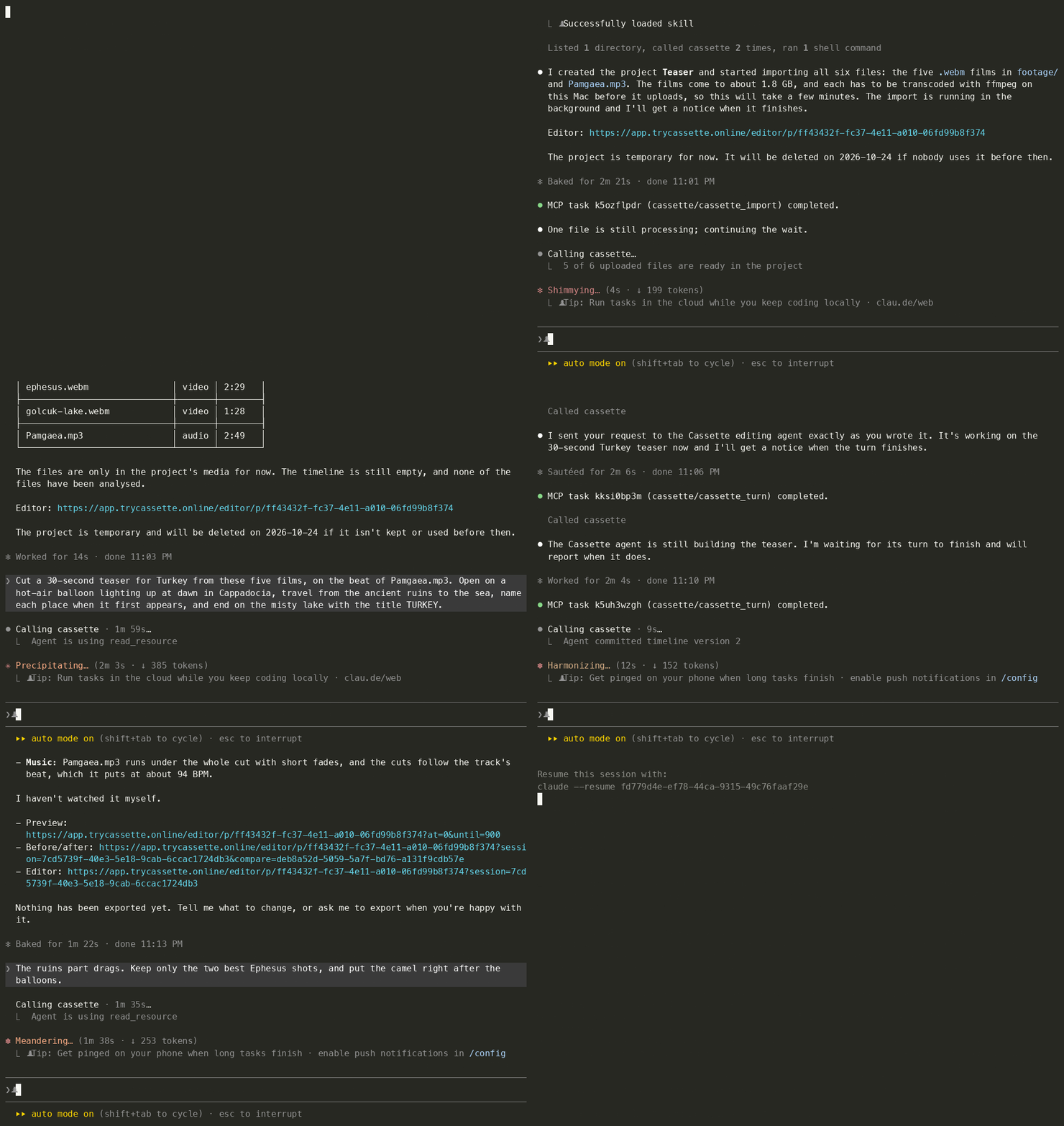
One Claude Code session, typed as you see it. Five 4K travel films (10½ minutes of footage) and a song go in, a
four-sentence brief and a one-line revision go to the Cassette agent word for word, and a 30-second 1080p MP4 lands in
cassette-exports/. Waits are fast-forwarded: in real time the import took 4½ minutes, the first cut 9½, the revision
3½ and the export 1.
Cut a 30-second teaser for Turkey from these five films, on the beat of Pamgaea.mp3. Open on a hot-air balloon lighting up at dawn in Cappadocia, travel from the ancient ruins to the sea, name each place when it first appears, and end on the misty lake with the title TURKEY.
The ruins part drags. Keep only the two best Ephesus shots, and put the camel right after the balloons.
Watch the teaser it made (MP4, 30 s, with sound). Footage and music credits are below.
You need uv (it fetches Python and the package on first start) and ffmpeg to import video.
# Claude Code
claude plugin marketplace add Cassette-Editor/oh-my-cassette
claude plugin install oh-my-cassette@cassette-editor
# Codex
codex plugin marketplace add https://github.com/Cassette-Editor/oh-my-cassette.git
codex plugin add oh-my-cassette@cassette-editor
# Hermes
hermes mcp add cassette --command uvx --args oh-my-cassette==0.6.0
OpenCode and any other MCP host: see Install below. Run uvx oh-my-cassette==0.6.0 login and complete the
email-code sign-in in your browser. Then restart your agent if it cannot refresh its tool list, and say:
Start a new Cassette project and import the clips in ./footage, then cut a 30-second travel video with a title at the start.
0.5 is a rewrite. The 0.4 plugin carried its own editing runtime, music search and Hermes gateway; 0.5 is a thin bridge to the Cassette MCP service, and the tools your agent sees are the service's.
uvx oh-my-cassette==0.6.0 login. 0.4 passwords and tokens are not used.cassette_run_job, cassette_ingest_media, cassette_match_bgm, …)
are gone. Reinstall the plugin, or point your host config at uvx oh-my-cassette==0.6.0.A project the bridge starts is a cloud project that Cassette deletes, with its media, after three idle days; every use
pushes that back, and each answer says when it is due (retention_expires_at). Exported files are already on your
machine in cassette-exports/ and stay there. A project made in Cassette for Mac is kept, and the bridge can open, edit
and export it while that Mac is online, but its media are imported in the app.
Oh My Cassette connects your coding agent to the Cassette editing agent. It is a local stdio MCP server
that relays to the Cassette MCP service (CASSETTE_MCP_URL), which in turn calls the Cassette backend:
Claude Code / Codex / OpenCode / Hermes ──stdio──▶ oh-my-cassette ──HTTP──▶ Cassette MCP service ──▶ Cassette backend
cassette-exports/. The workspace identity travels with each
call so the service can remember a project per directory.preparing and keeps going in the background, and the next identical call picks it up.bridge.*
errors with a retryable flag (and retry_after_seconds when the service said when), and, while
the service is unreachable or refuses the token, lists a single cassette_bridge_status tool that
says why.The rules between the plugin and the service are defined in
src/oh_my_cassette/contract.py; oh-my-cassette check verifies a
service against them.
uvx oh-my-cassette==0.6.0 check --url <endpoint>. While the
service is unreachable or refuses the token, only cassette_bridge_status is listed.uvx oh-my-cassette==0.6.0 resolves Python 3.11 or newer by itself.brew install ffmpeg,
sudo apt install ffmpeg or winget install ffmpeg. Video is transcoded on your machine before it
uploads. A build with zscale also tone-maps HDR footage properly.Which formats a tool accepts, and how files are prepared before upload, is declared by the service (video, audio and image types at most).
Sign in once with oh-my-cassette login, using the Cassette account of your projects: the browser asks for the emailed code and your consent. One sign-in reaches every project of the account, whether it was made on the web or in Cassette for Mac. A project whose media lie on a Mac opens in the app on that Mac; reading its pictures or sound and exporting it need that Mac online, and its media are imported there. Login, status and logout use your operating-system keyring; no token needs to be copied. Environment variables below are optional overrides.
| Variable | Default | Meaning |
|---|---|---|
CASSETTE_MCP_URL | the saved connection, otherwise https://mcp.trycassette.online/mcp | Explicit MCP endpoint override. |
CASSETTE_AUTH_TOKEN | unset | Advanced bearer-token override. Normally use login; the same account, scope and resource checks apply. Never place it in shared configuration. |
CASSETTE_WORKSPACE | the directory the host starts the server in | Where relative paths resolve, where local files may come from, and the directory the service may remember a project for. A host that starts the server in the whole disk or your home folder gives it no files to read until you set this, or CASSETTE_ALLOWED_ROOTS. |
CASSETTE_ALLOWED_ROOTS | unset | Extra directories local files may come from (:-separated; ; on Windows). |
CASSETTE_DOWNLOAD_DIR | <workspace>/cassette-exports | Where exported files are saved. The default must stay inside the workspace: a cassette-exports symlink leading elsewhere is refused. |
CASSETTE_MAX_UPLOAD_MB / CASSETTE_MAX_DOWNLOAD_MB | 4096 / 16384 | Size limits per file. |
CASSETTE_UPLOAD_ANY_TYPE | off | Allow non-media uploads when a tool accepts them. |
CASSETTE_LOCAL_WAIT_SEC | 240 | How long one call waits for local preparation and upload before it answers preparing. |
CASSETTE_FFMPEG / CASSETTE_FFPROBE | from PATH | The ffmpeg and ffprobe programs used to prepare local media. |
CASSETTE_TEMP_DIR | the system temp directory | Where each upload makes its own private directory (oh-my-cassette-job-*) for prepared files until they are uploaded. |
CASSETTE_CONNECT_TIMEOUT_SEC | 10 | How long to wait for the service when connecting. |
CASSETTE_MCP_HOST | unset | The host name sent to the service when the host does not identify itself. |
OH_MY_CASSETTE_LOG | WARNING | Log level on stderr. |
Plugin (recommended): the two commands at the top. The plugin uses the connection saved by oh-my-cassette login and starts uvx oh-my-cassette==0.6.0 with a 10-minute tool timeout.
Project scope without the plugin: copy .mcp.json into your project, or run:
claude mcp add --transport stdio cassette -- uvx oh-my-cassette==0.6.0
The skill lives in skills/cassette-video-edit/SKILL.md and ships with the plugin.
Plugin: the two commands at the top (.codex-plugin/plugin.json declares the server inline with tool_timeout_sec: 600 and passes the CASSETTE_* variables through from your shell). Or add the server directly:
codex mcp add cassette -- uvx oh-my-cassette==0.6.0
Add to opencode.json (project or ~/.config/opencode/opencode.json):
{
  "mcp": {
    "cassette": {
      "type": "local",
      "command": ["uvx", "oh-my-cassette==0.6.0"],
      "timeout": 600000
    }
  }
}
Then copy the skill so OpenCode loads it:
Stars on GitHub
Gives Claude Code access to the prompts.chat library, letting you search, retrieve and improve AI prompt templates, and find and install Agent Skills from its registry.
@gh-fA Claude Code skill for generating editable PPTX presentations and slides from a workflow, with reusable brand, style, layout, and deck workspaces, native charts, speaker notes, and template filling.
 @hugohe3
Gives AI agents control over Word, Excel and PowerPoint files, with skills for building .docx reports, academic papers, Excel dashboards and Morph-style animated slides.
 @iofficeai
A skill that builds animation-rich HTML presentations from scratch or converts PowerPoint files to web slides. Useful for anyone turning a deck into a web presentation.
 @zarazhangrui
Install it with the command on its page. It includes cassette-video-edit. Its skills do not fire on their own yet. Free and open source.
Is this plugin yours?
Claim it with GitHubSubmit a pluginPromote it