
Automation
Plugin
media
The current track, live in your Claude Code statusline — ticking every second, ⌘+clickable, styleable down to the bar characters: And whatever your Mac is playing — Spotify, Apple Music, a browser tab, VLC — you can control it from the chat too: "what song is

Plugin Signal66/100Solid
maintained73
capable60
documented100
adopted15
Install on Claude Code
> /plugin marketplace add Bangs00/claude-media-control> /plugin install media@claude-media-control
What's inside
Skill(16 skills)
/verifyHow to verify media.sh changes end-to-end on a real Mac — isolated data dir, real native build, and a controllable fake now-playing app (no dependency on the user's music apps)./artworkShow the album artwork (cover art) of the currently playing track. Use when the user asks to see the album art, cover image, or artwork of what's playing./configQuick media settings — turn the now-playing statusline, the /media:now progress bar, or the playback history on/off, or reset the statusline to its default look. `config <key> [on|off|value]` changes any key directly. Use when the user wants to enable, disable, or reset a media
Hook(1 hook)
Badges





README
claude-media-control
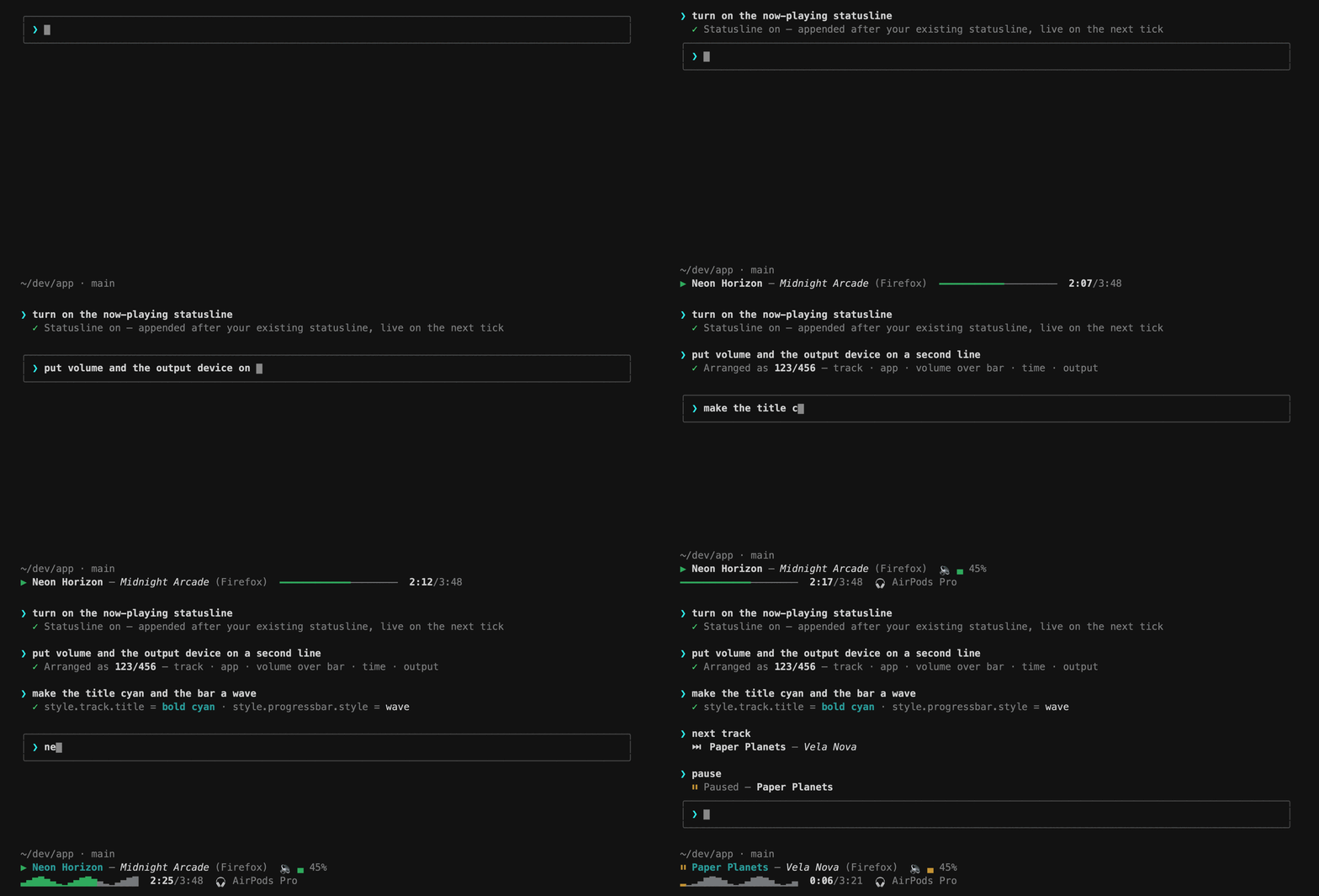
The current track, live in your Claude Code statusline — ticking every second, ⌘+clickable, styleable down to the bar characters:
▶︎ Karma Police — Radiohead (Spotify)  🔉 ▄ 45%
━━━━━━━━━━━━────────  2:13/4:24  🎧 AirPods Pro
And whatever your Mac is playing — Spotify, Apple Music, a browser tab, VLC — you can control it from the chat too: "what song is this?", "pause", "next", "play it on my AirPods". It talks to the macOS system-wide now-playing service, so there's no app lock-in, no OAuth, no API keys — and nothing to install with Homebrew.
Quick start
Inside Claude Code:
/plugin marketplace add Bangs00/claude-media-control
/plugin install media@claude-media-control
/media:config display.statusline on
That last line is the statusline — wired in automatically, live on the next
tick. macOS only; the first media command builds a tiny native helper once
(~2s). /media:doctor verifies everything (healthy = verdict: PRIMARY OK).
The statusline
Everything below is automatic — the full guide is docs/statusline.md:
- Safe wiring. Enabling appends the segment to your existing statusline —
which keeps running untouched, byte-for-byte. The previous
statusLinevalue is backed up and restored automatically if you ever uninstall the plugin. No restart, no manual steps. - ⌘+click to control (iTerm2, Ghostty, WezTerm, Kitty, VS Code, …): the ▶︎/⏸ icon toggles playback, the title jumps to the playing browser tab or Music track, and every progress-bar cell seeks to its position. Other terminals simply show the plain segment.
- Arrange it with a pattern in
/media:statusline: digits are items — 1 track · 2 app · 3 volume · 4 bar · 5 time · 6 output — and/starts a new line, so123/456stacks track/app/volume over bar/time/output. - Style every part: playing/paused accent colors, bold/italic/color per
part (named colors or hex codes like
#ff8800), 36 progress-bar charsets (fromline━━──tosmoothpartial blocks, aknobslider head, whole-barwave/pulse/eq/noteswaveforms and their braille twins, audio visualizersspectrum/mirror/cava/ripple, and aheartbeatECG━━┻┳━━), the bar length (1–60 cells), volume bar shapes, icons — oroffto hide any part. See the style gallery for all of them with examples — or paste a whole look from the recipes.
Control it from chat
Natural language, slash commands, or an interactive menu — all work:
| Say this | …or run | What happens |
|---|---|---|
| "what song is playing?" | /media:now | title / artist / app + progress bar |
| "pause the music" | /media:pause · /media:toggle | pause / resume the active player |
| "next track" | /media:next · /media:prev | skip / go back |
| "jump to 1:30" | /media:seek 1:30 | seek to an absolute position |
| "show the album art" | /media:artwork | saves the cover and displays it |
| "turn it down" | /media:volume 30 | system output volume (0–100) |
| "what played earlier?" | /media:history | recently played tracks |
| "switch to my AirPods" | /media:output airpods | list / switch audio output devices |
| "give me a remote" | /media:menu | interactive arrow-key controller |
| "make the title cyan" | /media:statusline | arrange + style the statusline |
| "turn off the history" | /media:config | quick toggles + statusline reset |
| — | /media:doctor | diagnose build / permissions / fallbacks |
Playback history is logged passively — it piggybacks on reads that
happen anyway (statusline ticks, commands), so there's no polling and no
daemon. The log keeps the latest 500 tracks locally and never leaves your
machine (/media:config history.record off stops it, /media:history clear
wipes it). Output devices are listed and switched through the public
CoreAudio API — no extra permissions.
How it works
macOS has no public API for another app's now-playing info; since 15.4,
the private MediaRemote framework answers only Apple-signed processes.
Like ungive/mediaremote-adapter,
this plugin loads a small Objective-C helper (native/adapter.m) through
/usr/bin/perl — an Apple platform binary — which passes the entitlement
check. No Command Line Tools? Reads fall back to compile-free
osascript/JXA, and control to per-app AppleScript (Spotify / Apple
Music). /media:doctor tells you which mode you're in.
Disclaimer. This relies on a private, undocumented Apple framework. It works on macOS 26.x today and re-validates itself after every macOS update (the build cache is keyed on the OS build), but Apple could change or block it at any time — the plugin then degrades to the fallbacks and
/media:doctorreports it. No warranty — see LICENSE.
Requirements
- macOS (tested on 26.x / Apple Silicon; the technique targets 15.4+).
- Xcode Command Line Tools for the one-time build — if you can
git clone, you already have them (xcode-select --installotherwise; without them the plugin runs in fallback mode).
No Homebrew, no Node, no Python, no API keys.
Troubleshooting
| Symptom | Fix |
|---|---|
DEGRADED — native helper unavailable | xcode-select --install, then /media:doctor --rebuild |
PRIMARY READ LIKELY BLOCKED after a macOS update | /media:doctor --rebuild; if it persists, open an issue |
| AppleScript control fails with error -1743 | approve your terminal under System Settings → Privacy & Security → Automation (fallback mode only) |
Nothing plays but now shows a track | stale app state; try /media:next or restart the player |
Build logs: ${CLAUDE_PLUGIN_DATA}/build.log.
Uninstall
/plugin uninstall media@claude-media-control
/plugin marketplace remove claude-media-control
This fully reverts your machine. Everything lives in two Claude-managed
directories (~/.claude/plugins/cache/… and …/data/…); no LaunchAgents,
no login items, no system packages. The statusline wiring undoes itself:
on the first tick after the uninstall, the wrapper restores your previous
statusLine, deletes itself and its backup, and removes the click-handler
app — your statusline is back exactly as it was, within a second
(details).
Two harmless things may remain: a macOS Automation approval if you used
the AppleScript fallback (tccutil reset AppleEvents clears it), and — only
if you wired the statusline manually — your own wrapper files, which are
yours to remove.
Roadmap
- Linux via
playerctl/MPRIS · Windows via SMTC — the dispatcher is already structured for per-OS backends; contributions welcome.
Development
claude --plugin-dir .          # load the plugin from a checkout
shellcheck scripts/*.sh        # lint
npx bats tests/media.bats      # unit tests (native stubbed out)
claude plugin validate . --strict
CI runs all of the above plus a strict native build on a macOS runner.
License
MIT. The native adapter ports BSD-3-Clause techniques from ungive/mediaremote-adapter and references CLI/JSON conventions from ungive/media-control — see native/NOTICE.
File tree
FAQ
media is a Claude Code plugin with 16 hand-picked skills for automation work, indexed on Flowy. Install it with the command on its page. It includes verify, artwork, config. Its skills do not fire on their own yet. Request auto-invocation to have Flowy route them as you prompt. Free and open source.
- What is media?
- The current track, live in your Claude Code statusline — ticking every second, ⌘+clickable, styleable down to the bar characters: And whatever your Mac is playing — Spotify, Apple Music, a browser tab, VLC — you can control it from the chat too: "what song is
- How do I install media?
- Run these in Claude Code: /plugin marketplace add Bangs00/claude-media-control then /plugin install media@claude-media-control. Then prompt normally.
- Does media auto-invoke its skills?
- Not yet. It is indexed on Flowy as a plain plugin. Request auto-invocation on its page and Flowy will route its skills for you as you prompt.
- Is media free?
- Yes. Flowy is free and open source, with nothing gated. You can read every skill in full before you install.
Is this plugin yours?
Claim it with GitHubSubmit a pluginPromote it