





Auto-invoked
Data
MCP
graymatter
Ships with graymatter: 30 sec to give your AI agents persistent memory. Reduce 90% token consumption while also maintaining quality.
Claude Code
$ go install github.com/angelnicolasc/graymatter/cmd/graymatter@latest
Codex
$ go install github.com/angelnicolasc/graymatter/cmd/graymatter@latest
Cursor
$ go install github.com/angelnicolasc/graymatter/cmd/graymatter@latest
Gemini CLI
$ go install github.com/angelnicolasc/graymatter/cmd/graymatter@latest
GitHub Copilot
$ go install github.com/angelnicolasc/graymatter/cmd/graymatter@latest
OpenCode
$ go install github.com/angelnicolasc/graymatter/cmd/graymatter@latest
Windsurf
$ go install github.com/angelnicolasc/graymatter/cmd/graymatter@latest
Security report
Info
Not enough data
Known flaws
Not published
Signed build
Not published
Maintained
Oct 9, 2026
Last push
Licence
MIT
Runs as
Local process
On your machine
Deprecated
Not published
Signals from public registries, not an audit. Checked Nov 15, 2026.
graymatter README



AI agents forget everything between sessions. GrayMatter gives them persistent memory, a self-building knowledge graph, and cuts context tokens by 90%.
One binary. Drop it in. Run it. No Docker, no databases, no config files, no cloud accounts, no bullshit.
General-purpose MCP server. Zero vendor lock-in.
Works with Claude Code, Cursor, Codex, OpenCode, Antigravity — and any MCP-compatible client.
Also a plain Go library if you don't use MCP.
Free. Offline. No account required.
Why
Every AI agent is stateless by default. Each run re-injects the full conversation history — and that history grows linearly. Two prompts in and you've already burned half of your daily quota.
That's not just a memory problem. That's a money and performance problem.
Mem0, Zep, Supermemory solve this — but they're Python/TypeScript-only and require a running server. The Go ecosystem has no production-ready, embeddable, zero-dependency memory layer for agents.
That gap is GrayMatter.
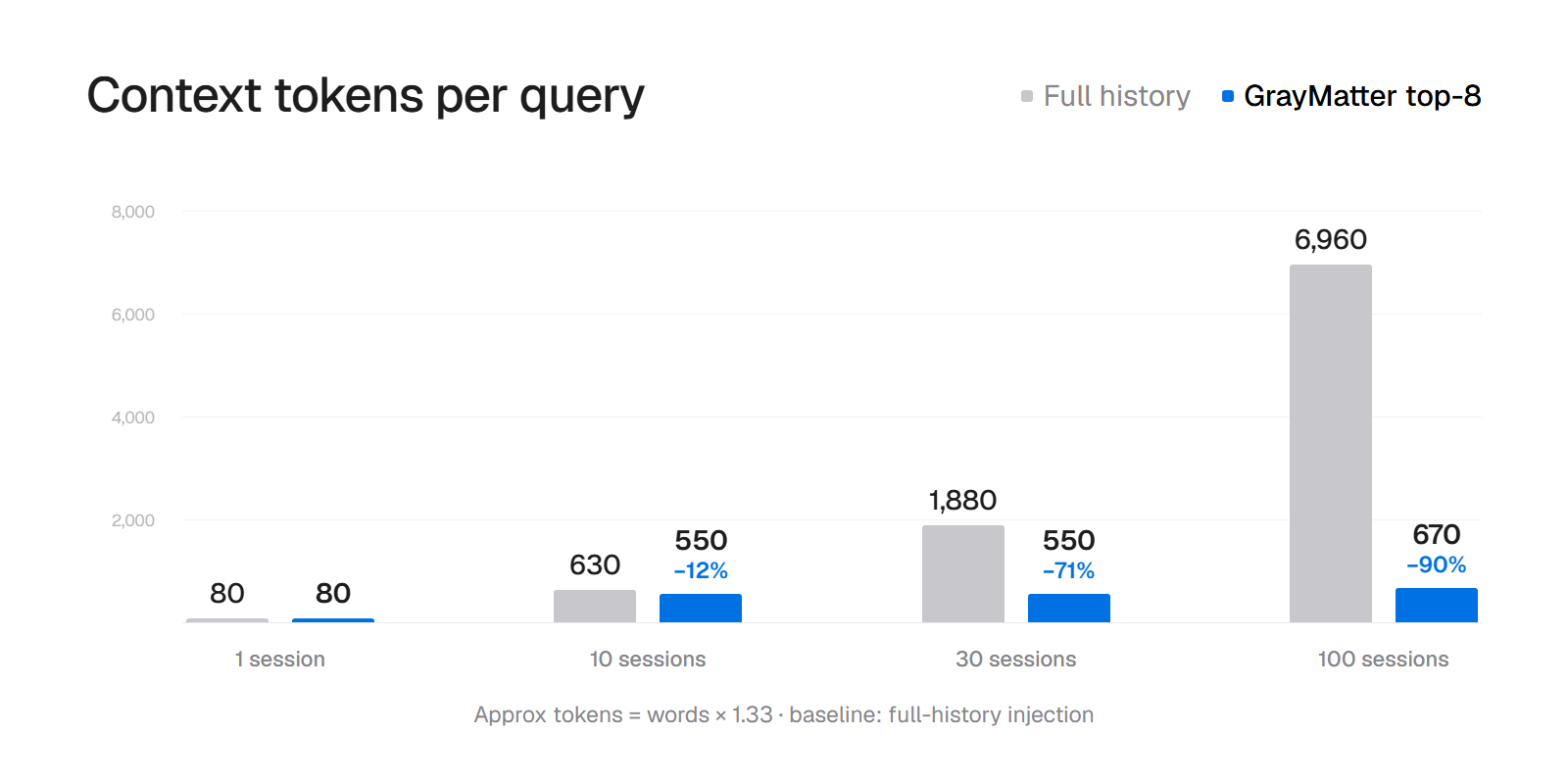
~90% reduction in context tokens — versus full-history injection. Remembers what a sliding window forgets: facts planted 96 sessions back come back 83% of the time. Context quality improves over time as consolidation surfaces only what matters. No Docker. No Redis. No API key required for storage. Drop it in once. It auto-connects to Claude Code, Cursor, Codex, OpenCode, Antigravity — any MCP-compatible client picks it up automatically.
Knowledge Graph
Your agent doesn't just remember facts — it builds a map of how they connect.
Run the daemon with --kg and every consolidation cycle extracts typed
entities (person, organization, project) and links the ones that appear
together. No manual tagging. No configuration. The graph builds itself from
ordinary use.
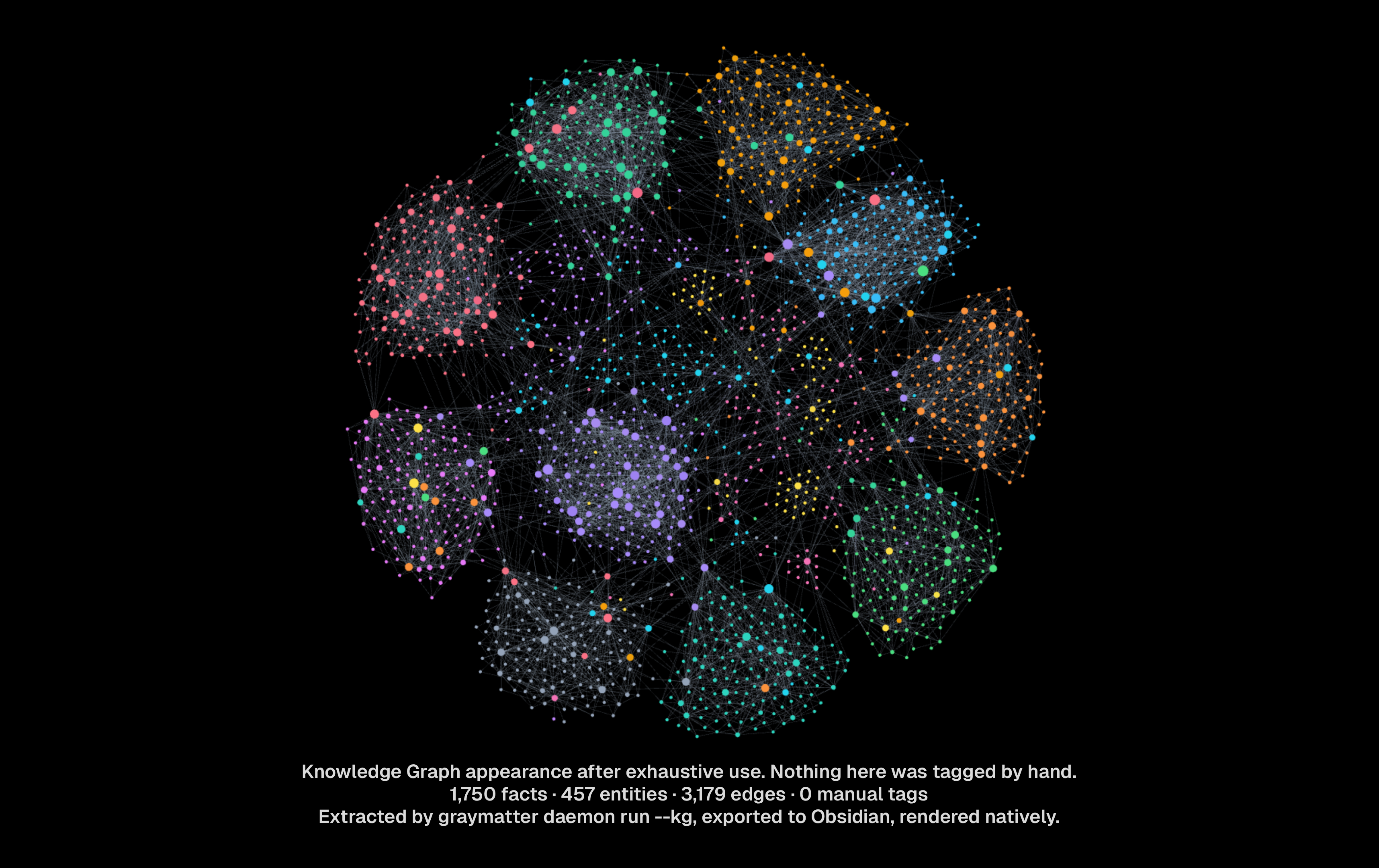
Every edge carries receipts: the fact IDs that produced it. Export to Obsidian with one command — entities become notes, connections become wikilinks, and the whole graph renders natively.
graymatter daemon run --kg # that's it — the graph builds itself
The graph as one self-contained page — inline force-directed SVG, zero external assets, works offline. Hover any edge to see the fact IDs that produced it:
graymatter kg render --out graph.html
graymatter kg render --out graph.dot    # Graphviz, for your own layout
graymatter doctor --graph --html        # analytics + this render in one go
Watch it build, one frame per session:
scripts/kg-timelapse.sh    # deterministic corpus -> frames -> GIF
                           # or anywhere: scripts/Dockerfile.kg-timelapse
Observability
You can't improve what you can't see.
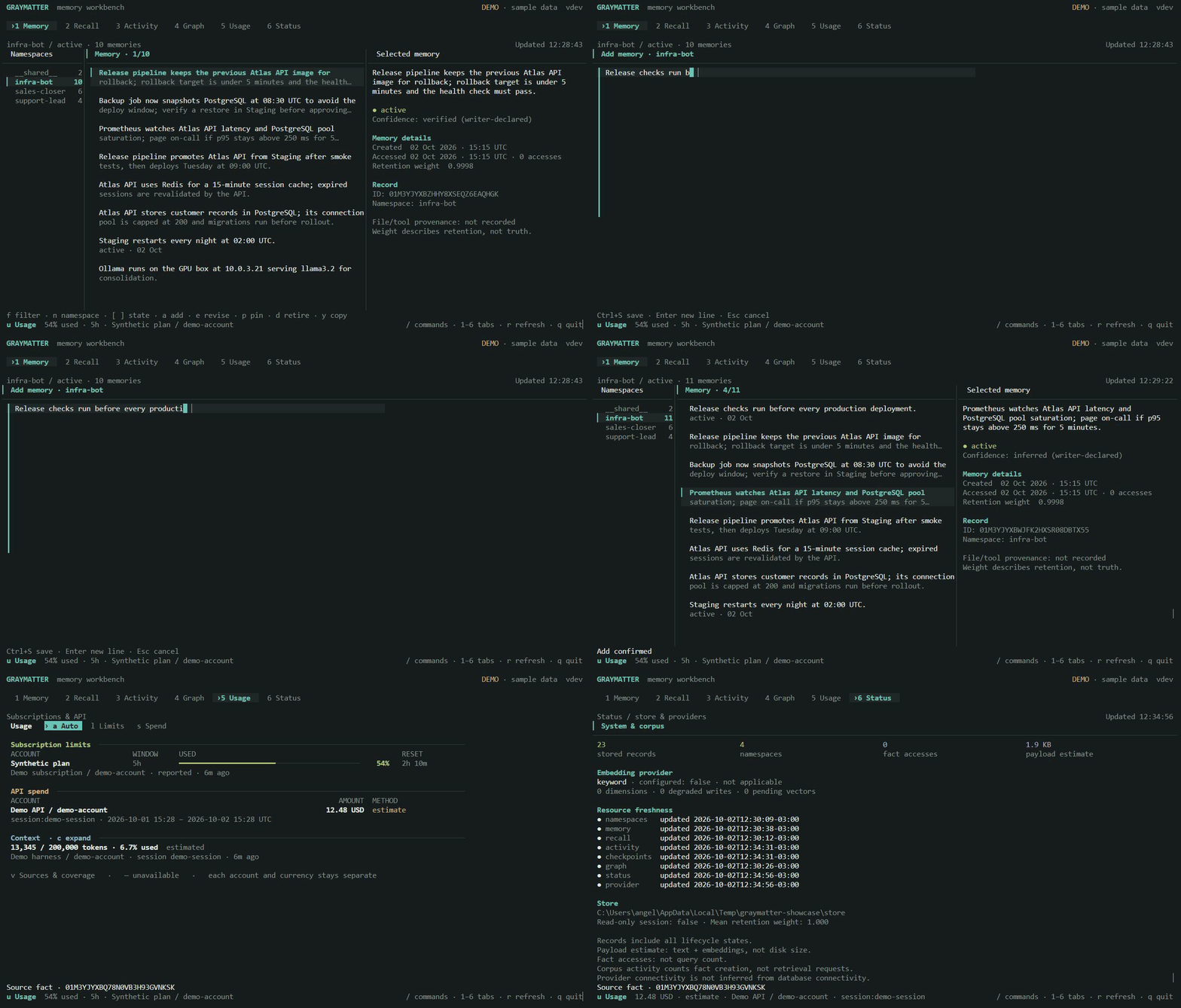
graymatter tui opens a memory workbench with six views:
| View | Purpose |
|---|---|
| Memory | Browse namespaces, filter active/retired/alias facts, inspect provenance, add, revise, retire and pin exact facts |
| Recall | Inspect ranking receipts without incrementing access counts or learning aliases |
| Activity | Inspect harness runs and checkpoints; confirm before stopping a running session |
| Graph | Follow connected entities and open recorded supporting facts |
| Usage | Switch between subscription limits and API spend, with separate session context and source status |
| Status | Inspect memory aggregates, embedding observations and configured providers |
Press 1–6 to switch views, / for the command palette, n for namespaces,
f to filter, Tab to move focus, and ? for contextual controls. Memory opens
first. Narrow terminals show one pane at a time; larger terminals show the list
and inspector together. --theme dark|light|terminal and optional --mouse
adapt the workbench to your terminal. --read-only prevents memory and session
mutations; it requires an existing store and either a running daemon or explicit
--no-daemon.
Usage stays available in the footer as well as its own view. Limits are reported per account and window; API costs retain currency, period, source and whether they are reported or estimated. Missing data remains unavailable, and failed refreshes keep the last observation marked stale. No account is connected automatically. See the workbench guide and Usage setup.
graymatter doctor --graph extends visibility to the knowledge graph itself:
hubs by degree, articulation points, orphans, and a declared connectivity
ratio — printed or emitted as JSON.
What GrayMatter gives you
| Persistent memory | Facts survive across sessions. Recall by meaning, not just keyword |
| 90% token reduction | Top-8 relevant facts instead of full-history injection |
| Automatic hooks | Claude Code injects routine recall every turn; MCP remains available for writes and focused searches (graymatter hooks install) |
| Receipts, not vibes | recall --explain returns why each fact ranked: per-signal ranks, fused score, provenance |
| Knowledge graph | Typed entities and co-mention edges, auto-populated from ordinary use |
| Self-curation | memory_reflect lets the agent add, update, forget, and link its own memories |
| Context block | Projects top facts into CLAUDE.md / AGENTS.md inside a token budget (context-sync) |
| Free auditor | doctor --audit measures tokens, duplicates, staleness, and marker conflicts in any instruction file |
| Deterministic decay | 30-day half-life; facts fade when nothing touches them. Tombstones, never deletes |
| Single binary | ~10 MB static. No Docker, no Redis, no config files, no cloud accounts |
Quick start
Install and see it working in under a minute — no API keys, no Ollama:
go install github.com/angelnicolasc/graymatter/cmd/graymatter@latest
graymatter demo              # offline sample store, then the workbench opens
graymatter init              # wire YOUR project: MCP config + memory block
graymatter init --hooks      # Claude Code: memory injected every turn
graymatter doctor            # read-only observations of local setup artifacts
Standard doctor does not write a probe, start a daemon, execute a binary on
PATH, or test whether the data directory is writable. Its config checks find
references in files; they do not prove which settings a client loaded. In JSON,
ok means no check failed, while readiness: not_evaluated keeps readiness
separate from the observations. The --health, --graph, --audit, and
--embeddings modes have separate contracts; graph rendering can write HTML.
graymatter init --global still performs that normal setup in the current
directory. It additionally installs the managed memory instructions in Claude
Code and OpenCode's home-scoped instruction files. It does not globalize
project-scoped MCP configs. If Claude's MCP server is already registered at
user scope and the instructions are already available globally, you do not
need to repeat local client setup in each repository. For a new user-scoped
Claude MCP registration, run once:
claude mcp add --scope user --transport stdio graymatter -- graymatter mcp serve
To prepare only the current project's memory directory before a session, use
graymatter init --store-only (available since v0.20.0). It creates
.graymatter/MEMORY.md if needed and leaves an existing regular
.graymatter/gray.db untouched. It does not
write client configs, instructions or hooks, change PATH, open the database,
or verify runtime health. If neither leaf is regular, symlink or other
nonregular MEMORY.md/gray.db entries cause an error; use --dir to select
the real data directory. You can repeat it safely:
graymatter init --store-only --quiet
For launchers that find the Git checkout or worktree root before running this
command, see the Claude Code examples.
Global hooks are optional (graymatter hooks install --scope global) and skip
unprepared directories. MCP can itself create gray.db when it starts, even
without init --store-only; this command does not prevent that behavior.
Project-scoped clients still need their own MCP config. Codex is the exception
in the table below because its MCP config is already home-scoped.
For a new, opt-in guarded Claude user registration, use --no-create and
prepare each selected checkout before connecting:
claude mcp add --scope user --transport stdio graymatter -- graymatter mcp serve --no-create
cd /path/to/selected/project
graymatter init --store-only --quiet
Reconnect the MCP client after preparation. --no-create is not added to
existing entries by init; update a custom registration deliberately. It
requires a regular gray.db, or a regular MEMORY.md when the database is
absent. It is neither a database health check nor a read-only mode: an accepted
server can create and write runtime files. Hooks and MCP reject a symlink,
directory, or other nonregular gray.db even in the default eager mode. For a
custom store, use the same absolute --dir for preparation, MCP, and hooks.
Before downgrading to a binary without --no-create, remove the flag from the
registration; an older binary rejects it instead of retrying with eager
creation.
MCP stdio and hooks now select one project root per invocation. With an
omitted --dir, they use that root's .graymatter directory; an explicit
relative --dir is instead relative to the process working directory. If a
previous process-directory store contains data at a different location,
select the intended store explicitly rather than moving it automatically.
See project routing and migration for

Ships withgraymatter
4911 MCP
Stars on GitHub
Momentum
- stars in total
- 491
More MCP servers from other plugins.


Auto-invoked
agentmemory
MCPShips with agentmemory: #1 Persistent memory for AI coding agents based on real-world benchmarks
 @rohitg00Install MCP
skill-seekers
MCPShips with skill-seekers: 🧠 The data layer for AI systems. Skill Seekers turns documentation sites, GitHub repos, PDFs, videos,…
 @yusufkaraaslanInstall MCP
Questions about graymatter.
- Which coding agents can use graymatter?
- graymatter works in any agent that reads an MCP config file: Claude Code, Codex, Cursor, Gemini CLI, GitHub Copilot, OpenCode and Windsurf. Each agent reads it from its own file; this page names the file for each one.