
Content
Plugin
sketchloop
Sketchloop is an agent skill that lets your coding agent create beautiful, hand-drawn-looking diagrams.

Plugin Signal51/100Fair
maintained72
capable14
documented100
adopted13
Install
$ npx -y skills add alexander-posztos/sketchloop --agent claude-code
What's inside
Badges
README
sketchloop
Sketchloop is an agent skill that lets your coding agent create beautiful, hand-drawn-looking diagrams. Ask it to "draw this as a hand-drawn diagram" and you get back a real image: the agent writes a D2 text file, renders it to a sketchy hand-drawn PNG completely offline, then looks at the rendered image and fixes its own diagram in a short loop.

Why sketchloop
I often find it hard to understand complex ideas just by reading text in a terminal. I'm a visual learner, so I like having my agent draw me an image instead. Those drawings were hit or miss though: broken layouts, unreadable labels, heavyweight browser tooling behind the scenes. I built sketchloop to get consistent, nice-looking diagrams.
Sketchloop needs no browser, no Node, no network. The only dependencies are two
single-binary CLIs: d2 (the agent describes the diagram as text,
d2 does the layout) and resvg (rasterizes it to a
PNG); the hand font is bundled. The skill tells the agent to look at the rendered PNG
and keep fixing the diagram until it looks good (hence, sketchloop), plus a few heuristics
that keep diagrams readable (split oversized graphs, cap chain lengths, short labels). It
works in any agent that can run a shell and view an image: Claude Code, Cursor, Copilot
CLI, Codex CLI.
You get three files back: the .png (to view/share), the .svg (vector,
self-contained, hand-drawn in any browser), and the editable .d2 source.
Install
First the two render dependencies, both browser-free single binaries (other install routes under Requirements):
brew install d2 resvg # macOS / Homebrew on Linux
Then the skill itself, either via skills.sh (installs into the harnesses it detects):
npx skills add alexander-posztos/sketchloop
or with the bundled installer:
git clone https://github.com/alexander-posztos/sketchloop
bash sketchloop/install.sh        # -> ~/.claude/skills/sketchloop; checks deps, verifies a render
install.sh copies the runtime files, tells you what to install if d2/resvg are missing
(it never installs anything itself; re-run with --force to overwrite an existing install),
and verifies the result with a real render. Pass a
directory to install elsewhere (e.g. bash sketchloop/install.sh .claude/skills/sketchloop
for per-project). It's all just a self-contained folder, so manual install works too:
# Claude Code, personal (every project) or per-project:
cp -R sketchloop ~/.claude/skills/sketchloop
cp -R sketchloop .claude/skills/sketchloop
# or symlink a checkout so `git pull` keeps it current:
ln -s "$PWD/sketchloop" ~/.claude/skills/sketchloop
The command name comes from the folder, so keep it named sketchloop (invoke with
/sketchloop, or just ask in plain language). Restart Claude Code once after first adding it.
Other harnesses read the same format from their own skill directories, e.g. ~/.agents/skills
(the cross-tool location), ~/.copilot/skills or .github/skills (GitHub Copilot),
.agents/skills (Codex CLI), or point the agent at SKILL.md directly. CLAUDE.md and
test.sh are dev-only; the skill itself needs SKILL.md, render.sh, reference/,
assets/, and examples/ (referenced from SKILL.md).
Use
Ask in plain language:
"Draw a hand-drawn architecture diagram of this repo: the main components and how they talk to each other."
The agent writes a .d2, renders it, checks the PNG, and drops the result into a
sketches/ folder under your working directory (one place to gitignore or delete; name a
different spot in the request if you want). You can also drive the renderer yourself:
./render.sh mydiagram.d2 # -> writes mydiagram.svg + mydiagram.png, prints the PNG path
How it works
diagram.d2 --[ d2 --sketch ]--> diagram.svg --[ font rewrite + resvg ]--> diagram.png
The agent writes the diagram as .d2 text and render.sh turns it into a hand-drawn PNG.
One catch I had to work around: SVG rasterizers ignore the hand font D2 embeds, so the
text would come out in a boring system sans. render.sh rewrites the SVG to use the
bundled Excalifont before handing it to resvg, so the letters stay hand-drawn too. (D2
has a native PNG export, but it quietly downloads a ~140 MB headless Chromium; the skill
never touches it.)
The self-correction loop
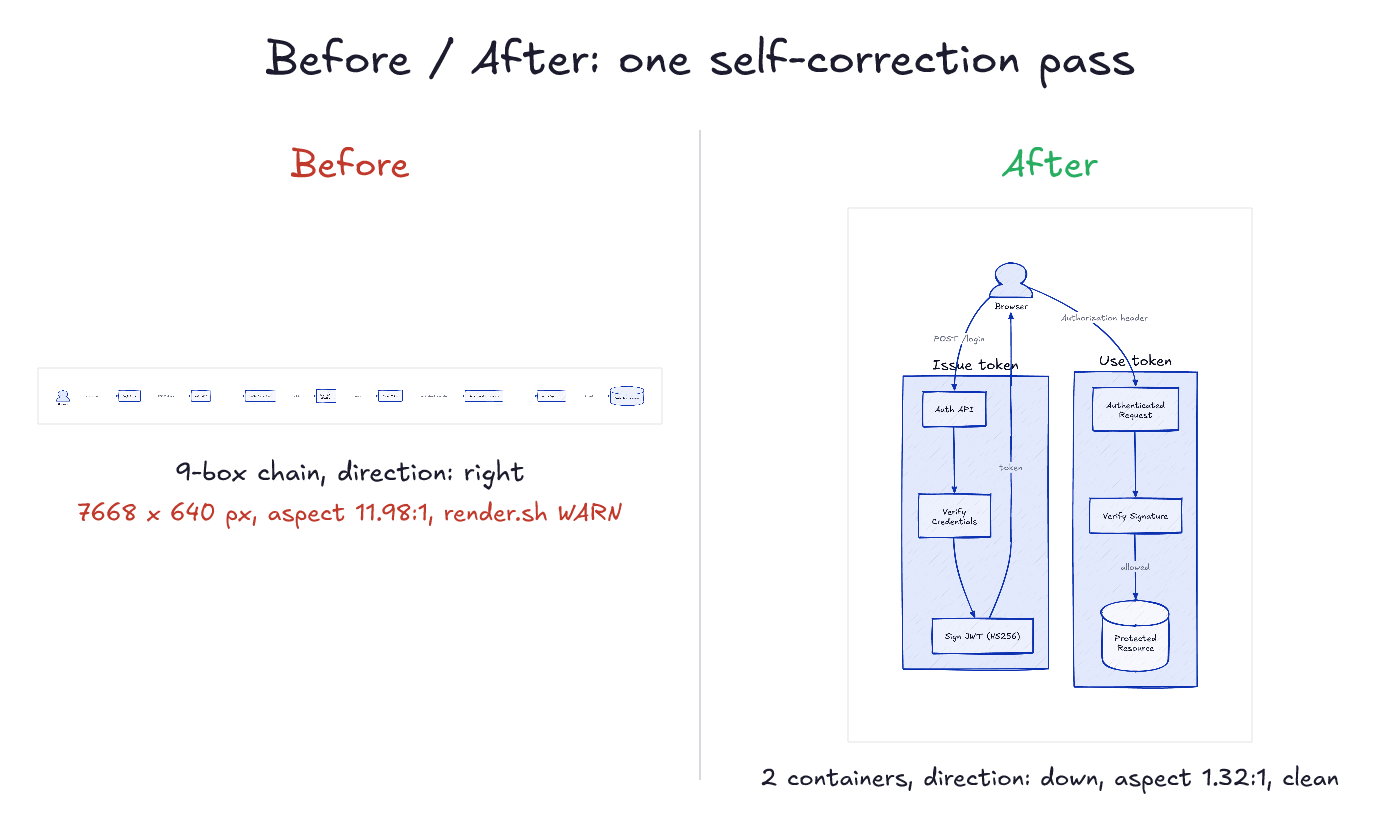
The loop matters when a first draft comes out wrong. Real example: a JWT flow written as one long chain renders as an unreadable 7668 x 640 strip. The agent reads the PNG, sees the strip, regroups the chain into two containers, and re-renders clean. It stops after ~2-3 passes.
Requirements
d2: single Go binary (verified on 0.7.1).brew install d2, the installer script at d2lang.com, orgo install oss.terrastruct.com/d2@latest.resvg: single Rust binary (verified on 0.47.0; older versions untested).brew install resvg,cargo install resvg, or a release binary.- Windows:
d2andresvgare native single binaries, butrender.shis bash; run it via Git Bash or WSL.
Credit
sketchloop is built on D2 (the diagram language and its --sketch
mode) and Excalifont, Excalidraw's own hand font
(SIL OFL 1.1). The browser-free rendering idea came from h0rv/d2-mcp
and i2y/d2mcp, and the look-and-fix loop was inspired by
coleam00/excalidraw-diagram-skill.
License
MIT for the skill (code, docs, examples). The bundled font is licensed separately under the SIL Open Font License 1.1.
File tree
FAQ
sketchloop is a Claude Code plugin with 1 hand-picked skill for content work, indexed on Flowy. Install it with the command on its page. It includes sketchloop. Its skills do not fire on their own yet. Request auto-invocation to have Flowy route them as you prompt. Free and open source.
- What is sketchloop?
- Sketchloop is an agent skill that lets your coding agent create beautiful, hand-drawn-looking diagrams.
- How do I install sketchloop?
- Run these in Claude Code: npx -y skills add alexander-posztos/sketchloop --agent claude-code. Then prompt normally.
- Does sketchloop auto-invoke its skills?
- Not yet. It is indexed on Flowy as a plain plugin. Request auto-invocation on its page and Flowy will route its skills for you as you prompt.
- Is sketchloop free?
- Yes. Flowy is free and open source, with nothing gated. You can read every skill in full before you install.
Is this plugin yours?
Claim it with GitHubSubmit a pluginPromote it