
Agent Orchestration
Plugin
agents-office
A 3D isometric office where AI agents do real work on your own Claude login. Six departments, thirty-five agents at their desks, a task bar that routes what you type to the right agent, and a Brain at the centre that is your own folder of notes.

Plugin Signal71/100Solid
maintained96
capable29
documented100
adopted60
Install
$ npx -y skills add ajsahni/agents-office --agent claude-code
Stats
635
Stars
186
Forks
Active
Maintenance
JavaScript
Language
7d ago
Last commit
2mo ago
Created
4h ago
Added
Repo: ajsahni/agents-office
What's inside
README
Agents Office v3 (Beta)
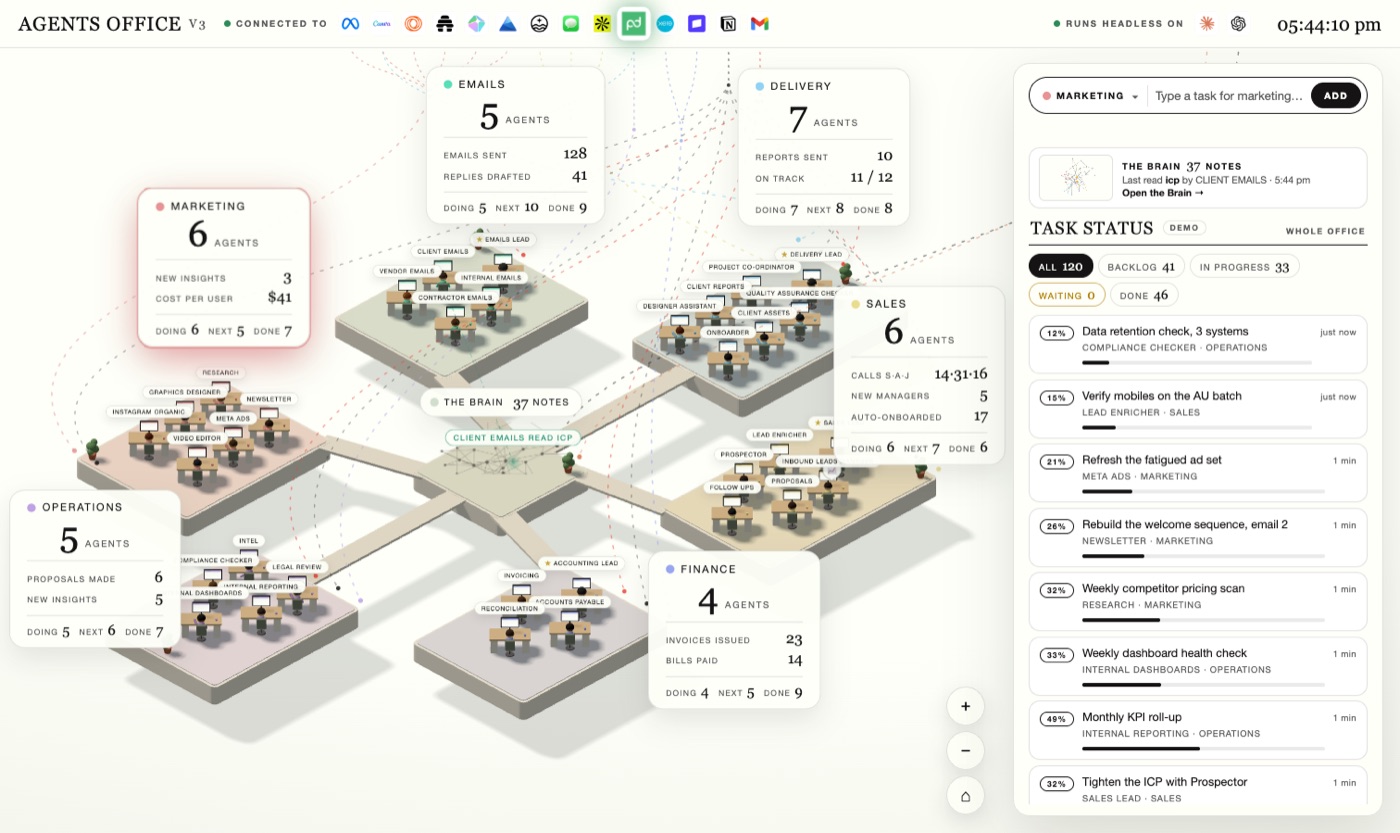
A 3D isometric office where AI agents do real work on your own Claude login.
Six departments, thirty-five agents at their desks, a task bar that routes what you type to the right agent, and a Brain at the centre that is your own folder of notes. Type a task, the office gives it to the right person, they read your notes, use the connectors you have already set up in Claude Code, do the work, and file the result back into your notes. Everything runs on your machine.
Beta. It works end to end. Expect rough edges and tell us about them in Issues.
License, in plain English: Agents Office is a Sahni.ai product. It is free for personal and internal use. You may not sell it, resell it, or build a paid product on it. You may not rename it, rebrand it, strip the Sahni.ai mark or the notices, present it as your own, or wire it into or bundle it with another product, agent system or workforce. (Formal terms: PolyForm Noncommercial 1.0.0 plus Sahni.ai's additional terms — see LICENSE.) The page carries the Sahni.ai mark at the bottom-left and a licence line along the bottom; leave them in place.
Latest updates
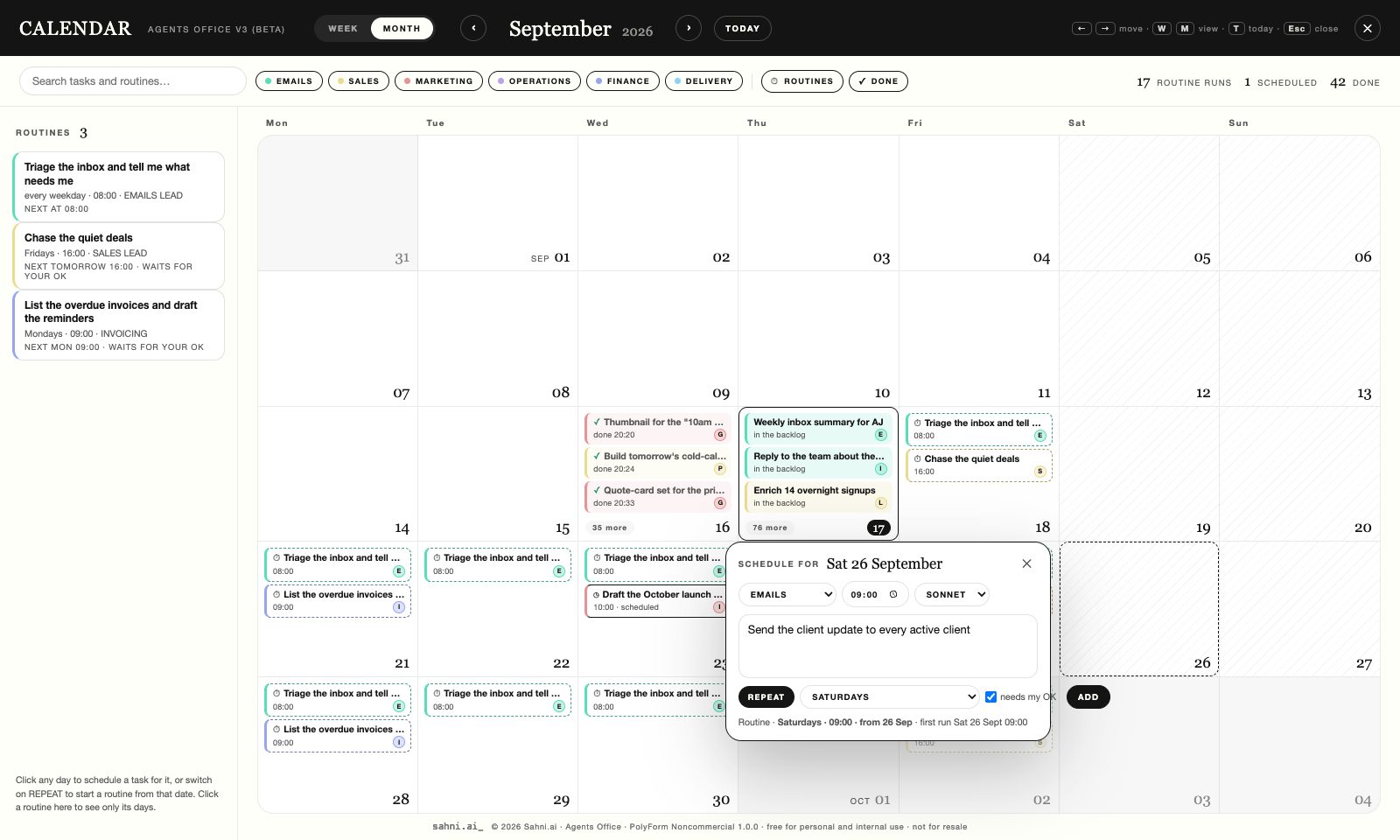
- The calendar (P) — 17 Sep 2026 · Everything on the day it belongs to: finished tasks, today's work, tasks you have scheduled, and every routine projected forward. Click any day to schedule a task for it, or switch on REPEAT to start a routine from that date. A rail lists the routines themselves. Month and week, dark mode too. → The calendar
- Agent Teams — 16 Sep · Press TEAM or say "as a team": the department lead splits the job across its desks, they work at the same time, leave notes for each other, and the lead writes the final. → Agent Teams
- Claude in Chrome — 16 Sep · The agents can use your own browser for any site you are signed in to, under the same read-freely, act-only-when-asked rule. → Claude in Chrome
- Models by name, effort, and the usage gauge — 9 Sep · Sonnet, Opus or Fable per task, routine, agent or office; an effort menu; your plan's session and week in the top bar. → Which model
- Routines — 9 Sep · Tasks on the office's own clock, with "needs my OK" before anything goes out. → Routines
- The lead interviews you, and the agents learn from corrections — 7 Sep · Say "set up" to a department lead; every
revise: …becomes a standing rule. → Teach the agents
The full list, release by release: CHANGELOG.
What you need
- macOS or Linux (Windows: works with
npmcommands directly,./setupis Bash only) - Node.js 20+ — https://nodejs.org
- git
- Claude Code, logged in with your Claude account, or an
ANTHROPIC_API_KEY
Install
git clone https://github.com/ajsahni/agents-office.git
cd agents-office
./setup          # checks Node, git and Claude; installs; builds; boots once
npm start        # → http://localhost:4520
Without ./setup: npm install && node build.mjs && npm start.
First five minutes
- Open http://localhost:4520. The panel on the right says LIVE · CLAUDE when the server is
connected. Double-clicking
dist/command-centre-v2.htmlopens the same office on its own, without a server, in demo mode. - In the bar at the top of the panel, pick a department, type a task in plain words, press Add. Claude picks the agent and names them; the task appears in the feed; the agent picks it up, works, and the deliverable lands in that agent's chat and in your brain folder as a note.
- Click any agent to talk to them. They answer in their role, grounded in your notes.
Say
revise: make it shorterand they rework their last deliverable. - Press G, or click the Brain, to open your notes as a graph. Hover a note to see its links, click it to read where it sits and who read or wrote it.
- The top bar shows the connectors your Claude Code is connected to. When an agent uses one, its logo pulses and the wire into that department lights up.
- The first deliverables will be competent and generic: the agents know the sample studio and one sentence about their own job. Point the brain at your notes, then teach them how you work (below). That is where the office becomes yours.
Connectors
The bar under CONNECTED TO is real: it is the list from claude mcp list on this machine,
which is the same list the agents get as tools. Gmail, Slack, Notion, Google Drive, Canva,
whatever you have connected in claude.ai or added with claude mcp add. A server that needs
authentication shows grey with the reason on hover, and is not wired to any pod until it works.
Nothing connected yet? The bar says so.
Agents can call those servers while they work, plus web search. They never get Bash, file tools or sub-agents. Their standing rule: read freely; send, post, pay, delete or change anything outside this machine only when your task explicitly asks for that exact action. A finished deliverable says which tools it used, and the note in your brain records them.
Decide what the agents may touch in office.config.json:
"mcp": { "allow": [], "deny": ["Stripe"], "departments": { "Slack": ["emails", "ops"] } },
"tools": { "web": true, "browser": true },
"teams": { "enabled": true, "max": 4 }
allow empty means every connected server. deny keeps a server in the bar but out of the
agents' hands ("deny": ["Chrome"] works the same for the browser). departments says which pods
a server is wired to (known brands have a default; anything else feeds every pod). Set tools.web
to false to keep the agents off the web, tools.browser to false to keep them out of your
Chrome (see Claude in Chrome).
Tool use needs the Claude Code login; on an ANTHROPIC_API_KEY the agents write from your notes only.
Make the agents yours
The 35 agents are in office.agents.json: an id, a department, a name, a role, what they do,
and the connectors they usually use. Change the name, the role, what they do and their tools.
Departments, leads and seats are fixed: six pods, 35 desks, that is the office. A new kind of
agent is a renamed seat in the right department.
The easy way is to let Claude do it. Open Claude Code in this folder and say what you want:
claude
> Rename the Newsletter agent to PODCAST NOTES. It turns each episode into show notes and a LinkedIn post, and uses Google Drive.
> Make the Sales department about wholesale accounts, not inbound leads. Rewrite what each agent does.
> Tell every Finance agent to use Xero and nothing else.
Claude reads CLAUDE.md, writes your changes to office.agents.local.json (yours, ignored by
git, so git pull never overwrites it), and validates them with npm run check. Restart the
office and the desks carry the new names. Edit the file by hand if you prefer; the shape is:
{ "agents": [
  { "id": "newt", "name": "PODCAST NOTES", "role": "Podcast Notes Agent",
    "does": "Turns each episode into show notes and a LinkedIn post.", "tools": ["google drive"],
    "brief": "Show notes are five bullets and a pull quote. The LinkedIn post opens with the quote, never with the episode title." }
] }
Edits to id, department or lead are ignored, and the server says so at start. The same
file can also sit in your brain as <brain>/Agents Office/agents.json; the office reads the
shipped roster, then the brain's, then the local file.
Teach the agents how you work
Renaming an agent says what it does. It does not say how. Out of the box every agent knows its one-line job, your notes, and a rule to hand over a finished deliverable, so the first results are competent and generic. Two ways to fix that, both read before every task:
- A brief is a few standing sentences on one agent: tone, red lines, who to escalate to.
It is the
brieffield above. - A skill is a folder in your brain,
<brain>/Agents Office/skills/<name>/, with aSKILL.md(when it applies, the steps, the shape, the rules) and the template or example beside it. Bind it to an agent or a department in its front matter. Same shape as a Claude Code skill.
---
name: proposal
description: How we write a client proposal
agents: [piper]
---
# Writing a proposal
Use this for any request that ends in a document a client says yes or no to.
1. Prices come from `10-Business/offer-ladder.md`. Never invent one.
2. Follow `template.md` beside this file, section for section.
- Three options, always. Recommend the middle one.
Three example skills ship in skills/ for the sample studio. The fastest way to write yours is
to hand Claude Code what you already have, the SOP, the email you keep copying, the last report
you were happy with, and ask for a skill:
claude
> Here is the proposal I sent Harbourside. Turn it into a skill for the Proposals agent: the
  shape as a template, the rules I follow, and keep this one as the example.
Skills and briefs take effect on the next task, no restart. npm run check validates them and
http://localhost:4520/api/skills shows who has what. The full guide, including what the agent
sees and how to write a good one, is SKILLS.md.
Or let the lead interview you
Click a department lead and say set up. The lead asks five questions, one at a time: what the department does here, the job you do most, what a good result looks like, what must never happen, which tools and people are involved. Then it writes a brief for each agent on its team and a skill for the job you described, into your brain, and tells you exactly what it wrote and one task to type to try it. Nothing is written until the last answer. "skip", "done" and "cancel" do what they say. A lead whose department has nothing of yours yet offers this in its greeting.
They learn from your corrections
Send a deliverable back with revise: … in the agent's chat and the correction is recorded in
<brain>/Agents Office/feedback/<agent>.md. Claude sorts it: a one-off about that task, or a
standing rule ("proposals are always one page") that the agent then applies to every task from
then on. The file is plain Markdown and it is yours: reword a rule, delete a line to unlearn it,
move a one-off up to make it a rule. When a rule is really a process, ask Claude Code to fold it
into the skill.
Routines: the office runs on its own clock
A routine is a task the office does by itself, on a timetable: every weekday at 08:00, every Monday, every hour. In this release routines are for Emails, Accounting and Sales; the other departments get them later, and say so if you try.
Three ways to set one, all the same underneath:
- Type it in the bar with the time in the sentence.
every weekday at 8am, triage the inbox and tell me what needs me. The hint line reads the schedule back before you press Add. Or press REPEAT and pick a cadence and a time. Times are this machine's clock.
The task box grows as you type (Shift+Enter for a new line, Enter adds). The ⤢ button in the box, or ⌘⇧E, opens a big editor with room for a whole brief; ⌘↵ adds from there, Esc closes.
- Tell a department lead in chat. "every Monday 9am, list the overdue invoices and draft the
reminders". The lead puts it on the right desk and reads the timetable back on
routines;pause …,resume …,run … nowanddelete …work with a few words from the name.
File tree
FAQ
agents-office is a Claude Code plugin with 3 hand-picked skills for agent orchestration work, indexed on Flowy. Install it with the command on its page. It includes client-reply, house-style, proposal. Its skills do not fire on their own yet. Request auto-invocation to have Flowy route them as you prompt. Free and open source.
- What is agents-office?
- A 3D isometric office where AI agents do real work on your own Claude login. Six departments, thirty-five agents at their desks, a task bar that routes what you type to the right agent, and a Brain at the centre that is your own folder of notes.
- How do I install agents-office?
- Run these in Claude Code: npx -y skills add ajsahni/agents-office --agent claude-code. Then prompt normally.
- Does agents-office auto-invoke its skills?
- Not yet. It is indexed on Flowy as a plain plugin. Request auto-invocation on its page and Flowy will route its skills for you as you prompt.
- Is agents-office free?
- Yes. Flowy is free and open source, with nothing gated. You can read every skill in full before you install.
Is this plugin yours?
Claim it with GitHubSubmit a pluginPromote it