
MCP Servers
Plugin
gitlab-mcp
📖 Documentation → Setup guides, environment variables, and the full tool reference live on the hosted docs site.

Plugin Signal72/100Solid
maintained99
capable23
documented100
adopted70
Install
$ npx -y skills add zereight/gitlab-mcp --agent claude-code
Stats
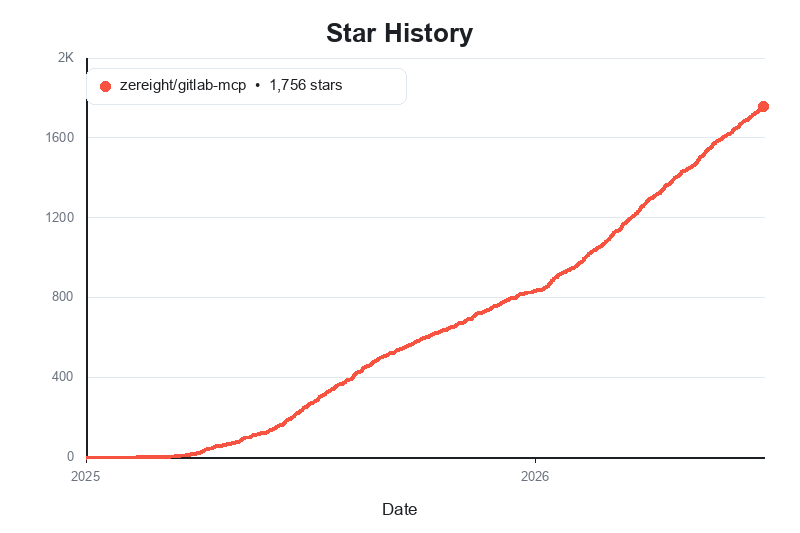
2,029
Stars
356
Forks
Active
Maintenance
TypeScript
Language
MIT
License
2d ago
Last commit
1y ago
Created
12h ago
Added
Repo: zereight/gitlab-mcp
What's inside
Skill(2 skills)
/gitlab-mcpUse this skill when working with the GitLab MCP server tools for merge requests, issues, repositories, pipelines, work items, variables, dependency proxy, vulnerabilities, webhooks, search, CI catalog, and related GitLab workflows./gl-cliUse GitLab from the terminal without registering an MCP server. Covers authenticating the zereight-mcp-gitlab CLI (PAT or OAuth device flow) and reading merge requests, diffs, discussions, issues, and pipelines. Use when the user asks about a GitLab MR/issue/pipeline and no
Badges







README
GitLab MCP Server
English | 한국어 | 简体中文 | Português (Brasil)
📖 Documentation → Setup guides, environment variables, and the full tool reference live on the hosted docs site.
@zereight/mcp-gitlab
Agent-workflow-optimized GitLab MCP — manage projects, merge requests, issues, pipelines, wiki, releases, tags, milestones, and more through stdio, SSE, and Streamable HTTP.
Supports PAT, OAuth, read-only mode, dynamic API URLs, and remote authorization for VS Code, Claude, Cursor, Copilot, and other MCP clients.
Why use this GitLab MCP?
- 267 tools +
discover_tools— start with a small toolset; activate more at runtime without CQRS-style grouping - MR 2-step review —
list_merge_request_changed_files→ batchedget_merge_request_file_diff - Agent Skill built in — workflow guidance in
skills/gitlab-mcp/ - Flexible auth — Personal Access Token, local OAuth2 browser flow, MCP OAuth proxy, and per-request remote authorization
- Multiple transports — stdio for local clients, SSE for legacy clients, and Streamable HTTP for modern remote deployments
- Client-friendly setup — examples for Claude Code, Codex, Antigravity, OpenCode, Copilot, Cline, Roo Code, Cursor, Kilo Code, and Amp Code
- Self-hosted ready — works with custom GitLab instances, proxy settings, and dynamic API URL routing
- JMESPath result filtering — optional
jmespathon tool calls (seetools/list) shrinks JSON results without changing GitLab API requests; when response masking is enabled, JMESPath runs on masked data.
How we compare
| @zereight/mcp-gitlab | GitLab MCP A (community CQRS-style) | |
|---|---|---|
| Best for | AI agent workflows | Enterprise multi-instance / grouped tools |
| Tool model | ~267 granular tools + discover_tools | ~50–60 grouped browse_* / manage_* tools |
| MR review | 2-step batched diff | Varies |
| Node.js | >=18.17 | Often >=24 |
| License | MIT | Varies |
Quick start: choose either Personal Access Token or OAuth2 setup below, install @zereight/mcp-gitlab, and use zereight-mcp-gitlab in your MCP client configuration.
Client Setup Guides
- Claude Code Setup Guide
- VS Code Setup Guide
- GitHub Copilot Setup Guide
- Codex Setup Guide
- Cursor Setup Guide
- JSON-Based MCP Clients Setup Guide - for Factory AI Droid, OpenClaw, and OpenCode style clients
- OAuth2 Authentication Setup Guide
- Environment Variables Reference
- Stateless Mode — Multi-Pod HPA
- Custom Agents and Multiple PAT Setup
Usage
Setup Overview
Authentication Methods
The server supports four authentication methods:
For local/desktop use (most common):
- Personal Access Token (
GITLAB_PERSONAL_ACCESS_TOKEN) — simplest setup - OAuth2 — Local Browser (
GITLAB_USE_OAUTH) — recommended for better security
For server/remote deployments:
- OAuth2 — MCP Proxy (
GITLAB_MCP_OAUTH) — for remote MCP clients such as Claude.ai - Remote Authorization (
REMOTE_AUTHORIZATION) — multi-user deployments where each caller provides their own token
Quick setup paths
- Claude Code: see Claude Code Setup Guide
- VS Code: see VS Code Setup Guide
- GitHub Copilot: see GitHub Copilot Setup Guide
- Codex: see Codex Setup Guide
- Cursor: see Cursor Setup Guide
- Factory AI Droid / OpenClaw / OpenCode style clients: see JSON-Based MCP Clients Setup Guide
- OAuth browser flow details: see OAuth2 Authentication Setup Guide
- OAuth without a localhost callback (SSO, remote shell, background clients): run
zereight-mcp-gitlab auth(GitLab 17.9+ device flow; 17.2–17.8 needoauth2_device_grant_flow), then start the server withGITLAB_USE_OAUTH=true. See standalone device-flow command.
For the simplest local setup, start with a Personal Access Token. For browser-based local auth, use OAuth2. For remote or multi-user deployments, continue to the MCP OAuth and Remote Authorization sections later in this README.
Install the server once:
brew tap zereight/gitlab-mcp https://github.com/zereight/gitlab-mcp
brew install zereight/gitlab-mcp/zereight-mcp-gitlab
Or with npm:
npm install -g @zereight/mcp-gitlab
Or with Nix, by adding this flake to your own:
# flake.nix
inputs.gitlab-mcp.url = "github:zereight/gitlab-mcp";

# wherever you configure your MCP client:
command = lib.getExe inputs.gitlab-mcp.packages.${system}.default;
The store path is pinned by your lock file; update it with nix flake update gitlab-mcp.
The examples use zereight-mcp-gitlab, a less collision-prone alias for the legacy mcp-gitlab binary. If your MCP client cannot find it, use the absolute path from which zereight-mcp-gitlab.
No global install? Pin npx to the previous stable release (the version these docs recommend), for example npx -y @zereight/mcp-gitlab@2.1.68. If you always want the newest release, use npx -y @zereight/mcp-gitlab@latest instead. The server prints a notice to stderr on startup when a newer version is available (disable with GITLAB_DISABLE_VERSION_CHECK=true).
Using CLI Arguments (for clients with env var issues)
Some MCP clients (like GitHub Copilot CLI) have issues with environment variables. Use CLI arguments instead:
{
  "mcpServers": {
    "gitlab": {
      "command": "zereight-mcp-gitlab",
      "args": ["--token=YOUR_GITLAB_TOKEN", "--api-url=https://gitlab.com/api/v4"],
      "tools": ["*"]
    }
  }
}
Available CLI arguments:
--token- GitLab Personal Access Token (replacesGITLAB_PERSONAL_ACCESS_TOKEN)--api-url- GitLab API URL (replacesGITLAB_API_URL)--read-only=true- Enable read-only mode (replacesGITLAB_READ_ONLY_MODE, deprecated — prefer--permission-mode=readonly)--permission-mode- Permission level:readonly,modify(no delete or teardown tools), orfull(replacesGITLAB_PERMISSION_MODE, defaultfull)--use-wiki=true- Enable wiki API (replacesUSE_GITLAB_WIKI, legacy — preferGITLAB_TOOLSETS=wiki)--use-milestone=true- Enable milestone API (replacesUSE_MILESTONE, legacy — preferGITLAB_TOOLSETS=milestones)--use-pipeline=true- Enable pipeline API (replacesUSE_PIPELINE, legacy — preferGITLAB_TOOLSETS=pipelines)--disable-version-check=true- Disable the startup new-version notice (replacesGITLAB_DISABLE_VERSION_CHECK)--masking-enabled=true- Enable text-response masking (replacesGITLAB_MASKING_ENABLED)--masking-config- Path to a masking configuration file (replacesGITLAB_MASKING_CONFIG)--masking-policy-file- Path to a protected managed-policy file (replacesGITLAB_MASKING_POLICY_FILE)--masking-workspace-dir- Directory used to resolve masking files (replacesGITLAB_MASKING_WORKSPACE_DIR)--compact-results=true- Truncate oversized MCP tool replies and attach a CLI command for the full payload (replacesGITLAB_MCP_COMPACT_RESULTS; default off)--compact-result-chars- Character threshold for compacting (replacesGITLAB_MCP_COMPACT_RESULT_CHARS; default4000)
CLI arguments take precedence over environment variables.
zereight-mcp-gitlab auth is a subcommand (not an MCP server flag). It runs GitLab device flow and exits. See CLI Arguments.
The same binary is also a gh-style GitLab CLI (tool <name> or curated forms such as mr list). No MCP registration is needed — set a PAT, or run auth and set GITLAB_USE_OAUTH=true: see CLI without MCP. Use it for the full payload in a terminal. MCP replies stay in the chat unless you set GITLAB_MCP_COMPACT_RESULTS=true (or --compact-results), which replaces oversized tool replies with a preview and a CLI command. Human CLI is never compacted. Same permission mode, toolsets, denied-tools regex, and tool-policy filters. Destructive tools and GITLAB_TOOL_POLICY_APPROVE tools need --yes. See Human CLI.
Fine-grained tool filtering: use
GITLAB_PERMISSION_MODE=modifyto allow create/update while blocking every delete tool and the destructive teardown tools (cancel_pipeline,cancel_pipeline_job,stop_environment,stop_stale_environments,unprotect_branch) — including destructive mutations (deletion and teardown verbs) throughexecute_graphqlandpush_filesdelete/moveactions — orGITLAB_PERMISSION_MODE=readonlyfor read-only access. You can also enable toolset groups withGITLAB_TOOLSETS=<group,…>, allow-list individual tools withGITLAB_TOOLS=<tool,…>(e.g. read-only groups plus a few specific write tools), and deny-list by pattern withGITLAB_DENIED_TOOLS_REGEX. The legacyUSE_GITLAB_WIKI/USE_MILESTONE/USE_PIPELINEflags are kept for backward compatibility only. See Tools Reference and Environment Variables.
- sse
docker run -i --rm \
  -e HOST=0.0.0.0 \
  -e GITLAB_PERSONAL_ACCESS_TOKEN=your_gitlab_token \
  -e GITLAB_API_URL="https://gitlab.com/api/v4" \
  -e GITLAB_PERMISSION_MODE=readonly \
  -e GITLAB_TOOLSETS=wiki,milestones,pipelines \
  -e SSE=true \
  -e SSE_AUTH_TOKEN=your_mcp_sse_token \
  -p 3333:3002 \
  zereight050/gitlab-mcp
File tree
FAQ
gitlab-mcp is a Claude Code plugin with 2 hand-picked skills for mcp servers work, indexed on Flowy. Install it with the command on its page. It includes gitlab-mcp, gl-cli. Its skills do not fire on their own yet. Request auto-invocation to have Flowy route them as you prompt. Free and open source.
- What is gitlab-mcp?
- 📖 Documentation → Setup guides, environment variables, and the full tool reference live on the hosted docs site.
- How do I install gitlab-mcp?
- Run these in Claude Code: npx -y skills add zereight/gitlab-mcp --agent claude-code. Then prompt normally.
- Does gitlab-mcp auto-invoke its skills?
- Not yet. It is indexed on Flowy as a plain plugin. Request auto-invocation on its page and Flowy will route its skills for you as you prompt.
- Is gitlab-mcp free?
- Yes. Flowy is free and open source, with nothing gated. You can read every skill in full before you install.
Is this plugin yours?
Claim it with GitHubSubmit a pluginPromote it