
Design
Plugin
mcp-excalidraw
mcp-excalidraw-server gives AI agents a live Excalidraw canvas they can draw on, look at, refine, and save into your repo.

Plugin Signal70/100Solid
maintained99
capable14
documented100
adopted72
Install
$ npx -y skills add yctimlin/mcp_excalidraw --agent claude-code
Stats
2,509
Stars
281
Forks
Active
Maintenance
TypeScript
Language
MIT
License
2d ago
Last commit
1y ago
Created
1h ago
Added
Repo: yctimlin/mcp_excalidraw
What's inside
Badges


README
Excalidraw MCP Server, CLI & Agent Skill
mcp-excalidraw-server gives AI agents a live Excalidraw canvas they can draw on, look at, refine, and save into your repo. Your agent creates architecture diagrams and flowcharts programmatically, sees its own work via screenshots, fixes layout problems, and exports .excalidraw files you can commit next to your code.
One canvas, three ways to drive it:
- Agent Skill + CLI — recommended for coding agents (Claude Code, Codex CLI, Cursor, OpenCode):
npx -y mcp-excalidraw-server <command>. Zero config, auto-starts the canvas, composable JSON in/out. - MCP Server — 26 tools over stdio for any Model Context Protocol client (Claude Desktop, Cursor, Codex CLI, Antigravity, ...). Speaks MCP
2026-07-28(server/discover, per-request_metaenvelope, tool calls without a handshake) and stays compatible with 2025-era clients that open withinitialize. - REST API — plain HTTP for LangChain and custom frameworks.
Core drawing runs locally (Node ≥ 20, MIT licensed) — no API keys or accounts. Mermaid conversion runs in the local browser canvas; share is optional and uploads an encrypted scene to excalidraw.com. The canvas page loads Excalidraw's fonts from the esm.sh CDN.
Demo
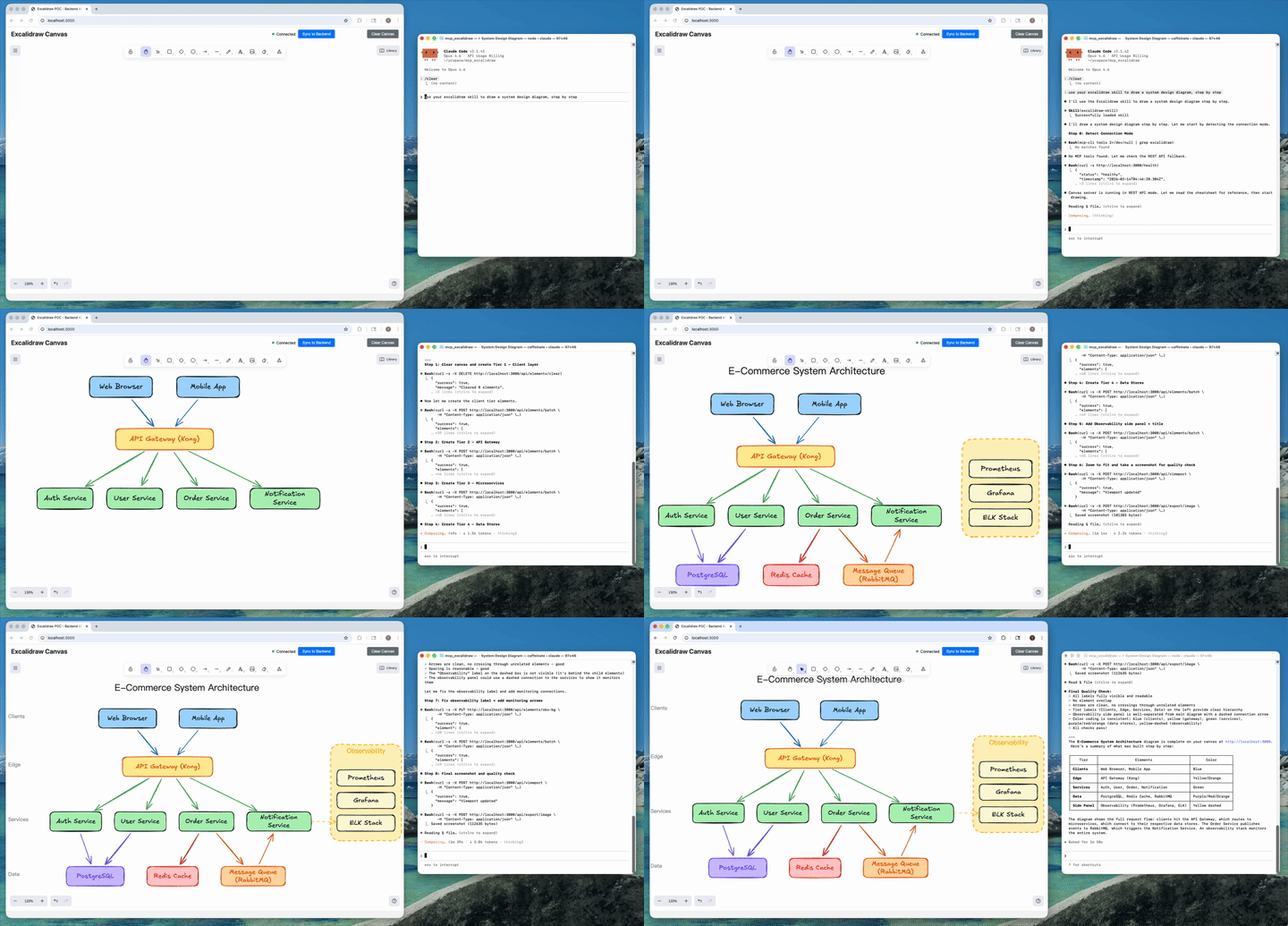
AI agent creates a complete architecture diagram from a single prompt (4x speed). Watch full video on YouTube
Table of Contents
- Demo
- What It Is
- How We Differ from the Official Excalidraw MCP
- What's New
- Installation
- Agent Skill
- CLI Reference
- Headless Rendering
- Configure MCP Clients
- Claude Desktop
- Claude Code
- Cursor
- Codex CLI
- OpenCode
- Antigravity (Google)
- MCP Tools (26 Total)
- Quick Start (From Source / Docker)
- Testing
- FAQ
- Troubleshooting
- Known Issues / TODO
- Development
- License
What It Is
Ask your agent to "draw the architecture of this service" and it produces a real, editable Excalidraw diagram — not a one-shot image. Because the agent can query, screenshot, and update individual elements, it iterates until labels fit, nothing overlaps, and arrows route cleanly; then it exports the result as a .excalidraw file that lives in your repo and gets updated when the code changes.
Under the hood there are two processes, one product:
- Canvas server: Excalidraw web UI + REST API + WebSocket real-time sync (default
http://127.0.0.1:3000) - A thin front-end of your choice: the CLI, the MCP stdio server, or raw HTTP — all drive the same canvas
Since v1.1 the canvas server starts itself: canvas-driving CLI commands (and the MCP server on launch) auto-spawn it if nothing is listening. status only inspects the current server state. Set EXCALIDRAW_NO_AUTOSTART=1 to opt out.
How We Differ from the Official Excalidraw MCP
Excalidraw has an official MCP — a chat widget that streams a diagram inline from a single prompt (the model gets two tools: a format reference and create_view). It's great for "draw me a cat" in Claude or ChatGPT. We solve a different problem: giving coding agents a persistent canvas workbench.
| Official Excalidraw MCP | This Project | |
|---|---|---|
| Approach | Prompt in, diagram out (one-shot widget) | Programmatic element-level control (CLI + 26 MCP tools) |
| State | Checkpoints inside the chat widget | Persistent live canvas with real-time sync |
| Element CRUD | Declarative re-send with delete markers | Full create / read / update / delete per element |
| AI sees the canvas | No | describe (structured text) + screenshot (image) |
| Iterative refinement | Regenerate from checkpoint | Draw → look → adjust → look again, element by element |
| Layout tools | No | align, distribute, group / ungroup, lock, duplicate |
| File I/O | No model-facing export | .excalidraw export/import — diagrams as repo artifacts |
| Snapshot & rollback | Widget-side checkpoints | Named server-side snapshots |
| Mermaid conversion | No | mermaid / create_from_mermaid |
| Shareable URLs | Widget-only | share / export_to_excalidraw_url |
| Viewport control | Camera animations | set_viewport (zoom-to-fit all or selected elements, center on one element, manual zoom) |
| Works without MCP | No | Yes — CLI + agent skill + REST API |
| Multi-agent | Single chat | Multiple agents on the same canvas concurrently |
TL;DR — The official MCP shows Excalidraw diagrams in your chat. This project gives your coding agent a full Excalidraw workbench: a canvas it can draw on, inspect, refine, and commit to your repo.
What's New
Current package version: 2.1.2. The current release line is v2.1 — Headless Rendering.
v2.1.2 — Fixes
- Snapshot restore no longer wipes the canvas; frames restore and import. (#101, thanks @sanjayy0612; #120)
- One label per shape, even across updates and renames. (#121, thanks @sdrshn-nmbr)
- Dropped images survive reload and show up in exports. (#122, thanks @appdesigngeeks)
- Text is no longer clipped when the font loads late. (#123, #124)
v2.1.1 — Fixes
- Large exports no longer fail with
invalid order key. (#115, thanks @fernandovmacedo) - Text and arrows no longer drift on each canvas sync. (#116, thanks @hidinginabunker)
- Library installs work and persist; labels re-wrap on resize. (#113, thanks @lukemariano)
v2.1 — Headless Rendering
- Screenshots and image exports no longer need a browser tab.
screenshot,export_to_imageandget_canvas_screenshotrender inside the canvas server: Excalidraw's own SVG exporter runs under Node (jsdom) and resvg rasterizes to PNG with bundled Excalifont/Virgil/Cascadia/Liberation fonts. Same output as the tab, deterministic (byte-identical for an unchanged scene), a few milliseconds per render, works in CI and Docker. See Headless Rendering. - New render options on the CLI, REST and MCP:
dark,scale(1–4),padding,elementIds(render a subset),frameId(render one frame),embedFonts.--renderer browserkeeps the old tab path. - New
rendercommand:npx -y mcp-excalidraw-server render docs/arch.excalidraw --out docs/arch.pngrenders a committed file offline — no canvas server at all. - Shapes created without
width/heightnow default to 100×100 in exports and renders (matching the canvas) instead of collapsing to 0×0. - Text stored with
width: 0, height: 0(scenes from pre-2.0 servers) is re-measured on export instead of exporting invisible. (#107)
v2.0 — Interchange-Grade Exports & MCP 2026-07-28
- Breaking: Node >= 20 required (was 18) — the MCP TypeScript SDK v2 sets the floor. Everything else is backward compatible, including existing MCP client configs.
- MCP protocol revision 2026-07-28: modern clients can call tools statelessly without an initialization handshake (
server/discover, per-request_metaenvelopes); legacy initialization-based clients keep working unchanged. (#98, thanks @anxkhn) - Exports render everywhere now:
.excalidraw/.excalidraw.mdfiles contain real Excalidraw elements — shape and arrow labels as bound text, live arrow bindings — so they open correctly on excalidraw.com and in the Obsidian Excalidraw plugin instead of losing labels (or being re-saved empty by the plugin). (#93, #95) - Byte-stable exports: deterministic ids, seeds, and key order — re-exporting an unchanged scene is byte-identical, so committed diagrams and vault files never produce phantom git diffs, and Obsidian block references survive re-exports.
- Obsidian vault fixes: Windows/CRLF
.excalidraw.mdfiles import correctly (#94, thanks @cason-miles);## Text Elementsblock references now cover shape labels too. - Element fields are never silently dropped: unknown Excalidraw properties (
containerId,textAlign,originalText, ...) pass through the server intact — fixes browser-edited text vanishing after sync. (#92, thanks @junuxyz) - Mermaid conversion merges into the existing canvas instead of replacing it, and each browser tab holds exactly one WebSocket connection (no more doubled labels). (#91)
- Viewport control:
set_viewportgainsscrollToElementIds(multi-element zoom-to-fit) andviewportZoomFactor, with strict single-mode validation and real error reporting. (#86, thanks @acercyc) - Dark mode: the canvas page chrome follows the editor theme and persists it across reloads. (#89, thanks @danielsvane)
v1.1 — CLI-First
- First-class CLI: every capability is now a composable command —
npx -y mcp-excalidraw-server add|query|describe|screenshot|export|import|mermaid|snapshot|arrange|share|...— JSON on stdout, meaningful exit codes. Also installed as theexcalidraw-canvasalias. - Zero-setup: canvas-driving CLI commands and the MCP server auto-start the canvas server if it isn't running (closes #66). Opt out with
EXCALIDRAW_NO_AUTOSTART=1. apply: multi-op patches ({"create":[...],"update":[{"id":"a","set":{...}}],"delete":[...]}) in a single invocation.install-skill:npx -y mcp-excalidraw-server install-skill --dir <skills-root>copies the portable agent skill into the directory your agent chooses (project or global), cleanly replacing older versions.- Skill is now CLI-first and no longer needs a cloned repo or configured MCP server to work.
- Typed queries:
query --filter locked=true --filter label.text=API— booleans, numbers, and nested keys work. - Internals: shared core library (
src/core/) behind both the CLI and MCP server; canvasgroupIdsare the source of truth for grouping (ungroup now works across restarts);node-fetchdropped; MCP version metadata derived frompackage.json; canvas server writes a pidfile and shuts down cleanly.
Installation
The only prerequisite is Node.js ≥ 20.
Easiest: let your agent install it
Copy this into your coding agent — it installs the portable skill into the project/global skill directory that agent already knows how to use, then verifies it by drawing a test diagram:
Install the Excalidraw canvas toolkit so you can draw diagrams for me:

1. Choose the right skill directory for this agent and scope (project or global).
2. Run: npx -y mcp-excalidraw-server install-skill --dir <that-skills-directory>
3. Read the installed excalidraw-skill/SKILL.md so you know the drawing workflow.
4. Start the canvas with: npx -y mcp-excalidraw-server start
   then tell me I can open http://127.0.0.1:3000 to watch you draw (optional).
5. Draw a small test diagram — two labeled boxes connected by an arrow — take a
   screenshot, and show me the result to confirm everything works.
Manual install
| You are... | Install with | Then |
|---|
File tree
FAQ
mcp-excalidraw is a Claude Code plugin with 1 hand-picked skill for design work, indexed on Flowy. Install it with the command on its page. It includes excalidraw-skill. Its skills do not fire on their own yet. Request auto-invocation to have Flowy route them as you prompt. Free and open source.
- What is mcp-excalidraw?
- mcp-excalidraw-server gives AI agents a live Excalidraw canvas they can draw on, look at, refine, and save into your repo.
- How do I install mcp-excalidraw?
- Run these in Claude Code: npx -y skills add yctimlin/mcp_excalidraw --agent claude-code. Then prompt normally.
- Does mcp-excalidraw auto-invoke its skills?
- Not yet. It is indexed on Flowy as a plain plugin. Request auto-invocation on its page and Flowy will route its skills for you as you prompt.
- Is mcp-excalidraw free?
- Yes. Flowy is free and open source, with nothing gated. You can read every skill in full before you install.
Is this plugin yours?
Claim it with GitHubSubmit a pluginPromote it