
CLI Tools
Plugin
xurl
A command-line tool for interacting with the X (formerly Twitter) API, supporting both OAuth 1.0a and OAuth 2.0 authentication.

Plugin Signal69/100Solid
maintained99
capable14
documented100
adopted67
Install
$ npx -y skills add xdevplatform/xurl --agent claude-code
What's inside
README
xurl - A curl-like CLI Tool for the X API
A command-line tool for interacting with the X (formerly Twitter) API, supporting both OAuth 1.0a and OAuth 2.0 authentication.
Features
- Multi-app support — register multiple X API apps with separate credentials and tokens
- OAuth 2.0 PKCE flow authentication
- OAuth 1.0a authentication
- Multiple OAuth 2.0 account support per app
- Default app and default user selection (interactive Bubble Tea picker or single command)
- Persistent token storage in YAML (
~/.xurl/auth.yml), auto-migrates from the legacy single-file layout - HTTP request customization (headers, methods, body)
- Per-request app override with
--app - End-to-end encrypted XChat client (
xurl chat) built on the official chat-xdk crypto library
Installation
Homebrew (macOS)
brew install --cask xdevplatform/tap/xurl
npm
npm install -g @xdevplatform/xurl
Shell script (no sudo required)
curl -fsSL https://raw.githubusercontent.com/xdevplatform/xurl/main/install.sh | bash
Installs to ~/.local/bin. If it's not in your PATH, the script will tell you what to add.
Go
go install github.com/xdevplatform/xurl@latest
Usage
Authentication
You must have a developer account and app to use this tool.
Register an app
Register your X API app credentials so they're stored in ~/.xurl/auth.yml (no env vars needed after this):
xurl auth apps add my-app --client-id YOUR_CLIENT_ID --client-secret YOUR_CLIENT_SECRET
If you want the app to keep its own callback configuration in ~/.xurl/auth.yml, you can store the redirect URI there too:
xurl auth apps add my-app --client-id YOUR_CLIENT_ID --client-secret YOUR_CLIENT_SECRET --redirect-uri http://localhost:8080/callback
You can register multiple apps:
xurl auth apps add prod-app --client-id PROD_ID --client-secret PROD_SECRET
xurl auth apps add dev-app  --client-id DEV_ID  --client-secret DEV_SECRET
Legacy / env-var flow: You can also set
CLIENT_IDandCLIENT_SECRETas environment variables. They'll be auto-saved into the active app on first use.
REDIRECT_URInow resolves in this order:REDIRECT_URIenvironment variable, then the app's storedredirect_uriin~/.xurl/auth.yml, then the built-in defaulthttp://localhost:8080/callback.
OAuth 2.0 User-Context
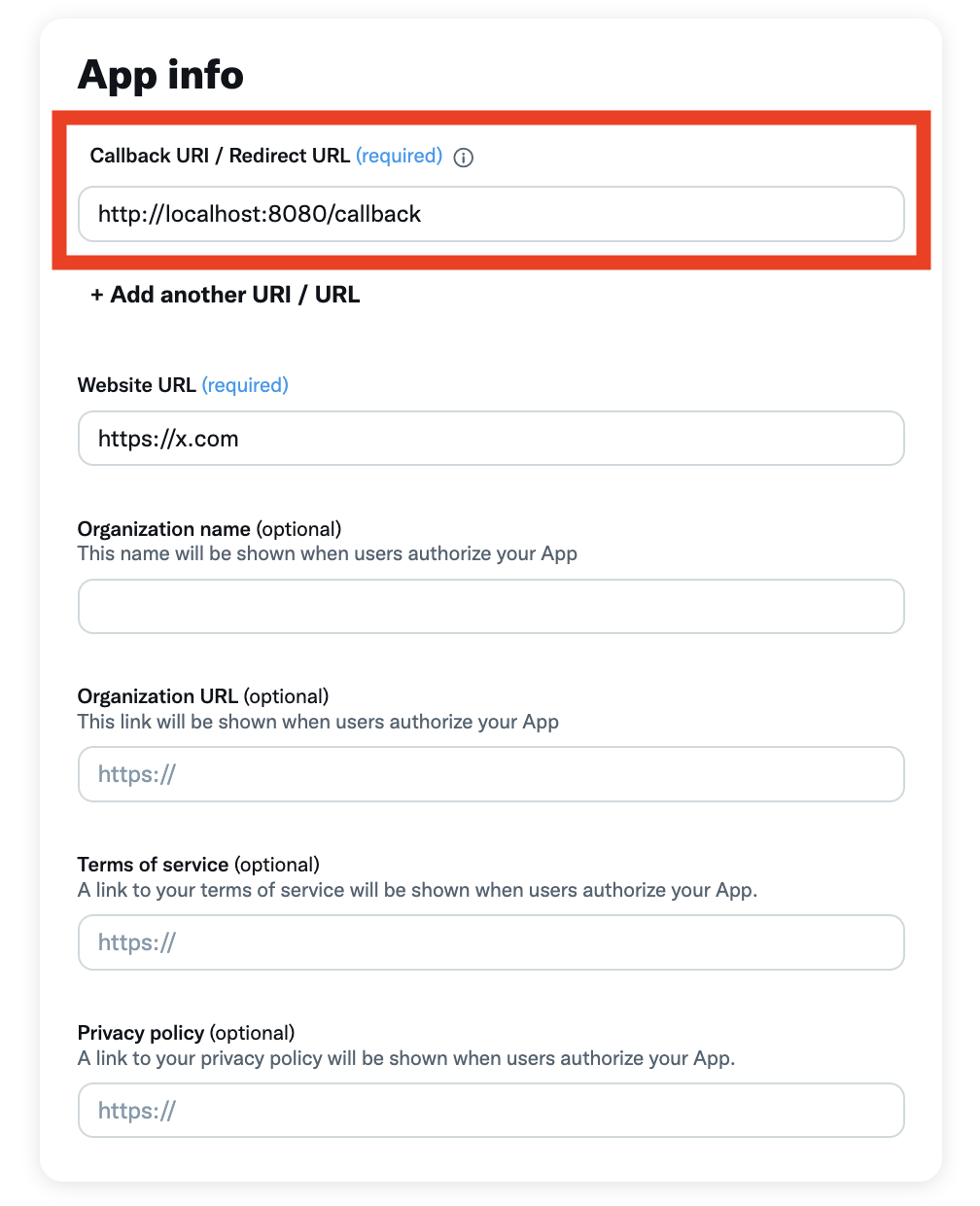
Note: For OAuth 2.0 authentication, you must specify the redirect URI in the X API developer portal.
- Create an app at the X API developer portal.
- Go to authentication settings and set the redirect URI to the same value that
xurlwill use throughREDIRECT_URI. The default ishttp://localhost:8080/callback, andxurlderives the callback host, port, and path from the effective redirect URI. The effective value is resolved fromREDIRECT_URI, then the app's storedredirect_uri, then the built-in default. When you uselocalhost,xurllistens on both127.0.0.1and::1so browser loopback resolution does not break the callback.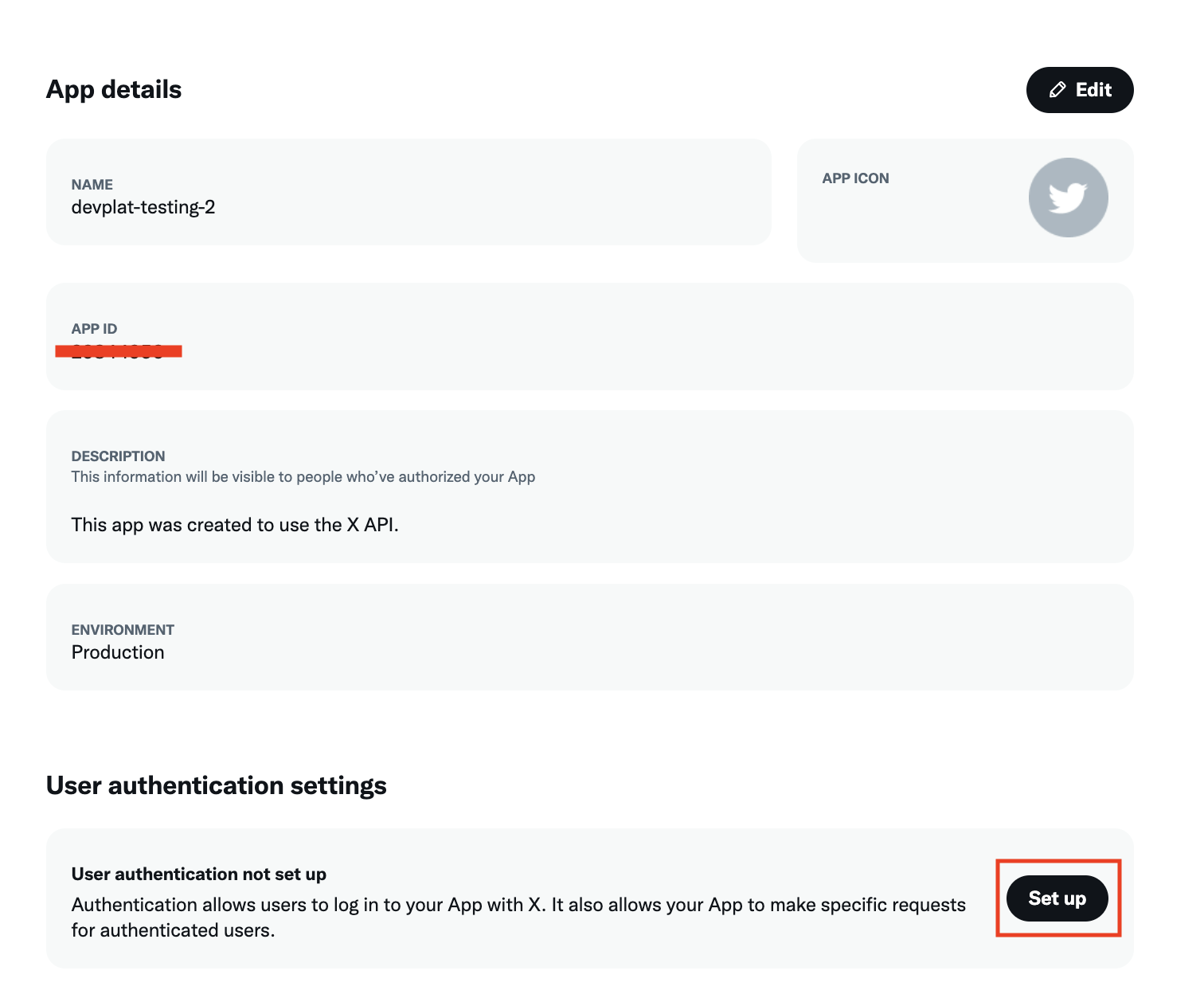
- Register the app (if you haven't already):
xurl auth apps add my-app --client-id YOUR_CLIENT_ID --client-secret YOUR_CLIENT_SECRET
- Get your access keys for the registered app:
xurl auth oauth2 --app my-app
If you omit --app, the token is saved to the current default app. You can also run xurl auth default my-app first and then use xurl auth oauth2.
Headless / remote machines. The default flow opens a browser and waits for a callback on localhost, which isn't reachable from a remote server. On those hosts use --headless:
xurl auth oauth2 --app my-app --headless
xurl prints the authorization URL; open it on any device with a browser, approve, then paste the resulting redirect URL (or just the code value from the address bar) back into the prompt. No callback listener is needed — the page failing to load is expected; the code is in the URL.
If X returns a client-forbidden / client-not-enrolled error even though auth completed successfully, check the app’s package and environment in the X developer console. On current X platform setup, the working fix was:
- Go to
Apps->Manage apps - Open the app
- Use
Move to package - Choose
Pay-per-use - Move the app to the
Productionenvironment
Without that enrollment step, xurl whoami and other /2/* reads can fail even when the OAuth callback and tokens are valid.
If X does not return your username reliably through /2/users/me, authenticate with an explicit handle instead:
xurl auth oauth2 --app my-app YOUR_USERNAME
That keeps the OAuth2 token associated with the expected username and also gives shortcut commands a fallback when /2/users/me is unavailable.
App-only authentication (Bearer Token):
xurl auth app-only BEARER_TOKEN
cat token.txt | xurl auth app-only -          # read from stdin (keeps it out of shell history)
This stores X's app-only Bearer Token (from the developer portal), used at request time with --auth app. It's named for the auth mode (app-only) rather than the token scheme (bearer), since OAuth2 user tokens are also sent as Authorization: Bearer.
Back-compat:
xurl auth appandxurl auth bearerstill work as aliases, and--bearer-token TOKENis still accepted.
OAuth 1.0a authentication:
xurl auth oauth1 --consumer-key KEY --consumer-secret SECRET --access-token TOKEN --token-secret SECRET
Multi-App Management
List registered apps:
xurl auth apps list
Update credentials on an existing app:
xurl auth apps update my-app --client-id NEW_ID --client-secret NEW_SECRET
xurl auth apps update my-app --redirect-uri http://localhost:8080/callback
REDIRECT_URI from the environment still overrides the stored app value at runtime, so auth apps update --redirect-uri is best for your default per-app callback while env vars remain the temporary override path.
View the effective and stored redirect URI for an app:
xurl auth apps redirect-uri get my-app
Set the stored redirect URI for an app:
xurl auth apps redirect-uri set my-app http://localhost:8080/callback
Remove an app:
xurl auth apps remove old-app
Set the default app and user — interactive picker (uses Bubble Tea):
xurl auth default
Set the default app and user — single command:
xurl auth default my-app              # set default app
xurl auth default my-app alice        # set default app + default user
Use a specific app for a single request:
xurl --app dev-app /2/users/me
Authentication Status
View authentication status across all apps:
xurl auth status
This output shows the effective redirect URI for each app and, when REDIRECT_URI is set in the environment, also shows the stored app value separately so precedence is visible.
Example output:
▸ my-app  [client_id: VUttdG9P…]
      redirect_uri: http://localhost:8080/callback  [app config]
    ▸ oauth2: alice
      oauth2: bob
      oauth1: ✓
      bearer: ✓

  dev-app  [client_id: OTHER789…]
      redirect_uri: http://localhost:8080/callback  [built-in default]
      oauth2: (none)
      oauth1: –
      bearer: –
X Platform Enrollment Troubleshooting
If OAuth succeeds but reads like xurl whoami fail with an error body containing client-forbidden or client-not-enrolled, the current X platform fix is to move the app into the Pay-per-use package and use the Production environment in the developer console. This is an X platform enrollment issue, not a local callback-listener issue in xurl.
▸ on the left = default app. ▸ next to a user = default user.
Clear Authentication
xurl auth clear --all                       # Clear all tokens
xurl auth clear --oauth1                    # Clear OAuth 1.0a tokens
xurl auth clear --oauth2-username USERNAME  # Clear specific OAuth 2.0 token
xurl auth clear --bearer                    # Clear bearer token
Making Requests
Basic GET request:
xurl /2/users/me
Custom HTTP method:
xurl -X POST /2/tweets -d '{"text":"Hello world!"}'
Add headers:
xurl -H "Content-Type: application/json" /2/tweets
Specify authentication type:
xurl --auth oauth2 /2/users/me
xurl --auth oauth1 /2/tweets
xurl --auth app /2/users/me
Use specific OAuth 2.0 account:
xurl --username johndoe /2/users/me
Streaming Responses
Streaming endpoints (like /2/tweets/search/stream) are automatically detected and handled appropriately. The tool will automatically stream the response for these endpoints:
/2/tweets/search/stream/2/tweets/sample/stream/2/tweets/sample10/stream/2/tweets/firehose/stream/lang/en/2/tweets/firehose/stream/lang/ja/2/tweets/firehose/stream/lang/ko/2/tweets/firehose/stream/lang/pt
For example:
xurl /2/tweets/search/stream
You can also force streaming mode for any endpoint using the --stream or -s flag:
xurl -s /2/users/me
Printing an Access Token
xurl token prints a valid OAuth2 access token for the active app to stdout (a single line, no decoration). If the stored token has expired it is refreshed and persisted first. This command never opens a browser, so it is safe to use in scripts:
xurl token                 # token for the default app/user
xurl token --app my-app    # token for a specific app
xurl token -u alice        # token for a specific OAuth2 user
TOKEN=$(xurl token) && curl -H "Authorization: Bearer $TOKEN" https://api.x.com/2/users/me
If no token is available (and none can be refreshed), it exits non-zero with a hint to run xurl auth oauth2.
MCP Server (xurl mcp)
xurl mcp turns xurl into a Model Context Protocol bridge for the hosted X API MCP server. It reads newline-delimited JSON-RPC from stdin, relays each message to a remote Streamable HTTP MCP endpoint with an Authorization: Bearer <token> header, and writes the server's responses (plain JSON or text/event-stream) back to stdout as newline-delimited JSON. The MCP session id is maintained automatically and the token is refreshed in-process as it expires.
Because X's OAuth requires your own app (there is no dynamic client registration), xurl holds the app identity and mints/refreshes the token. On first run with no cached token, the bridge opens the browser for a one-time OAuth2 login using the CLIENT_ID/CLIENT_SECRET from its environment, then caches and auto-refreshes the token for subsequent runs. The MCP handshake is held until that login completes, so give the server a generous startup_timeout_sec.
Use it directly from any MCP client (Claude Desktop, Cursor, etc.) with a standard MCP server config — no separate install step is needed thanks to the npm launcher:
{
  "mcpServers": {
    "xapi": {
      "command": "npx",
      "args": ["-y", "@xdevplatform/xurl", "mcp", "https://api.x.com/mcp"],
      "env": { "CLIENT_ID": "...", "CLIENT_SECRET": "..." },
      "startup_timeout_sec": 300
    }
  }
}
Requirements for the first-run browser login: a browser on the machine running the client, and your X app must have the OAuth2 redirect URI http://localhost:8080/callback registered (or set REDIRECT_URI to one that is). On a headless host with no reachable browser, authenticate out-of-band first with xurl auth oauth2 --headless (the bridge then just reuses the cached token).
The <url> positional is optional and defaults to https://api.x.com/mcp. --app is honored, so you can point a client at a specific registered app:
File tree
FAQ
xurl is a Claude Code plugin with 1 hand-picked skill for cli tools work, indexed on Flowy. Install it with the command on its page. It includes xurl. Its skills do not fire on their own yet. Request auto-invocation to have Flowy route them as you prompt. Free and open source.
- What is xurl?
- A command-line tool for interacting with the X (formerly Twitter) API, supporting both OAuth 1.0a and OAuth 2.0 authentication.
- How do I install xurl?
- Run these in Claude Code: npx -y skills add xdevplatform/xurl --agent claude-code. Then prompt normally.
- Does xurl auto-invoke its skills?
- Not yet. It is indexed on Flowy as a plain plugin. Request auto-invocation on its page and Flowy will route its skills for you as you prompt.
- Is xurl free?
- Yes. Flowy is free and open source, with nothing gated. You can read every skill in full before you install.
Is this plugin yours?
Claim it with GitHubSubmit a pluginPromote it