
Security
Plugin
sandvault
SandVault (sv) manages a limited user account to sandbox shell commands and AI agents, providing a lightweight alternative to application isolation using virtual machines.

Plugin Signal69/100Solid
maintained97
capable23
documented100
adopted56
Install
$ npx -y skills add webcoyote/sandvault --agent claude-code
Stats
417
Stars
25
Forks
Active
Maintenance
Shell
Language
Apache-2.0
License
7d ago
Last commit
1y ago
Created
Repo: webcoyote/sandvault
What's inside
Badges

README
SandVault - Run AI agents and shell commands in a sandboxed macOS user account. Sandboxed web and app testing with Chrome and iOS Simulator.
- AI ready - Includes Claude Code, OpenAI Codex, OpenCode, Google Gemini, pi, Muse Code
- Web and iOS automation - sandbox access to Chrome / Lightpanda and iOS Simulator
- Fast context switching - No VM overhead; instant user switching
- Passwordless - switch accounts without a prompt (after setup)
- Shared workspace - joint access to
/Users/Shared/sv-$USER - Defense in depth - limited user account +
sandbox-exec - Clean uninstall - Complete removal with
sv uninstall
Quick Links
- Run Browser Automation from within the sandbox that can be used for testing web interactions.
- Run iOS Simulator Automation from within the sandbox that can be used for iOS app testing.
- To run
xcodebuildorswiftsee Sandboxing xcodebuild and swift for details. - To run other sandboxed applications inside sandvault, use the
-xoption. See Sandboxing other apps for details. - It's not possible to run GUI applications from within the sandbox; see Running GUI Applications for details.
Security Model
SandVault has limited access to your computer:
- Cannot access your home directory
- Runs with standard user privileges
- Cannot modify system files
- Has no access to mounted drives
- writable:  /Users/Shared/sv-$USER         -- only accessible by you & sandvault-$USER
- writable:  /Users/sandvault-$USER         -- sandvault's home directory
- readable:  /usr, /bin, /etc, /opt         -- system directories
- no access: /Users/*                       -- other user directories

- writable:  /Volumes/Macintosh HD          -- accessible as per file permissions
- no access: /Volumes/*                     -- cannot access mounted/remote/network drives
Installation
Install via Homebrew:
brew install sandvault
Install via git:
# Clone the repository
  git clone https://github.com/webcoyote/sandvault

# Option 1: add the sandvault directory to your path
  export PATH="$PATH:/path/to/where/you/cloned/sandvault"

# Option 2: add to your shell configuration for easy access
  echo >> ~/.zshrc  'alias sv="/path/to/where/you/cloned/sandvault/sv"'
  echo >> ~/.bashrc 'alias sv="/path/to/where/you/cloned/sandvault/sv"'
Quick Start
# Run Claude Code in the sandbox
# shortcut: sv cl
  sv claude

# Run OpenAI Codex in the sandbox
# shortcut: sv co
  sv codex

# Run OpenCode in the sandbox
# shortcut: sv o
  sv opencode

# Run Google Gemini in the sandbox
# shortcut: sv g
  sv gemini

# Run pi in the sandbox
# shortcut: sv p
  sv pi

# Run Muse Code in the sandbox
# shortcut: sv m
  sv muse

# Run command shell in the sandbox
# shortcut: sv s
  sv shell
Connect via SSH
The default mode for sandvault runs commands as a limited user (basically sudo -u sandbox-$USER COMMAND). Sandvault also configures the limited sandvault account so that you can run commands via SSH (ssh sandbox-$USER@127.0.0.1), and everything works the same. Use the -s or --ssh option to use SSH mode with sv, or use tmux or screen for users so inclined.
# Run using impersonation
# sv COMMAND
  sv gemini

# Run using ssh
# sv -s/--ssh COMMAND
  sv --ssh gemini
To let other keys SSH into the sandvault user, drop each public key into its own file in ~/.config/codeofhonor/sandvault/authorized_keys.d/, then run any sv command to apply it:
cp ~/.ssh/id_ed25519_laptop.pub ~/.config/codeofhonor/sandvault/authorized_keys.d/laptop
sv build
Those files are the source of truth: sandvault regenerates the sandvault user's authorized_keys from them plus its own key on every run, so deleting a file revokes that key on the next run. Files that are not SSH public keys are ignored with a warning, and a private key left there stops the build rather than being copied into the sandbox.
Advanced Commands
# Run AI agent with optional arguments
# Usage:
#   sv <agent> [PATH] [-- AGENT_ARGUMENTS]
# Example:
  sv gemini -- --continue


# Run shell command in sandvault and exit
# Usage:
#  sv shell [PATH] -- [SHELL_COMMAND]
# Example:
  sv shell /Users -- pwd      # output: /Users


# Send input via stdin
# Usage:
#   <producer> | sv shell [PATH] [-- SHELL_COMMAND]
# Examples:
  echo "pwd ; exit" | sv shell /Users       # output: /Users

  echo ABC | sv shell -- tr 'A-Z' 'a-z'     # output: abc

  cat PROMPT.md | sv gemini


# Clone local/remote Git repository into /Users/Shared/sv-$USER/repos/<git-repository> and open there
# Usage:
#   sv-clone [OPTIONS] URL_OR_LOCAL_PATH [-- SV_ARGS]
# Examples:
  sv-clone https://github.com/webcoyote/sandvault.git -- codex
  sv-clone ~/src/my-app -- codex
  sv-clone https://github.com/webcoyote/sandvault.git -- shell
  sv-clone ../my-app -- shell
Use a full or relative path with a directory name for local clones. Everything
after -- is passed to sv, so sv-clone ~/src/my-app -- claude -- --model opus
clones the repository and starts Claude Code there. Run sv-clone --help for the
full list of options, including -k/-w to provision a per-repository deploy key.
For local Git repositories, sandvault also wires remotes:
- Your local Git repository gets/updates remote
sandvault->/Users/Shared/sv-$USER/repos/<git-repository> - This lets you run
git fetch sandvaultfrom the original local Git repository to pull commits made in the sandvault Git repository.
Native Install
By default, SandVault installs AI tools via Homebrew on the host side. With --native-install (-N), tools are instead installed inside the sandbox using their own installers:
- Claude Code — installed via
curl -fsSL https://claude.ai/install.sh | bash - Codex — installed via
npm install -g @openai/codex - OpenCode — installed via
curl -fsSL https://opencode.ai/install | bash - Gemini — installed via
npm install -g @google/gemini-cli - pi — installed via
npm install -g @earendil-works/pi-coding-agent - Muse Code — installed via
curl -fsSL https://dev.meta.ai/install.sh | bash
Tools are installed on first run and reused on subsequent runs.
# Install and run Claude Code natively
sv --native-install claude
sv -N claude

# Works with all AI agents
sv -N codex
sv -N opencode
sv -N gemini
sv -N pi
sv -N muse
To make native install the default, set SANDVAULT_ARGS:
# Add to your shell profile (~/.zshrc, ~/.bashrc, etc.)
export SANDVAULT_ARGS="--native-install"

# Now 'sv claude' uses native install automatically
sv claude
Environment Variables
Set SANDVAULT_ARGS to supply default arguments that are prepended to the command line:
# Add to your shell profile (~/.zshrc, ~/.bashrc, etc.)
export SANDVAULT_ARGS="--verbose --ssh"

# Now these are equivalent:
sv claude
sv --verbose --ssh claude
Shell quoting is supported, so arguments with spaces work:
export SANDVAULT_ARGS='shell "/Users/me/my project"'
Explicit command-line arguments are appended after SANDVAULT_ARGS, so they are processed afterwards.
Maintenance Commands
# Build sandvault but do not run a command
  sv build
  sv b


# Rebuild sandvault, including updating all file permissions and ACLs in the shared volume
  sv build --rebuild
  sv b -r

# Fix permissions when using a restrictive umask (e.g. 077)
  sv --fix-permissions
  sv --fix-permissions build

# Uninstall sandvault (does not delete files in the shared volume)
  sv uninstall


# Misc commands
  sv --version
  sv --help
agentsview Integration
agentsview is a dashboard for AI coding agents that shows session history, search, and cost tracking. If you have agentsview installed on the host, sv-agentsview-setup mirrors sandbox session data so that it appears next to your host-side sessions.
# Detect agentsview, prompt to opt in, and configure
sv-agentsview-setup
You are prompted once, on the first run. After that, sv-agentsview-setup re-syncs on every run. It installs the mirror symlinks and adds the missing scan paths to ~/.agentsview/config.toml. New agents that sandvault adds in a later release appear the next time you run the command. When a new scan path is added, the command shows a diff and asks for confirmation. If you decline, that agent is skipped permanently. Remove its key from /Users/Shared/sv-$USER/_sandvault/setup/agentsview-declined.keys to enable it again.
Then run agentsview serve. You will see your sandvault AI sessions in the agentsview dashboard.
Nested sandboxes
In addition to running in a different macOS user account, sandvault also runs applications using macOS sandbox-exec, which further limits what resources are accessible.
Some applications, like swift, already run inside a sandbox. Because macOS does not support nested (i.e. recursive) sandboxes, these applications fail to run.
Read on for solutions.
Sandboxing xcodebuild and swift
For swift (and xcodebuild, which runs swift), you can set the following variables in your build scripts to run inside sandvault:
For swift:
ARGS=()

# Disable sandboxing when running inside sandvault to avoid nested sandbox-exec
if [[ -n "${SV_SESSION_ID:-}" ]]; then
    ARGS+=(--disable-sandbox)
fi

swift build "${ARGS[@]}" "$@"
For xcodebuild:
ARGS=()

# Disable sandboxing when running inside sandvault to avoid nested sandbox-exec
if [[ -n "${SV_SESSION_ID:-}" ]]; then
    export SWIFTPM_DISABLE_SANDBOX=1
    export SWIFT_BUILD_USE_SANDBOX=0
    ARGS+=("-IDEPackageSupportDisableManifestSandbox=1")
    ARGS+=("-IDEPackageSupportDisablePackageSandbox=1")
    # shellcheck disable=SC2016 # Expressions don't expand in single quotes # that is intentional
    ARGS+=('OTHER_SWIFT_FLAGS=$(inherited) -disable-sandbox')
fi

xcodebuild \
    build \
    "${ARGS[@]}" \
    ...
Sandboxing other apps
If the app you intend to run does not support disabling the use of sandbox-exec like xcodebuild and swift you can run sandvault without sandbox-exec:
# Disable use of sandbox-exec (app still runs as sandvault user) using -x / --no-sandbox
  sv -x           claude
  sv --no-sandbox codex
  sv --no-sandbox shell $HOME/projects/my-app -- xcodebuild ...
Disabling sandbox-exec has the following security implications:
- No protection against reading/writing removable drives (
/Volumes/...) - No protection against writing files with
o+w(0002) file permissions
# To find all files on your computer that are "world writable" (perms: `o+w` / 0002)
# run this command from your account (not in sandvault):
  find / \
       -path "/Users/sandvault-$USER" -prune \
    -o -path "/Users/sv-$USER" -prune \
    -o -perm -o=w -print 2>/dev/null
Troubleshooting
If your sandbox is misbehaving you can fix it with a rebuild or uninstall/reinstall. They're both safe and will not delete files in the shared sandbox folder.
# Force rebuild
sv --rebuild build


# Uninstall then reinstall
sv uninstall
sv build
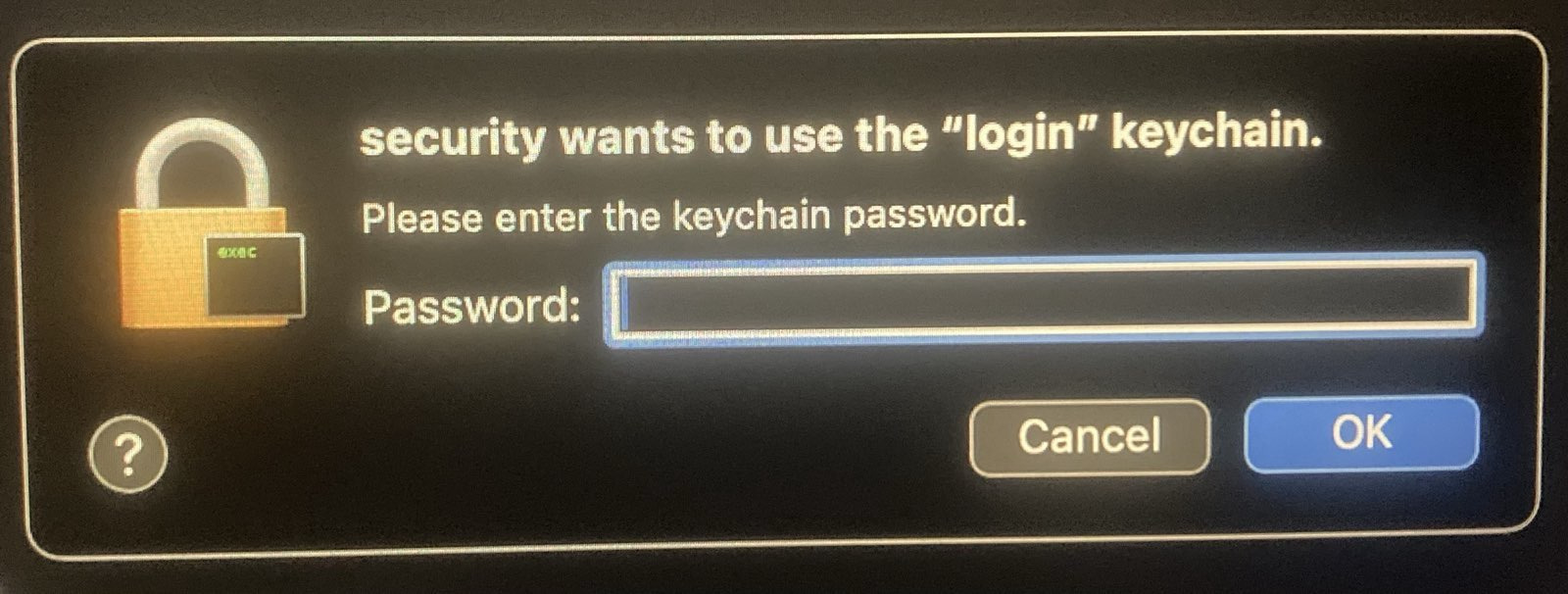
Fix the security popup
File tree
FAQ
sandvault is a Claude Code plugin with 1 hand-picked skill for security work, indexed on Flowy. Install it with the command on its page. It includes sv. Its skills do not fire on their own yet. Request auto-invocation to have Flowy route them as you prompt. Free and open source.
- What is sandvault?
- SandVault (sv) manages a limited user account to sandbox shell commands and AI agents, providing a lightweight alternative to application isolation using virtual machines.
- How do I install sandvault?
- Run these in Claude Code: npx -y skills add webcoyote/sandvault --agent claude-code. Then prompt normally.
- Does sandvault auto-invoke its skills?
- Not yet. It is indexed on Flowy as a plain plugin. Request auto-invocation on its page and Flowy will route its skills for you as you prompt.
- Is sandvault free?
- Yes. Flowy is free and open source, with nothing gated. You can read every skill in full before you install.
Is this plugin yours?
Claim it with GitHubSubmit a pluginPromote it