
Design
Plugin
aws-architecture-diagram-skill
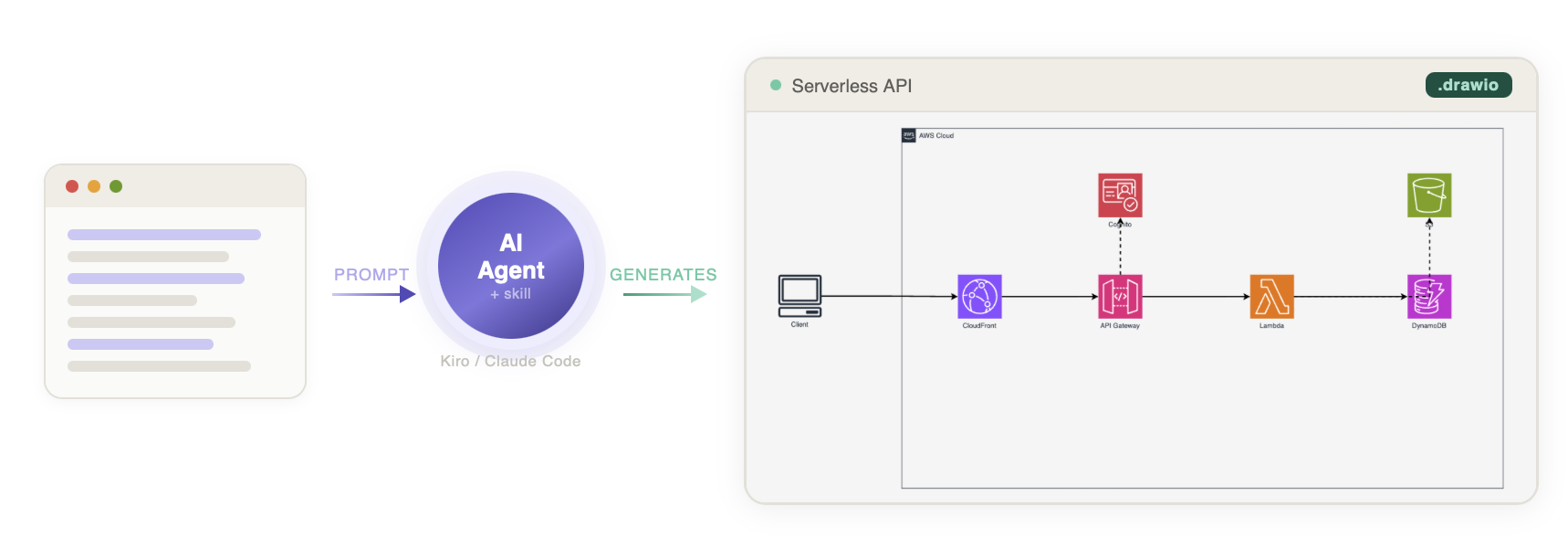
One prompt. One .drawio file. Every icon renders correctly because the skill carries a verified catalog of 270+ stencil names, not guesses.

Plugin Signal63/100Solid
maintained91
capable14
documented100
adopted47
Install on Claude Code
> /plugin marketplace add vidanov/aws-architecture-diagram-skill> /plugin install aws-architecture-diagram@vidanov-skills
What's inside
Badges





README
AWS Architecture Diagram Skill
Quick start · Examples · Why icons break · Comparison · Contributing
One prompt. One .drawio file. Every icon renders correctly because the skill carries a verified catalog of 270+ stencil names, not guesses.

Works with any AI assistant: ChatGPT, Claude Projects, Kiro CLI, Claude Code, Cursor, or internal agents.
The problem this solves
AI agents generate broken AWS diagrams. Icons show as empty boxes because the stencil names are wrong. Layout is random. Styling is inconsistent. You spend more time fixing the output than you saved generating it.
This skill gives the agent the correct stencil names, layout rules, and styling conventions. The output opens clean in draw.io with no manual fixes.
Quick start
npx skills add vidanov/aws-architecture-diagram-skill
Install to a specific agent:
npx skills add vidanov/aws-architecture-diagram-skill --agent claude-code
npx skills add vidanov/aws-architecture-diagram-skill --agent cursor
npx skills add vidanov/aws-architecture-diagram-skill --agent kiro-cli
Install globally (available in all projects):
npx skills add vidanov/aws-architecture-diagram-skill --global
No CLI required:
- Copy the prompt from
chatgpt/PROMPT.mdinto your system prompt or custom instructions - Upload the reference files from
chatgpt/references/to the knowledge base - Start asking for diagrams
Tip: Set temperature to 0.3 for consistent XML output.
# Claude Code
mkdir -p ~/.claude/skills/aws-architecture-diagram
cp claude/SKILL.md ~/.claude/skills/aws-architecture-diagram/SKILL.md
cp -r references ~/.claude/skills/aws-architecture-diagram/references

# Kiro CLI (global)
mkdir -p ~/.kiro/skills/aws-architecture-diagram
cp kiro/SKILL.md ~/.kiro/skills/aws-architecture-diagram/SKILL.md
cp -r references ~/.kiro/skills/aws-architecture-diagram/references
Usage
Ask for a diagram:
Create an AWS architecture diagram for a serverless API with Lambda, DynamoDB, and API Gateway
With export:
Create an AWS architecture diagram as PNG for a real-time data pipeline with Kinesis, Lambda, and S3
Example output
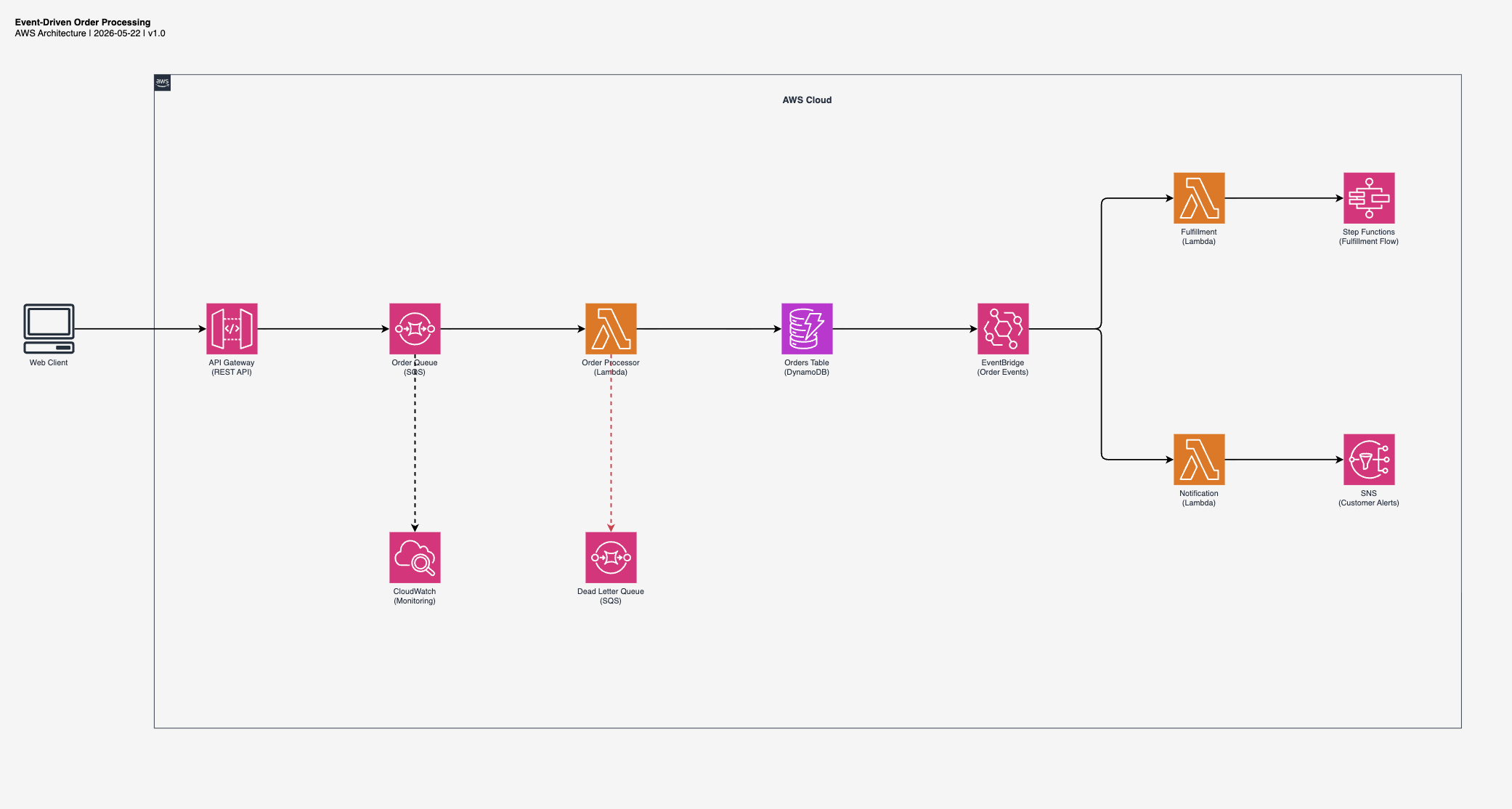
Event-driven order processing
"Create an event-driven order processing architecture with SQS, Lambda, DynamoDB, and EventBridge"
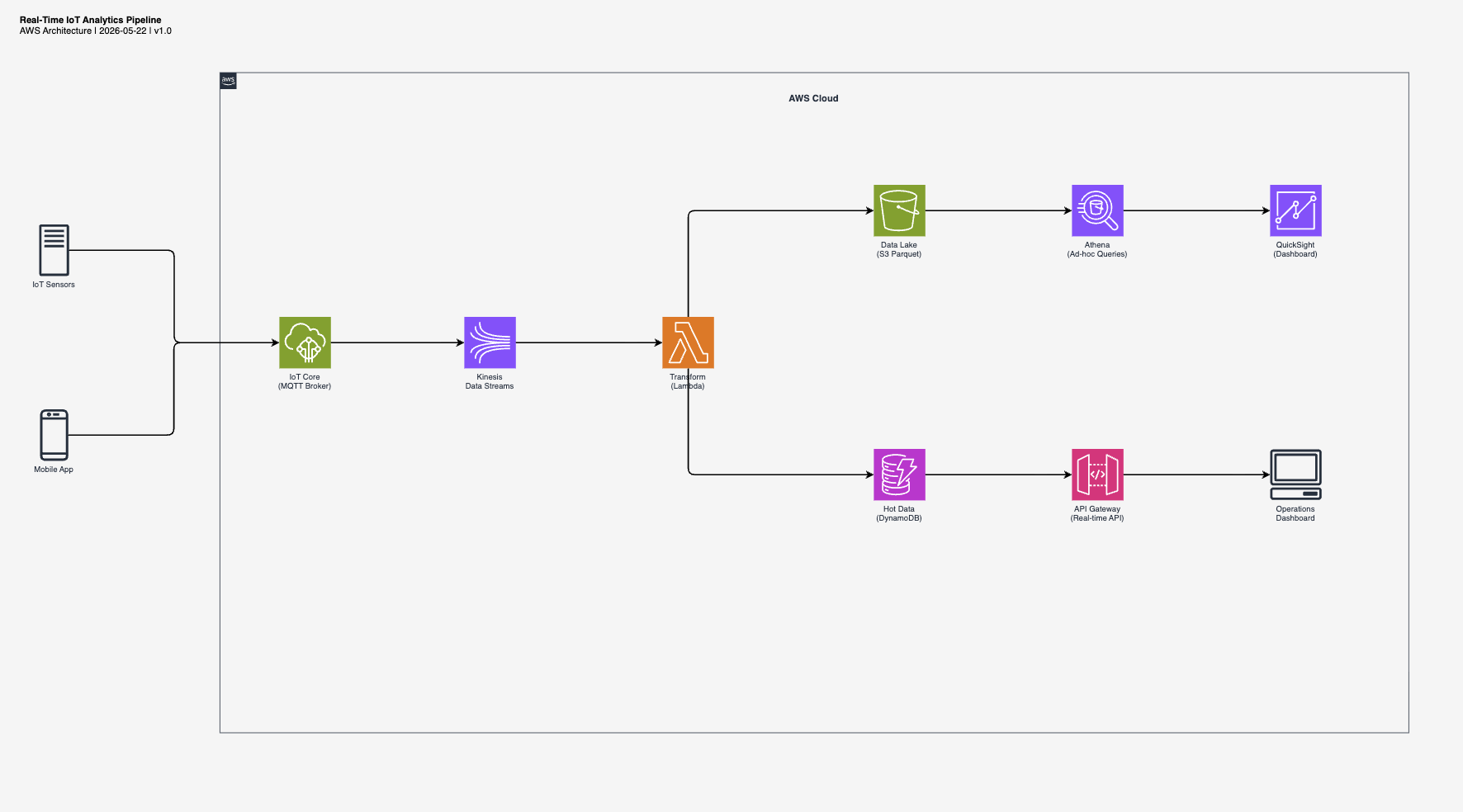
Real-time IoT analytics
"Create a real-time IoT analytics pipeline with Kinesis, Lambda, S3 data lake, and DynamoDB"
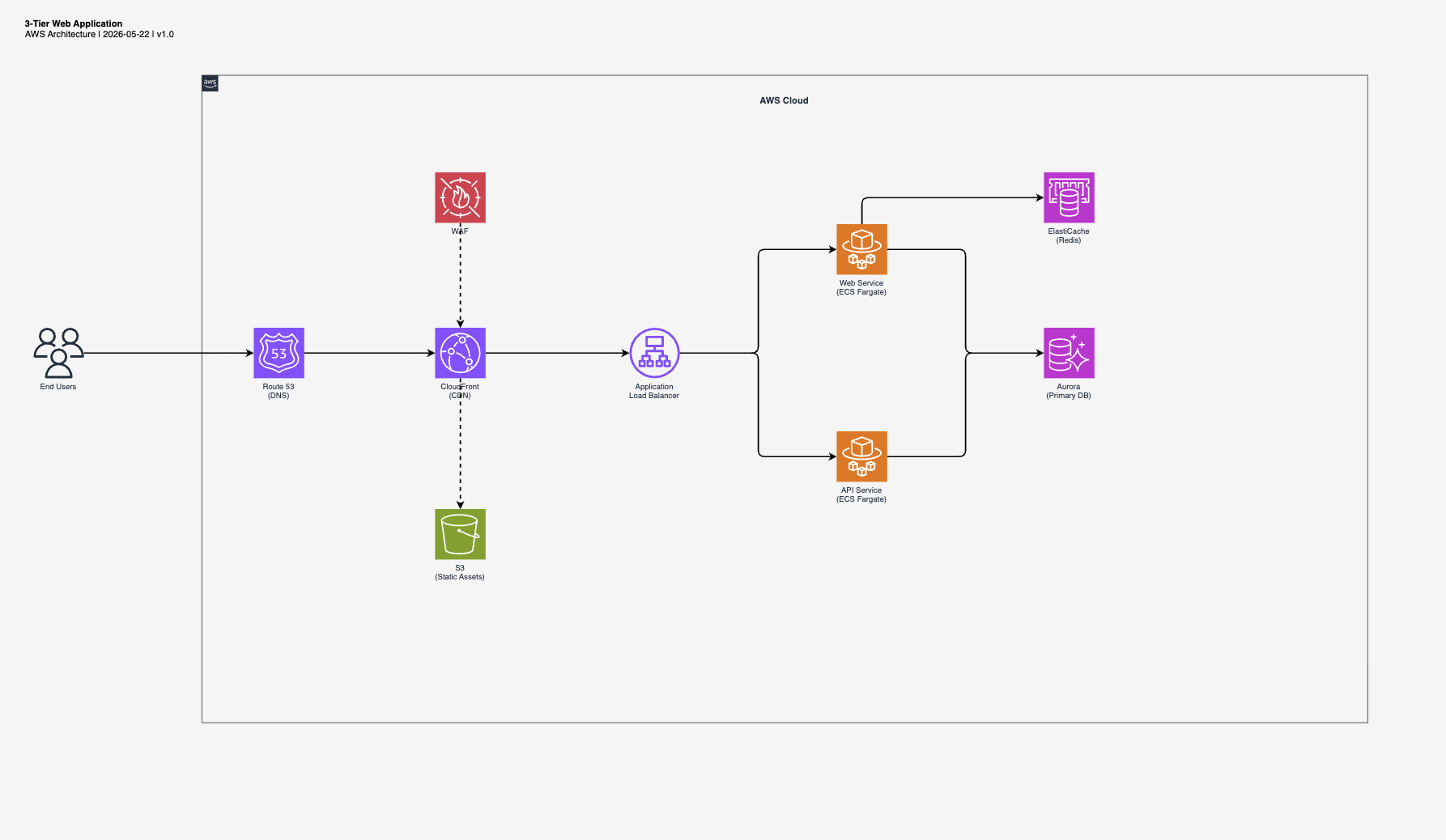
3-tier web application
"Create a 3-tier web application with CloudFront, ALB, ECS Fargate, Aurora, and ElastiCache"
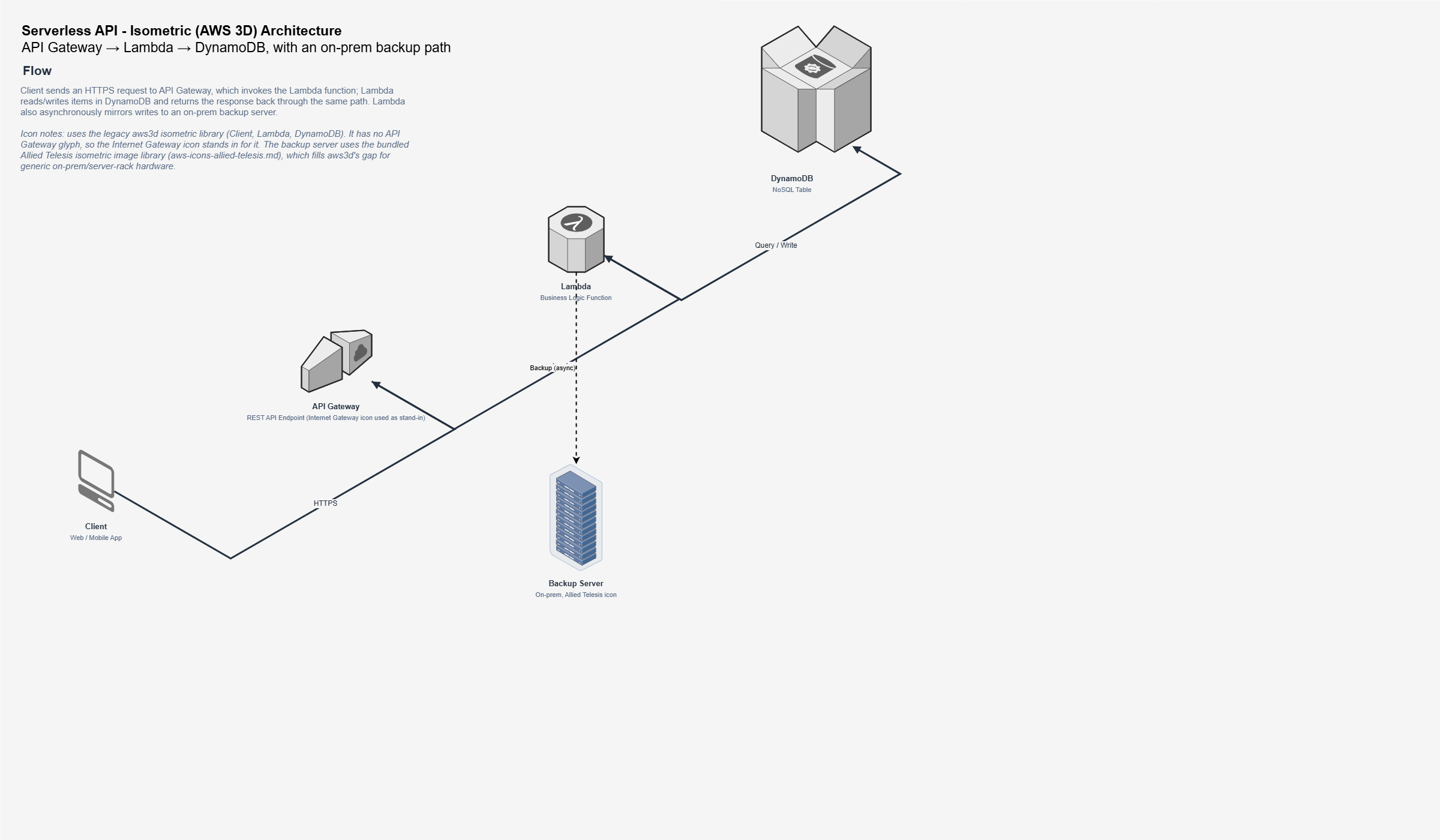
3D serverless API (isometric)
"Create a 3D AWS architecture diagram for a serverless API with Lambda, DynamoDB, and S3"
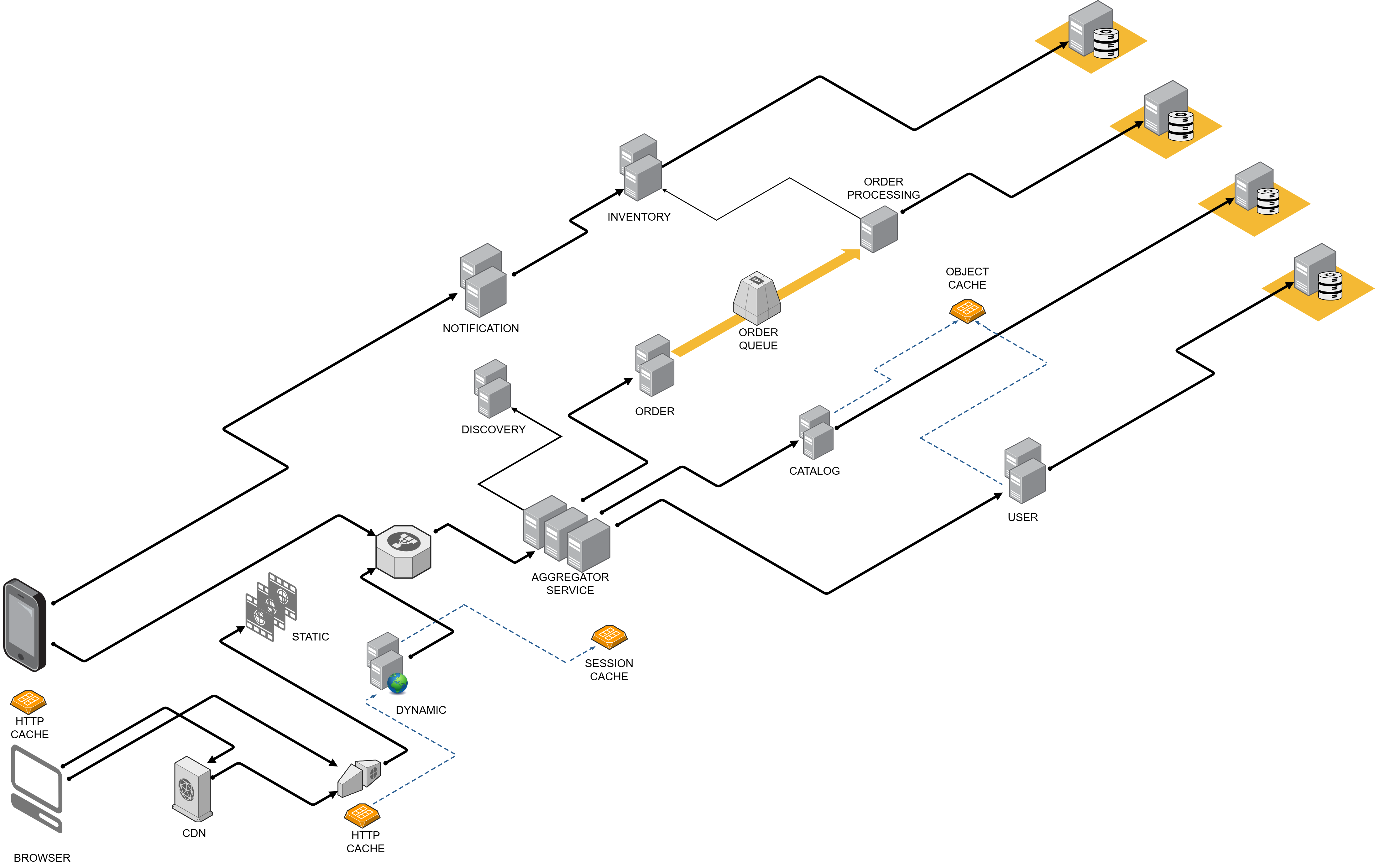
3D e-commerce website architecture (isometric)
"Create a 3D isometric AWS architecture for an e-commerce website"
Why icons break (and how this skill prevents it)
draw.io AWS icons have two patterns with opposite strokeColor rules:
| Pattern | Style | strokeColor | Use for |
|---|---|---|---|
| Service-level | shape=mxgraph.aws4.resourceIcon;resIcon=mxgraph.aws4.<name> | #ffffff (required) | Main service icons (colored square + white glyph) |
| Resource-level | shape=mxgraph.aws4.<name> | none (required) | Sub-resources (silhouette icons) |
Confusing these two patterns is the #1 cause of broken icons in AI-generated diagrams. The skill encodes the correct pattern for every icon.
draw.io stencil names also don't match current AWS service names. Renamed services keep old identifiers (OpenSearch is still elasticsearch_service in the stencil). The skill carries the correct mapping so the agent never guesses.
What the skill enforces
- Left-to-right flow (UI on left, data on right)
- 78px icons, strokeWidth=2 edges, AWS color palette
- Minimum 220px horizontal spacing, 250px vertical between lanes
- Two-step approach: generate XML, export to PNG, visually verify, fix if needed
- Only verified stencil names (no empty-box surprises)
Supported services (270+ icons)
| Category | Examples |
|---|---|
| Compute | Lambda, EC2, ECS, EKS, Fargate |
| App Integration | API Gateway, SNS, SQS, EventBridge, Step Functions |
| Database | DynamoDB, RDS, Aurora, ElastiCache |
| Storage | S3, EFS, EBS |
| Networking | CloudFront, Route 53, VPC, ELB (ALB/NLB) |
| Security | IAM, Cognito, KMS, WAF |
| Analytics/ML | Kinesis, Athena, Bedrock, SageMaker |
Known broken stencils (avoid these)
mxgraph.aws4.dynamodb_table→ usemxgraph.aws4.dynamodbinsteadmxgraph.aws4.dynamodb_stream→ usemxgraph.aws4.dynamodbwith labelmxgraph.aws4.general_saml_token→ usemxgraph.aws4.traditional_server
Comparison
| Solution | Output | Editable | Zero deps | Verified icons |
|---|---|---|---|---|
| This skill | .drawio | yes | yes (markdown file) | yes (270+) |
| jgraph/drawio-mcp | .drawio | yes | no (MCP server) | no |
| awslabs/aws-diagram-mcp-server | PNG | no | no (Python+GraphViz) | N/A |
| awslabs/diagram-as-code | PNG/SVG | no | no (Go binary) | N/A |
| clouda.ai | PNG | no | N/A (SaaS) | N/A |
No runtime dependencies. A markdown file, not a server. Output is native .drawio XML you can open, edit, and version-control.
Structure
aws-architecture-diagram-skill/
├── chatgpt/
│   ├── PROMPT.md                       # Universal prompt (any AI assistant)
│   └── references/                     # Icon catalog in .txt format
├── kiro/SKILL.md                       # Kiro CLI version
├── claude/SKILL.md                     # Claude Code version
├── references/                         # Icon catalog in .md format (9 files)
├── examples/                           # Example .drawio outputs
├── templates/                          # Base templates
└── docs/                               # Hero image, example PNGs
Contributing
PRs welcome:
- Found a broken stencil name? Fix it.
- Want to add a new AWS service icon? Add it to the correct references file.
- Layout improvement ideas? Open an issue or PR.
- Bug with a specific AI agent? Report it.
Contributors
- @svetozarm (Svetozar Miucin) · Kiro CLI install support
- @SyedSamrozeAli (Syed Samroze Ali) · 3D isometric diagram support
License
MIT
If this saved you a diagramming session, a star ⭐ helps the next person find it.
Also by the author
- writing-craft-skill: teach AI agents to write well using classic copywriting craft plus AI anti-pattern detection
- shape: runtime governance for AI agents (phases, transactions, budget gates, proof traces)
File tree
FAQ
aws-architecture-diagram-skill is a Claude Code plugin with 1 hand-picked skill, indexed on Flowy in the Design category. Install it with the command on its page. It includes aws-architecture-diagram. Its skills do not fire on their own yet. Request auto-invocation to have Flowy route them as you prompt. Free and open source.
- What is aws-architecture-diagram-skill?
- One prompt. One .drawio file. Every icon renders correctly because the skill carries a verified catalog of 270+ stencil names, not guesses.
- How do I install aws-architecture-diagram-skill?
- Run these in Claude Code: /plugin marketplace add vidanov/aws-architecture-diagram-skill then /plugin install aws-architecture-diagram@vidanov-skills. Then prompt normally.
- Does aws-architecture-diagram-skill auto-invoke its skills?
- Not yet. It is indexed on Flowy as a plain plugin. Request auto-invocation on its page and Flowy will route its skills for you as you prompt.
- Is aws-architecture-diagram-skill free?
- Yes. Flowy is free and open source, with nothing gated. You can read every skill in full before you install.
Is this plugin yours?
Claim it with GitHubSubmit a pluginPromote it