
Operations
Plugin
tma1
pre-release, and without it the badge renders "no releases found".

Plugin Signal74/100Solid
maintained100
capable41
documented100
adopted44
Install on Claude Code
> /plugin marketplace add tma1-ai/tma1> /plugin install tma1@tma1
Stats
121
Stars
14
Forks
Active
Maintenance
Go
Language
Apache-2.0
License
2d ago
Last commit
7mo ago
Created
3h ago
Added
What's inside
Skill(4 skills)
README
TMA1




A monolith for your agent's loop. Silent until it talks back.
TMA1 is local-first observability for LLM agents, powered by GreptimeDB. It records every LLM call on your machine, then routes what it sees back into the agent's next turn through hooks and MCP tools.
One binary. No Docker. No Grafana. No cloud account.
The name comes from TMA-1 (Tycho Magnetic Anomaly-1) in 2001: A Space Odyssey: the monolith buried on the moon, silently recording everything until you dig it out.
Quickstart
curl -fsSL https://tma1.ai/install.sh | TMA1_ADAPTER=claude-code bash
The installer registers TMA1 as a background service and starts it. The dashboard is at http://localhost:14318.
TMA1_ADAPTER accepts claude-code, codex, or all. See
Install for Windows and for installing without an adapter.
What it does
TMA1 does two things.
It feeds context to the agent. Before each turn the agent receives a
<tma1-context> block: what it has done this session, which files changed
under it, whether the build is broken, and any anomaly worth acting on.
The Stop hook blocks turn completion while a HIGH-severity issue is
unresolved. Ten MCP tools answer further queries on demand, including
keyword search across every session recorded on the machine.
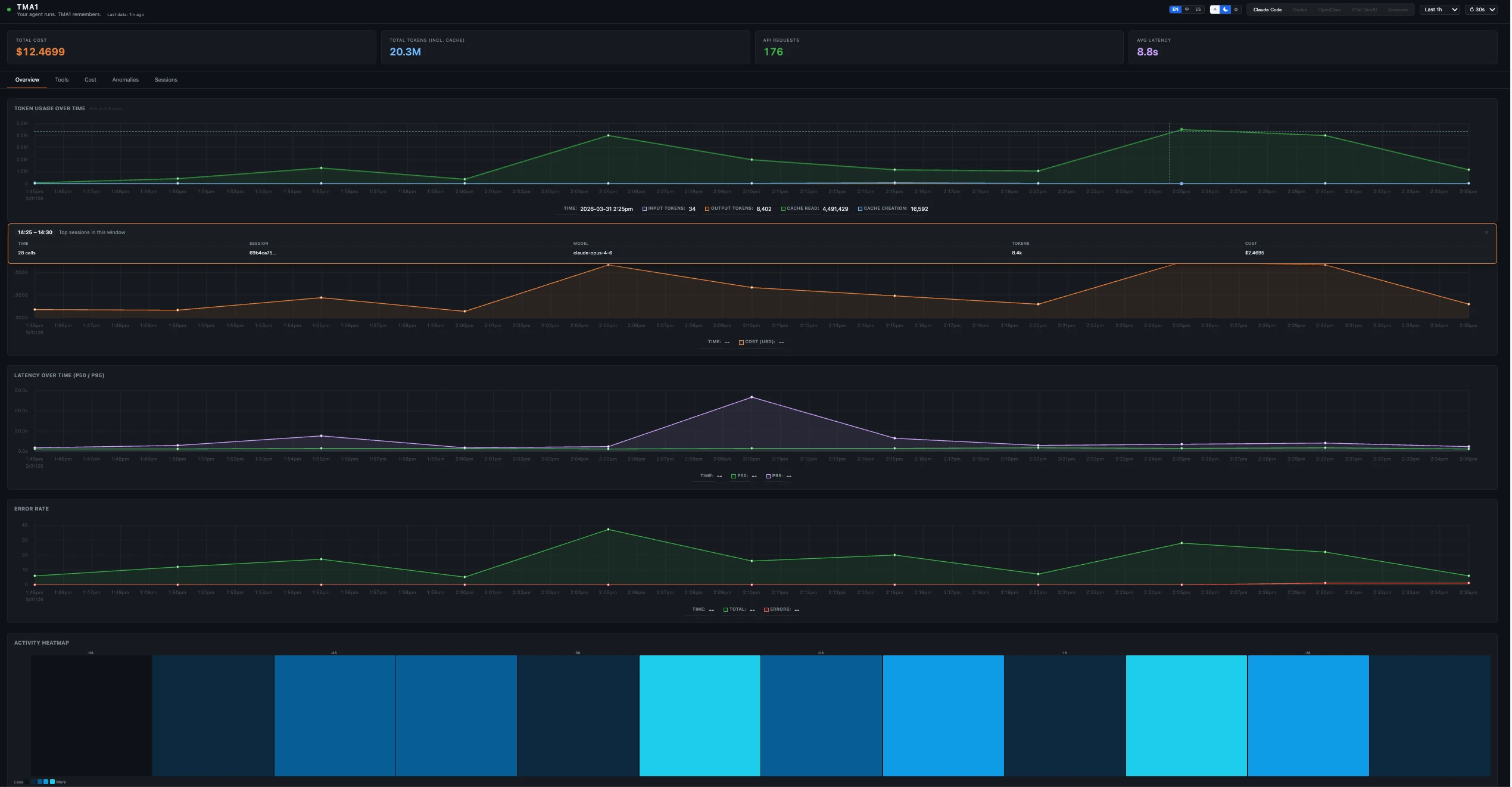
It reports to you. The dashboard covers token usage, cost, latency, tool activity, conversation replay, anomaly history, prompt evaluation, and SQL over the raw tables.
Supported sources
| Source | How TMA1 reads it | What you get |
|---|---|---|
| Claude Code | OTel metrics/logs/traces, hooks, JSONL transcripts | Cost, tools, traces, sessions, anomalies, injected context |
| Codex | OTel logs/metrics, hooks, JSONL sessions | Cost, tools, sessions, anomalies, injected context |
| Copilot CLI | JSONL sessions from ~/.copilot/session-state/ | Sessions, tools, cost where available |
| OpenClaw | OTel traces/metrics, JSONL sessions | Traces, cost, sessions, security signals |
| Any GenAI app | OTel traces using GenAI semantic conventions | Traces, latency, cost aggregation |
All data is stored locally under ~/.tma1/.
How it fits together
Agent -- OTLP/HTTP --+
       -- /api/hooks +--> tma1-server (port 14318)
       -- MCP stdio --+        |
                              v
                        GreptimeDB (port 14000)
                              |
                              v
                        Embedded dashboard
TMA1 reverse-proxies OTLP to GreptimeDB, ingests hook events and JSONL transcripts, runs the perception layer, stores everything in GreptimeDB, and serves the dashboard.
Traces, metrics, and logs are kept as queryable data. Session data and
anomaly emits live in tma1_* tables.
Four query surfaces: the TMA1 dashboard, the exec_query MCP tool,
MySQL protocol on port 14002, and GreptimeDB's own dashboard
(SQL/PromQL editor, table browser) at
http://localhost:14000/dashboard/#/dashboard/query.
Closing the agent loop
TMA1 pushes and pulls context.
Hooks push context into the next agent turn. The installer registers all
27 Claude Code hook events for telemetry, but only five of them inject
anything back: SessionStart, UserPromptSubmit, PostToolUse, Stop,
and PreCompact. Codex registers five and injects on four; it has no
PreCompact, and it ignores additionalContext from PreToolUse, so
that one is telemetry only.
The hook script POSTs to http://127.0.0.1:14318/api/hooks; the response
body becomes agent context. When TMA1 is unreachable or slow the hook
returns empty stdout and the agent continues without it.
MCP serves the pull direction, from the same binary:
tma1-server mcp-serve
It exposes:
| Tool | Purpose |
|---|---|
get_context_bundle | One compact view of session state, anomalies, build status, external changes, and project structure |
get_session_state | Tool history, token totals, current focus, recent files |
get_anomalies | Active anomalies for the session |
get_build_status | Last captured build/dev output |
get_external_changes | Files changed outside the agent loop |
get_project_state | Cached project language, build system, key files, top-level dirs |
get_peer_sessions | Recent sessions on this project by agent — peers, or your own with agent_source: "self" |
search_sessions | Find past sessions by what was said in them |
get_session_transcript | Read one session's conversation, by id or id prefix |
exec_query | One read-only SELECT against the local database |
/tma1-peer codex wraps get_peer_sessions: Claude Code reads Codex's
work on the same project verbatim. The Codex-side skill does the reverse.
Session history
Every session from every agent on the machine is stored locally and stays queryable, by you in the dashboard and by the agent through MCP:
/tma1-search retry backoff        # which past sessions discussed this?
/tma1-search --session 3d8f1d0a   # read that session's conversation
/tma1-peer self --limit 3         # what did I do here earlier today?
search_sessions scopes to the current project by default and returns
matching sessions with snippets and a session_id. --all-projects
widens the scope; --days N widens the window.
get_session_transcript accepts that id, or the 8-character abbreviation
from the <tma1-context> block, and pages through the conversation with
offset / has_more.
Keyword matching runs against a FULLTEXT index and is word-boundary based
and case-sensitive. When that pass returns nothing, the search widens to a
case-folded substring scan and reports match_mode: "substring".
Install
TMA1_ADAPTER wires a coding agent's hooks, MCP entry, and skills.
Claude Code and Codex require it for context injection and the /tma1-*
commands. It is optional otherwise: OTLP traffic to port 14318 is
recorded without it, and Copilot CLI sessions are discovered from disk.
# macOS / Linux
curl -fsSL https://tma1.ai/install.sh | TMA1_ADAPTER=claude-code bash
curl -fsSL https://tma1.ai/install.sh | TMA1_ADAPTER=codex bash
curl -fsSL https://tma1.ai/install.sh | TMA1_ADAPTER=all bash

# no adapter — server only, wire an agent later
curl -fsSL https://tma1.ai/install.sh | bash
Windows PowerShell, with the adapter as an environment variable:
$env:TMA1_ADAPTER = 'claude-code'; irm https://tma1.ai/install.ps1 | iex
The installer registers a background service (launchd agent on macOS,
systemd user unit on Linux, scheduled task on Windows) and starts it. The
dashboard is available at http://localhost:14318 when the script exits.
Start tma1-server manually only when building from source, or when
service registration was skipped.
On first start TMA1 writes a GreptimeDB config into ~/.tma1/config/,
downloads the GreptimeDB binary if needed, starts it as a child process,
and serves the dashboard from the same tma1-server process.
Wire an agent
To have the agent install TMA1 itself:
Read https://tma1.ai/SKILL.md and follow the instructions to install or upgrade TMA1 for your AI agent
The curl installer writes global files only: hook scripts, MCP config,
and the TMA1 skills. Project-local AGENTS.md and CLAUDE.md are left
untouched.
Skill and command files are written by install, not refreshed by the
binary at startup. Re-run install --adapter after upgrading;
tma1-server logs a warning at startup when the installed files no
longer match the binary.
For project-local instructions, run from the project root:
tma1-server install --adapter claude-code --project .
tma1-server install --adapter codex --project .
Uninstall adapter wiring:
tma1-server uninstall --adapter claude-code --project .
tma1-server uninstall --adapter codex --project .
Build sensor
The build wrapper captures dev and test output and feeds failures back to the agent. Two modes:
# One-shot — wrapper exits with the wrapped command's exit code:
tma1 build --tag test -- make test
tma1 build --filter-regex '^error|FAIL' -- pytest -v

# Persistent (dev servers, watchers) — use --watch for time-debounced flush
# and Ctrl-C signal forwarding:
tma1 build --watch --tag dev -- npm run dev
tma1 build --watch --tag watch -- cargo watch -x test
The build sensor writes to tma1_build_events. Anomaly rules
(repeated_failed_build, build_broken_after_my_edit) read this table
to tell the agent to stop retrying the same failing command and fix the
current error first.
Supported flags:
| Flag | Purpose |
|---|---|
--watch | Long-running mode: flush on a debounce interval instead of by line count, and forward SIGINT/SIGTERM to the wrapped process. Required for persistent processes like npm run dev. |
--debounce DUR | Flush interval for --watch (default 2s) |
--tag NAME | Tag this build run so the dashboard can group it (e.g. npm, pytest) |
--filter-regex PAT | Only capture lines matching the pattern |
--filter-invert | Invert the filter — capture lines NOT matching the pattern |
--no-color | Strip ANSI color codes from captured output |
--project DIR | Override the project directory used for scoping (default: cwd) |
OTLP endpoints
Use the wildcard endpoint when the agent or SDK supports it:
http://localhost:14318/v1/otlp
Direct signal endpoints are also accepted:
http://localhost:14318/v1/traces
http://localhost:14318/v1/metrics
http://localhost:14318/v1/logs
Codex commonly uses separate per-signal endpoints; most OTel SDKs can use
the single /v1/otlp base.
Configuration
| Variable | Default | Description |
|---|---|---|
TMA1_HOST | 127.0.0.1 | Address tma1-server binds to |
TMA1_PORT | 14318 | HTTP port for tma1-server |
TMA1_DATA_DIR | ~/.tma1 | Data, config, and binary directory |
TMA1_GREPTIMEDB_VERSION | v1.2.1 | GreptimeDB version to install. Pinned to an exact tag; set to latest to track stable releases instead |
TMA1_GREPTIMEDB_HTTP_PORT | 14000 | GreptimeDB HTTP and OTLP port |
TMA1_GREPTIMEDB_GRPC_PORT | 14001 | GreptimeDB gRPC port |
TMA1_GREPTIMEDB_MYSQL_PORT | 14002 | GreptimeDB MySQL protocol port |
TMA1_LOG_LEVEL | info | debug, info, warn, or error |
TMA1_DATA_TTL | 60d | Default TTL for auto-created tables |
TMA1_LLM_API_KEY | empty | API key for optional prompt evaluation |
TMA1_LLM_PROVIDER | anthropic | anthropic or openai |
TMA1_LLM_MODEL | auto | Model override for prompt evaluation |
TMA1_QUERY_CONCURRENCY | 4 | Max concurrent SQL queries from the dashboard |
TMA1_ADAPTER | empty | Install-time adapter list: claude-code, codex, comma-separated, or all |
TMA1_MCP_CALLER | empty | Set by adapter installers. Identifies the calling agent, so get_peer_sessions can exclude it from the default fan-out and resolve agent_source: "self" |
TMA1_DISABLE_INJECTION | unset | Set to 1 to record hooks but return no injected context |
File tree
FAQ
tma1 is a Claude Code plugin with 4 hand-picked skills, indexed on Flowy in the Operations category. Install it with the command on its page. It includes tma1-peer, tma1-search, tma1-setup. Its skills do not fire on their own yet. Request auto-invocation to have Flowy route them as you prompt. Free and open source.
- What is tma1?
- pre-release, and without it the badge renders "no releases found". Leave sort at the default (date) — semver sort compares the pre-release identifier lexically, which orders alpha9 above alpha14. --> A monolith for your agent's loop.
- How do I install tma1?
- Run these in Claude Code: /plugin marketplace add tma1-ai/tma1 then /plugin install tma1@tma1. Then prompt normally.
- Does tma1 auto-invoke its skills?
- Not yet. It is indexed on Flowy as a plain plugin. Request auto-invocation on its page and Flowy will route its skills for you as you prompt.
- Is tma1 free?
- Yes. Flowy is free and open source, with nothing gated. You can read every skill in full before you install.
Is this plugin yours?
Claim it with GitHubSubmit a pluginPromote it