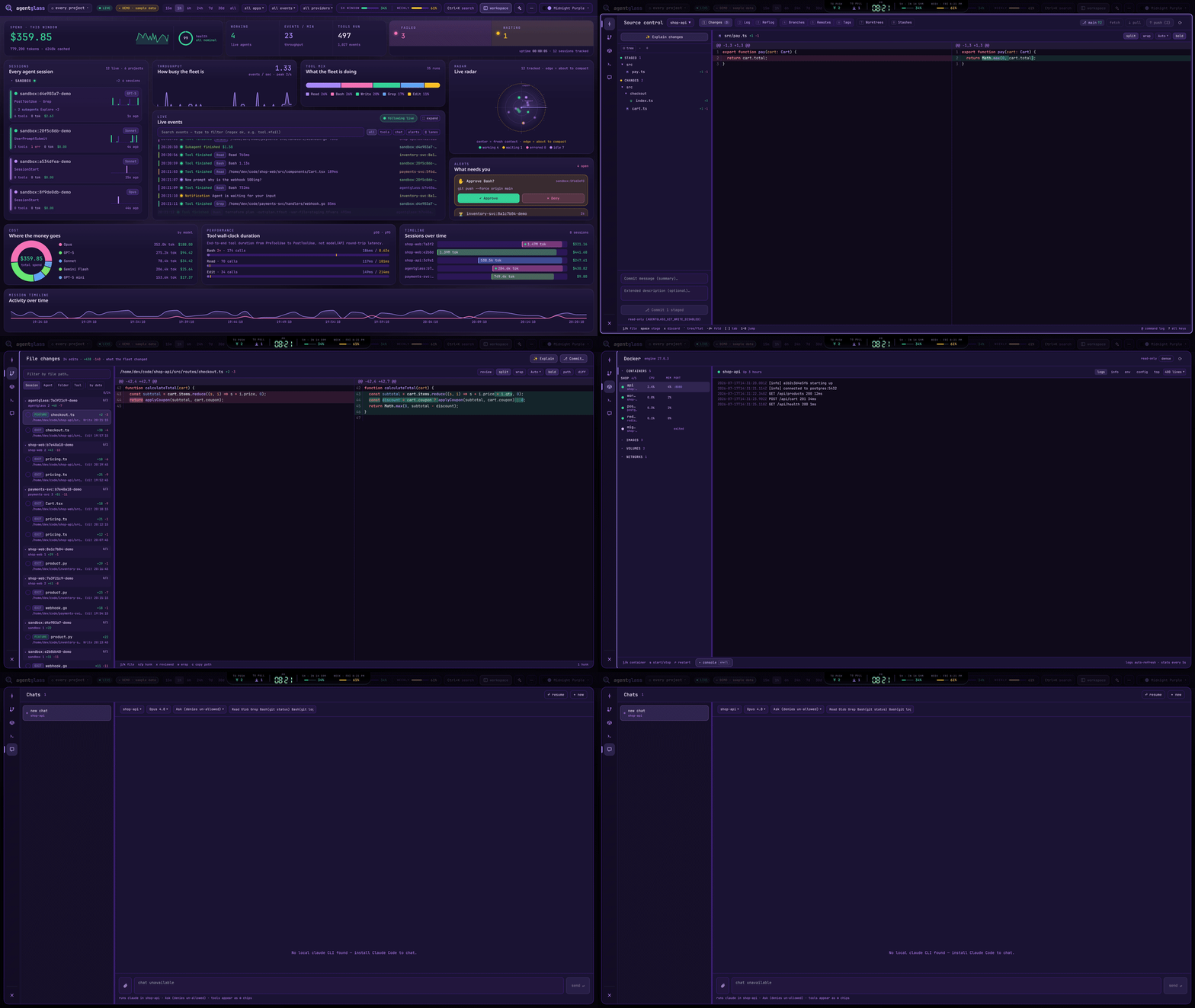
Every AI coding agent on your machine, on one screen — live cost, tokens and tool calls across every provider, and a hold on anything dangerous until you say go. From your desk or your phone.
$ npx -y skills add SirAllap/agentglass --agent claude-code
Run the curl in your terminal, the rest in Claude Code.
Repo: SirAllap/agentglass
What's inside
Every AI coding agent on your machine, on one screen — live cost, tokens and tool calls across every provider, and a hold on anything dangerous until you say go. From your desk or your phone.


Point any AI coding agent at agentglass — via Claude Code hooks or any OpenTelemetry GenAI exporter (OpenAI Codex, Gemini CLI, Bedrock, LangChain, LiteLLM…) — and watch every agent, tool call, token, and dollar move in real time. Cost tracking, tool-latency percentiles, error timelines, session lifecycles, one switch that filters the whole cockpit by provider, and 22 themes. It persists across reloads (unlike a pure in-browser stream).
And it's not just a viewer. agentglass carries a full workspace in the same cockpit — the idea is simple: browser, terminal, IDE panels, agent telemetry… all in one place. A syntax-highlighted diff viewer for everything the fleet changed, a lazygit-style source-control panel (stage, commit, push), a pull-request panel that reviews and merges without opening a browser, a Tasks panel that turns a GitHub issue straight into a worktree, a lazydocker-style Docker panel (containers, logs, stats), a real terminal (an actual PTY shell on your machine, not an emulation), a chat panel that drives local Claude Code, Codex and Antigravity sessions, and a file browser that opens into the same editor — all a keystroke apart in one window, under a bar that mirrors your desktop notifications so nothing is lost while you are fullscreen. Ships as a native desktop app, server included.
The full cockpit running on fabricated sample data — a simulated live event stream, populated radar, spend charts, and even the control-plane approve/deny gate. No install, no server. (Everything there is fake; it's a showcase.)
agentglass watches every Claude Code session on your machine — you don't
launch it per-repo. Alongside the live hook stream, a transcript scanner
reads ~/.claude/projects directly, so history from every project is there the
moment you open the dashboard, and new sessions tail in live (deduped against
the hooks, so nothing is double-counted).
Want to focus? Scope the whole cockpit to a single project — only that repo (and its worktrees) show up, and its git / terminal / chat panels, diffs, and spend are all you see. The natural way is the in-app project picker: on first open (a desktop app has no "current folder", so it asks) you choose what this cockpit is about, and the ⌂ name in the header switches it any time:
~/code) → every repo from
that folder inward;The choice is applied live and persisted (root in
~/.config/agentglass/config.json), so the next launch opens straight into it.
It can also be set from outside:
AGENTGLASS_ROOT=~/code/my-project bun run dev
# desktop: AGENTGLASS_ROOT=~/code/my-project agentglass
Leave everything unset and it covers the whole machine. You can also pin the
repo sweep to specific directories via AGENTGLASS_REPO_DIRS, or the same
config file:
{ "root": "~/code/my-project", "repoDirs": ["~/code", "/mnt/hdd/code"] }
Watching is only half of it. agentglass grew a set of lazygit / lazydocker-style panels — plus a real terminal, a Claude chat, GitHub issues and a file browser — that live right in the app, so you can go from seeing what the fleet did to acting on it without leaving the tab. Keyboard-driven, and they wear the same 22 themes.
The 0.8 redesign made the workspace the whole window rather than a modal over the dashboard. A rail down the left switches between the views, and the dashboard — the cockpit above — is now the first of them, one key away whenever you want it back. Every view has the same fixed-height title bar and the same list width, so switching changes the panel and nothing else moves.
The rail carries Dashboard 1, Git g, Diff d, Pull requests p, Tasks i, Docker o, Terminal t, Chat c, a Browser b where the build has one, and Files e. Drag it to reorder — put the terminal at the bottom if that is where your thumb goes — and the numbered shortcuts follow your arrangement, so the tooltips never start lying. Drag the seam beside any list to resize it; every view shares that width, and it is remembered.
Two kinds of shortcut, because they answer different questions. On the dashboard, bare letters jump straight to a view — g d p i o t c e. Inside any other view every keystroke belongs to whatever has focus, usually a shell, so navigation there carries a modifier: Ctrl+1…Ctrl+N walk the rail in order, Ctrl+[ / Ctrl+] cycle it, and Ctrl+\ (⌘\) toggles between the dashboard and the last view you were in. Both sets are rebindable in Settings ▸ Shortcuts, and the modified one takes any combination you like — Ctrl+Alt+J is recorded exactly as you hold it.

Drag the rail to reorder it. Put the terminal at the bottom if that is where your thumb goes; Ctrl+1–6 follow your arrangement, so the tooltips never start lying. Drag the seam beside any list to resize it — every view shares that width, and it is remembered.
A strip across the top of the window, always visible, whatever view you are in.
It carries what you would otherwise go looking for — commits to push and to pull, live shells, chats waiting on you, your Anthropic 5-hour and weekly plan meters, a clock — plus a bell with everything that has happened while you were elsewhere, and one lane in the middle for the thing that just did.
And it mirrors your machine's own notifications: agentglass runs fullscreen, so the Slack banner your desktop draws is behind the app that is covering it. Those arrive as cards over the top-right corner — sender, message, and the link if the message carried one — and then wait in the bell. A copy, never an interception: your desktop still shows its own, and agentglass never becomes the notification daemon. Capability-probed on the server, so a platform without a notification bus says so instead of offering a switch that does nothing.
Two switches in Settings ▸ Notifications, because there are two sources. From your desktop is off by default (it reads every notification you receive) with a second choice of how much to show — who it was from, or the whole message — and a quiet mode that keeps collecting without interrupting. From agentglass is on, and turning it off silences chats finishing and branches falling behind while still letting anything held waiting on you speak. Neither switch stops the bell collecting: silence is about interruption, never about the record.
dEvery Edit/Write the fleet makes, gathered into one reviewable, chaptered list. Shiki syntax highlighting composed with a word-level intra-line diff, split or unified, ligatures and a per-diff theme, "reviewed" check-offs — plus one-click ✨ Explain (a local-Claude walkthrough of the whole change set) and ⎇ Commit… to turn a review straight into a commit.

gA live view of any repo's working tree (repos are discovered from the fleet's own file paths). Stage / unstage / discard, interactive hunk staging, a commit composer, branches (checkout / create / delete), log, reflog, remotes, tags, worktrees and stashes — plus push / pull / fetch. Keyboard-driven (j/k move · s/u stage · x discard · 1–8 jump to a tab) and write-gated, so it's read-only until you opt in.
It also does the three things you would otherwise drop to a terminal for:
Sync from base. Pull main into the branch you are on, from the header, with the count of what is waiting. Disabled while the tree is dirty — merging over uncommitted work is how you lose it.
Resolve conflicts. Conflicted files are listed as what they are — files git has stopped in the middle of, not ordinary edits — so you cannot commit one with <<<<<<< still in it. Take a whole file's ours/theirs for the lockfile case, or open it one by one and choose a side per conflict block — or keep both, in either order — with both versions side by side and the common ancestor when git recorded one. Nothing is written until every block has an answer, because defaulting the ones you did not read is exactly how a merge quietly eats somebody's work.
Undo the merge, while that is still exactly reversible — only when nothing is committed on top and nothing is pushed. If either is true the button explains why instead of offering you a lie.

p
Every open pull request in one repository at a time — picked from a repo selector in the panel header, with the repo list discovered from the fleet's own file paths, like the git panel. It opens on what is waiting on your review, because that is the question a review dashboard exists to answer; if nothing is waiting it falls through to your own once, so it never lands on an empty pane. Saved views — Needs my review, Mine, Failing, Ready, All — are a scope and a query under one name, each carrying a live count where the scope is loaded and its last known one everywhere else. Each row carries its checks rolled into one dot (hover for passed · failed · skipped · running) and a here chip when this checkout is on that branch.
Above the tabs, a masthead that survives them: state, number and title, then author, branch, size, reviewers, assignee and milestone, the labels, and a ⋯ menu for the things you do to a pull request rather than in it — retitle, request a review, edit labels, convert to draft, copy the link, hand it to Claude, close it. Open Files and you still know whose change you are reading. Check states arrive in a second batched pass after the list itself lands — until it returns the dot is grey and reads Checks…, the header says Loading check states…, and rows with unknown checks are deliberately kept by the filter rather than hidden. That is what keeps the list itself instant.
Filter it the way you filter GitHub. Below the saved views is a query box plus eight multi-select facet menus — Author, Label, Reviews, Checks, Draft, Base, Assignee, Milestone — each showing a live count per option, a Sort pill, a removable chip per active filter and an "N of M" count. The query string is the single source of truth: key:value tokens plus bare words, keys case-insensitive, double quotes for values with spaces (label:"needs review"). Keys are author, label, review, checks, is, base, assignee, milestone and sort. Semantics are OR within a facet, AND across facets — two authors widens, adding a label then narrows. Bare words match the PR number, title or author, and sort takes recently-updated (default), newest, oldest, most-changed, title or checks. Unknown keys, half-typed tokens and unclosed quotes degrade to free text rather than emptying the list. Picking a saved view writes that view's query into the same box, so the chips still show what is on and still take it off again; edit it and the view row says Custom rather than claiming you are still in one.
author:sirallap label:bug is:draft sort:checks
Keyboard-driven both sides: in the list, j/k (or ↓/↑) move the selection and reset the detail to overview, / jumps into the query box, Esc clears it. In a PR's files tab, j/k walk the file list, n/p jump hunk to hunk, x marks a file viewed and ↵ folds it — the same keys the File changes modal uses, with the legend on screen. None of them fire while a query or comment box has focus.
Open one and it has overview · conversation · commits · files · checks · review. The diff is the app's own viewer — the same SplitDiff / UnifiedDiff the file-changes panel uses, keybindings and all, rather than a second implementation that drifts — and it reads per file or per commit, with merge commits marked as the trunk catch-ups they are so you do not review them as work.
The conversation is one timeline, and the machines are turned down rather than interleaved. Reviews, comments, line threads and the events between them read in the order they happened, on a single rail, oldest first or newest first. On a real review, four issue comments were all from CI and one coverage table alone was 46,551 characters, so automation collapses to a digest with the original a click away. Everything a person wrote renders as real markdown at a reading measure, because prose set to the full width of a 2000px window is unreadable however correctly it is formatted. A composer sits at the end, where a conversation ends, with Write and Preview.
Files opens open. Every file's diff is expanded from the start — that is how you read a change — and each one mounts as it comes near the viewport, so a sixty-file pull request scrolls instead of stalling; anything over 600 changed lines starts folded, because a regenerated lockfile is not what the tab should open on. Per file there is a Viewed switch rather than a tick, since viewed is state you keep for the length of a review, and the bar above carries a path filter, Unified / Split / Wrap, collapse-all and how many of the files you have got through.
Reviews work the way GitHub's do. Line comments queue as drafts (a pending chip counts them) and go up together as one review — approve, request changes or comment — so a half-finished review never lands in someone's inbox a line at a time. Threads belong to the review that opened them, are anchored to the code they are about, link out when you do want the browser, and the app declines to let you approve your own pull request.
A PR's overview is also where you act on it. It leads with whether the thing can land and what is stopping it, each blocker linking to the tab that would fix it. Squash-and-merge (pinned to the head SHA, so a push you have not seen makes GitHub refuse; optionally deleting the branch), enable auto-merge, close, update the branch from base, convert to or from draft, re-run failed checks — merges and closes behind a confirm dialog. The description is editable in place, with Write and Preview, and any checklist in it gets a progress bar. And Review with Claude: it opens the chat panel on this project with the review prompt already written, pinned to the PR's head SHA and pointed at gh pr diff for the change itself. It writes nothing — no fetch, no checkout, no directory left in your repository — and the prompt waits in the composer rather than sending itself, so the run starts when you say so. Same trick behind Ask Claude why on a failing check, which hands over the job that broke instead of the whole diff.
Check results notify you only for the pull requests you have a stake in — the ones you authored (mine) and the ones waiting on your review. Browsing all shows every PR's check state but never pushes a notification, and each PR notifies once per verdict however many checks it runs.
Nothing blocks on the network: the server has one thread, so every read is a cached answer that shows its own age. Check states come back in one batched GraphQL query rather than a subprocess per pull request, which is what makes a fifty-row list affordable.
iGitHub issues for one repository, your own local to-do list, and ClickUp, under a single rail tab. The GitHub half opens on what is assigned to you, each row carrying its labels, its assignee, the comment count and how long since it moved. Open one and the column beside it reads the whole issue — body, labels, milestone, assignees, open or closed — and Start → turns it into work: a worktree, a plain branch, or a tmux window with Claude and the prompt already written, so a task goes from read to being worked without a detour through the terminal. An issue already underway wears an in progress chip, because the app knows which worktrees it started.

oContainers, images, volumes and networks in one stacked column whose headers never leave — so "is anything dangling?" is answerable without navigating away from the container you are watching. Containers group by compose project with live CPU / memory in aligned columns, and a dense toggle drops the image line when you would rather fit more on screen.
Select one and the pane beside it carries logs · info · env · config · top, with the logs coloured by level and pinned to the bottom while they stream. exec drops you into a shell inside that container — in the console already docked below, so your history and any running job survive it. Start / stop / restart / rm per container, and start / stop / restart across a whole compose project at once (rm stays per-container), with each bulk action hidden when it would do nothing. Same keyboard-first feel, same write-gate.

tNot a command-runner imitation: the server opens your login shell inside a
real PTY (xterm.js in front, a pseudo-terminal behind a WebSocket), in any
repo/worktree the fleet has touched. Job control, Ctrl+C / Ctrl+R,
tab-completion, colors, vim / htop / lazygit — everything a local terminal
does. Sessions are per-repo and persistent: close the panel mid-build,
reopen later, the job is still running with scrollback intact.
The PTY backend is POSIX-only, so on a Windows host the Term view is present but disabled and says why — ConPTY is not implemented yet. The decision is made on the server, not in the browser, so a Windows browser pointed at a Linux or macOS server still gets a full shell.
The ⚙ commands menu makes every project command self-explanatory and one
click away — and it covers the whole selected project, not just its root:
Makefile targets with their descriptions (from ## comment annotations or
the # comment above each target) plus package.json scripts, discovered
in the repo root and its subfolders. A monorepo's nested commands come out
ready to run (make -C api test, bun run --cwd web dev), grouped by folder
in the menu, each with the right runner (bun / npm / pnpm / yarn)
detected from that folder's lockfile. agentglass's own Makefile is annotated
this way — make help prints the same list in the shell.
Run tmux in it and the panel adopts its windows as its own tabs. The list
comes from tmux, the pixels come from agentglass: click to switch, + for a new
window, double-click to rename, and tmux's own status line steps aside (one
click brings it back, and it is restored when the panel closes). Nothing about
the keyboard changes — ^b c, ^b n, ^b 2 and everything else still go
straight to tmux, and the tabs follow. The point is that the window list stops
being the one strip of the workspace themed by whichever .tmux.conf the
machine happens to carry.
If a shell ever renders solid white, switch Settings ▸ Preferences ▸
Terminal renderer to Compatibility. xterm's GPU renderer is fast, but on
some Linux GPU/compositor stacks it paints the terminal blank with no catchable
context-loss event — so the default (Auto) uses the GPU on macOS and Windows
and the DOM renderer on Linux. GPU forces WebGL back on anywhere; a real
context loss still drops that session to DOM permanently. The choice applies to
newly opened shells, and is separate from AGENTGLASS_GPU, which is the
Electron window compositor rather than xterm.

cMulti-chat against your local claude, codex or agy CLI: pick a repo/worktree,
a model, and a permission mode (plan → default / acceptEdits → bypass), then converse —
replies stream in, tool calls appear as chips, and follow-ups resume the same
session. Sessions you start here show up in the fleet like any other agent.
Every list is the CLI's own answer rather than a table in this repo. Codex reads
its models_cache.json; Antigravity answers agy models. Claude Code publishes
no list at all — there is no claude models subcommand, no --list-models, and
nothing cached on disk — so its catalogue lives in
shared/claude-models.json.
It is data, not code: edit that file and the dropdown follows on the next request. No rebuild, no restart.
{ "id": "claude-opus-5", "display_name": "Claude Opus 5", "status": "active",
"release_date": "2026-07-24", "scheduled_shutdown_date": "2027-07-24" }
A model is offered until its scheduled_shutdown_date has passed — that date is
the last day it appears, so it drops out the day after, and the panel stops
offering retired models without anyone editing anything. status is recorded for
the reader and is deliberately not a filter: a superseded model still answers
until it is actually retired, and hiding it early would remove a choice that
works. A row with no shutdown date never expires, which reads as "no retirement
announced".
To change the list without touching the checkout — a packaged install, or a
read-only one — put your own copy at ~/.config/agentglass/claude-models.json,
or point AGENTGLASS_CLAUDE_MODELS at a file. Ids are validated against the same
expression that guards the spawn, so an entry that could not be sent is never
offered.
The same panel drives codex as well. When both CLIs are on the machine an
agent picker appears next to the repo — it is switchable until the chat has a
thread, then frozen, because a resume id belongs to the CLI that minted it and
there is no meaning to handing a live conversation from one to the other.
Codex brings its own vocabulary rather than borrowing Claude's. Its modes are
filesystem sandboxes (Read-only, Write in this repo, ⚡ Full access)
instead of per-tool permissions, so there is no allowlist box for a Codex chat —
it decides at the filesystem boundary, not per tool call. The model list is read
from Codex's own models_cache.json, so it follows whatever your CLI currently
offers instead of a table in this repo that goes stale on every release. Pasted
and dropped images are Claude-only: codex exec takes images as file paths
rather than content blocks, so the panel says so instead of dropping them
silently.
A Codex chat shows tokens but no cost and no context meter. codex exec
reports neither a price nor a per-turn prompt size, and a bar drawn at 0 / 400k
would be a claim about a session we know nothing about. Its token counts are
cumulative for the whole thread rather than per turn, so they are assigned
rather than added up — and its input count includes the cached part, which is
subtracted back out so the "In" row means the same thing for both agents.
Install and authenticate the Codex CLI separately, then make sure the codex
executable is on the server's PATH when agentglass starts. The chat panel uses
codex exec --json for new turns and codex exec resume for follow-ups; it does
not replace the CLI's own login or configuration. Set CODEX_HOME when Codex
keeps its state somewhere other than ~/.codex — the model cache and rollout
history are read from that location. To turn off the Codex integration while
leaving Claude chat available, set AGENTGLASS_CODEX_DISABLED=1 before starting
the server.
The panel drives agy as well — Google's agentic CLI, and a separate
product from the Gemini CLI: a separate binary with separate state, whose
model list spans Anthropic and open-weight models as well as Google's. Wiring
one does nothing for the other, and the Gemini CLI keeps its own OpenTelemetry
route onto the radar unchanged.
Its four modes line up with Claude's — Ask, Plan, Auto-accept edits,
⚡ Bypass — because it really does decide per tool call rather than by
drawing a line around the filesystem. The model list comes from agy models, so
it follows whatever your CLI currently offers. Like Codex, it takes images as
file paths rather than content blocks, so pasted images are refused with a
sentence instead of being dropped.
Two honest gaps, both consequences of Antigravity exporting no telemetry of its own:
agy you
ran in a terminal stays invisible.Install and authenticate the CLI separately, and make sure agy is on the
server's PATH when agentglass starts. To turn it off while leaving the other
two, set AGENTGLASS_ANTIGRAVITY_DISABLED=1.
↩ resume picks up a session that already exists — including one you started
in a terminal — with its full context intact, and opens it against the CLI that
created it. Sessions that are still running are listed but can't be picked: a
session has a single owner, and a second writer on the same transcript corrupts
its history. For Codex the replayed history comes from its rollout in
$CODEX_HOME/sessions (~/.codex/sessions by default), since the OpenTelemetry
stream that puts Codex on the radar carries tool calls but none of the words.
What a session shows: the conversation is a timeline, not only a chat
log. Tool runs interleave with messages, each tool card carries the head of its
output (so a failing test is distinguishable from a passing one without leaving
the panel), and subagents report the parent's session id, so their tool
calls nest under the Task call that spawned them and fold away behind a
… +N tool uses toggle. Images are sent to the model as image blocks; other
files are quoted into the message. Type / in the composer to list and insert
skills/commands (slash commands are enabled in -p, they just weren't
discoverable).

eA file tree for any checkout the fleet has touched, one level at a time so a repo with a node_modules in it stays cheap to walk. Two searches, because they are two questions: Names finds the file called X, Contents finds the code that says X. Open a file and it comes up in the app's own editor — the same one the diff viewer and the pull-request panel use — to read, or to edit and save.

Two tabs of a panel that opens from the foot of the rail, over whatever view you are in. Ports lists everything listening — the port, the process, the checkout it was started from, how long it has held the socket, and whether an agent started it — so "what is on 3000, and who started it" has an answer without reaching for lsof. It flags a server whose checkout was deleted underneath it, and the one process that is not yours it will name but never signal. Resources is the machine's own load — CPU, memory, swap, disk and temperature — with the fleet's own processes broken out from the rest, and a per-checkout disk measure a click away.


The cockpit stays at the desk. A hunk-level diff and a docker table are not
things anybody drives with a thumb, and a narrower version of them is not a
phone app — it is the wrong app, smaller. So a phone gets a different
application: a native Android build that lives in mobile/, pairs
with your machine over your own wifi, and reads the same server the cockpit
reads.
It used to be a second web app, and it could never do the one thing it
existed for. crypto.subtle is secure-context only, so a page served at
http://192.168.1.20:4000 has no WebCrypto at all: it cannot generate the key
the pairing handshake is built on, and the phone on the sofa was exactly the
device that could not complete it. The app is not a page. It brings its own
P-256 (@noble, on Hermes — no secure context and no native module), so the same
handshake works unchanged over plain HTTP on the network you are already on —
and the handshake itself did not move to meet it: not a route, not a field.
It is not in a store. It is an Expo project in this repository, run from
Metro onto your own phone or emulator — mobile/README.md
is the two commands and the traps.
| Tab | What it is for |
|---|---|
| Now | The queue below: everything that wants a decision, in one list you can empty. |
| Terminal | The machine's real tmux panes, as tabs — not a second empty prompt. Open one and you are looking at what is on that screen right now: the agent mid-turn, the build that failed, the rebase waiting on a decision. It joins as its own grouped session with window-size largest, so attaching from the sofa does not drag a 200-column session down to phone width on the desk. A key bar carries what a software keyboard has no room for — Escape, Tab, the arrows, ^C, and the tmux prefix. |
| Chats | The same conversation you left at the desk, and still the same one when you sit back down: the session lives on the server, not on this phone. Scoped to Live when anything is running, because that is almost always why you reached for it. |
| PRs | Per repository, with the three things that decide whether you open it at all on the row itself — is CI red, has somebody approved, how big is it. The check rollup costs about four times the rest of the row, so it arrives on a second pass and says checks… until it does rather than claiming there are none. |
| Repos | Every checkout, not one per repository — linked worktrees answer with the same pull requests but have their own uncommitted work. A switch per file is the staging; then a title, Commit, and Push if the branch is ahead. |
| Tasks | Your board's own views, in the order the workspace has them, in the colours it gave them — a phone showing a different slice of the board than the computer is a second place to keep in your head. |
| Settings | What this phone is paired to, what it was granted, and whether it may buzz. |

That is the whole difference: a dashboard is something you re-read, and this is something you can empty. Every card is one decision carrying its own action, and answering it takes the card out of the list.
| Card | What it is, and what you can do about it |
|---|---|
| Blocked · waiting on you | A gate. The agent is stopped dead until you answer, so this outranks everything: allow or deny, with the command it wants to run in front of you. |
| Container down | A container that exited non-zero, is restarting, or is dead. Tail the log, restart it, or hand it to Claude. |
| CI went red | The failing check on one of your pull requests. Open the log, or re-run it. |
| Ready to merge | Approved, checks green, nothing in the way. The one card that finishes work rather than starting it. |
| Review requested | Somebody asked for your eyes. Opens the pull request, diff and all. |
| Stopped · wants direction | A session that ended its turn and has gone quiet — between four minutes and twelve hours. Under four it is probably still thinking; over twelve it is yesterday's problem, not tonight's. |
| Stopped part-way | A checkout left mid-rebase, mid-merge or mid-cherry-pick. Nothing is running there and nothing will until somebody finishes it. |
Ordered by what it costs you to be away: blocking a person first, then broken, then finished-and-waiting, then everything else — and within a rank, newest first. A card you are not going to deal with tonight can be snoozed, and it comes back when it changes.
The diff is unified, wrapped, with a + or − glyph on every line as well as
the tint — at 11.5px, outdoors, in one hand, colour alone is not a signal to
rely on, and for a good number of people it is not a signal at all.
Settings ▸ Remote access, one switch to open the port. Then adding a device is its own small handshake, and it is deliberately not one step.
The pane shows a QR code and six digits. Scan the code with the app — or paste the link it encodes, which carries the address as well as the ticket — type the digits, and a request appears back at the computer, naming the device, the address it came from and the same six digits. It waits for somebody there to accept. Nothing exists until they do, and the ticket is good for two minutes: the app counts them down on both screens, because an invitation that has quietly expired looks exactly like a phone that cannot reach the machine.
That shape is the point. The QR is an invitation, not a key. It used to be the machine's own token, which meant a photograph of this screen, a screenshot in a chat or a shared window in a call was a working shell on your laptop; there is no way to scan a code carefully, and being able to see it was the whole authorisation. Now seeing it gets you a form asking for six digits that are not in the picture. The credential itself is minted only after a person agrees, and it is encrypted to a key the phone generated for that one pairing — so on a network without TLS, everything else on the wifi can watch the entire exchange and still not have it.
Each device is then its own thing: named, at a level you chose while looking at the request, and revocable on its own.
/terminal/pty refuses
anything less.The app is shown its own grant rather than left to discover it: a phone paired to Answer things gets the list of changes and no commit button. Hiding a button never stopped anything — the scope is checked on the route, per request — but a button that answers "you may not" is a worse way to learn it than a screen that never offered it.
Forget one device and only that one stops working: its credential is revoked, the sockets it is holding are closed, and the desk and every other phone carry on. Rotating the code is still there for when you have lost the code itself, and still kicks everything.
It is your network only — the server binds to the LAN. The same pane will tell you when a host firewall is dropping the packets, because otherwise "nothing answered at 192.168.1.20" is all anyone gets, and that sentence is equally true of a machine that is switched off. Over café wifi, pair on the Tailscale address it offers instead: that one is encrypted end to end.
The cockpit itself still opens in a phone browser, and the page ships a web
manifest so Add to home screen gives it an icon that opens without browser
chrome. Pairing one, though, needs a secure context for the same WebCrypto
reason as ever — so it is the tailnet HTTPS address that works there, never
http://192.168.…. That is what the app is for.
The honest answer is Tailscale, and it is the one the Remote pane offers beside the LAN address. A tailnet address is reachable from a train, encrypted end to end, and limited to devices signed into your own account — which is a much narrower grant than a network. Install it on both ends, pair on that address, and the sofa and the airport work the same way.
The tempting answer is a tunnel — cloudflared, ngrok, a reverse proxy — and
it is worth being plain about what that is. This server can open a shell, push
to your repositories and control Docker on the machine it runs on. Putting a
public hostname in front of it means the only thing between the internet and
that is a credential, and credentials leak by being pasted into the wrong
window. Treat the port the way you treat sshd: if you must put a proxy in
front of it, terminate TLS there, require authentication at the proxy as well,
and set AGENTGLASS_ALLOWED_HOSTS so the DNS-rebinding guard knows the name.
It is not a configuration this project tests, and it is not one to reach for
because Tailscale looked like a bigger setup than it is.
Either way, the tunnel is for the browser, not for the hooks. Everything
that reports into agentglass — the Claude Code hooks, the OTel exporters, the
gate that holds a tool call — posts to the server on the machine it is running
on, at http://127.0.0.1:4000. It has to: the hook scripts refuse to send a
transcript anywhere but this host, precisely because a cloned repository can set
AGENTGLASS_SERVER in its own settings.json and would otherwise redirect your
prompts and file contents to somebody else. Pointing them at a public hostname
does not make anything work better, and turning off the guard to do it
(AGENTGLASS_ALLOW_REMOTE=1) is for the case where the server genuinely runs on
another machine — not for the case where you added a tunnel to it.
Settings ▸ This phone may buzz, one switch. A gate holding, a tool that
failed, a run that stopped — the same notes the computer puts on its own screen,
raised on the phone instead. They ride the live connection this device already
holds: {type:"alert"} on the socket is the identical frame the desk turns
into a native notification, so there is no push service in the path, no account
anywhere, no device token held by anybody, and nothing to register.
What that costs, said plainly: the app has to be alive to hear it. Android keeps the socket for a while after the screen goes off and then freezes the process, so this reaches a pocket for a while and not for ever. The Settings screen says so where you turn it on, rather than implying a guarantee it cannot keep. Send a test alert is there because the alternative way to find out whether it works is to miss the thing it exists for.
What is worth interrupting for is decided on the phone, and there are four
different ways to say no: you are looking at the app already (the queue is
on screen and updating, and a notification over the top of it is the app telling
you what you can see), it is the same alert inside ninety seconds (a
reconnect re-broadcasts, and a phone reconnects every time it comes out of a
pocket — without this, walking into the office buzzes once per lift door), the
server itself called it worth knowing and not worth stopping for, or it
arrives with no title, and a buzz with no explanation teaches people to
ignore the next one. Only an agent that is stopped and waiting on a person gets
Android's max. Making everything urgent is how a channel ends up switched off
in the system settings, where the app cannot see it and cannot ask again.
There was a Web Push route here, and it is gone. It woke a locked phone through Google's or Mozilla's push service, with Allow and Deny drawn on the notification — and by the end nothing could subscribe to it: a service worker and
PushManagerneed a secure context, so a phone opening the QR link athttp://192.168.…had neither. The same measurement that ended the browser companion, one layer down. It left with the switch that turned it on, rather than staying as a route nobody could reach.
AGENTGLASS_NOTIFY is the desktop channel and does not gate this one: a paired
phone hears the socket whether or not the machine it watches has a screen.
agentglass is a visibility layer, not a harness: it doesn't run your agents or impose a workflow on them — it shows you what they're actually doing, and puts the controls (diff, commit, terminal, docker) next to what it shows. Everyone's harness is their own; the missing piece is seeing through it.
Most agent dashboards show a live event feed and forget everything on refresh. agentglass adds the layer that actually answers "what did this cost, what's slow, what's breaking, and how much of my plan is left?" — across every provider and every project, wrapped in a fast, animated cockpit.
| Feature | What you get |
|---|---|
| 🛰 Mission-Control cockpit | Mission clock, live throughput, tool-mix, a sweeping agent radar (distance from centre = context window used — a blip at the edge is about to compact), plain-English event stream, and a "what needs you" alert center. |
| 🗂 Every project, machine-wide | A transcript scanner reads every Claude Code session on the machine — history is there on open, new sessions tail in live. Or scope the whole cockpit to one project (or one folder of projects) with the in-app picker. |
| 🖥 Native desktop app | Own window + icon and a self-contained bundled server — nothing to run in a terminal. Launch-at-login toggle, attaches to a running server instead of duplicating it. |
| 🔬 Diff & review | A real diff viewer for everything the fleet changed — Shiki highlighting + word-level diff, split/unified, AI Explain, and commit-straight-from-review. |
| 🌿 Source control | lazygit in the cockpit: stage, hunk-stage, commit, branch, stash, push/pull — live on any repo the fleet touched (write-gated). |
| 🐳 Docker | lazydocker in the cockpit: containers by compose project, live stats, a log viewer, start/stop/restart (write-gated). |
| ▶ Real terminal | A true PTY shell (your login shell) per repo/worktree over a WebSocket — persistent sessions, plus a described, ready-to-run list of every Makefile target & package script across the whole project, grouped by folder. |
| 💬 Claude chat | Drive local Claude Code sessions from the browser — model + permission-mode picker, streamed replies, resumable sessions that appear in the fleet. |
| 💰 Cost & tokens | Per-event, per-session, per-model USD from a tunable pricing table (input / output / cache-write / cache-read). |
| ⏱️ Tool latency | PreToolUse→PostToolUse pairing → real p50 / p95 / max per tool. |
| 📊 Persistent analytics | SQLite-backed. /stats over any time window survives reloads and restarts. |
| 🌐 Any provider | Claude Code hooks plus an OpenTelemetry OTLP receiver (gen_ai.* spans). Provider is auto-detected from the model per event, so a session that switched models is counted under each provider it actually used — then filter the entire cockpit (cost, tools, latency, sessions, radar…) by provider. A model no rule recognises lands in a real Unknown bucket you can select, rather than disappearing from every filtered view. |
| 🤖 Per-model breakdown | Cost & token split across every model — Claude, GPT, Gemini, and more — from a tunable pricing table. |
| 🧵 Session lifecycle | Timeline of every session: start→end, duration, tokens, cost. |
| 📈 Anthropic plan usage | 5-hour + weekly plan-limit meters — shown only when you're viewing Anthropic (the one provider with a usage API), on wide screens. |
| ⌨ Command palette + shortcuts | Ctrl-K to filter, switch theme, change window, export; d diffs · g git · p pull requests · i tasks · o Docker · t terminal · c chat · e files · k skills · s stats · / search; click any event for full details; click an agent to filter to it. |
| 🎨 22 themes | 11 dark palettes (Midnight Purple, Forest, Ember, Nord, …), each with a light twin — instant switch, remembered. |
| 🔔 Alerts | A held gate reaches whatever is attached: the notch in the cockpit, a native OS notification on the desktop, and a paired phone over its own live socket — plus webhook (Slack/Discord), notify-send on a headless box and an optional in-app chime. |
| 💰 Budgets | "No more than $40 a month on this repository." Per-project and per-model, warned at 80% rather than only when you cross it, counted from the daily rollup as well as live events so a monthly budget really means a month. Settings ▸ Preferences. |
| 📤 Export | One-click CSV / JSON of all events. |
22 palettes — 11 dark, each with a light twin. The two the app is serious on, the same dashboard in each:
| Dark | Light |
|---|---|
![]() | ![]() |
The rest — Midnight Purple, Forest, Ember, Nord, Deep Sea, Rosewood, Carbon and their light twins — switch instantly and are remembered.
agentglass is a desktop app. Grab the installer for your platform from Releases, launch it, and the cockpit opens with its own server bundled inside. Nothing to run in a terminal, no port to open in a browser.
| Linux | macOS |
|---|---|
.AppImage (chmod +x, run it) or .deb | .dmg, Apple Silicon and Intel |
That alone already shows you everything: the built-in transcript scanner
reads ~/.claude/projects, so every Claude Code session on the machine is
there on first open, with no wiring at all.
To also get live streaming and PreToolUse gating, wire the hooks once
(opt-in, details below).
In the desktop app there is nothing to clone: the hooks ship inside the
bundle, and Settings ▸ Hooks wires them into ~/.claude/settings.json and
takes them out again, showing whether they are currently installed.
From a checkout, the forwarder lives in the repo, so this path wants a clone and Python 3; it needs nothing else:
git clone https://github.com/SirAllap/agentglass.git && cd agentglass
python3 hooks/install_hooks.py # global Claude Code hooks
python3 hooks/seed_demo.py # optional: streams demo agents for ~30s
Want to look before installing? The live demo is this exact UI, built from the same source on every push, running on fabricated data.
For hacking on agentglass, or for a headless box. Requires Bun ≥ 1.1 and Python 3 (the hook forwarder and the terminal's pseudo-terminal both run under it). Everything else agentglass shells out to is listed under Requirements, and checked for you in Settings ▸ Requirements.
bun install
bun run dev # server :4000 + UI :6180 (vite dev server)
make desktop # or: build the UI and launch the real shell
bun run dev gives you the same UI in a browser tab at
http://localhost:6180, minus what only the shell can do (fullscreen, zoom,
launch-at-login, and the self-update route, which refuses a browser by design).
It is the development path, not the way to run the app. If something else on
your machine already owns :4000, the tab will talk to that server, so check
the port before believing an empty dashboard.
Running a second server alongside the installed app — a test instance, a
worktree you want to poke at — needs AGENTGLASS_DB, and this is the one that
bites. Isolating XDG_CONFIG_HOME is not enough: the database is found via
XDG_DATA_HOME, and a checkout with no agentglass.db of its own resolves to
the installed app's real history. A second server there would run a second
transcript scanner over it, and two scanners over one file inflate events,
tokens and cost — the scanner's rows carry no event_id, so the idempotency
index cannot dedupe them, nothing errors, and the totals simply grow. The claim
at boot now stops that scanner from starting, which keeps the numbers honest but
also means your test instance sees no live sessions. Give it its own file:
S=$(mktemp -d)
env AGENTGLASS_DB=$S/agentglass.db \
XDG_DATA_HOME=$S/data XDG_CONFIG_HOME=$S/cfg \
AGENTGLASS_PORT=4713 \
bun run server/src/index.ts
(GH_CONFIG_DIR=$HOME/.config/gh too, if you want the PR panel to work — gh
reads its login through XDG_CONFIG_HOME, and isolating that logs it out.)
Single-port deploys (a headless box, a systemd unit): build the UI once and the server serves it itself, one process, one port, API and dashboard on the same origin:
bun run build # web/dist
cd server && bun run src/index.ts # dashboard AND API on :4000
When web/dist doesn't exist (plain bun run dev, or the packaged app's
bundled server), nothing is served over HTTP: the server is API-only and no
dashboard is reachable on that port at all.
Prefer make? Every entry point is a described Makefile target, and make help
lists them all (make dev, make setup, make demo-feed, make desktop, …).
The in-app terminal (t → ⚙ commands) surfaces the same list, ready to
click-run.
bun run setup appends the agentglass forwarder to your global
~/.claude/settings.json, so every Claude Code session — in any project —
starts streaming to the dashboard. No hand-copying, no per-project setup.
(It's deliberately not run automatically on bun install: touching
~/.claude is a decision, so postinstall only prints a reminder.) Safe to
re-run:
*.bak.agentglass.<timestamp>
before any change.--source-app is omitted so each session shows up under its
own project's folder name in the dashboard.bun run setup # wire the global hooks (also: make setup)
bun run setup:undo # remove the agentglass hooks again
Even without any hooks, the built-in transcript scanner already surfaces every Claude Code session on the machine — the hooks add live
PreToolUsegating and lower-latency streaming on top.
Prefer to scope it to one project instead of globally? Point the installer at a
project directory (writes <project>/.claude/settings.json):
python3 hooks/install_hooks.py --project ~/code/my-project
Both use a dependency-free Python forwarder that POSTs to the server; Stop /
SubagentStop / SessionEnd pass --add-chat so token usage can be read from
the transcript. The raw hook blocks also live in
hooks/settings.example.json for manual setups.
agentglass drives the tools you already have rather than bundling its own. The app itself is self-contained (the server ships inside it), so this list is about what each feature shells out to, and what stands down when it isn't there.
The app checks all of it for you: Settings ▸ Requirements shows every tool, whether this machine has it, what stops working without it, and a link to the project's own install page. Nothing there installs anything, and the guidance is deliberately generic: there is one macOS, one Windows and an unbounded number of Linux distributions, so how you install software is yours to know.
Needed
| Tool | Why | Without it |
|---|---|---|
| git | Source control, file changes, pull requests, worktrees; the terminal uses it to decide where to open | Those panels stay empty and the terminal cannot open in a repo |
| Claude Code CLI | The chat panel runs claude: every turn, the pane engine, Review with Claude, the walkthrough | No chatting from the app. Sessions still appear: the transcript scanner reads ~/.claude/projects regardless |
| Python 3 | Runs the hook forwarder, and backs the terminal's pseudo-terminal | Hooks stay wired and fail on every event, so nothing streams live and nothing says why. The terminal still opens, in a mode where full-screen programs do not render. Windows hooks use py or python |
Per feature
| Tool | Gives you | Without it |
|---|---|---|
| tmux | Chats as live panes you can attach to, your tmux windows as tabs, theme sync | Chats run one process per turn instead: slower to start, nothing left running |
| GitHub CLI | The whole pull-requests panel | No PRs. It also has to be logged in (gh auth login), which is the step people miss |
| Docker | Containers, images, volumes, logs | No docker panel. The daemon has to be running, not just the CLI installed |
| Neovim | Sending a file to a live editor, theme sync | The app hands you a command to paste instead |
| setsid, script (util-linux) | Process groups per shell, and the fallback pseudo-terminal | A closed terminal can leave background processes behind |
| D-Bus tools, libnotify, xdg-utils | Mirroring desktop notifications into the app, alerts when no window is open, opening their links (Linux) | Those notifications simply do not appear |
| polkit | Handing a worktree back to you when a container left root-owned files in it | That one repair button fails |
Two more that are not binaries
.AppImage: needs FUSE, which some distributions no longer install
by default. The .deb has no such requirement.git, Bun and a
working build toolchain. It is opt-in and never automatic.On Windows, the terminal, tmux chat panes, the notification mirror and self-update are off by design rather than broken: they need a POSIX pseudo-terminal, a Unix shell and a D-Bus session respectively. Everything else, including the transcript scanner and the git and PR panels, works.
agentglass ships as a desktop app — its own window and icon, plus a self-contained server (the Bun backend compiled to a standalone binary and shipped as an Electron sidecar), so there's nothing to run in a terminal. Launch it from your app menu and the cockpit opens; close it and the server goes with it. The UI is the same web app, run in Chromium so it composites on the GPU.
Installers for every release are published on
Releases:
.AppImage and .deb for Linux, .dmg for macOS (Apple Silicon and Intel).
That is the way to install it.
On Apple Silicon, macOS may refuse to launch the app with a misleading
"agentglass.app is damaged and can't be opened" message. The download is
not actually damaged. The .dmg is not yet code-signed and notarized with
an Apple Developer ID, so Gatekeeper blocks the quarantined app your browser
downloaded and shows that wording instead of the softer "unidentified developer"
prompt. Clear the quarantine flag with the built-in xattr tool, then open it
normally:
xattr -dr com.apple.quarantine /Applications/agentglass.app
Right-click → Open does not clear this specific "damaged" variant on Apple Silicon; only the command above does. Signing and notarization are on the roadmap (they can run in CI on a macOS runner, so no Mac hardware is needed). For background, see Apple's Safely open apps on your Mac.
Building it yourself, from a clone:
make desktop # build the UI and launch Electron + the sidecar
make desktop-dist # package installable binaries (electron-builder)
make desktop-install # install for this user (no root)
Then launch agentglass from your desktop menu, or agentglass from a shell.
The packaged app's bundled server serves the API and nothing else: the UI is
loaded from the shell's own agentglass:// origin, which a browser cannot
reach, so an install never exposes a dashboard on a port.
:4000
(e.g. a bun run dev you left running), the app attaches to it instead of
racing a second one against the same database. Note the trigger: it is the
port, so a second server started deliberately on another port sails past
this check. What stops that one is the database claim below.event_id, so the ingest idempotency
index cannot dedupe them. A claim left behind by a killed process is taken
over, not honoured. Give a second instance its own AGENTGLASS_DB and both
scan.AGENTGLASS_DIE_WITH_PARENT, armed by the shell) and exits rather
than lingering on the port.AGENTGLASS_RETENTION_DAYS
default as every other way of running it; the packaged app sets nothing. The
boot log and Settings ▸ Budgets both state the window in force. Spend history
outlives the rows via the daily rollup, which has no expiry — but the raw
prompts and command lines behind it do not. Set
AGENTGLASS_RETENTION_DAYS=0 if you want them kept for ever.A desktop app launched from its icon has no "current folder" — so on first open the cockpit asks which folder it's about: pick a project, a folder of projects, or the whole machine, and switch any time from the ⌂ header. The choice persists across launches. Prefer to decide at launch time? Pass the directory instead:
make desktop-open DIR=~/code/my-project # or: agentglass ~/code/my-project
Works on Linux and macOS.
Settings ▸ About shows the version you are running, the commit it was built from, and whether a newer release is published. One click builds it and restarts.
The in-app updater is POSIX-only. It rebuilds from source, so it needs git and bun on the machine, and on Windows it is switched off rather than shelling out to a bash that may not exist — About still reports the version and the newest published tag, but updating means downloading the installer again. When the machine is offline the pane says it could not reach the release feed, instead of claiming you are up to date.

It tracks tags, never a branch tip. A tip is wherever development happened to stop — half a feature, a debugging commit — and tagging is the act of saying this one is tested. So nothing pushed after the last tag reaches an installed app until you tag it:
git tag v0.3.0 && git push --tags # now every install is offered it
The build happens in agentglass's own clone under ~/.cache/agentglass/source, never in your checkout — so a convenience button can never move your HEAD or touch work in progress. It works out what it already has from git describe rather than a version field, so a package.json nobody remembered to bump cannot make an older tag look like an upgrade.
The route that runs it is the strictest in the server: reachable from the desktop shell's own origin and nothing else — not from a browser, not from another machine on your network. It is the one endpoint that executes arbitrary code, so the ordinary "local network is fine" rule is not enough for it.
Updating this way compiles on your machine, which is only reasonable because your machine already has the toolchain. It is not a substitute for a signed release feed, and it is deliberately not automatic — nothing is downloaded or run until you press the button.
agentglass is a workspace, not just a viewer: it can open a real shell, write to your repos and control Docker. It ships safe for its intended home — your own single-user machine — and you should know exactly where the lines are:
127.0.0.1 —
nothing on your network can reach it.0600, in your config dir) and runs its server behind it, remote
access or not, so that reaching the port and being let through it stop being
the same thing. localhost belongs to the machine, not to your account:
without this, a second Unix user on the box — or a browser extension holding
http://localhost/* — opened http://localhost:4000 and got the cockpit,
shell included. This does not make the app the only way in, and isn't
meant to: a browser still gets there with ?token=, which is what the phone
and the QR flow are built on. It closes the callers that can reach the port
and can't read the file. Running the server yourself (bun run server) on
loopback with no AGENTGLASS_TOKEN set is unchanged — still no auth, because
there "can reach localhost" is a choice you made knowingly.AGENTGLASS_TOKEN and every route
requires it — Authorization: Bearer <token> for the API, ?token=<token> on
the dashboard URL (it's stored and stripped from the address bar). The
append-only telemetry sinks (/ingest, the OTLP receivers) are the one
exception, and only for a sender on this machine: a local hook has no way
to carry a secret, while appending from the network is not inert — an event
raises a notification on your desk and on your paired phone, and lands in the
database for good. From off-box those sinks need the token like everything
else (the hook scripts send it when AGENTGLASS_TOKEN is in their env). This is what makes a
shared machine or a network bind safe, and it stops other local processes
from opening the shell. Binding a non-loopback address without a token
refuses to run unauthenticated: it mints one, prints it, and saves it
0600 under your config dir on POSIX (Linux/macOS). Windows has no POSIX
mode bits, so there the file falls back to your account's default ACL.Host). Running it
behind a reverse proxy? Allow its name via AGENTGLASS_ALLOWED_HOSTS.AGENTGLASS_TOKEN. Either way, consider disabling the
capability surfaces you don't use: AGENTGLASS_TERMINAL_DISABLED=1, AGENTGLASS_FS_BROWSE_DISABLED=1,
AGENTGLASS_CHAT_DISABLED=1, AGENTGLASS_CODEX_DISABLED=1,
AGENTGLASS_ANTIGRAVITY_DISABLED=1, AGENTGLASS_GIT_WRITE_DISABLED=1,
AGENTGLASS_DOCKER_WRITE_DISABLED=1.AGENTGLASS_BIND=0.0.0.0
hands the shell, git write and Docker control to that network. Do it only with
a token set and AGENTGLASS_TRUST_LAN=1 (off by default, LAN browsers are
refused as cross-origin without it), and only on a network you fully trust.
Settings › Remote does all three as one switch, and shows you a QR code —
including a warning in these words, because the switch is the same decision.
If a device still can't reach it, the host firewall is dropping the packets:
the panel names it and prints the command that opens the port to your subnet
only. Tailnet (Tailscale) addresses count as private under TRUST_LAN too.bypassPermissions for Claude (claude --dangerously-skip-permissions),
full-access for Codex (codex --dangerously-bypass-approvals-and-sandbox)
and always-proceed for Antigravity (agy --dangerously-skip-permissions) —
are honored only when AGENTGLASS_CHAT_BYPASS=1. One opt-in covers all three,
since it is the same decision. Without it Claude is downgraded to a prompting
default, Codex to its read-only sandbox, and Antigravity to asking.0700 dir, 0600 file) on POSIX; on Windows, which has no POSIX
mode bits, it falls back to your account's default ACL. Outbound calls are few and all of them are yours to
switch off: the optional Anthropic plan-usage meter (api.anthropic.com,
using your own credentials), the update check against the GitHub releases API,
the Pull requests panel through your own authenticated gh CLI, the AI
Explain walkthrough through a local claude (or your ANTHROPIC_API_KEY),
and anything you configure (webhook alerts).~/.config/agentglass/push.json) is no longer
written or read. An existing one is dead weight and can be deleted.agentglass can do more than watch: a PreToolUse hook can hold a tool call
until you approve or deny it from the dashboard. Wire hooks/gate_event.py into
a project's PreToolUse and risky tool calls show up under "What needs you"
with Approve / Deny buttons — decide from any device and the agent unblocks.
"PreToolUse": [
{ "matcher": "Bash", "hooks": [{ "type": "command",
"command": "python3 ~/code/agentglass/hooks/gate_event.py --source-app my-project" }] }
]
On Windows, use py (or python) instead of python3 in hand-written hook commands; hooks/install_hooks.py picks this automatically.
Safe by design — it never blocks your agents by accident:
AGENTGLASS_GATE_TIMEOUT (default 60s) → auto-allowIt also survives a restart. Pending requests are persisted, so restarting or crashing the server brings the queue back instead of quietly auto-allowing everything that was waiting on you — the hook re-attaches to the request it was already holding. A request whose window ran out while the server was down is resolved by your configured policy and says so in "What needs you", because an outcome nobody chose is the one worth showing.
Scope it with the matcher (e.g. Bash only, or a specific tool) so you're not
gating every call. Denying returns a PreToolUse deny with your reason — and
when you just press Deny without typing one, the agent is told a human stopped
it, that retrying the same call is pointless, and to try another approach or ask
you. That sentence is read by the model, not by you, so it is written for it.
Want the opposite trade-off? Set AGENTGLASS_GATE_FAILCLOSED=1 and a timeout or
an unreachable control plane denies instead of allows — the fleet stops
until you decide. Off by default; turn it on only when blocking is safer than
proceeding, and remember agentglass being down then blocks every gated call.
Two ways in: an agent with hooks can post through the bundled forwarder, and anything that speaks OpenTelemetry can point its exporter here.
Kimi Code CLI hooks
can stream its session and tool lifecycle through the bundled hook forwarder.
Agentglass recognizes the real K3 names (k3, kimi-k3, and kimi-code/k3)
as Moonshot / K3, understands both Moonshot cache-token formats, and applies
K3's input, output, and cache-hit rates without counting cached prompt tokens
twice.
Kimi's hook payload does not carry token usage, so hooks populate the live
session/tool views; a Kimi/Moonshot adapter can send its final usage object to
POST /ingest for exact token and cost charts. Copy the ready-to-use
config.toml hook blocks from the extension guide.
agentglass isn't Claude-only. It exposes an OTLP/HTTP trace receiver that
maps OpenTelemetry GenAI spans (the gen_ai.* semantic conventions) into the
same events the dashboard already understands — so anything emitting GenAI
telemetry streams in: the OpenAI / Google / Bedrock SDK instrumentations,
LangChain, LiteLLM, OpenLLMetry, Arize Phoenix and the other OpenInference
instrumentors.
Not Claude Code's own OTel export, which this used to list. That export is
metrics, and this receiver takes spans and log records — so pointing
OTEL_EXPORTER_OTLP_ENDPOINT at agentglass from Claude Code sends its metrics
to an endpoint that turns them away and says why. Nothing is lost: Claude Code
is already covered, at far higher fidelity, by the hooks (bun run setup) —
per-tool timings, the prompt, the arguments, and the gate. Metrics carry totals,
which is the one thing the dashboard can already compute.
Like the Claude Code hooks, one command detects and wires any installed agent
CLI that speaks OpenTelemetry — backed up first, idempotent, and never run
behind your back on bun install:
bun run connect # detect + wire installed agent CLIs (also: make connect)
bun run connect:undo # unwire them again
~/.gemini/settings.json (OTLP traces → /v1/traces)~/.codex/config.toml (OTLP logs → /v1/logs)Start a new gemini / codex session after connecting and it streams straight in.
OpenCode does not export OpenTelemetry and has no hook system to wire, but it does load plain JS from its own plugin directory. So this one is a file copy:
bun run connect:opencode # deploy the plugin (also: make connect-opencode)
bun run connect:opencode:undo # remove it again
It writes one dependency-free file to ~/.config/opencode/plugins/agentglass.js
— nothing else in your OpenCode config is touched, no package.json is edited
and no package is installed. The plugin subscribes to OpenCode's event bus and
POSTs the same normalised events to /ingest that the Claude Code hooks do, so
prompts, tool calls, usage and subagents all land in the same fleet.
Safe to re-run, and deliberately timid about a directory this app does not own:
it refuses to replace an agentglass.js that is not ours, backs up before
overwriting one that is, and on --undo leaves an unrelated plugin of that name
exactly where it is. It also refuses to deploy at all if AGENTGLASS_SERVER
points off this machine, rather than wiring up an endpoint and relying on the
plugin to decline later.
Start a new opencode session after connecting for it to take effect.
The receiver accepts OTLP/HTTP in both protobuf (the SDK default) and JSON, so no Collector is needed — just aim any exporter's endpoint at the server:
export OTEL_EXPORTER_OTLP_ENDPOINT=http://127.0.0.1:4000
# spans POST to /v1/traces automatically (protobuf or http/json both accepted)
The provider and model are auto-detected from the spans (gen_ai.system,
gen_ai.request.model) — no config, no dropdown. Mapping:
chat / completion / …) → a costed "turn" event carrying the
span's token usage. Cost uses the same pricing table
(OpenAI, Gemini, Mistral, … included; override with AGENTGLASS_PRICING).execute_tool, or any span with gen_ai.tool.name) → a paired
PreToolUse + PostToolUse, so tool latency (p50/p95) and the tool-mix
populate.Some agents (OpenAI Codex CLI) export OpenTelemetry logs rather than traces —
those go to /v1/logs, which maps each GenAI log record (tool decision/result,
inference, prompt) to an event the same way. Codex's native event.kind,
input_token_count, output_token_count, cached_token_count, and
cache_write_token_count fields are recognized directly; cached input is kept
in its own buckets rather than charged again as ordinary input.
Non-GenAI spans/records are ignored — this is an agent-observability lens, not a general trace or log store.
| Var | Default | Meaning |
|---|---|---|
AGENTGLASS_PORT | 4000 | Server HTTP/WS port. |
AGENTGLASS_BIND | 127.0.0.1 | Address the server binds to. Loopback-only by default. Exposing (0.0.0.0) requires AGENTGLASS_TOKEN and AGENTGLASS_TRUST_LAN=1, and only on a trusted network. See Security model. |
AGENTGLASS_TOKEN | — | Shared secret required on every route but the telemetry intake sinks. Pass as Authorization: Bearer <t> or ?token=<t>. Locks the server to you on a shared machine and makes a network bind safe. Exposing — or setting AGENTGLASS_TRUST_LAN=1 — auto-mints + prints a token (saved 0600 in the config dir on POSIX; the default ACL on Windows). /health is exempt alongside the intake sinks, so a shell can probe which server owns the port. |
AGENTGLASS_TRUST_LAN | — | 1 → also trust RFC1918 (private-LAN) addresses as origins/hosts, not just loopback. Required for LAN browsers to reach an exposed instance. Off by default: a shell-granting server trusts only localhost unless told otherwise. Setting it makes a token mandatory — even on the default loopback bind — because it widens the CSRF origin gate to any private-IP page; with no AGENTGLASS_TOKEN set the server mints, persists and prints one. |
AGENTGLASS_ALLOWED_HOSTS | — | Comma-separated extra hostnames accepted by the DNS-rebinding guard (requests must arrive under a localhost/private Host). Only needed behind a reverse proxy. |
AGENTGLASS_WEB_DIR | — | Directory holding the built dashboard (index.html + assets/) to serve from the API port. Defaults to web/dist beside the source. The desktop app sets it to the bundle it ships, which is what lets its own server hand a phone a dashboard instead of a bare API. |
AGENTGLASS_DB | ~/.local/share/agentglass/agentglass.db | SQLite file path. The default lives under $XDG_DATA_HOME (or ~/.local/share), created 0700. A pre-existing agentglass.db in the working directory wins — but only for a checkout that already has one: a fresh clone has no such file, so bun run dev there lands on the shared history under $XDG_DATA_HOME, the same file the installed app uses. Isolating XDG_DATA_HOME alone is not enough either if you also want the installed app's database left alone — set this variable. A second server on the same file runs with its transcript scanner disabled (see the claim above), so it will not corrupt anything, but it also will not scan. |
AGENTGLASS_DB_CLAIM | 1 | 0 → do not claim the database file at boot, and do not stand the scanner down when someone else holds it. The escape hatch for the case where the claim itself is in the way; leaving it on is what keeps two processes from double-counting events, tokens and cost. |
AGENTGLASS_ROOT | — | Scope the whole cockpit to one project (repo + worktrees) or a folder of projects. Unset = every project on the machine. Also set by passing a directory to the desktop app; the in-app project picker sets/clears the same scope at runtime and persists it as root in the config file (note: the env var, when set, wins again on the next launch). |
AGENTGLASS_REPO_DIRS | — | Colon-separated dirs to sweep for git repos (git / terminal / chat panels). Also settable as repoDirs in the config file. |
AGENTGLASS_PROJECTS_DIR | ~/.claude/projects | Root the transcript scanner reads Claude Code session logs from. Several roots can be listed, separated by the platform's PATH delimiter (: on Linux/macOS, ; on Windows). |
AGENTGLASS_SCAN_INTERVAL_MS | 3000 | Transcript scan poll interval (min 500). |
AGENTGLASS_SCAN_DISABLED | — | 1 → turn off the machine-wide transcript scanner (rely on hooks / OTel only). |
AGENTGLASS_RETENTION_DAYS | 8 | Days of raw events to keep (pruned hourly). Covers the full 7d stats window; 0 = keep forever. Expiring days are folded into a daily rollup first, so spend history outlives the rows — see spend per day in Statistics. |
AGENTGLASS_PRICING | — | Path to a JSON pricing override (see server/src/pricing.ts). |
AGENTGLASS_WEBHOOK | — | POST {text} alerts here (Slack/Discord compatible). |
AGENTGLASS_NOTIFY | — | 1 → fire desktop alerts. A connected client (browser or desktop app) raises a native OS notification on any platform; notify-send is the fallback for a headless server with nothing attached to show it. Does not gate the phone, which hears every alert on the socket it already holds and decides for itself — see Alerts on the phone. |
AGENTGLASS_SERVER | http://127.0.0.1:4000 | Used by the hook/seed scripts. Refused unless it points at this machine — see the next row. A localhost value is accepted and rewritten to 127.0.0.1 before connecting: the server binds IPv4-only, so on a host that resolves localhost to ::1 first, every event pays a refused connect before falling back. |
AGENTGLASS_ALLOW_REMOTE | — | 1 → let the hook scripts post to a non-local AGENTGLASS_SERVER. Off by default and deliberately awkward: those payloads carry full session transcripts, and AGENTGLASS_SERVER can be set by a repo-local settings.json — so a cloned repository could otherwise redirect your transcripts to somebody else's host. Set it only if you genuinely run the server on another machine. |
VITE_CW_SERVER | http://<host>:4000 | UI → server URL (build/dev time). Unset, the UI resolves same-origin when the server itself served it (single-port mode), :4000 otherwise. |
AGENTGLASS_GIT_WRITE_DISABLED | — | 1 → make the Source control panel read-only (no stage / commit / push). Also makes the Pull requests panel read-only — no merge, close, review submit or branch update. |
AGENTGLASS_DOCKER_WRITE_DISABLED | — | 1 → make the Docker panel read-only (no start / stop / restart / rm). |
AGENTGLASS_TERMINAL_DISABLED | — | 1 → disable the in-browser Terminal entirely (no PTY shells are spawned). Also settable as "terminalDisabled": true in config.json, so it is reachable from a desktop-launched app that inherits no env; the env var overrides the file when set. Moot on Windows, where the terminal is already off — the PTY backend is POSIX-only. |
AGENTGLASS_EDITOR_DISABLED | — | 1 → refuse open in editor, so the app cannot hand a path to a live nvim or $EDITOR. |
AGENTGLASS_GPU | — | 1 → opt an Electron window back into full GPU compositing. The desktop shell composites the final frame on the CPU on Linux by default, because some GPU/compositor stacks paint the window white. Unrelated to the terminal's own renderer setting. |
AGENTGLASS_MAX_TERMINALS | 200 | Ceiling on concurrent PTY sessions. |
AGENTGLASS_AUTOFETCH_SECONDS | 60 | How often the git panel fetches in the background. |
AGENTGLASS_GIT_TIMEOUT_SECONDS | 120 | Ceiling on a single git subprocess. |
AGENTGLASS_FS_BROWSE_DISABLED | — | 1 → disable directory completion in the project picker (/fs/complete). Separate from the terminal switch on purpose: disabling the shell should not leave the directory tree readable. |
AGENTGLASS_CHAT_DISABLED | — | 1 → disable the Chat panel (no claude sessions can be started from the browser). |
AGENTGLASS_CLAUDE_MODELS | — | Path to the Claude model catalogue, overriding the copy in the checkout. See Which models the Chat panel offers. |
AGENTGLASS_CODEX_DISABLED | — | 1 → disable the Codex agent in the Chat panel, leaving Claude chat available. Codex is offered whenever a codex executable is on the server's PATH. |
AGENTGLASS_ANTIGRAVITY_DISABLED | — | 1 → disable the Antigravity agent in the Chat panel, leaving the other two available. Antigravity is offered whenever an agy executable is on the server's PATH. Independent of the Gemini CLI, which is a different product and is not driven from the chat panel at all. |
CODEX_HOME | ~/.codex | Codex's own override for where it keeps its state. agentglass reads the model cache and the rollout history (resumed-thread transcripts) from there. |
AGENTGLASS_CHAT_BYPASS | — | 1 → allow the Chat panel's unattended modes: bypassPermissions for Claude (--dangerously-skip-permissions), full-access for Codex (--dangerously-bypass-approvals-and-sandbox) and always-proceed for Antigravity (--dangerously-skip-permissions). Off by default; one opt-in covers all three, since it is the same decision. |
AGENTGLASS_CHAT_ENGINE | process | tmux → new chats run as a live claude in a pane on agentglass's own tmux server instead of one claude -p per turn. Faster per turn (the CLI's session start is paid once, not every message) and the session is attachable from your own terminal; costs a warm CLI (~380MB, growing with use) for as long as the chat is warm. Per-chat in Settings → Preferences → How new chats run. |
AGENTGLASS_TMUX_SOCKET | agentglass | Socket name for that server (tmux -L <name>). It is always launched with a config of our own (-f), never your ~/.tmux.conf — otherwise tpm/resurrect/continuum would come with it and continuum's autosave would overwrite your own saved layout in the shared ~/.tmux/resurrect/. |
AGENTGLASS_TMUX_IDLE_MINUTES | 30 | Minutes a chat pane may sit unused before its CLI is reclaimed. The next turn resumes the session transparently (one slower turn). 0 disables eviction and keeps every warm chat resident. |
AGENTGLASS_COMMIT_DISABLED | — | 1 → disable the diff viewer's Commit… composer. |
AGENTGLASS_GATE_TIMEOUT | 60 | Seconds the PreToolUse gate hook waits for an approve/deny before auto-allowing. |
AGENTGLASS_GATE_FAILCLOSED | — | 1 → a gate timeout (server) or an unreachable control plane (hook) denies the tool call instead of allowing it. Off by default (fail-open — never block agents by accident). |
AGENTGLASS_RATE_MAX | 300 | Max intake requests (/ingest, OTLP receivers) per source-address+route within the window, before 429. |
AGENTGLASS_RATE_WINDOW_MS | 10000 | Rate-limit window in ms for the intake sinks. |
AGENTGLASS_CODE_DIR | ~/code | Where the skills explorer scans for per-project .claude skills/commands. |
AGENTGLASS_WALKTHROUGH_MODEL | claude-haiku-4-5 | Model for the AI Explain walkthrough (uses a local claude CLI, else ANTHROPIC_API_KEY). |
CLAUDE_CREDENTIALS | ~/.claude/.credentials.json | OAuth token for the Anthropic plan-usage meters (never leaves your machine except to api.anthropic.com). |
Scope is a boundary, not just a filter. With a project open, git writes, the
terminal and chat are all refused outside it — the same rule that decides what the
dashboard shows. This is a behaviour boundary, not cosmetic: with a project
open, opening the app on ~/code and then jumping to /tmp in the terminal is
refused, and git writes outside the root are blocked — on their own, by the
scope boundary. (The AGENTGLASS_GIT_WRITE_DISABLED/AGENTGLASS_TERMINAL_DISABLED
knobs are a separate, global off-switch, not what enforces the root.)
For genuinely multi-repo work, scope to the parent folder (~/code) rather
than one repo: every repo beneath it is then in scope. An unscoped instance
covering every repo is unaffected.
Prefer a file over env vars? Drop a ~/.config/agentglass/config.json (or
$XDG_CONFIG_HOME/agentglass/config.json) with root, repoDirs,
terminalDisabled and/or chatBypass; env vars override it. The last two
matter for a desktop-launched app, which inherits no shell environment and so
cannot be configured by export at all.
Pricing is a user-editable default. Numbers in
pricing.tsare per 1M tokens and matched againstmodel_nameby substring. Anthropic (Claude) rates are verified; other providers are marked approx — verify current rates and tune, or pointAGENTGLASS_PRICINGat your own JSON.
| Route | Description |
|---|---|
POST /ingest | Ingest an event {source_app, session_id, hook_event_type, event_id?, reported_cost_usd?, payload?, chat?, model_name?}. A high-entropy event_id makes retries idempotent; reported cost (maximum $100,000) overrides estimated cost for that event. |
POST /v1/traces | OTLP/HTTP (JSON + protobuf) — maps OpenTelemetry gen_ai.* spans to events (any provider). |
POST /v1/logs | OTLP/HTTP (JSON + protobuf) — maps OpenTelemetry GenAI log records to events (e.g. Codex CLI). |
GET /events/recent?limit= | Latest events. |
GET /events/filter-options | Distinct apps / event types / models. |
GET /projects | Known projects (filtered to the active scope) + the current workspace. |
POST /workspace | Scope the cockpit to a project / folder at runtime ({root}; null → whole machine). Applied live, persisted to the config file — this is what the in-app project picker calls. |
GET /sessions?limit= | Session rollups. |
GET /stats?window=<ms> | Full analytics summary (totals, by-model, tool latency, timeline). |
GET /usage/daily?days=<n> | Daily totals across the retention boundary — the folded rollup plus the live events, joined and summed, with seam_day saying where one ends and the other begins. |
GET /skills | Skill/command catalog scanned from ~/.claude + $AGENTGLASS_CODE_DIR/*/.claude, joined with recorded usage. |
GET /changes?limit= | Recent file changes (Edit/Write) as diff hunks — feeds the File changes diff viewer. |
POST /walkthrough | AI Explain — a local-Claude walkthrough of a set of diffs (per-file summary + review focus). |
GET /git/tree · /repos · /branches · /log · /graph · /worktrees · /stashes · /commit-diff · POST /git/status | Live working-tree, branches, log/graph, worktrees & stashes for a repo (read). /repos honours the active scope; ?all=1 lists the whole machine (what the project picker uses). |
POST /git/{stage,unstage,discard,commit-staged,push,pull,fetch,checkout,branch-*,stash-*,apply-hunk,merge,rebase,reset,worktree-*} | Mutating git ops — gated by AGENTGLASS_GIT_WRITE_DISABLED. |
GET /docker/overview · /stats · /logs · /inspect · /top | Containers / images / volumes / networks, live CPU-mem stats, container logs, environment & config, running processes. |
POST /docker/{start,stop,restart,rm} | Container actions — gated by AGENTGLASS_DOCKER_WRITE_DISABLED. |
GET /git/conflicts · /conflict-blocks · POST /git/resolve · /resolve-blocks · /sync-base · /merge-abort · /merge-continue · /undo-merge | Mid-merge state: which files are conflicted, the <<<<<<< blocks inside one, and taking a side per file or per block. Sync a branch from its base, and undo the last merge while that is still exactly reversible. Write-gated. |
GET /update/status · /update/log · POST /update/run | The running version, the newest published release tag, and building it. Desktop-shell origin only — refused (403) for a browser, another machine, or a caller with no Origin at all, because it is the one route that executes arbitrary code. |
WS /terminal/pty?root=&cols=&rows= | A real PTY shell in a repo/worktree — raw bytes out, {t:"in"|"resize"} frames in. Gated by host platform (never available on Windows — no POSIX PTY backend), by "terminalDisabled" in config.json, and by AGENTGLASS_TERMINAL_DISABLED; GET /terminal/commands carries the reason (windows | config | env) so the panel can say which. |
GET /terminal/commands?root= | Ready-to-run project commands: Makefile targets with descriptions + package.json scripts (runner-aware), from the repo root and its subfolders (make -C …), grouped by folder. |
GET /chat/enabled · POST /chat/send | Drive a local claude session in a repo (streamed JSONL) — gated by AGENTGLASS_CHAT_DISABLED. send takes an optional engine (process | tmux). |
GET /chat/attach | The tmux attach command for a chat running on the pane engine, and whether its pane is still up. |
GET /codex/enabled · POST /codex/send | The same, driving a local codex session (codex exec --json, codex exec resume for follow-ups) — gated by AGENTGLASS_CODEX_DISABLED. enabled carries the model list read from Codex's own cache. |
GET /codex/transcript?id= | What a Codex thread said, read from its rollout under $CODEX_HOME/sessions. The OTel stream carries its tool calls but none of the prose, so this is what a resumed Codex chat replays. |
GET /antigravity/enabled · POST /antigravity/send | The same for a local agy session (agy -p … --output-format stream-json, --conversation for follow-ups) — gated by AGENTGLASS_ANTIGRAVITY_DISABLED. enabled carries the model list from agy models. send also turns the turn's own frames into events, since Antigravity reports to nothing else. There is no transcript route: its conversations are protobuf inside SQLite. |
GET /prs/capability · /prs/list · /prs/detail · /prs/diff · /prs/commit-diff · /prs/branch-url | Pull requests through the gh CLI, per repository: capability probe, the list for a scope tab, one PR's full detail, its diff, a single commit's diff. Cached, with check states filled by a second batched GraphQL pass. |
POST /prs/{review,review-with,comment,reply,thread-resolved,react,edit,labels,reviewers,draft,update-branch,rerun,merge,close} | Pull-request actions — gated by AGENTGLASS_GIT_WRITE_DISABLED and by the active scope. |
POST /prs/review-prompt | The prompt to review a PR with Claude, and the directory to run it in. Reads only, so the write switch does not gate it; the active scope still does. |
GET /issues/list · /issues/detail · /issues/work | GitHub issues through the gh CLI, per repository — the list for a state, one issue's full detail, and which of them this machine already holds a worktree for. Cached like the PR routes. |
POST /issues/{start,finish,claim,comment,state} | Start an issue as a worktree / branch / Claude window, finish it, claim it, comment, open or close — gated by AGENTGLASS_GIT_WRITE_DISABLED and the active scope. |
GET /files/tree · /files/find · /files/grep | A checkout's file tree one level at a time, filename search, and full-text content search — read, scoped to a repo the fleet has touched. |
GET /machine/ports · /machine/resources · /machine/space · POST /machine/kill | What is listening (port, process, the checkout it was started from, age, agent-started), the machine's CPU / memory / disk load with the fleet's own processes broken out, and a per-checkout disk measure. kill signals a process — gated. |
GET /hooks/status · POST /hooks/install · /hooks/uninstall | Whether the Claude Code hooks are wired into ~/.claude/settings.json, and wiring or removing them — what Settings ▸ Hooks calls, so a packaged app needs no clone. |
GET /health | Liveness plus an identity marker (service: "agentglass"), so a client can tell our server from a stranger on the same port. Token-exempt. |
GET /usage | Anthropic plan-limit windows (5-hour / weekly) for the usage meters. |
GET /session?id= | Full detail for one session (events, files, totals). |
GET /insights | Derived warnings — loops, fast burn, high failure rate, spend velocity. |
GET /search?q= | Full-text search across all captured prompts/commands/outputs. |
POST /gate · GET /gate/pending · POST /gate/decide | Control-plane approve/deny for the opt-in PreToolUse gate. |
GET /actions?limit=&before= | Every write the cockpit performed — git, docker, pull requests, gate decisions — with the address it came from. Append-only; unscoped on purpose. |
POST /control | Drive the dashboard's own UI (switch view, toggle workspace, theme, zoom, new chat) from an external controller — a Stream Deck, a phone. Validated then rebroadcast on /stream; changes only what's shown, grants no capability the keyboard doesn't. See docs/EXTENDING.md. |
GET /export?format=csv|json | Download all events (bounded by retention). |
GET /export?kind=daily&format=csv|json | Download the daily totals, rollup included — so a month already pruned still exports. |
WS /stream | Live frames — initial · openTools · event · session · git · ci · alert · control. Read-only: the socket never accepts commands. |
Claude Code hooks ───────────▶ hooks/send_event.py ──┐
OpenTelemetry (any provider) ─▶ /v1/traces, /v1/logs ┤
~/.claude/projects (every session) ─▶ scan + tail ───┤──▶ server (Bun)
│ ├─ ingest.ts normalize + token/cost delta
│ ├─ transcripts.ts machine-wide scan + live tail
│ ├─ otlp.ts map gen_ai.* spans/logs → events
│ ├─ config.ts project scoping (root / repoDirs)
│ ├─ db.ts SQLite: events + sessions, latency pairing
│ ├─ pricing.ts model → USD (any provider)
│ ├─ alerts.ts webhook / desktop / attached clients
│ ├─ gitwork.ts live working tree (lazygit)
│ ├─ docker.ts live containers (lazydocker)
│ ├─ terminal.ts real PTY shells over WS (+ make/script catalog)
│ ├─ chat.ts drive local `claude` sessions (stream-json)
│ ├─ issues.ts GitHub issues via gh, start one as a worktree
│ ├─ files.ts checkout tree, filename & content search
│ ├─ machine.ts listening ports, CPU/mem/disk, per-repo space
│ ├─ gate.ts approve/deny control plane
│ ├─ walkthrough.ts local-Claude "Explain" of a diff set
│ └─ WS /stream ─┐
│ ▼
web (React + Vite + Motion + Recharts + Shiki + xterm.js, :6180)
└─ also packaged as an Electron desktop app with a bundled Bun sidecar
How cost stays correct: transcripts report cumulative session tokens. On ingest the server diffs each cumulative report against the session's prior total, storing a per-event delta — so timeline sums and session totals agree and nothing is double-counted. Hook events and the scanner dedupe against each other by session, so the same turn is never counted twice.
Where this is going — themes, not dates. The living version is the issue tracker; the help wanted and good first issue labels mark the best places to start.
Now
Next
Later / exploring
Recently shipped — see the releases for the full record.
crypto.subtle is secure-context only; it pairs, buzzes with the screen off, and holds a real tmux pane. The desktop moves to Electron 43, off a line that went EOL in April 2025, with the fuses proven in the packaged binary rather than in the config that asked for them, and the window backend read from the session instead of pinned to one that no longer draws on Wayland. The build stamp now names the tree that was packaged rather than whatever HEAD happened to be, so "does my installed app have that fix?" is answerable. On the server: the telemetry sinks stop being tokenless from anywhere but loopback, a proxy can no longer present itself as loopback, and an alert that could go missing on the way to you does not. The whole product carries one version number.deliver() that reaches a phone with its screen off (#412). Tap the alert and you land on the thing it was about (#417). Only an agent that is stopped is worth waking a pocket for (#420). An iPhone in a browser tab was being told push works when it does not, and is not any more (#414). You can prove the whole path works without waiting for an agent to block (#415)..env to a model (#390). There is a record of who did what (#389), a gate denial the agent can act on instead of guess at (#380), and a security policy that says what is kept, how to remove it, and what is not a bug (#384, #378). Eleven code-scanning alerts triaged: three were real and are fixed, and none were dismissed (#432).:4000PRs welcome. If you want to adapt agentglass to another agent or harness without forking, start with docs/EXTENDING.md — OTLP ingest, the gate primitive, themes, and config surfaces are already there.
Issues and PRs welcome — see CONTRIBUTING.md. Small, fast, and dependency-light on purpose: a Bun/SQLite server, a React/Vite UI, an Electron desktop shell, and a stdlib-only Python hook forwarder.
Built by @SirAllap (David Pallares). Original work — not a fork. Not affiliated with or endorsed by Anthropic; "Claude" and "Claude Code" are trademarks of Anthropic.
MIT © 2026 David Pallares — see LICENSE.
.github/
assets/
android.png
chat.png
dashboard.png
diff.png
docker.png
files.png
git.png
hero.gif
logo.svg
ports.png
pr.png
resources.png
settings-shortcuts.png
settings.png
tasks.png
terminal.png
theme-dark.png
theme-light.png
dependabot.yml
FUNDING.yml
ISSUE_TEMPLATE/
bug_report.yml
config.yml
feature_request.yml
PULL_REQUEST_TEMPLATE.md
workflows/
android-apk.yml
ci.yml
codeql.yml
desktop-binaries.yml
pages.yml
pr-template-nudge.yml
release.yml
traffic.yml
.gitignore
bin/
agentglass-browser
bun.lock
CODE_OF_CONDUCT.md
CONTRIBUTING.md
docs/
BROWSER-TIER1.md
EXTENDING.md
mockups/
pr-triage-onescreen.html
superpowers/
plans/
2026-07-31-provider-usage-gauges.md
specs/
2026-07-31-antigravity-agent-design.md
2026-07-31-provider-usage-gauges-design.md
electron/
.gitignore
appctl.sh
build.mjs
guest-guard.js
icons/
icon-512.png
icon-full.png
icon.icns
icon.ico
icon.png
install-local.sh
main.js
package.json
preload.js
self-update.sh
hooks/
connect_opencode.py
connect_otel.py
gate_event.py
install_hooks.py
opencode-plugin.js
seed_demo.py
send_event.py
settings.example.json
statusline.sh
landing/
hero.gif
index.html
og.png
LICENSE
Makefile
mobile/
.gitignore
.npmrc
app/
app.json
_layout.tsx
(tabs)/
_layout.tsx
chats.tsx
index.tsx
now.tsx
prs.tsx
repos.tsx
review.tsx
settings.tsx
tasks.tsx
terminal.tsx
chat/
[id].tsx
pair.tsx
assets/
adaptive-icon.png
icon.png
splash-icon.png
metro.config.js
package-lock.json
package.json
plugins/
with-release-signing.js
README.md
scripts/
build-terminal-engine.mjs
build-terminal-font.mjs
qa.ts
src/
lib/
api.ts
b64.ts
dates.ts
host.ts
live.ts
pairing.ts
rng.ts
model/
chatList.ts
haltState.ts
machine.ts
nowQueue.ts
prRows.ts
quota.ts
transcript.ts
nav/
bar.ts
icons.tsx
TabBar.tsx
notifications/
notify.ts
policy.ts
state/
host-context.tsx
use-keyboard.ts
use-palette.ts
use-queue.ts
use-usage.ts
terminal/
keys.ts
mirror.ts
nerd-icons.woff2
tabs.ts
terminal-html.ts
TerminalView.tsx
theme.ts
ui.tsx
web-shims/
camera.tsx
clipboard.ts
haptics.ts
notifications.ts
README.md
secure-store.ts
webview.tsx
test/
api-errors.test.ts
chat-fidelity.test.ts
chat-find.test.ts
chat-list.test.ts
due-date.test.ts
feed.test.ts
fleet-shapes.test.ts
keyboard-inset.test.ts
keys.test.ts
live-wake.test.ts
look.test.ts
machine.test.ts
mirror.test.ts
native-imports.test.ts
nav.test.ts
notify-deliverable.test.ts
notify-policy.test.ts
now-queue.test.ts
pair-origin.test.ts
pair-paste.test.ts
pairing-e2e.test.ts
pairing.test.ts
pane-line.test.ts
queue-truth.test.ts
quota.test.ts
repo-halt.test.ts
term-ansi.test.ts
terminal-document.test.ts
terminal-poll.test.ts
terminal-socket-lifetime.test.ts
terminal-tabs.test.ts
terminal-takeover.test.ts
terminal-theme.test.ts
transcript.test.ts
tsconfig.json
tsconfig.test.json
package.json
QA.md
README.md
scripts/
browser-drive.ts
capture-live.ts
capture-og.ts
capture.ts
cdp.ts
conflict-drive.ts
headcheck.ts
heavytx.ts
icon-ink.ts
landing-analytics.mjs
landing-release.mjs
loadtest.ts
logo.mjs
make-icons.ts
perfbudget.ts
scanbench.ts
smoke.ts
soak.ts
still.ts
tmuxTmp.ts
traffic-snapshot.mjs
SECURITY.md
server/
package.json
src/
actions.ts
agentdone.ts
agentprobe.ts
agents/
claudecode.ts
alerts.ts
antigravity.ts
auth.ts
browserdrive.ts
browseruse.ts
budget.ts
chat.ts
chatpane.ts
chromiumcookies.ts
claudemodels.ts
clickup.ts
clickupviews.ts
clickupwatch.ts
codex.ts
codexusage.ts
config.ts
control.ts
cookieentry.ts
cookieimport.ts
cookieread.ts
cookiesources.ts
credentials.ts
db.ts
deps.ts
devices.ts
docker.ts
editor.ts
embed.d.ts
evidence.ts
files.ts
fsbrowse.ts
gate.ts
git.ts
gitlocks.ts
gitlog.ts
gitwork.ts
hooksetup.ts
ignored.ts
index.ts
ingest.ts
insights.ts
issues.ts
loopwatch.ts
machine.ts
mergesession.ts
net.ts
notifications.ts
otlp_pb.ts
otlp.ts
pairing.ts
paneagent.ts
paneloc.ts
panewt.ts
params.ts
places.ts
placestore.ts
pricing.ts
procdetail.ts
projectadd.ts
providers.ts
providerusage.ts
prs.ts
pty_bridge.py
ratelimit.ts
recipes.ts
reminders.ts
remote.ts
secretservice.ts
selfupdate.ts
shots.ts
singleflight.ts
skills.ts
spawnpool.ts
tasks.ts
terminal.ts
themesync.ts
tidy.ts
tmuxctl.ts
tmuxpane.ts
transcripts.ts
usage.ts
viewtemp.ts
walkthrough.ts
webui.ts
worktree.ts
test/
action-log.test.ts
agent-probe.test.ts
agent-routes.test.ts
agentdone.test.ts
alert-naming.test.ts
alerts-sink.test.ts
antigravity.test.ts
auth-token.test.ts
branch-merged.test.ts
browser-cli.test.ts
browser-places-route.test.ts
browser-use.test.ts
browserdrive.test.ts
budget-routes.test.ts
budget.test.ts
build-stamp.test.ts
cdp-literal.test.ts
changes-scope.test.ts
chat-allowlist.test.ts
chat-effort.test.ts
chat-images.test.ts
chat-keepalive.test.ts
chat-pane.test.ts
chat-scope.test.ts
chat-stderr.test.ts
chromium-cookies.test.ts
claude-models.test.ts
clickup-prefix.test.ts
clickup-watch.test.ts
clickup.test.ts
clickupviews.test.ts
codex-usage-refresh.test.ts
codex-usage.test.ts
codex.test.ts
comment-markdown.test.ts
commit-rename.test.ts
config-root.test.ts
conflict-blocks.test.ts
conflict-file.test.ts
conflict-preview-live.test.ts
conflict-preview.test.ts
conflicts.test.ts
control.test.ts
cookie-import.test.ts
cookie-sources.test.ts
cookieread-pipe.test.ts
credentials.test.ts
cumulative-cost.test.ts
db-pricing-baseline-migration.test.ts
db-second-scanner.test.ts
deps-catalog.test.ts
deps.test.ts
desktop-fuses.test.ts
desktop-origin.test.ts
desktop-sidecar-failure.test.ts
desktop-token.test.ts
device-scope.test.ts
devices.test.ts
docker-capability.test.ts
docker-scope.test.ts
env-reveal-route.test.ts
equivalent-tokens.test.ts
evidence.test.ts
failure-rate-denominator.test.ts
fetch-atomic.test.ts
files-at-ref.test.ts
files-find-dirs.test.ts
files-scope.test.ts
fixtures/
electron-stub.cjs
eqtok-probe.ts
trust-test-proxy.ts
freePort.ts
fsbrowse-cap.test.ts
fsbrowse.test.ts
gate-actor-route.test.ts
gate-denial-reason.test.ts
... 599 moreFAQ
agentglass is a Claude Code plugin with 1 hand-picked skill for development work, indexed on Flowy. Install it with the command on its page. It includes browser-use. Its skills do not fire on their own yet. Request auto-invocation to have Flowy route them as you prompt. Free and open source.