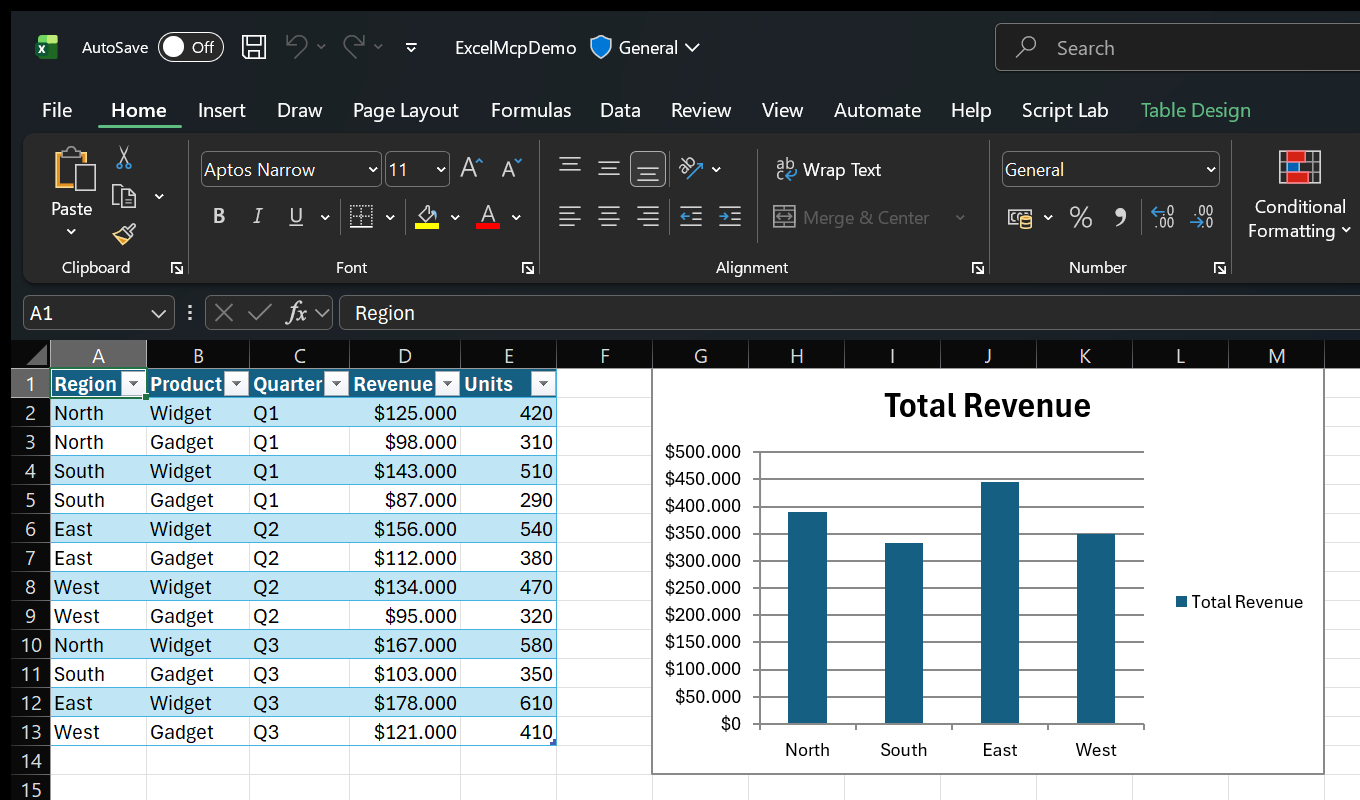
Automate Excel with AI — A Model Context Protocol (MCP) server for comprehensive Excel automation through conversational AI. MCP Server for Excel enables AI assistants (GitHub Copilot, Claude, ChatGPT) to automate Excel through natural language commands.
$ npx -y skills add sbroenne/mcp-server-excel --agent claude-code
Repo: sbroenne/mcp-server-excel
What's inside
Automate Excel with AI — A Model Context Protocol (MCP) server for comprehensive Excel automation through conversational AI.
MCP Server for Excel enables AI assistants (GitHub Copilot, Claude, ChatGPT) to automate Excel through natural language commands. Automate Power Query, DAX measures, VBA macros, PivotTables, Charts, formatting, and data transformations (26 tools with 234 operations).
⚡ Powered by the real Excel engine — ExcelMcp drives the actual Excel application through its official COM API, so it does what file-parser tools can't: run live operations (refresh Power Query, recalculate, refresh PivotTables and the Data Model, evaluate DAX, run VBA and Python =PY()) and edit your existing workbooks with every formula, PivotTable, chart, macro and format left intact.
💡 Interactive Development - See results instantly in Excel. Create a query, run it, inspect the output, refine and repeat. Excel becomes your AI-powered workspace for rapid development and testing.
🧪 LLM-Tested Quality - Tool behavior validated with real LLM workflows using pytest-skill-engineering. We test that LLMs correctly understand and use our tools.
Technical Requirements:
[!TIP] Also building PowerPoint decks? Check out PowerPoint MCP Server — the sister project, built the same way.
26 specialized tools with 234 operations:
📚 Complete Feature Reference → - Detailed documentation of all 234 operations
Create & Populate Data:
Analysis & Visualization:
Formatting & Styling:
Formatting split: number display formats use the range tool, while visual styling and auto-fit use range_format.
Automation:
🪟 Agent Mode — Watch AI Work in Excel:
Perfect for:
Not suitable for:
| Platform | Installation |
|---|---|
| VS Code | Install Extension (one-click, recommended) |
| Claude Desktop | Download .mcpb from latest release |
| Any MCP Client | Download mcp-excel.exe from latest release and add to PATH |
| Details | 📖 MCP Server Installation Guide |
⚠️ Important: Close all Excel files before using. The server requires exclusive access to workbooks during automation.
This package provides both CLI and MCP Server interfaces. Choose based on your use case:
| Interface | Best For | Why |
|---|---|---|
CLI (excelcli) | Coding agents (Copilot, Cursor, Windsurf) + Scripting | 64% fewer tokens - single tool, no large schemas. Auto-generated from Core code, ensuring 1:1 feature parity. Bundled with excel-cli skill. |
| MCP Server | Conversational AI (Claude Desktop, VS Code Chat) | Rich tool discovery, persistent connection. Better for interactive, exploratory workflows. |
Installation:
excel-cli plugin for skill guidance, then install excelcli separatelyexcel-cli skill separately when your agent already has excelcli available on PATH⚡ CLI Commands: Generated automatically from Core service definitions using Roslyn source generators. All CLI commands maintain exact 1:1 parity with MCP tools through shared code generation. See code generation docs for details.
ExcelMcp is available as two GitHub Copilot CLI plugins in the Copilot plugin marketplace:
# Register the plugin marketplace (one-time)
copilot plugin marketplace add sbroenne/mcp-server-excel-plugins
# Install one or both plugins
copilot plugin install excel-mcp@mcp-server-excel-plugins # For conversational AI
copilot plugin install excel-cli@mcp-server-excel-plugins # For scripting / coding agents
excel-mcp — MCP server for conversational workflowsexcel-cli — Skill for coding agents (install excelcli separately if you want the CLI tool)Note: After each release, there may be a short delay before plugins appear in the marketplace. You may need to wait a few moments for updates to sync.
| Metric | CLI | MCP Server | Winner |
|---|---|---|---|
| Tokens | ~59K | ~163K | 🏆 CLI (64% fewer) |
Key insight: MCP sends 26 tool schemas to the LLM on each request (~100K+ tokens).
Manual Installation:
# Primary: Download standalone executables from latest release (no .NET runtime required)
# https://github.com/sbroenne/mcp-server-excel/releases/latest
# - ExcelMcp-MCP-Server-{version}-windows.zip → extract mcp-excel.exe
# - ExcelMcp-CLI-{version}-windows.zip → extract excelcli.exe (optional, for scripting)
# Secondary: Install via .NET tool (requires .NET 10 runtime)
dotnet tool install --global Sbroenne.ExcelMcp.McpServer
dotnet tool install --global Sbroenne.ExcelMcp.CLI
# After installing either way, auto-configure all your coding agents:
npx add-mcp "mcp-excel" --name excel-mcp
⚠️ Step 2 requires Node.js for
npx. Install withwinget install OpenJS.NodeJS.LTSif needed.
# Optional: Install agent skills for better AI guidance
npx skills add sbroenne/mcp-server-excel --skill excel-cli # Coding agents
npx skills add sbroenne/mcp-server-excel --skill excel-mcp # Conversational AI
💡 Skills provide AI guidance - The CLI skill is highly recommended (agents don't work perfectly with CLI without it). The MCP skill is recommended - it adds workflow best practices and reduces token usage.
ExcelMcp uses Windows COM automation to control the actual Excel application (not just .xlsx files).
The MCP Server and CLI are two equal, first-class entry points. Each hosts its own ExcelMCP Service that manages Excel sessions — the MCP Server runs it in-process (direct calls, no pipe), while the CLI uses a background daemon over a named pipe so sessions persist across CLI invocations:
┌──────────────────────┐ ┌──────────────────────┐
│ MCP Server │ │ CLI (excelcli) │
│ (AI assistants) │ │ (coding agents) │
└──────────┬───────────┘ └──────────┬───────────┘
│ in-process │ named pipe →
│ (direct calls) │ background daemon
▼ ▼
┌──────────────────────┐ ┌──────────────────────┐
│ ExcelMCP Service │ │ ExcelMCP Service │
│ (session mgmt) │ │ (daemon; sessions │
│ │ │ persist across │
│ │ │ CLI invocations) │
└──────────┬───────────┘ └──────────┬───────────┘
▼ ▼
Core Commands Core Commands
▼ ▼
┌──────────────────────┐ ┌──────────────────────┐
│ Excel COM API │ │ Excel COM API │
│ (Excel.Application) │ │ (Excel.Application) │
└──────────────────────┘ └──────────────────────┘
Both entry points share the same Core Commands codebase, so every operation behaves identically. They are separate processes, though: each runs its own ExcelMCP Service and its own Excel instance, and they do not share live sessions with each other.
Key Benefits:
excelcli calls, so scripts don't re-open files each time💡 Tip: Watch Excel While AI Works By default, Excel runs hidden for faster automation. To see changes in real-time, just ask:
The AI will display the Excel window so you can watch every operation happen live - great for learning or verifying changes!
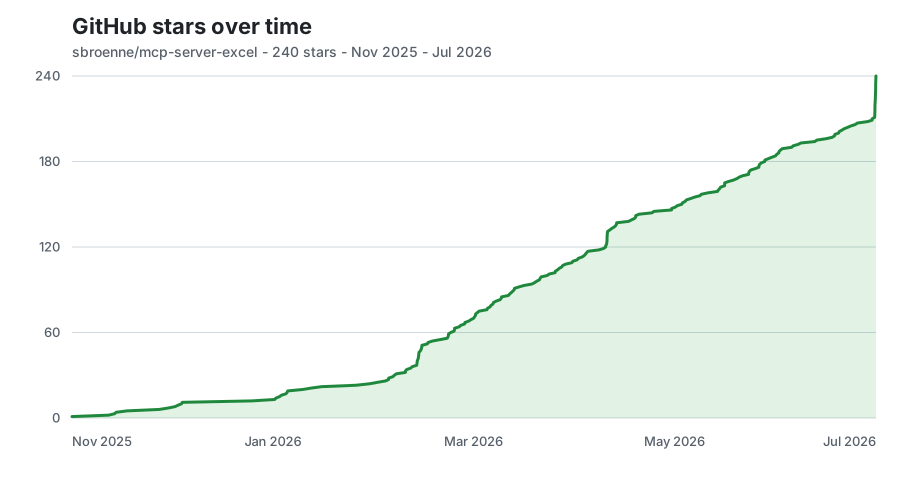
Updated daily from GitHub's stargazer data.
📚 CLI Guide → | CLI Skill for Agents → | MCP Server Guide → | All Agent Skills →
License: MIT License - see LICENSE file
Privacy: See PRIVACY.md for our privacy policy Contributing: See CONTRIBUTING.md for guidelines
Built With: This entire project was developed using GitHub Copilot AI assistance - mainly with Claude but lately with Auto-mode.
Acknowledgments:
Other projects by the author:
.changeset/
config.json
README.md
.editorconfig
.gitattributes
.github/
agents/
squad.agent.md
CODEOWNERS
codeql/
codeql-config.yml
copilot-instructions.md
dependabot.yml
instructions/
architecture-patterns.instructions.md
bug-fixing-checklist.instructions.md
coverage-prevention-strategy.instructions.md
critical-rules.instructions.md
development-workflow.instructions.md
documentation-structure.instructions.md
excel-com-interop.instructions.md
excel-connection-types-guide.instructions.md
llm-testing-philosophy.instructions.md
mcp-llm-guidance.instructions.md
mcp-server-guide.instructions.md
meta.instructions.md
readme-management.instructions.md
testing-strategy.instructions.md
ISSUE_TEMPLATE/
breaking-changes-issue.md
bug_report.md
feature_request.md
mcp_server_issue.md
plugins/
excel-cli/
bin/
download.ps1
install-global.ps1
start-cli.ps1
README.md
excel-mcp/
.mcp.json
bin/
download.ps1
install-global.ps1
start-mcp.ps1
README.md
marketplace-repo/
README.md
pull_request_template.md
release-notes-template.md
workflows/
changeset-check.yml
ci.yml
codeql.yml
dependency-review.yml
deploy-gh-pages.yml
docs/
publish-plugins-setup.md
publish-plugins.yml
release.yml
.gitignore
.squad/
agents/
cheritto/
charter.md
hanna/
charter.md
kelso/
charter.md
mccauley/
charter.md
nate/
charter.md
ralph/
charter.md
scribe/
charter.md
shiherlis/
charter.md
trejo/
charter.md
casting/
casting-history.json
casting-policy.json
casting-registry.json
history.json
policy.json
registry.json
ceremonies.md
charter.md
config.json
constraint-tracking.md
copilot-instructions.md
decisions/
decisions.md
2026-04-24-plugin-auth-revert.md
decisions.md
fact-checker-charter.md
identity/
now.md
wisdom.md
issue-lifecycle.md
mcp-config.md
multi-agent-format.md
plugin-marketplace.md
roster.md
routing.md
scribe-charter.md
skill.md
skills/
cross-repo-release-preflight/
SKILL.md
dependabot-tooling-downgrade/
SKILL.md
dependency-validation/
SKILL.md
error-transport-context/
SKILL.md
mcp-cli-parity-triage/
SKILL.md
mcp-schema-enum-regression/
SKILL.md
node24-action-upgrades/
SKILL.md
plugin-build-smoke-regression/
SKILL.md
plugin-overlay-bundling/
SKILL.md
plugin-surface-wording/
SKILL.md
precommit-release-gates/
SKILL.md
project-conventions/
SKILL.md
publish-hardening-docs/
SKILL.md
retire-legacy-distribution-surface/
SKILL.md
workflow-run-tag-resolution/
SKILL.md
team.md
templates/
casting/
casting-history.json
casting-policy.json
casting-reference.md
casting-registry.json
Futurama.json
ceremonies.md
charter.md
constraint-tracking.md
cooperative-rate-limiting.md
copilot-instructions.md
fact-checker-charter.md
history.md
identity/
now.md
wisdom.md
issue-lifecycle.md
keda-scaler.md
loop.md
machine-capabilities.md
mcp-config.md
multi-agent-format.md
orchestration-log.md
package.json
plugin-marketplace.md
ralph-circuit-breaker.md
ralph-triage.js
raw-agent-output.md
roster.md
routing.md
run-output.md
scribe-charter.md
skill.md
skills/
project-conventions/
SKILL.md
squad.agent.md
squad.agent.md.template
workflows/
squad-ci.yml
squad-docs.yml
squad-heartbeat.yml
squad-insider-release.yml
squad-issue-assign.yml
squad-label-enforce.yml
squad-preview.yml
squad-promote.yml
squad-release.yml
squad-triage.yml
sync-squad-labels.yml
.vscode/
mcp.json
settings.json
CHANGELOG.md
Directory.Build.props
Directory.Build.props.user.template
Directory.Build.targets
Directory.Packages.props
docs/
ADR-001-NO-UNIT-TESTS.md
AUTHOR.md
BREAKING-CHANGES.md
CLAUDE-MCPB-SUBMISSION.md
COM-API-BEHAVIOR-FINDINGS.md
CONTRIBUTING.md
COPILOT-PLUGIN-DISTRIBUTION.md
DEVELOPMENT.md
INSTALLATION-CLI.md
INSTALLATION-MCP-SERVER.md
INSTALLATION.md
MCP_REGISTRY_PUBLISHING.md
NUGET-GUIDE.md
PIA-COVERAGE.md
PRE-COMMIT-SETUP.md
RELEASE-STRATEGY.md
TEST-NAMING-STANDARD.md
VERSION-CHECKING.md
examples/
mcp-configs/
claude-desktop-config.json
cline-mcp-config.json
cursor-mcp-config.json
README.md
vscode-mcp-config.json
windsurf-mcp-config.json
README.md
FEATURES.md
gh-pages/
.gitignore
docs/
2049c837880704706739672b0ca752f9.txt
architecture.md
assets/
images/
excel-demo-pivottable.png
excel-demo-python.png
excel-demo-table-chart.png
icon.png
logo.png
og-card.png
star-history.svg
stylesheets/
extra.css
BingSiteAuth.xml
changelog.md
cli.md
CNAME
contributing.md
favicon.ico
features.md
index.md
installation-cli.md
installation-mcp-server.md
installation.md
mcp-server.md
privacy.md
related-projects.md
robots.txt
security.md
skills.md
troubleshooting.md
hooks.py
mkdocs.yml
overrides/
home.html
main.html
README.md
requirements.txt
global.json
infrastructure/
azure/
appinsights-resources.bicep
appinsights-test.bicep
appinsights-test.parameters.json
appinsights.bicep
appinsights.parameters.json
deploy-appinsights.ps1
README.md
LICENSE
llm-tests/
.gitignore
.python-version
.vscode/
settings.json
aitest-reports/
results.json
cli/
cli_mcp_server.py
__init__.py
conftest.py
test_cli_calculation_mode.py
test_cli_chart_positioning.py
test_cli_chart.py
test_cli_file_worksheet.py
test_cli_financial_report_automation.py
test_cli_modification_patterns.py
test_cli_pivottable_layout.py
test_cli_powerquery_datamodel.py
test_cli_range.py
test_cli_sales_report_workflow.py
test_cli_slicer.py
test_cli_styling.py
test_cli_table.py
conftest.py
extract_failures.py
Fixtures/
amazon.csv
orders-fact.json
products-dimension.json
products-powerquery.m
range-test-data.json
mcp_tests/
__init__.py
test_mcp_calculation_mode.py
test_mcp_chart_collision_detection.py
test_mcp_chart_positioning.py
test_mcp_chart.py
test_mcp_file_worksheet.py
test_mcp_financial_report_automation.py
test_mcp_modification_patterns.py
test_mcp_pivottable_layout.py
test_mcp_powerquery_datamodel.py
test_mcp_range.py
test_mcp_sales_report_workflow.py
test_mcp_screenshot_ab.py
test_mcp_slicer.py
test_mcp_styling.py
test_mcp_table.py
pyproject.toml
pyrightconfig.json
README.md
uv.lock
mcpb/
Build-McpBundle.ps1
BUILD.md
icon-512.png
manifest.json
README.md
NuGet.Config
package-lock.json
package.json
PRIVACY.md
README.md
Sbroenne.ExcelMcp.sln
scripts/
audit-cli-actions.ps1
audit-core-coverage.ps1
Build-AgentSkills.ps1
Build-Changelog.ps1
Build-Plugins.ps1
check-cli-action-coverage.ps1
check-cli-coverage.ps1
check-cli-settings-usage.ps1
check-com-leaks.ps1
check-doc-counts.ps1
check-dynamic-casts.ps1
check-mcp-core-implementations.ps1
check-plugin-readmes.ps1
check-success-flag.ps1
fix-void-test-assignments.ps1
pre-commit.ps1
refactor-service.ps1
Stop-ExcelMcpProcesses.ps1
Sync-PublishedPluginRepo.ps1
Test-CliWorkflow.ps1
Test-E2E.ps1
Update-StarHistory.ps1
SECURITY.md
skills/
excel-cli/
README.md
references/
cli-commands.md
README.md
SKILL.md
excel-mcp/
README.md
references/
anti-patterns.md
behavioral-rules.md
calculation.md
chart.md
claude-desktop.md
conditionalformat.md
dashboard.md
datamodel.md
dmv-reference.md
excel_agent_mode.md
gotchas.md
m-code-syntax.md
pivottable.md
powerquery.md
range.md
screenshot.md
slicer.md
table.md
window.md
... 609 moreFAQ
mcp-server-excel is a Claude Code plugin with 2 hand-picked skills for mcp servers work, indexed on Flowy. Install it with the command on its page. It includes excel-cli, excel-mcp. Its skills do not fire on their own yet. Request auto-invocation to have Flowy route them as you prompt. Free and open source.