
Cloud & Infrastructure
Plugin
eda-agent
eda-agent is a Claude Code plugin with 1 hand-picked skill, indexed on Flowy in the Cloud & Infrastructure category.

Plugin Signal67/100Solid
maintained100
capable14
documented100
adopted51
Install
$ npx -y skills add salitronic/eda-agent --agent claude-code
What's inside
README
eda-agent
MCP server that lets an AI (or any MCP-compatible client) interact with a live Altium Designer session, with KiCad and EasyEDA Pro available as additional backends. It exposes around 450 tools on Altium, covering schematic, PCB, library, project, and design-agent operations, over a persistent DelphiScript bridge. The AI reads the design you currently have open, asks questions about it, and can modify it in place while you watch. The backend is selected at startup, so each user sees only their own tool set.
⚠️ Experimental. Not all tools are extensively tested. Some can crash the Altium DelphiScript engine. See Known limitations before using on any design you haven't backed up.
Demo
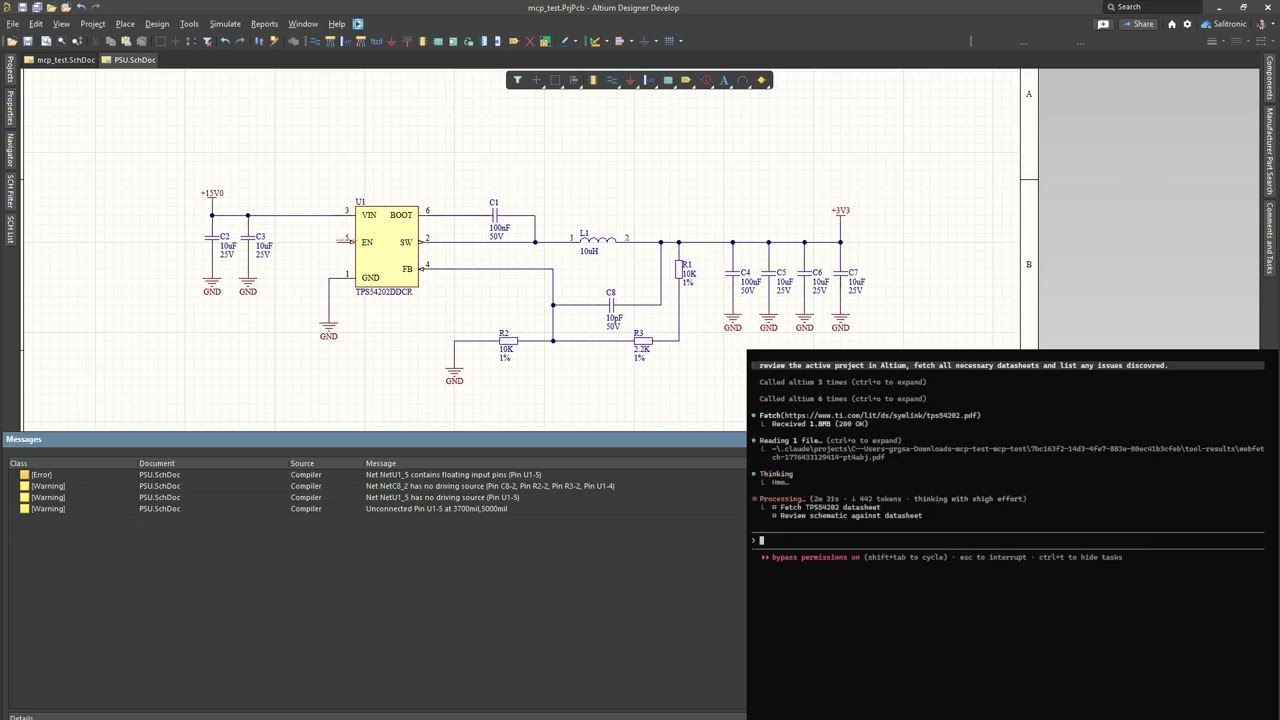
Claude Code reviewing a buck converter through eda-agent. The feedback resistor divider on this schematic is intentionally wrong; Claude catches it among other recommendations.
Support the project
Developing eda-agent and testing it against Altium's scripting engine takes a significant amount of work. If you find eda-agent useful in your work, a donation helps keep the progress going.
Dashboard
Two dashboards ship with eda-agent:
- In-Altium status window - a floating Altium-side window showing live status, request count, cumulative Altium-side time, auto-shutdown countdown, and a per-command log with durations.
Hide pingsfilters the 30 s keep-alive traffic;Only >100msisolates slow calls. The Detach button exits the polling loop cleanly; it saves nothing, so unsaved edits stay in the editor. - Web dashboard - a local browser dashboard at
http://127.0.0.1:8766, focused on design review. A Review tab surfaces datasheet / MPN / manufacturer / footprint coverage gauges and an actionable issue queue (missing datasheet, missing MPN, orphan nets, ...); Project, Components, Nets, Libraries and Plan tabs give live structured views. Click any component or net to drill into a detail drawer; one click cross-probes it into Altium. Light / dark theme, server-sent-events live feed. It is auto-started by the MCP server - the Open Dashboard button on the in-Altium status window launches the browser.
How it works
- Altium Designer stays open and in full control of your design
- A DelphiScript polling loop runs inside Altium's scripting engine
eda-agent(Python, launched by your MCP client) sends commands via file-based IPC- Altium executes, writes a response, and returns to polling
- You see the changes happen live in Altium
This is not a batch tool that opens a project, runs a script, and exits. It's a live connection for as long as you want it (conversational design review, guided refactoring, ad-hoc BOM queries, "what nets does this resistor connect to?"), all on the project you currently have open.
Features
- ~450 tools on the default Altium backend (480+ with both registered) across application, project, library, schematic/general, PCB, and design-agent categories
- Generic primitives (
obj_query,obj_modify,obj_create,obj_delete,run_process) that work on almost any schematic or PCB object type via late-binding, avoiding per-type handler proliferation - Bulk batch primitives:
obj_batch_modify,obj_batch_create,obj_batch_delete,pcb_place_tracks,pcb_move_components,sch_place_wires,place_net_labels,place_power_ports,sch_place_components,sch_set_components_parameters,get_sch_doc_pins,lib_add_pins,proj_get_connectivity_many,sim_attach_primitives. Collapse N LLM turns + N IPC round-trips into one. Typical wall-time savings: 10 to 100x on multi-item edits - Design review snapshot:
design_review_snapshotbundles 8 to 12 review reads (project info, components, nets, rules, diff, messages, stats, unrouted, BOM) into a single call. One LLM turn instead of a dozen - Design-lint sweep:
design_lint_reportruns 31 audit checks in one IPC pass and returns a structured violation list - schematic-side (component-parameter visibility per class, power-port orientation, floating ports, multi-output / no-driver nets, duplicate designators, off-grid components) and PCB-side (DNP variant components, tented-via ratio, near-miss track endpoints, signal vias without nearby return via, via antennas, removed pad shapes, components outside outline, pads too close to board edge, invalid polygon regions, optional DRC). Each check is also exposed as a standaloneaudit_*MCP tool; the dashboard's Status → Health subtab has a one-click Lint panel that calls/api/lintand groups results by Schematic / PCB - Canonical circuit blocks:
design_add_circuit_blockfolds a whole block into aDesignPlanin one call, allocating refdes, wiring every pin to the right net and tagging power / ground and roles. Twelve of them:decoupling,pullup,pulldown,series_resistor,voltage_divider,rc_lowpass,rc_highpass,led_indicator,crystal,pi_filter,mosfet_low_side,mosfet_high_side. Naming-agnostic: you supply the part identities, it owns only the wiring pattern.design_list_circuit_blocksreturns each one's parameter contract, so the planner never guesses a parameter name - Datasheet-first discipline: every component-surfacing response (
pcb_get_components,proj_get_bom,proj_get_component_info,proj_find_component,lib_search,design_review_snapshot,sim_get_readiness) carries a_datasheet_guidanceblock with per-part vendor search queries.app_attach/app_pingcarry a_system_reminderso every MCP client that connects sees the rule at session start. LLM-fabricated datasheet values are forbidden; WebFetch/WebSearch are called out by name - Sch <-> PCB netlist crossref:
crossref_net(net_name)compares the schematic pin list against the PCB pad list for the same net. Catches ECO drift, stale post-fabrication routing, phantom nets from port/sheet-entry rename conflicts.in_syncflag +sch_only/pcb_onlydiff - SPICE simulation workflow:
sim_get_readinessaudits every component and partitions into ready / needs-primitive / needs-file.sim_attach_primitivessets SpicePrefix + Value on passives.sim_attach_modellinks a vendor.mdl/.ckt.sim_rundispatches the simulator. Built-in guardrail: never fabricate a SPICE model file, fetch the vendor one - Focus-independent PCB access: every PCB handler falls back to
GetPCBBoardByPathwhenGetCurrentPCBBoardreturns nil (user has a sch tab focused). No more misleading "No PCB document is active" when the PCB is right there - Fast and compile-cached: persistent polling loop; ~10 ms per call in active mode.
SmartCompilecachesDM_Compilewith a 2 s TTL so a multi-read review pays for one compile instead of a dozen. Explicitproj_force_recompile+proj_get_compile_freshnessprobes for cases that need a guaranteed-fresh netlist (e.g. after user edits) - Persistent polling loop: one script start, then ~10 ms per tool call in active mode
- Annotation runs silently:
proj_annotatedesignates components without popping the annotate dialog - Drives the GUI where there is no API: a great deal of Altium exists only as menus and dialogs.
app_click_menuwalks the real menu bar by name (and lists what a menu holds, so paths are discovered rather than guessed);app_list_open_dialogsreports what is on screen, what it says and whether Altium is stuck;app_set_dialog_controlsets checkboxes, fields and grid rows;app_press_dialog_buttonpresses one button;app_drive_dialogsanswers a whole sequence reactively. None of it uses the bridge, only Win32 and the accessible layer, so it keeps working while a modal has the scripting engine blocked, which is exactly when you need it.app_run_ui_commandfires a menu command and answers its dialogs in the same call, because a command that opens a modal blocks the bridge and a second call would never arrive. The driver decides from what is on screen rather than from a script, stops on any dialog it cannot classify, and gates the press that changes the design behindallow_commit. Dialog text that Altium paints into handle-less controls is recovered by OCR and labelled as read from pixels, not text - Deferred save for speed: mutations mark documents as modified in memory; disk writes happen on explicit
app_save_all, andapp_detachsaves the documents that were edited. A clean document is never rewritten. Before this, every edit triggered a full project save, which dominated latency - Two dashboards: an in-Altium floating status window (status, request count, per-command performance, command log, Detach button) and a browser-based web dashboard (
127.0.0.1:8766) for design review - datasheet / MPN / footprint coverage gauges, an actionable issue queue, component / net drill-in, one-click cross-probe into Altium, light / dark theme. The whole project view loads in one bundled IPC round-trip (project.dashboard_snapshot); the web dashboard auto-starts with the MCP server - DelphiScript trap linter:
scripts/altium/lint.py(wired intobuild.py) scans the Pascal sources for known parser hazards -Cardinal()casts, malformed hex literals, empty.Add('')arguments, braces inside comments, fixed-size arrays as function locals, reserved-word identifiers - and fails the build before a bad deploy - Activity logs: every command is appended to
workspace/activity.log(CSV with timestamps, durations, command name, response size). The bridge also writesbridge_trace.logfor IPC-level diagnostics - Bulk-tool nudge: when a singular tool is hit 2 to 3 times in 10 s, the response carries a
_hint_bulkfield pointing at the batch variant. Clients that missed the bulk tool in the docstring learn about it at runtime - Design agent surface: six MCP tools (
design_get_discipline,design_snapshot_inventory,design_validate_plan,design_execute_plan,design_audit_schematic,design_validate) that let an MCP-client LLM produce a structuredDesignPlanJSON, instantiate it on a fresh sheet (parts + wires + labels + rail glyphs), audit the result for layout problems, and validate ERC + connectivity. Datasheet-first, NDA-isolated by construction - Motif composer + canonical priors + Sugiyama placement: three-layer placement strategy. (1) Sugiyama / force-directed gives every part a baseline position. (2) The motif composer detects canonical sub-circuits in the netlist (bypass cap, voltage divider, fb_divider, lc_output, ...) via VF2 subgraph isomorphism and splats each match into its frozen canonical layout - same data shape, IC-anchored or self-contained. (3) Canonical priors apply per-role-pair nudges (e.g.
vcc_decoupsits 400 mils from its IC). A final overlap-shove pass repairs any collisions; sheet-edge clamping keeps every glyph and port within the page boundary. Role-compatibility filter drops false-positive motif matches (a structural rc-lowpass that's actually a decoupling cap stays out of the filter motif). Topology-agnostic - works for a buck, an LDO, an MCU, an audio amp, anything with a clean net graph
File tree
FAQ
eda-agent is a Claude Code plugin with 1 hand-picked skill, indexed on Flowy in the Cloud & Infrastructure category. Install it with the command on its page. It includes autodesign. Its skills do not fire on their own yet. Request auto-invocation to have Flowy route them as you prompt. Free and open source.
- What is eda-agent?
- MCP server that lets an AI (or any MCP-compatible client) interact with a live Altium Designer session, with KiCad and EasyEDA Pro available as additional backends.
- How do I install eda-agent?
- Run these in Claude Code: npx -y skills add salitronic/eda-agent --agent claude-code. Then prompt normally.
- Does eda-agent auto-invoke its skills?
- Not yet. It is indexed on Flowy as a plain plugin. Request auto-invocation on its page and Flowy will route its skills for you as you prompt.
- Is eda-agent free?
- Yes. Flowy is free and open source, with nothing gated. You can read every skill in full before you install.
Is this plugin yours?
Claim it with GitHubSubmit a pluginPromote it