
Data
Plugin
webarchiveextractor
Mac OS X utility to un-archive .webarchive files (like when saving from Safari) Don't want to compile it yourself?

Plugin Signal39/100Fair
maintained19
capable14
documented100
adopted54
Install
$ npx -y skills add robrohan/webarchiveextractor --agent claude-code
Stats
346
Stars
60
Forks
Quiet
Maintenance
Objective-C
Language
7mo ago
Last commit
15y ago
Created
What's inside
README
WebArchiveExtractor
Mac OS X utility to un-archive .webarchive files (like when saving from Safari)
Don't want to compile it yourself? You can purchase the app directly at therohans.com/webarchiveextractor/.
This project was forked from Vitaly Davidenko's repo on sourceforge.
Usage
You can use the utility graphically by launching WebArchiveExtractor.app directly. See interface here.
You can also run the same executable from from the command line:
./WebArchiveExtractor.app/Contents/MacOS/WebArchiveExtractor
Running with no arguments will just launch the GUI.
Claude Code Skill
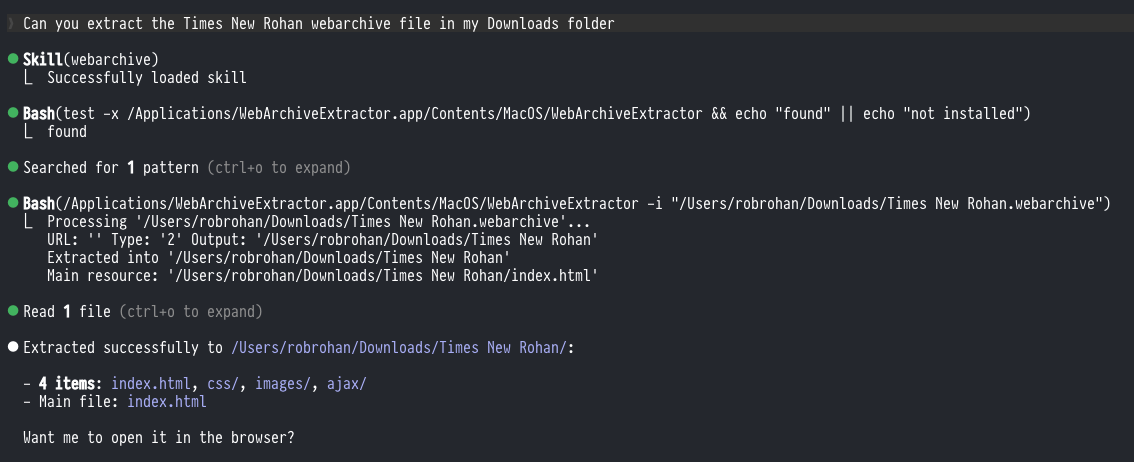
This repo includes a Claude Code skill that lets you extract .webarchive files by just asking Claude naturally (e.g. "extract this webarchive file").
Installing the Skill
Copy the skill into your Claude Code skills directory:
mkdir -p ~/.claude/skills/webarchive
cp skills/webarchive/SKILL.md ~/.claude/skills/webarchive/SKILL.md
Once installed, Claude Code will recognize requests to extract .webarchive files and use WebArchiveExtractor automatically. The skill requires the app to be installed at /Applications/WebArchiveExtractor.app (see Build below).
Note: Due to macOS app sandboxing, the only reliable output location when using the CLI via Claude Code is the user's
~/Downloadsfolder. If extraction to another directory fails or produces no output, use~/Downloadsas the destination.
CLI Usage
Extract contents of website.webarchive to a directory named website relative to CWD:
WebArchiveExtractor website.webarchive
WebArchiveExtractor -i website.webarchive
Define explicit output directory:
WebArchiveExtractor website.webarchive -o out
Build
You should be able to automatically build and sign a release for local execution by running this command in the root of the project, even if you are not an Apple developer (assuming you've got the Xcode CLI tools):
Update: You need to do two things first:
- Step 1. Download Xcode from the App Store (Note: You don't have to run it, if you do it'll use up a bunch of disk space)
- Step 2. Run
xcodebuild -runFirstLaunchin the Terminal
xcodebuild -project WebArchiveExtractor.xcodeproj
If the command fails, you'll need to open the project in Xcode to investigate.
The resulting WebArchiveExtractor.app should be in build/Release. To install, you can just drag it to your Applications directory.
Keep in mind that the executable is inside the
.appbundle. To reference the command in your shell, you can do something like either of the following:
Add to PATH:
# Add this to your shell's rc file:
export PATH="$PATH:/Applications/WebArchiveExtractor.app/Contents/MacOS/"
Symlink to a location already in PATH:
ln -s /Applications/WebArchiveExtractor.app/Contents/MacOS/WebArchiveExtractor ~/.local/bin/WebArchiveExtractor
File tree
FAQ
webarchiveextractor is a Claude Code plugin with 1 hand-picked skill, indexed on Flowy in the Data category. Install it with the command on its page. It includes webarchive. Its skills do not fire on their own yet. Request auto-invocation to have Flowy route them as you prompt. Free and open source.
- What is webarchiveextractor?
- Mac OS X utility to un-archive .webarchive files (like when saving from Safari) Don't want to compile it yourself? You can purchase the app directly at therohans.com/webarchiveextractor/. This project was forked from Vitaly Davidenko's repo on sourceforge.
- How do I install webarchiveextractor?
- Run these in Claude Code: npx -y skills add robrohan/webarchiveextractor --agent claude-code. Then prompt normally.
- Does webarchiveextractor auto-invoke its skills?
- Not yet. It is indexed on Flowy as a plain plugin. Request auto-invocation on its page and Flowy will route its skills for you as you prompt.
- Is webarchiveextractor free?
- Yes. Flowy is free and open source, with nothing gated. You can read every skill in full before you install.
Is this plugin yours?
Claim it with GitHubSubmit a pluginPromote it