
Development
Plugin
sandbox-agent
Run Coding Agents in Sandboxes. Control Them Over HTTP. Supports Claude Code, Codex, OpenCode, and Amp.

Plugin Signal63/100Solid
maintained56
capable43
documented100
adopted68
Stats
1,570
Stars
125
Forks
Maintained
Maintenance
TypeScript
Language
Apache-2.0
License
3mo ago
Last commit
7mo ago
Created
Repo: rivet-dev/sandbox-agent
What's inside
Agent(4 agents)
Command(2 commands)
/post-release-testingYou are a post-release testing agent. Your job is to verify that a sandbox-agent release works correctly./releaseYou are a release agent for the Gigacode project (sandbox-agent). Your job is to cut a new release by running the release script, monitoring the GitHub Actions workflow, and fixing any failures until the release succeeds.
README
Why Sandbox Agent?
Running coding agents remotely is hard. Existing SDKs assume local execution, SSH breaks TTY handling and streaming, and every agent has a different API. Building from scratch means reimplementing everything for each coding agent.
Sandbox Agent solves three problems:
-
Coding agents need sandboxes — You can't let AI execute arbitrary code on your production servers. Coding agents need isolated environments, but existing SDKs assume local execution. Sandbox Agent is a server that runs inside the sandbox and exposes HTTP/SSE.
-
Every coding agent is different — Claude Code, Codex, OpenCode, Cursor, Amp, and Pi each have proprietary APIs, event formats, and behaviors. Swapping agents means rewriting your integration. Sandbox Agent provides one HTTP API — write your code once, swap agents with a config change.
-
Sessions are ephemeral — Agent transcripts live in the sandbox. When the process ends, you lose everything. Sandbox Agent streams events in a universal schema to your storage. Persist to Postgres, ClickHouse, or Rivet. Replay later, audit everything.
Features
- Universal Agent API: Single interface to control Claude Code, Codex, OpenCode, Cursor, Amp, and Pi with full feature coverage
- Universal Session Schema: Standardized schema that normalizes all agent event formats for storage and replay
- Runs Inside Any Sandbox: Lightweight static Rust binary. One curl command to install inside E2B, Daytona, Modal, Cloudflare Containers, Agent Computer, or Docker
- Server or SDK Mode: Run as an HTTP server or embed with the TypeScript SDK
- OpenAPI Spec: Well documented and easy to integrate from any language
- OpenCode SDK & UI Support (Experimental): Connect OpenCode CLI, SDK, or web UI to control agents through familiar OpenCode tooling
Architecture
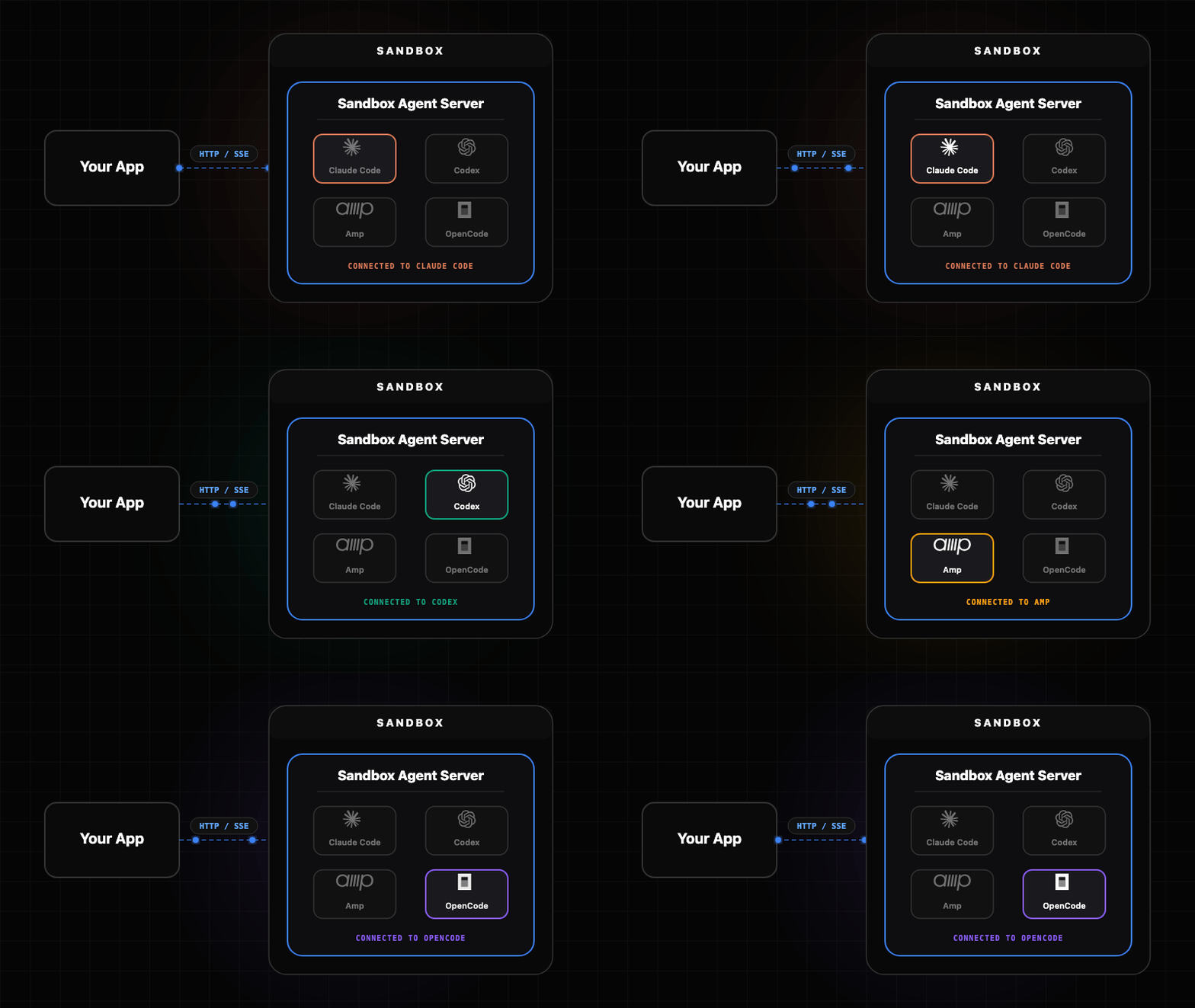
The Sandbox Agent acts as a universal adapter between your client application and various coding agents. Each agent has its own adapter that handles the translation between the universal API and the agent-specific interface.
- Embedded Mode: Runs agents locally as subprocesses
- Server Mode: Runs as HTTP server from any sandbox provider
Components
| Component | Description |
|---|---|
| Server | Rust daemon (sandbox-agent server) exposing the HTTP + SSE API |
| SDK | TypeScript client with embedded and server modes |
| Inspector | Built-in UI at inspecting sessions and events |
| CLI | sandbox-agent (same binary, plus npm wrapper) mirrors the HTTP endpoints |
Get Started
Choose the installation method that works best for your use case.
Skill
Install skill with:
npx skills add rivet-dev/skills -s sandbox-agent
bunx skills add rivet-dev/skills -s sandbox-agent
TypeScript SDK
Import the SDK directly into your Node or browser application. Full type safety and streaming support.
Install
npm install sandbox-agent@0.4.x
bun add sandbox-agent@0.4.x
# Optional: allow Bun to run postinstall scripts for native binaries (required for SandboxAgent.start()).
bun pm trust @sandbox-agent/cli-linux-x64 @sandbox-agent/cli-linux-arm64 @sandbox-agent/cli-darwin-arm64 @sandbox-agent/cli-darwin-x64 @sandbox-agent/cli-win32-x64
Setup
Local (embedded mode):
import { SandboxAgent } from "sandbox-agent";

const client = await SandboxAgent.start();
Remote (server mode):
import { SandboxAgent } from "sandbox-agent";

const client = await SandboxAgent.connect({
  baseUrl: "http://127.0.0.1:2468",
  token: process.env.SANDBOX_TOKEN,
});
API Overview
const agents = await client.listAgents();

await client.createSession("demo", {
  agent: "codex",
  agentMode: "default",
});

await client.postMessage("demo", { message: "Hello from the SDK." });

for await (const event of client.streamEvents("demo", { offset: 0 })) {
  console.log(event.type, event.data);
}
SDK documentation — Managing Sessions
HTTP Server
Run as an HTTP server and connect from any language. Deploy to E2B, Daytona, Vercel, or your own infrastructure.
# Install it
curl -fsSL https://releases.rivet.dev/sandbox-agent/0.4.x/install.sh | sh
# Run it
sandbox-agent server --token "$SANDBOX_TOKEN" --host 127.0.0.1 --port 2468
Optional: preinstall agent binaries (no server required; they will be installed lazily on first use if you skip this):
sandbox-agent install-agent --all
To disable auth locally:
sandbox-agent server --no-token --host 127.0.0.1 --port 2468
Quickstart — Deployment guides
CLI
Install the CLI wrapper (optional but convenient):
npm install -g @sandbox-agent/cli@0.4.x
# Allow Bun to run postinstall scripts for native binaries.
bun add -g @sandbox-agent/cli@0.4.x
bun pm -g trust @sandbox-agent/cli-linux-x64 @sandbox-agent/cli-linux-arm64 @sandbox-agent/cli-darwin-arm64 @sandbox-agent/cli-darwin-x64 @sandbox-agent/cli-win32-x64
Create a session and send a message:
sandbox-agent api sessions create my-session --agent codex --endpoint http://127.0.0.1:2468 --token "$SANDBOX_TOKEN"
sandbox-agent api sessions send-message my-session --message "Hello" --endpoint http://127.0.0.1:2468 --token "$SANDBOX_TOKEN"
sandbox-agent api sessions send-message-stream my-session --message "Hello" --endpoint http://127.0.0.1:2468 --token "$SANDBOX_TOKEN"
You can also use npx like:
npx @sandbox-agent/cli@0.4.x --help
bunx @sandbox-agent/cli@0.4.x --help
Inspector
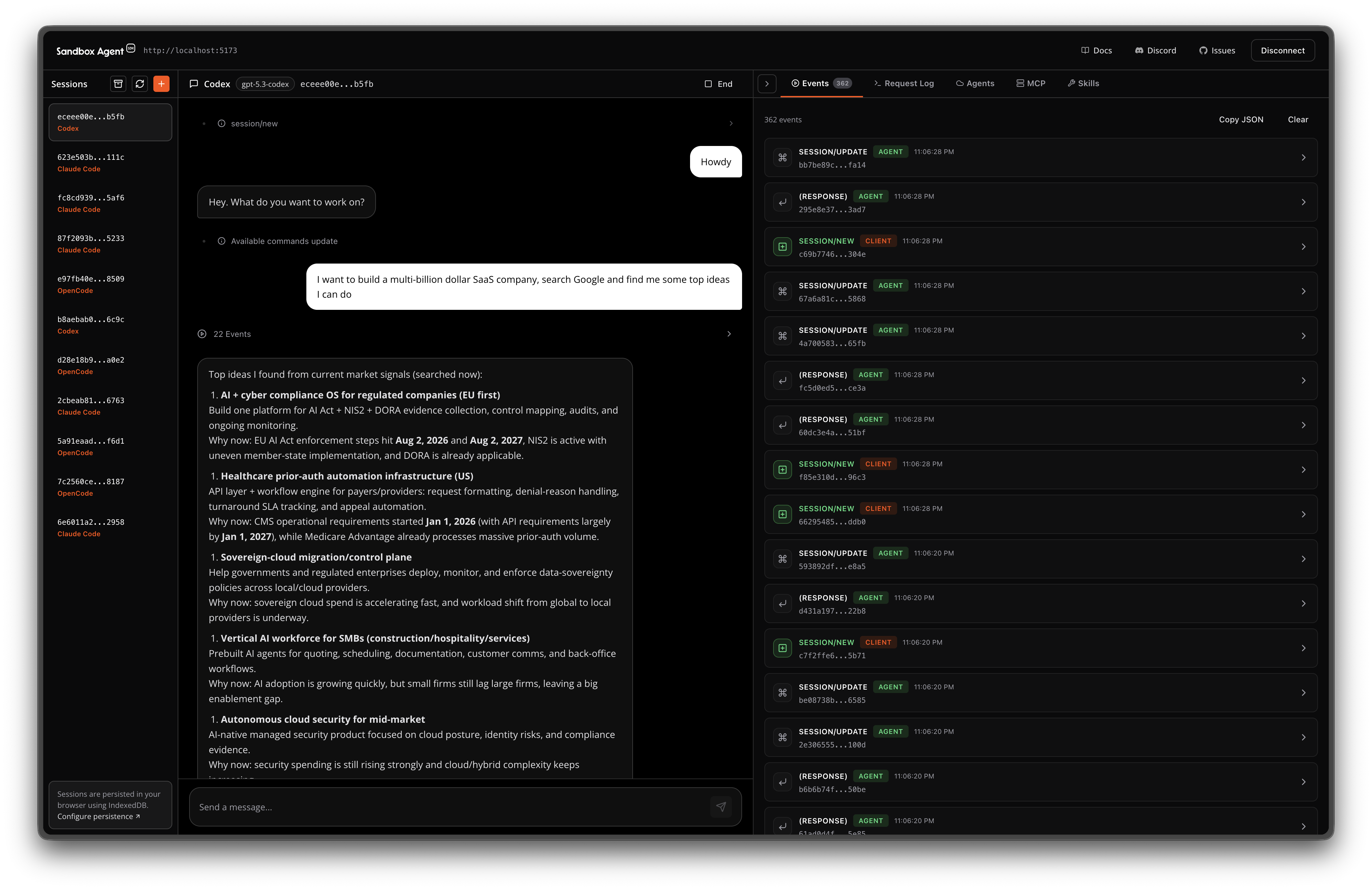
Debug sessions and events with the built-in Inspector UI (e.g., http://localhost:2468/ui/).
OpenAPI Specification
Explore API — View Specification
Tip: Extract credentials
Often you need to use your personal API tokens to test agents on sandboxes:
sandbox-agent credentials extract-env --export
This prints environment variables for your OpenAI/Anthropic/etc API keys to test with Sandbox Agent SDK.
FAQ
No, they're complementary. AI SDK is for building chat interfaces and calling LLMs. This SDK is for controlling autonomous coding agents that write code and run commands. Use AI SDK for your UI, use this when you need an agent to actually code.
Claude Code, Codex, OpenCode, Cursor, Amp, and Pi. The SDK normalizes their APIs so you can swap between them without changing your code.
This SDK does not handle persisting session data. Events stream in a universal JSON schema that you can persist anywhere. See Managing Sessions for patterns using Postgres or Rivet Actors.
Both. Run locally for development, deploy to E2B, Daytona, or Vercel Sandboxes for production.
The server is a single Rust binary that runs anywhere with a curl install. If your platform can run Linux binaries (Docker, VMs, etc.), it works. See the deployment guides for E2B, Daytona, and Vercel Sandboxes.
Yes. Use sandbox-agent credentials extract-env to extract API keys from your local agent configs (Claude Code, Codex, OpenCode, Amp, Pi) and pass them to the sandbox environment.
Rust gives us a single static binary, fast startup, and predictable memory usage. That makes it easy to run inside sandboxes or in CI without shipping a large runtime, such as Node.js.
You can for development. But in production, you need isolation. Coding agents execute arbitrary code — that can't happen on your servers. Sandboxes provide the isolation; this SDK provides the HTTP API to control coding agents remotely.
Official SDKs assume local execution. They spawn processes and expect interactive terminals. This SDK runs a server inside a sandbox that you connect to over HTTP — designed for remote control from the start.
Coding agents expect interactive terminals with proper TTY handling. SSH with piped commands breaks tool confirmations, streaming output, and human-in-the-loop flows. The SDK handles all of this over a clean HTTP API.
Out of Scope
- Storage of sessions on disk: Sessions are already stored by the respective coding agents on disk. It's assumed that the consumer is streaming data from this machine to an external storage, such as Postgres, ClickHouse, or Rivet.
- Direct LLM wrappers: Use the Vercel AI SDK if you want to implement your own agent from scratch.
- Git Repo Management: Just use git commands or the features provided by your sandbox provider of choice.
- Sandbox Provider API: Sandbox providers have many nuanced differences in their API, it does not make sense for us to try to provide a custom layer. Instead, we opt to provide guides that let you integrate this repository with sandbox providers.
Roadmap
- Python SDK
- Automatic MCP & skill & hook configuration
- Todo lists
File tree
FAQ
sandbox-agent is a Claude Code plugin with hand-picked skills for development work, indexed on Flowy. Install it with the command on its page. Its skills do not fire on their own yet. Request auto-invocation to have Flowy route them as you prompt. Free and open source.
- What is sandbox-agent?
- Run Coding Agents in Sandboxes. Control Them Over HTTP. Supports Claude Code, Codex, OpenCode, and Amp.
- How do I install sandbox-agent?
- Run these in Claude Code: . Then prompt normally.
- Does sandbox-agent auto-invoke its skills?
- Not yet. It is indexed on Flowy as a plain plugin. Request auto-invocation on its page and Flowy will route its skills for you as you prompt.
- Is sandbox-agent free?
- Yes. Flowy is free and open source, with nothing gated. You can read every skill in full before you install.
Is this plugin yours?
Claim it with GitHubSubmit a pluginPromote it