
Agent Orchestration
Plugin
workmux-status
git worktrees + tmux windows for zero-friction parallel dev

Plugin Signal78/100Solid
maintained98
capable41
documented100
adopted73
Install on Claude Code
> /plugin marketplace add raine/workmux> /plugin install workmux-status@workmux
Stats
2,790
Stars
332
Forks
Active
Maintenance
Rust
Language
MIT
License
3d ago
Last commit
11mo ago
Created
1h ago
Added
Repo: raine/workmux
What's inside
README
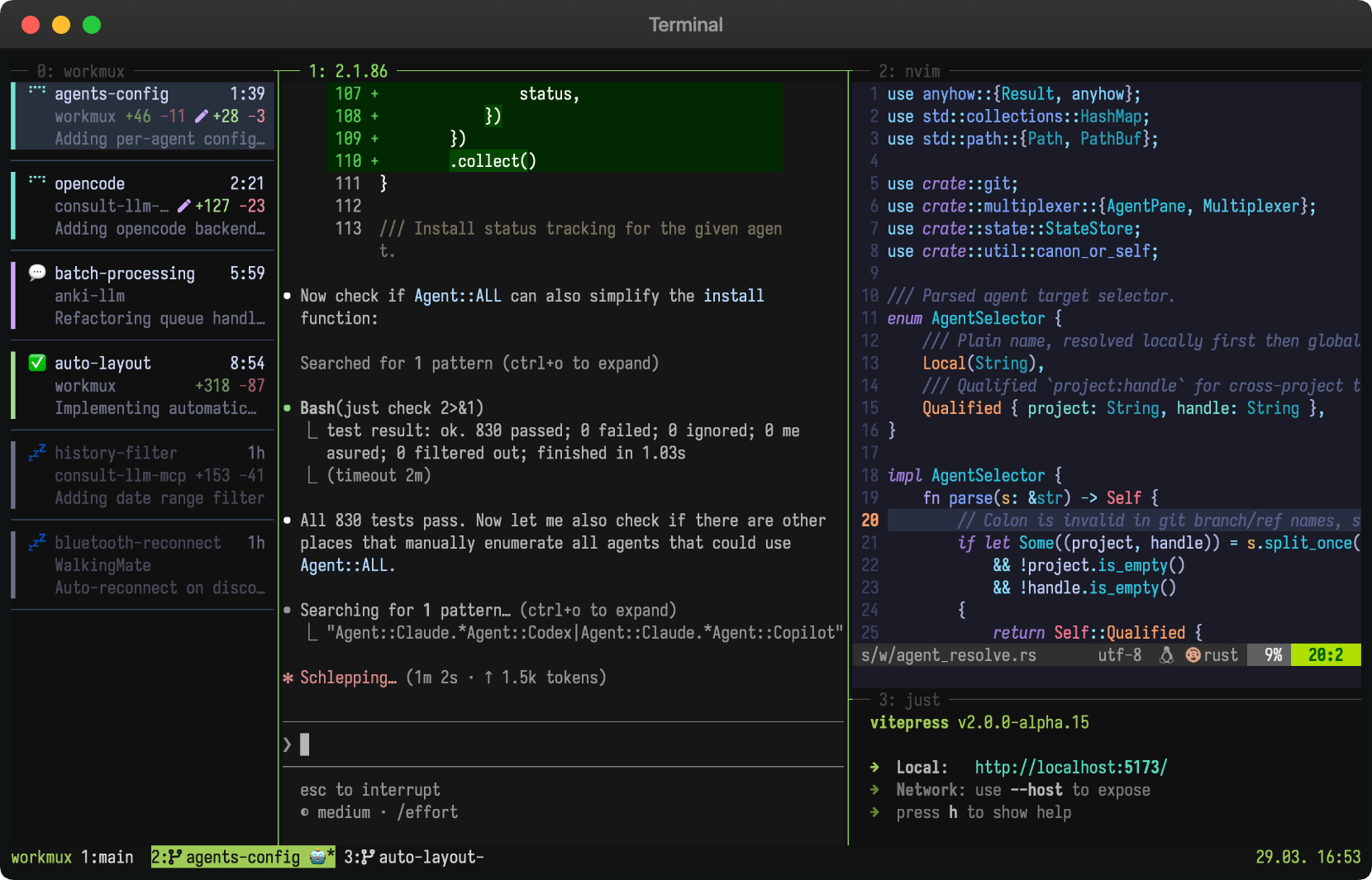
Giga opinionated zero-friction workflow tool for managing git worktrees and tmux windows as isolated development environments. Perfect for running multiple AI agents in parallel without conflict.
Philosophy: Build on tools you already use. tmux/zellij/kitty/etc. for windowing, git for worktrees, your agent for coding - workmux ties them together.
* Also supports kitty, WezTerm, and Zellij as alternative backends.
📖 New to workmux? Read the introduction blog post for a quick overview.
[!TIP] I'm building aven, a local-first task manager for power users and agents.
Why workmux?
Parallel workflows. Work on multiple features the same time, each with its own AI agent. No stashing, no branch switching, no conflicts.
One window per task. A natural mental model. Each has its own terminal state, editor session, dev server, and AI agent. Context switching is switching tabs.
Automated setup. New worktrees start broken (no .env, no node_modules,
no dev server). workmux can copy config files, symlink dependencies, and run
install commands on creation.
One-command cleanup. workmux merge handles the full lifecycle: merge the
branch, delete the worktree, close the tmux window, remove the local branch.
Terminal workflow. Build on your terminal setup instead of yet another agentic GUI that won't exist next year. If you don't have one yet, tmux might be worth picking up.
New to worktrees? See Why git worktrees?
Features
- Create git worktrees with matching tmux windows in a single command (
add) - Merge branches and clean up everything (worktree, tmux window, branches) in
one command (
merge) - Dashboard for monitoring agents, reviewing changes, and sending commands
- Sidebar for a persistent, at-a-glance view of all agents across tmux windows
- Delegate tasks to worktree agents with the
/worktreeskill - Display agent status in tmux window names
- Automatically set up your preferred tmux pane layout (editor, shell, watchers, etc.)
- Run post-creation hooks (install dependencies, setup database, etc.)
- Copy or symlink configuration files (
.env,node_modules) into new worktrees - Sandbox agents in containers or VMs for enhanced security
- Automatic branch name generation from prompts using LLM
- Shell completions
What people say
- "I've been using (and loving) workmux which brings together tmux, git worktrees, and CLI agents into an opinionated workflow." - Coolin96 on Hacker News
- "Thank you so much for your work with workmux! It's a tool I've been wanting to exist for a long time." - rstacruz on GitHub
- "It's become my daily driver - the perfect level of abstraction over tmux + git, without getting in the way or obscuring the underlying tooling." - cisaacstern on GitHub
- "I have to mention workmux at every opportunity because it's the perfect glue between worktrees, agents and tmux windows." - dedbrizz on Threads
- "Since I discovered workmux I'm cooking. Amazing parallel-agent driver if you like tmux and want to keep your config." - MatijaSosic on X
- "Using workmux with a well-configured tmux has been a breath of fresh air" - sbeirakh_il on X
- "I've been using it for about a month now, and it's been nothing but great." - gabrielrockson_ on X
- "I still don't see the need for Herdr. Workmux adds busy/question/done status, manages worktrees by itself, and etc. It lives on an already existing tmux setup." - 13hcoks on X
- "Want modern terminal workspace features without abandoning your setup? Here is how to keep Tmux and boost your workflow using Workmux." - Sam Natale on YouTube
Installation
Bash YOLO
curl -fsSL https://raw.githubusercontent.com/raine/workmux/main/scripts/install.sh | bash
Homebrew (macOS/Linux)
brew install raine/workmux/workmux
Cargo (requires rustup):
cargo install workmux
mise:
mise use -g cargo:raine/workmux
Nix (flake and home-manager setup):
nix profile install github:raine/workmux
For manual installation, see pre-built binaries.
Quick start
[!NOTE] workmux requires a terminal multiplexer. Make sure you have tmux (or WezTerm / Kitty / Zellij) installed and running before you start. See My tmux setup if you need a starting point.
-
Initialize configuration (optional):
workmux initThis creates a
.workmux.yamlfile to customize your workflow (pane layouts, setup commands, file operations, etc.). workmux works out of the box with sensible defaults, so this step is optional. -
Create a new worktree and tmux window:
workmux add new-featureThis will:
- Create a git worktree at
<project_root>/../<project_name>__worktrees/new-feature - Copy config files and symlink dependencies (if configured)
- Run any
post_createsetup commands - Create a tmux window named
wm-new-feature(the prefix is configurable) - Set up your configured or the default tmux pane layout
- Automatically switch your tmux client to the new window
- Create a git worktree at
-
Do your thing
-
Finish and clean up
Local merge: Run
workmux mergeto merge into the base branch and clean up in one step.PR workflow: Push and open a PR. After it's merged, run
workmux removeto clean up.
Configuration
workmux uses a two-level configuration system:
- Global (
~/.config/workmux/config.yaml): Personal defaults for all projects - Project (
.workmux.yaml): Project-specific overrides
Project settings override global settings. When you run workmux from a
subdirectory, it walks upward to find the nearest .workmux.yaml, allowing
nested configs for monorepos. See the
Monorepos guide
for details. For hook lists (post_create, pre_merge, pre_remove) and file
operation lists (files.copy, files.symlink), you can use "<global>" to
include global values alongside project-specific ones. Other settings like
panes are replaced entirely when defined in the project config.
Global configuration example
~/.config/workmux/config.yaml:
nerdfont: true # Enable nerdfont icons (prompted on first run)
merge_strategy: rebase # Make workmux merge do rebase by default
merge_keep: true # Keep worktree, window, and branch after merge by default
confirm_unmerged_removal: false # Remove unmerged branches without confirmation
agent: claude

panes:
  - command: <agent> # Start the configured agent (e.g., claude)
    focus: true
  - split: horizontal # Second pane with default shell
Project configuration example
.workmux.yaml:
post_create:
  - '<global>'
  - mise use

files:
  symlink:
    - '<global>' # Include global symlinks (node_modules)
    - .pnpm-store # Add project-specific symlink

panes:
  - command: pnpm install
    focus: true
  - command: <agent>
    split: horizontal
  - command: pnpm run dev
    split: vertical
For a real-world example, see
workmux's own .workmux.yaml.
Configuration options
Most options have sensible defaults. You only need to configure what you want to customize.
Basic options
| Option | Description | Default |
|---|---|---|
main_branch | Branch to merge into | Auto-detected |
base_branch | Default base ref for new worktrees, or auto for the effective main branch | Current branch |
worktree_dir | Directory for worktrees (absolute or relative). Supports ~ and {project}. | <project>__worktrees/ |
window_prefix | Prefix for tmux window/session names. Supports {project}. | wm- |
mode | Tmux mode (window or session) | window |
default_session | Session to return to when a workmux session closes (session mode) | Previous session |
window_placement | New tmux window placement (after_current or rightmost) | after_current |
agent | Default agent for <agent> placeholder | claude |
agents | Named agent commands (docs, global-only) | {} |
merge_strategy | Default merge strategy (merge, rebase, squash) | merge |
merge_keep | Keep resources after workmux merge by default | false |
confirm_unmerged_removal | Confirm before deleting branches with commits not merged into their base | true |
theme | Dashboard color scheme (custom colors) | default (auto dark/light) |
Set base_branch: auto to create independent work streams from each repository's
File tree
FAQ
workmux-status is a Claude Code plugin with 6 hand-picked skills for agent orchestration work, indexed on Flowy. Install it with the command on its page. It includes coordinator, merge, open-pr. Its skills do not fire on their own yet. Request auto-invocation to have Flowy route them as you prompt. Free and open source.
- What is workmux-status?
- git worktrees + tmux windows for zero-friction parallel dev
- How do I install workmux-status?
- Run these in Claude Code: /plugin marketplace add raine/workmux then /plugin install workmux-status@workmux. Then prompt normally.
- Does workmux-status auto-invoke its skills?
- Not yet. It is indexed on Flowy as a plain plugin. Request auto-invocation on its page and Flowy will route its skills for you as you prompt.
- Is workmux-status free?
- Yes. Flowy is free and open source, with nothing gated. You can read every skill in full before you install.
Is this plugin yours?
Claim it with GitHubSubmit a pluginPromote it