
Security
Plugin
ironcurtain
A secure\* runtime for autonomous AI agents, where security policy is derived from a human-readable constitution.

Plugin Signal73/100Solid
maintained100
capable48
documented75
adopted59
Install
$ npx -y skills add provos/ironcurtain --agent claude-code
Stats
615
Stars
81
Forks
Active
Maintenance
TypeScript
Language
Apache-2.0
License
12h ago
Last commit
8mo ago
Created
2h ago
Added
What's inside
Skill(7 skills)
Agent(2 agents)
clean-implementerUse this agent when you need to implement a design, feature, or refactor code with an emphasis on clean architecture, testability, and maintainability. This includes writing new modules, refactoring existing code to reduce duplication or complexity, breaking up large files orfeature-architectUse this agent when designing new features, planning component interfaces, defining type hierarchies, or architecting abstractions for the codebase. This includes situations where you need to think through API boundaries, module decomposition, dependency management, or type-safe
Badges




README
IronCurtain
A secure* runtime for autonomous AI agents, where security policy is derived from a human-readable constitution.
*When someone writes "secure," you should immediately be skeptical. What do we mean by secure?
[!WARNING] Research Prototype. IronCurtain is an early-stage research project exploring how to make AI agents safe enough to be genuinely useful. APIs, configuration formats, and architecture may change. Contributions and feedback are welcome.
Demo
The agent is asked to clone a repository and push changes. Both git_clone and git_push are escalated by the policy engine, but the auto-approver approves them automatically — the user's trusted input from command mode (Ctrl-A) provided clear intent, so no manual /approve was needed.
The Problem
Autonomous AI agents can manage files, run git commands, send messages, and interact with APIs on your behalf. But today's agent frameworks give the agent the same privileges as the user such as full access to the filesystem, credentials, and network. Security researchers call this ambient authority, and it means a single prompt injection or multi-turn drift can cause an agent to delete files, exfiltrate data, or push malicious code.
The common response is to either restrict agents to a narrow sandbox (limiting their usefulness) or to ask the user to approve every action (limiting their autonomy). Neither is satisfactory.
The Approach
IronCurtain takes a different path: express your security intent in plain English, then let the system figure out enforcement.
You write a constitution which is a short document describing what your agent is and isn't allowed to do. IronCurtain compiles this into a deterministic security policy using an LLM pipeline, validates the compiled rules against generated test scenarios, and then enforces the policy at runtime on every tool call. The result is an agent that can work autonomously within boundaries you define in natural language.
The key ideas:
- The agent is untrusted. IronCurtain assumes the LLM may be compromised by prompt injection or drift. Security does not depend on the model "being good."
- English in, enforcement out. You write intent ("no destructive git operations without approval"); the system compiles it into deterministic rules that are enforced without further LLM involvement at runtime.
- Semantic interposition. Instead of giving the agent raw system access, all interactions go through MCP servers (filesystem, git, etc.). Every tool call passes through a policy engine that can allow, deny, or escalate to the user for approval.
- Defense in depth. Agent code runs in a V8 isolate with no direct access to the host. The only way out is through semantically meaningful MCP tool calls and every one is checked against policy.
Architecture
IronCurtain supports two session modes with different trust models:
-
Builtin Agent (Code Mode) — IronCurtain's own LLM agent writes TypeScript snippets that execute in a V8 sandbox. IronCurtain controls the agent, the sandbox, and the policy engine. Every tool call exits the sandbox as a structured MCP request, passes through the policy engine (allow / deny / escalate), and only then reaches the real MCP server.
-
Docker Agent Mode — An external agent (Claude Code, Goose, Codex) runs inside a container without direct public-network access. IronCurtain mediates the external effects: LLM API calls pass through a TLS-terminating MITM proxy (host allowlist, fake-to-real key swap), MCP tool calls pass through the same policy engine, and supported package installations go through validating package proxies.
Opt-in nested Docker gives developer sessions a private, ephemeral
daemon without exposing the host Docker socket. Implemented profiles cover Apple Container and Docker
Desktop on macOS, and WSL2 with Docker Desktop on amd64. Its offline, images, and packages modes
separate local image use, mediated public image pulls, and supported package builds. Native Linux Engine
is not admitted for nesting; see the configuration reference for prerequisites and limitations.
In both modes, the agent is untrusted. Security does not depend on the model following instructions — it is enforced at the boundary.
See SANDBOXING.md for the full architecture with diagrams, layer-by-layer trust analysis, and macOS platform notes.
Quick Start
Prerequisites
- Node.js 24 or 26 — the even-numbered major lines IronCurtain tests. Both install prebuilt
isolated-vmbinaries. Node 25 is unsupported and untested. - Docker — not required but strongly recommended for Docker Agent Mode, which provides the strongest isolation. On macOS 26+ (Apple silicon), Apple
containerworks as an alternative backend (VM per container; used automatically when its services are running — seecontainerRuntimeinironcurtain config) - An API key for at least one LLM provider (Anthropic, Google, or OpenAI)
Install
As a global CLI tool (end users):
npm install -g @provos/ironcurtain
From source (development):
git clone https://github.com/provos/ironcurtain.git
cd ironcurtain
npm install
One-time setup
1. Set your API key:
export ANTHROPIC_API_KEY=sk-ant-...
You can also place keys in a .env file in the project root (loaded automatically via dotenv), or add them to ~/.ironcurtain/config.json via ironcurtain config. Environment variables take precedence over config file values. Supported: ANTHROPIC_API_KEY, GOOGLE_GENERATIVE_AI_API_KEY, OPENAI_API_KEY.
2. Run the first-start wizard (run this explicitly before using the recommended mux path; it also runs automatically on first non-mux ironcurtain start):
ironcurtain setup
Walks you through GitHub token setup, web search provider, model selection, and other settings. Creates ~/.ironcurtain/config.json with your choices.
Running IronCurtain
IronCurtain ships with a default policy geared towards the developer experience — read-only operations are allowed, mutations (writes, pushes, PR creation) escalate for human approval. You can start using it immediately after setup.
Terminal multiplexer (recommended)
The recommended way to use IronCurtain. It gives you the full power of your agent's interactive TUI (Claude Code or Goose) while IronCurtain mediates every tool call through its policy engine — all in a single terminal.
ironcurtain mux
Key capabilities:
- Full agent TUI — The agent runs in a PTY inside a Docker container with no network access. You interact with it exactly as if it were running locally.
- Inline escalation handling — When a tool call needs approval, an escalation picker overlays the viewport with single-key actions (a/d/w for approve/deny/whitelist). Use
/approve+ Nto whitelist a domain or path for the rest of the session. - Trusted user input — Text typed in command mode (Ctrl-A) is captured on the host side before entering the container. This creates a verified intent signal that the auto-approver can use — e.g., typing "push my changes to origin" will auto-approve a subsequent
git_pushescalation. - Tab management — Spawn multiple concurrent sessions (
/new), switch between them (/tab N, Alt-1..9), close them (/close). Multiple mux instances can run in parallel.
See DEVELOPER_GUIDE.md for the full walkthrough: input modes, trusted input security model, escalation workflow, and keyboard reference.
Non-mux sessions
Use ironcurtain start for quick one-shot tasks, scripts, or when you explicitly want the local builtin agent. For normal interactive Docker-agent work, use ironcurtain mux.
ironcurtain start "Summarize the files in ./src"     # Single-shot mode
ironcurtain start -w ./my-project "Fix the tests"    # Single-shot workspace mode
ironcurtain start --agent builtin                    # Local builtin REPL, no Docker
ironcurtain start --persona my-assistant "Check my email"  # Use a persona
Other running modes
IronCurtain also supports session resume (--resume <session-id>), a legacy raw PTY/debug mode, a Signal messaging transport for mobile approval, and a daemon mode for scheduled cron jobs. The daemon has an optional web UI (--web-ui) for browser-based monitoring and escalation handling. See RUNNING_MODES.md for details.
Multi-agent workflows
IronCurtain orchestrates multiple AI agents through structured workflows. The bundled vulnerability discovery workflow hunts memory-safety and logic bugs in native code through a tiered harness pipeline (Tier 1 isolated function → Tier 2 multi-component → Tier 3 full build) with libFuzzer/AFL++ coverage gating, hypothesis-driven discover/triage states, and a final human report-review gate. The design-and-code workflow runs plan / design / implement / review cycles, also with human gates. Each agent runs in its own Docker container with role-specific policy boundaries; the engine manages state transitions, artifact passing, and crash-resume checkpointing automatically. Open source, runs entirely on your machine, enforces per-agent security policies via the constitution-based policy engine, and works with any Docker-containerized agent — comparable in scope to Amazon Kiro and Google Jules for coding tasks, but with first-class security and an extensible workflow definition format.
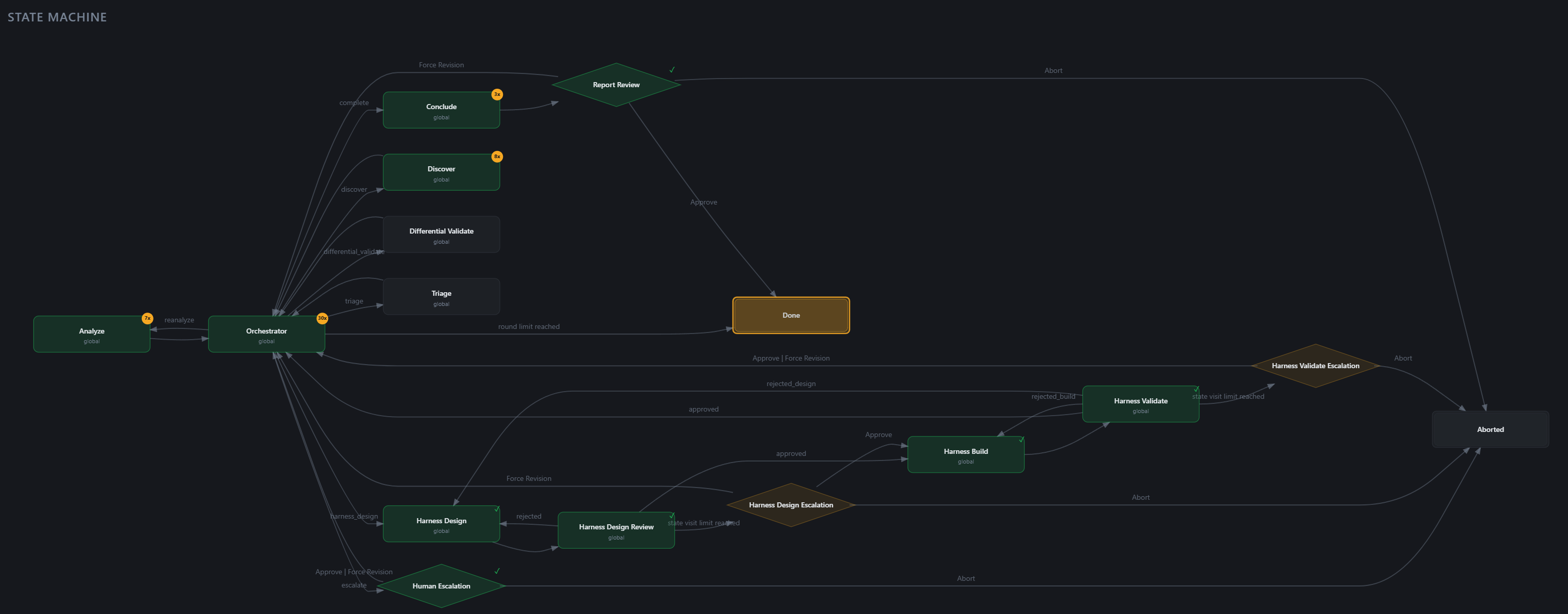
The web UI is the intended interface for workflow runs. Start the daemon, open the printed URL, and drive runs from the Workflows page — the state-machine graph above is live, the agent-message timeline streams with markdown rendering, gate reviews include a workspace + artifact browser, and past runs stay listed.
ironcurtain daemon --web-ui
CLI access is available for scripting, automation, and debugging:
ironcurtain workflow start vuln-discovery \
  "Find memory-safety bugs in libical" --workspace ~/src/libical
ironcurtain workflow start design-and-code \
  "Build a REST API with authentication"
See WORKFLOWS.md for the full documentation.
Customizing Your Policy
The default policy works well for general development, but you can tailor it to your workflow:
1. Customize your constitution (optional but recommended):
ironcurtain customize-policy
An LLM-assisted conversation that generates a constitution tailored to your workflow, saved to ~/.ironcurtain/constitution-user.md. You can also edit this file directly.
2. Compile the policy:
ironcurtain compile-policy
Translates your constitution into deterministic rules, generates test scenarios, and verifies them. Compiled artifacts go to ~/.ironcurtain/generated/.
Personas
Personas are named policy profiles — each bundles a constitution, compiled policy, persistent workspace, and semantic memory. Use them to run agents with different roles or access levels.
File tree
FAQ
ironcurtain is a Claude Code plugin with 7 hand-picked skills, indexed on Flowy in the Security category. Install it with the command on its page. It includes email-formatting, gmail-query-syntax, json-schema-emails. Its skills do not fire on their own yet. Request auto-invocation to have Flowy route them as you prompt. Free and open source.
- What is ironcurtain?
- A secure\* runtime for autonomous AI agents, where security policy is derived from a human-readable constitution. _\*When someone writes "secure," you should immediately be skeptical. What do we mean by secure?_
- How do I install ironcurtain?
- Run these in Claude Code: npx -y skills add provos/ironcurtain --agent claude-code. Then prompt normally.
- Does ironcurtain auto-invoke its skills?
- Not yet. It is indexed on Flowy as a plain plugin. Request auto-invocation on its page and Flowy will route its skills for you as you prompt.
- Is ironcurtain free?
- Yes. Flowy is free and open source, with nothing gated. You can read every skill in full before you install.
Is this plugin yours?
Claim it with GitHubSubmit a pluginPromote it