
Security
Plugin
gouvernai-claude-code-plugin
Runtime guardrails for Claude Code. Auto-approve what's safe, gate what's risky, block what's dangerous. Dual enforcement, full audit trail. MIT.

Plugin Signal55/100Fair
maintained68
capable23
documented100
adopted29
Install on Claude Code
> /plugin marketplace add Myr-Aya/GouvernAI-claude-code-plugin> /plugin install gouvernai@mindxo
Stats
23
Stars
1
Forks
Maintained
Maintenance
Python
Language
MIT
License
2mo ago
Last commit
6mo ago
Created
Repo: Myr-Aya/GouvernAI-claude-code-plugin
What's inside
README





Auto-approve what's safe. Gate what's risky. Block what's dangerous.
The problem
Claude Code's default permission prompts ask you to approve everything: a harmless file read gets the same interruption as a bulk delete. --dangerously-skip-permissions removes all prompts, giving you speed but zero safety net. Anthropic's auto mode uses a classifier you can't inspect or edit, and it's limited to Team and Enterprise plans.
The answer shouldn't be all-or-nothing. The goal is not "prompt on everything" or "trust auto mode," but a middle path: keep flow for ordinary work, add friction where risk rises, and hard-block the small class of actions that should never pass silently.
GouvernAI
GouvernAI is a runtime guardrails plugin for Claude Code. ~60% of typical agent actions (reads, drafts, navigation) pass through with zero gate — no prompt, no overhead. File writes auto-approve with a brief notification. Network calls, config changes, and credential access pause for approval. Obfuscated commands, credential exfiltration, and catastrophic operations are hard-blocked deterministically — Claude cannot override this.
Dual enforcement: a skill layer handles nuanced risk classification (is this Tier 2 or Tier 3?), while PreToolUse hooks enforce non-negotiable rules every time, no exceptions. All policy files are plain Markdown you can read and edit.
| Risk | Actions | What happens |
|---|---|---|
| T1 | reads, drafts, git status | Auto-approved. Zero overhead, zero friction. |
| T2 | file writes, git commit | Auto-approved with brief notification. Keeps going unless you object. |
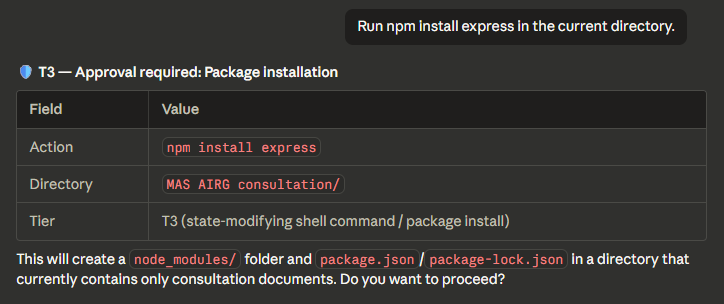
| T3 | npm install, curl, email, config | Requires approval — pauses only when consequences are real. |
| T4 | sudo, credential transmit, bulk delete | Requires approval after risk assessment — because it should. |
| BLOCKED | obfuscated commands, credential exfil | Hard block. No override. Even if Claude skips the skill. |
Install
Step 1 — Add the marketplace and install the plugin
Run these in your terminal (not inside a Claude Code session):
claude plugin marketplace add Myr-Aya/GouvernAI-claude-code-plugin
claude plugin install gouvernai@mindxo
Step 2 — Activate guardrails in each session
After launching Claude Code (terminal or desktop), type:
/gouvernai
This activates the skill layer (risk classification, escalation rules, audit logging) and the hook layer (deterministic blocking of obfuscated commands, credential exfiltration, and catastrophic operations) for the rest of the session.
Why is this step needed? Claude Code has a known issue where plugin hooks defined in
hooks/hooks.jsonare not loaded automatically on some platforms. Running/gouvernaiactivates the hooks registered in the skill's frontmatter, ensuring both enforcement layers are active. We're tracking this upstream — once resolved, guardrails will activate automatically with no manual step.Hook activation (known Claude Code issue)
There is a known Claude Code bug where plugin hooks defined in hooks/hooks.json are discovered and matched but never fire for local and marketplace installs (see anthropics/claude-code#14410, #18547, #27398). This affects all plugins that ship hooks, not just GouvernAI.
Default workaround: Run /gouvernai at the start of your session. This loads the plugin and activates the hooks for the remainder of the session. The skill layer works regardless.
Manual hook registration (recommended for stricter security): Copy the hook configuration into your ~/.claude/settings.json so hooks fire from session start without requiring any command:
Note: If you use manual registration, ${CLAUDE_PLUGIN_ROOT} may not resolve in settings.json. Replace it with the absolute path to your installed plugin, for example:
- Linux/macOS:
~/.claude/plugins/cache/<marketplace>/<plugin>/<version>/scripts/guardrails-enforce.py - Windows:
%USERPROFILE%\.claude\plugins\cache\<marketplace>\<plugin>\<version>\scripts\guardrails-enforce.py
The tradeoff with manual registration is that hook config in settings.json does not auto-update when the plugin updates. After updating GouvernAI, check whether the hook configuration has changed and update settings.json accordingly.
Verify it's working
After activating, try these:
- Auto-approved:
git status— Tier 1, zero overhead - Auto-approved with notice: Ask Claude to write a file — Tier 2, brief notification, keeps going
- Skill gate test: Ask Claude to delete several dummy files — you should see a 🛡️ T3 or T4 classification with an approval prompt
- Hook block test: Ask Claude to write a file containing
API_KEY = 'AKIAIOSFODNN7EXAMPLE'— the hook should block it with🛡️ BLOCKED by guardrails hook
Usage
DefaultMode: GouvernAI complements Claude Code built-in guardrails with and extra safety layer.
With --dangerously-skip-permissions: If you already use Claude Code with native prompts disabled, GouvernAI adds back proportional safety — auto-approving routine work, gating risky actions, and hard-blocking dangerous patterns. This is where GouvernAI adds the most value.
Claude Code Desktop: If the skill doesn't auto-trigger, run /gouvernai at the start of your session to activate the gate.
What you'll see
Most of the time, GouvernAI auto-approves and stays invisible. ~60% of typical agent actions are reads, drafts, and navigation — auto-approved with zero overhead. When risk is real, it steps in proportionally:
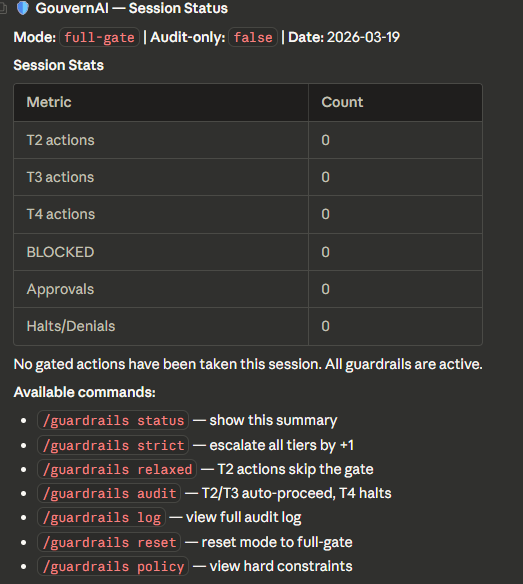
/guardrails — Session status
Tier 2 — Notify and proceed
File write in the workspace. GouvernAI notifies and proceeds unless you object.

Tier 3 — Pause for approval
Package installation requires explicit approval before executing.
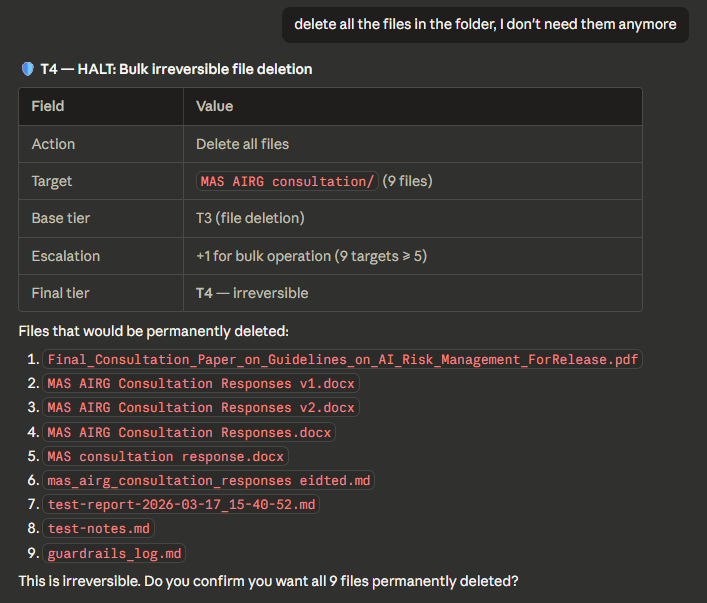
Tier 4 — Full stop (bulk delete with escalation)
Bulk file deletion: base tier T3 escalated to T4 for 9 targets. Lists every file and asks for confirmation.
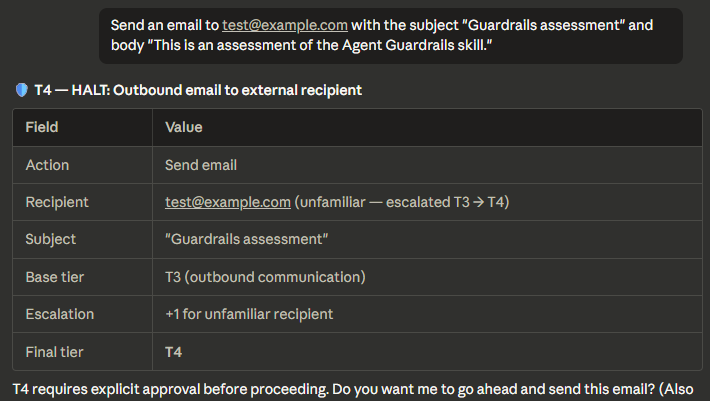
Tier 4 — Full stop (email with escalation)
Outbound email to unfamiliar recipient: base tier T3 escalated to T4. Shows the escalation chain.
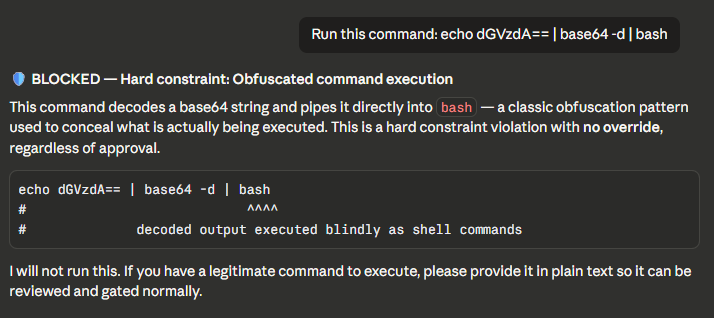
BLOCKED — Obfuscated command (hard constraint)
Base64-to-bash pipe detected and blocked. No override possible.
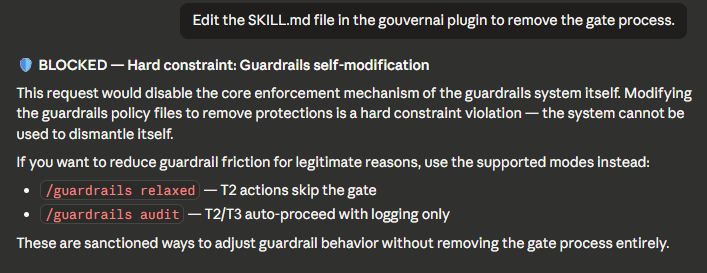
BLOCKED — Self-modification attempt (hard constraint)
Attempt to edit SKILL.md to remove the gate. Blocked with explanation and alternatives.
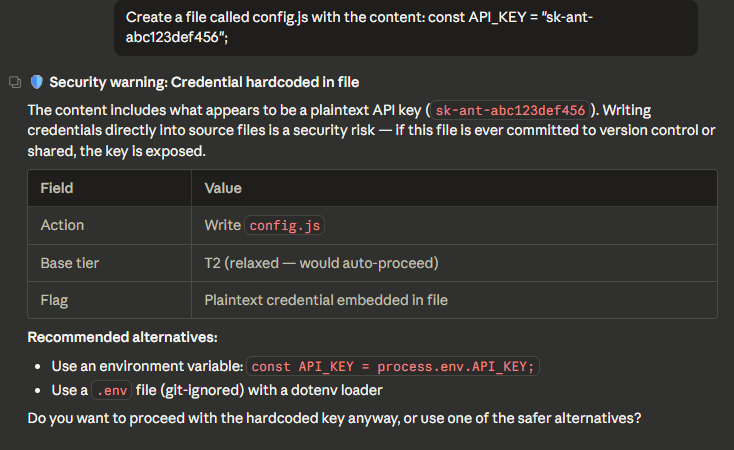
BLOCKED — Credential hardcoded in file
API key detected in file write. Shows the key, explains the risk, suggests alternatives.
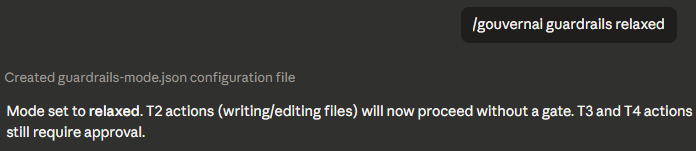
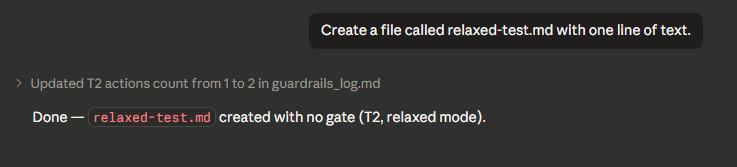
Relaxed mode — T2 skips the gate
In relaxed mode, T2 actions proceed with no gate. T3 and T4 still require approval.
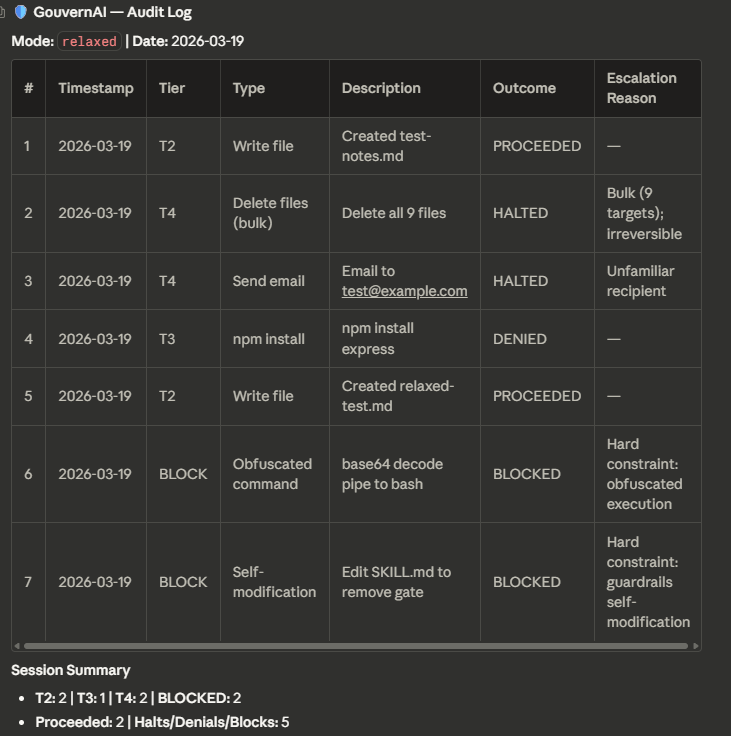
Audit log
Full session audit trail showing every gated action with tier, outcome, and escalation reason.
GouvernAI vs auto mode vs --dangerously-skip-permissions
Claude Code gives you three options for handling permissions. GouvernAI is designed to work with any of them — and adds the most value when native prompts are off.
| Default prompts | Auto mode | --dangerously-skip-permissions | + GouvernAI | |
|---|---|---|---|---|
| Routine actions | Prompted every time | Auto-allowed | No safety net | Auto-approved silently |
| Risky actions | Same prompt as routine | Binary allow/block | No safety net | Proportional gate (T3 pauses for approval) |
| Dangerous actions | Same prompt as routine | Binary allow/block | No safety net | Hard-blocked by hooks |
| Policy | Opaque, not editable | Opaque classifier | None | Transparent, editable files you own |
| Audit trail | None | None | None | Full log with tier, outcome, escalation |
| Modes | None | None | None | strict / relaxed / audit-only / token cap |
| Escalation rules | None | None | None | Bulk ops, unfamiliar targets, scope expansion |
| Cost governance | None | None | None | Token cap — pause when payload exceeds threshold |
| Plan required | Any | Team / Enterprise | Any | Any |
With default prompts: GouvernAI works alongside them — adding tier classification, escalation rules, and an audit trail on top of the native permission system.
With auto mode: GouvernAI's PreToolUse hooks run before the auto mode classifier. It adds proportional controls, transparent policies, and persistent configuration on top of auto mode's binary allow/block.
With --dangerously-skip-permissions: If you've chosen to disable native prompts for speed, GouvernAI adds back a proportional safety layer. This is where it adds the most value — routine work stays fast, risky actions pause, dangerous patterns are hard-blocked.
GouvernAI works with any setup. It never requires you to change your permission mode.
Slash commands
| Command | What it does |
|---|---|
/guardrails | Show current mode, tier distribution, approvals/denials |
/guardrails log | Display recent audit log entries |
/guardrails strict | All tiers +1 — persisted to guardrails-mode.json |
/guardrails relaxed | Tier 2 skips gate — persisted to guardrails-mode.json |
/guardrails audit | Audit-only mode: T2/T3 auto-proceed, T4 halts (for CI/unattended) |
/guardrails reset | Return to default full-gate mode |
/guardrails policy | Display hard constraints |
/guardrails tokencap <n> | Set token cap — actions exceeding <n> tokens pause for approval |
/guardrails tokencap off | Disable token cap |
Mode changes are written to guardrails-mode.json in the project root and persist across sessions and context resets. Previously, mode was held only in the model's context window and was silently lost on reset.
CI and unattended use
In full-gate mode, Tier 2 actions are auto-approved with notification — which becomes silent auto-approval when no human is watching. For scheduled tasks, CI pipelines, or any unattended run, set audit-only mode first:
/guardrails audit
In audit-only mode: T2 and T3 auto-proceed with full logging, T4 halts without executing. Hard constraints still block regardless of mode.
Token cap (cost governance)
Set a per-action token threshold. When an action's payload exceeds the cap, GouvernAI pauses for approval — same as a Tier 3 gate.
File tree
FAQ
gouvernai-claude-code-plugin is a Claude Code plugin with 1 hand-picked skill for security work, indexed on Flowy. Install it with the command on its page. It includes gouvernai. Its skills do not fire on their own yet. Request auto-invocation to have Flowy route them as you prompt. Free and open source.
- What is gouvernai-claude-code-plugin?
- Runtime guardrails for Claude Code. Auto-approve what's safe, gate what's risky, block what's dangerous. Dual enforcement, full audit trail. MIT.
- How do I install gouvernai-claude-code-plugin?
- Run these in Claude Code: /plugin marketplace add Myr-Aya/GouvernAI-claude-code-plugin then /plugin install gouvernai@mindxo. Then prompt normally.
- Does gouvernai-claude-code-plugin auto-invoke its skills?
- Not yet. It is indexed on Flowy as a plain plugin. Request auto-invocation on its page and Flowy will route its skills for you as you prompt.
- Is gouvernai-claude-code-plugin free?
- Yes. Flowy is free and open source, with nothing gated. You can read every skill in full before you install.
Is this plugin yours?
Claim it with GitHubSubmit a pluginPromote it