
Monitoring
Plugin
c9watch
Mac app and JSON CLI to monitor every Claude Code, Codex, Cursor Agent and Pi session on your machine.

Plugin Signal66/100Solid
maintained100
capable14
documented100
adopted45
Install
$ npx -y skills add minchenlee/c9watch --agent claude-code
Stats
135
Stars
34
Forks
Active
Maintenance
Rust
Language
MIT
License
1d ago
Last commit
8mo ago
Created
7h ago
Added
What's inside
README
c9watch (short for claude code watch, like k8s for Kubernetes) gives you a real-time view of every Claude Code, Codex, Cursor Agent, and Pi session running on your machine. A desktop dashboard for you, and a JSON CLI for your agents — both watching the same sessions at the same time.
You see which agent needs permission, which one is working, and which one is idle. Your agents can do the same — querying session status, searching past work, and coordinating with each other — all through the same tool.
Claude Code and Codex are fully monitored. Cursor Agent is monitor-only. Pi is read-only. OpenCode is a preview that needs a manual server connection. See Compatibility for what each one supports.
From the same author: rmdv
Demo
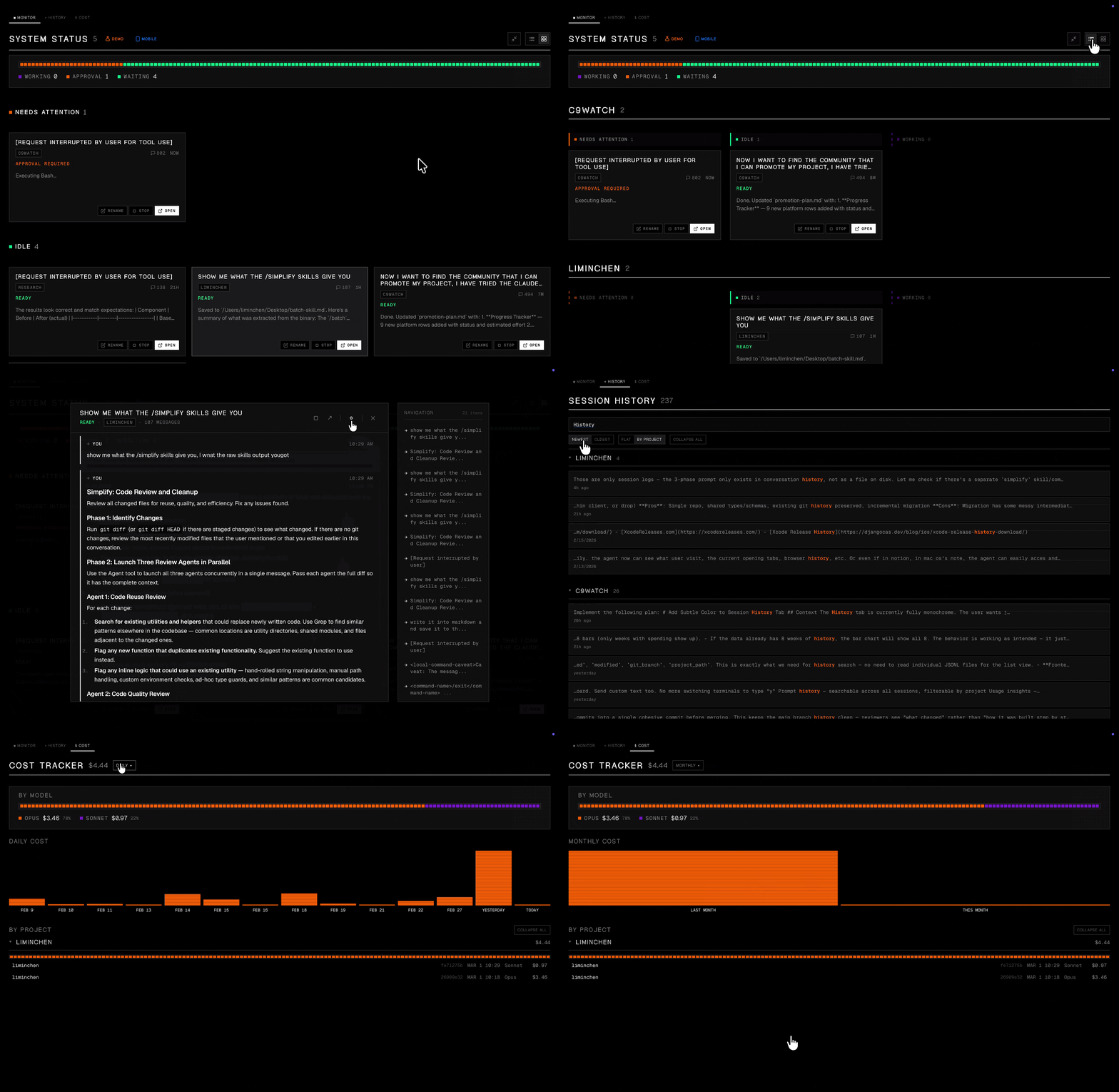
Works with everything. Tied to nothing.
Unlike other Claude Code management tools that require you to launch sessions from within their app, c9watch doesn't care where you start your sessions. It discovers them automatically by scanning running processes at the OS level.
Start Claude Code or Codex from any terminal or IDE you already use -- VS Code, Zed, iTerm2, Antigravity, you name it -- and c9watch picks them all up. No plugins to install. No workflows to change. No vendor lock-in.
Just open c9watch and see everything.
Lightweight and fast.
Built with Tauri, Rust, and Svelte -- not Electron. The app binary is small, memory usage is minimal, and the UI stays snappy. Rust handles process scanning and file parsing at native speed. Svelte compiles away the framework overhead. You're already running multiple Claude Code agents eating up resources -- your monitoring tool shouldn't add to the pile.
Install
Desktop app (macOS)
With Homebrew:
brew install --cask minchenlee/tap/c9watch
The cask installs the app only. To use the CLI, symlink it: ln -s /Applications/c9watch.app/Contents/MacOS/c9watch ~/.local/bin/c9watch.
Or with the install script, which also sets up the CLI:
curl -fsSL https://raw.githubusercontent.com/minchenlee/c9watch/main/install.sh | bash
This installs the app to /Applications and symlinks the CLI to ~/.local/bin/c9watch, so both the GUI and c9watch list, c9watch view, etc. work out of the box.
Or grab the latest .dmg from the Releases page (you'll need to symlink the CLI manually: ln -s /Applications/c9watch.app/Contents/MacOS/c9watch ~/.local/bin/c9watch).
CLI only (macOS & Linux)
curl -fsSL https://raw.githubusercontent.com/minchenlee/c9watch/main/install-cli.sh | bash
Installs to ~/.local/bin by default. Use | bash -s -- --global to install to /usr/local/bin instead.
Build from source
Prerequisites: Rust, Node.js (v18+), and the Tauri CLI.
git clone https://github.com/minchenlee/c9watch.git
cd c9watch
npm install
npm run tauri build       # Desktop app → src-tauri/target/release/bundle/macos/
To build just the CLI (no Node.js or Tauri CLI needed):
cd src-tauri
cargo build --release --no-default-features --features cli
# Binary → target/release/c9watch
Screenshots
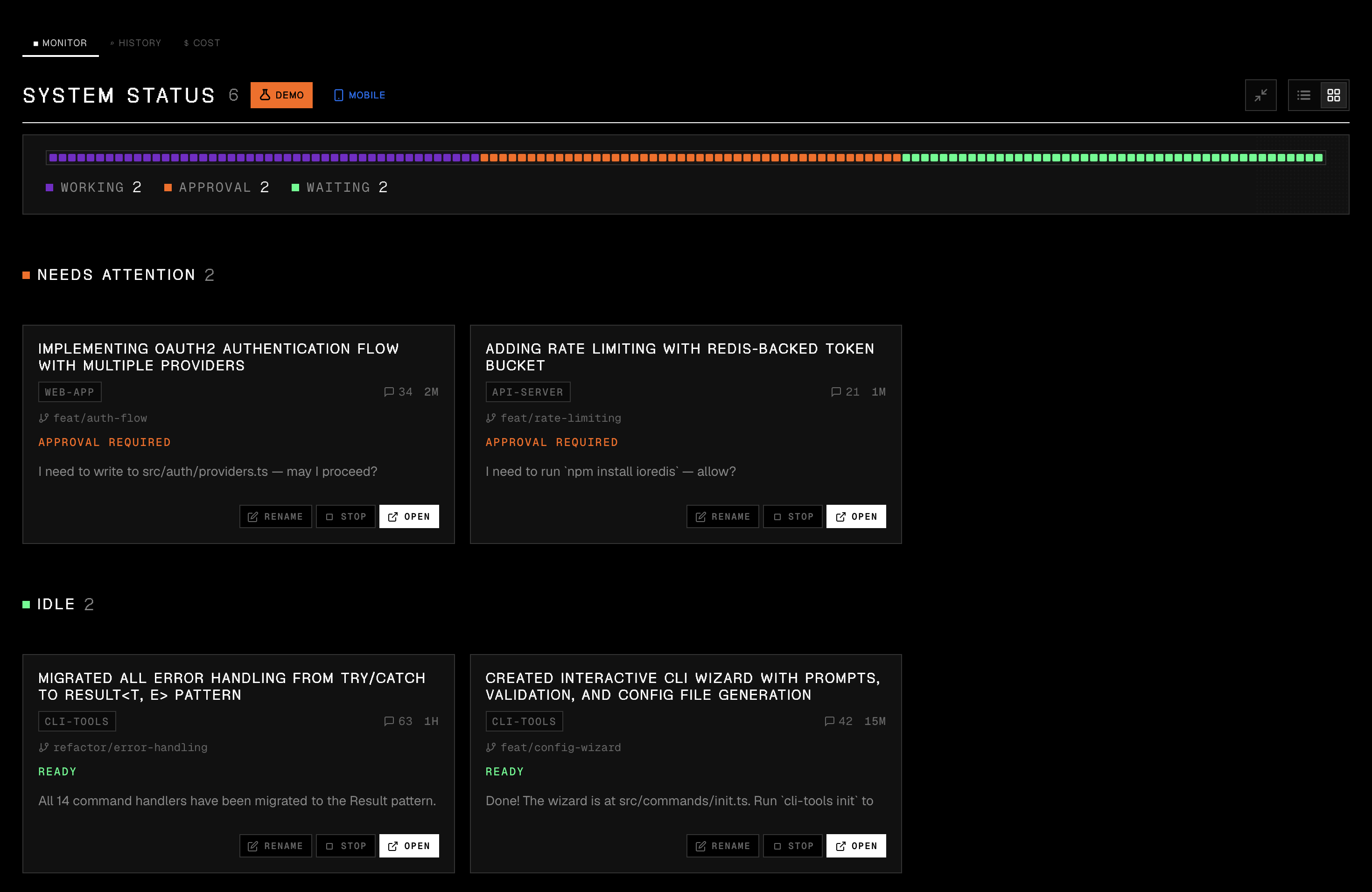
Monitor -- see what needs your attention first
Sessions grouped by status. Permission requests surface to the top so you never leave an agent stuck waiting.
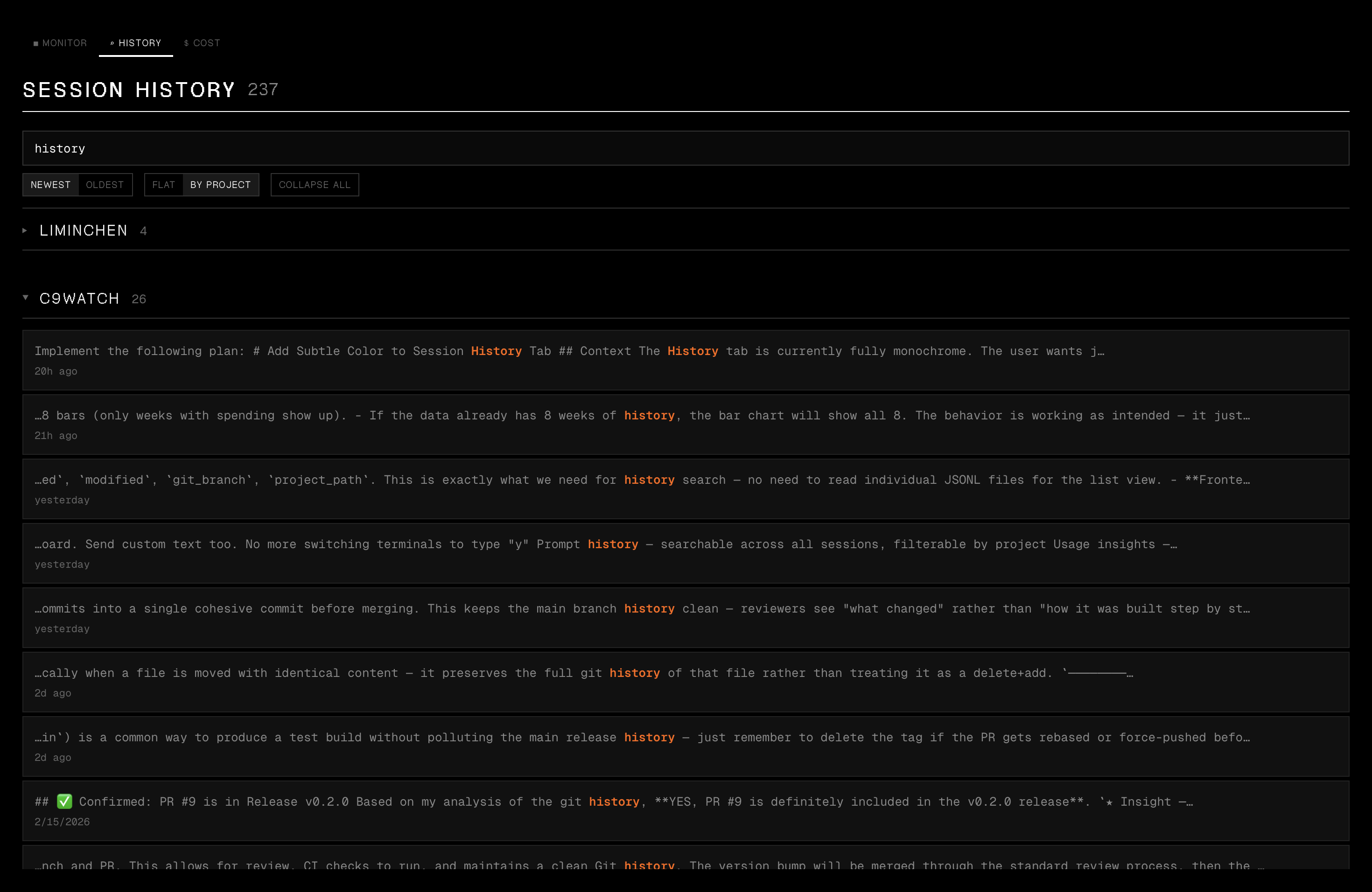
History -- browse and search past sessions
Search all past sessions with instant metadata filter and deep content search. Click a result to view the full conversation.
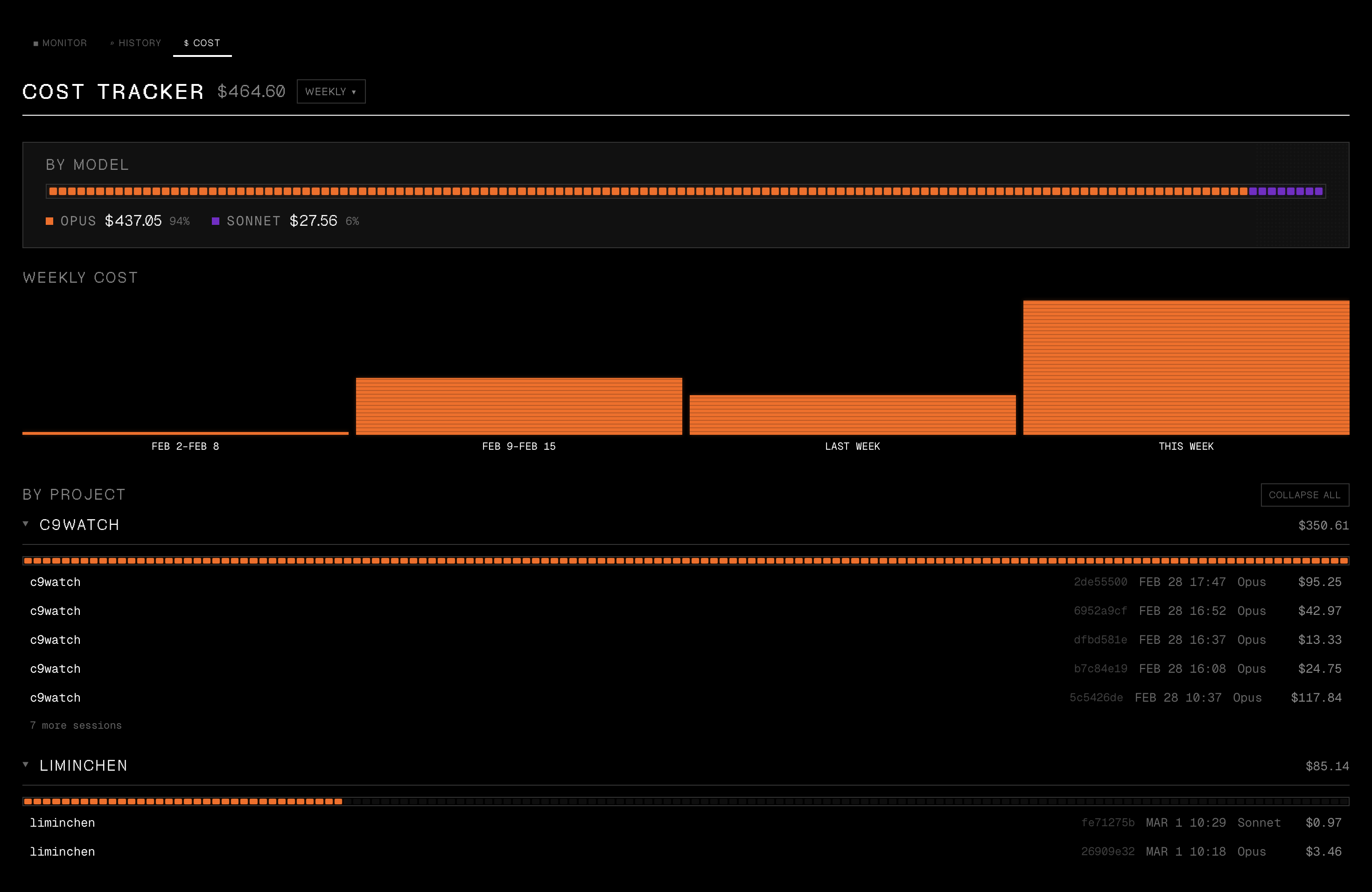
Cost -- track your spending
Daily, per-project, and per-model spending breakdowns across all your Claude Code sessions.
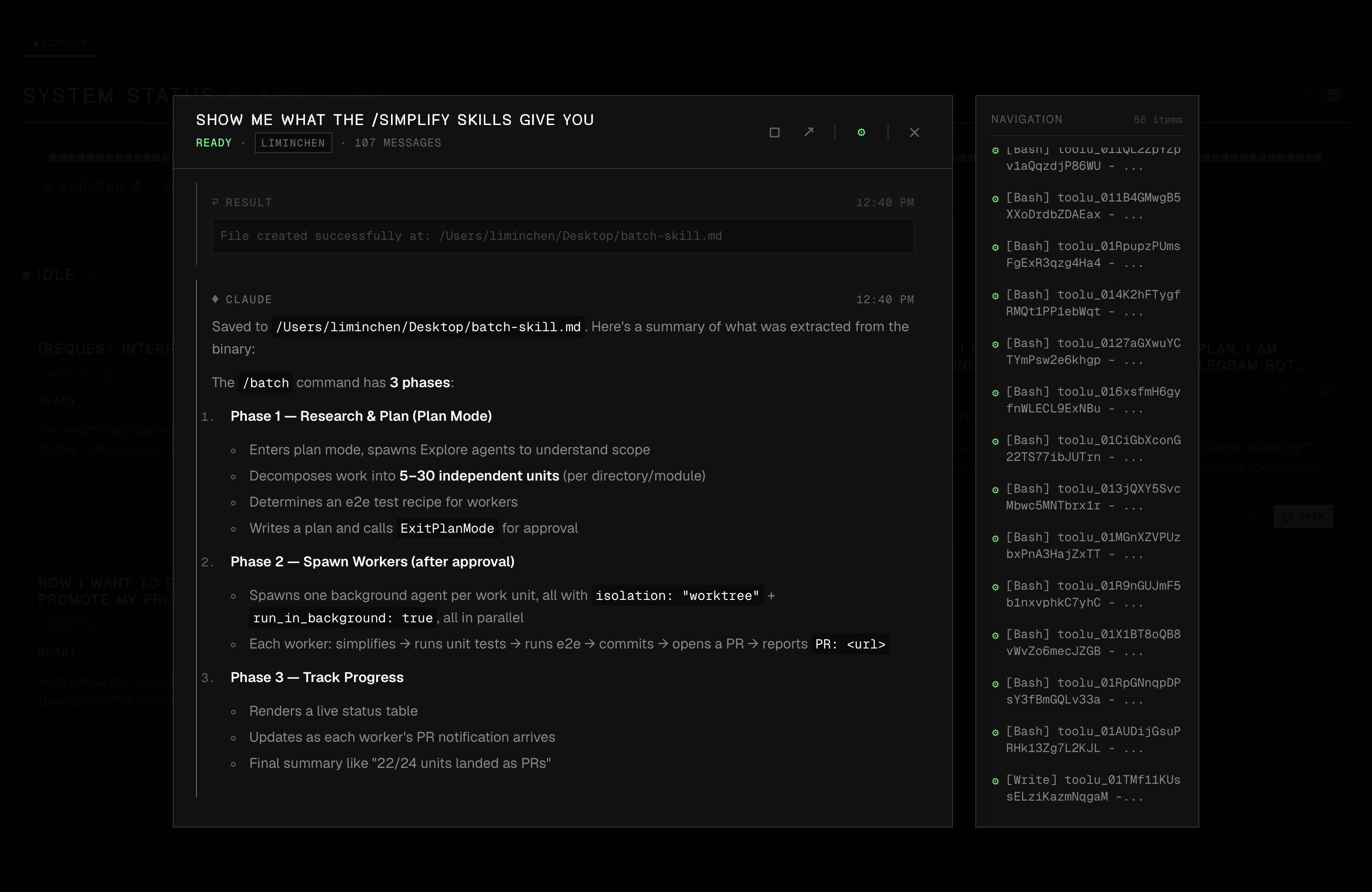
Conversation viewer -- inspect any session
Expand any session to see the full conversation with formatted markdown, code blocks, inline images, and a navigation sidebar.
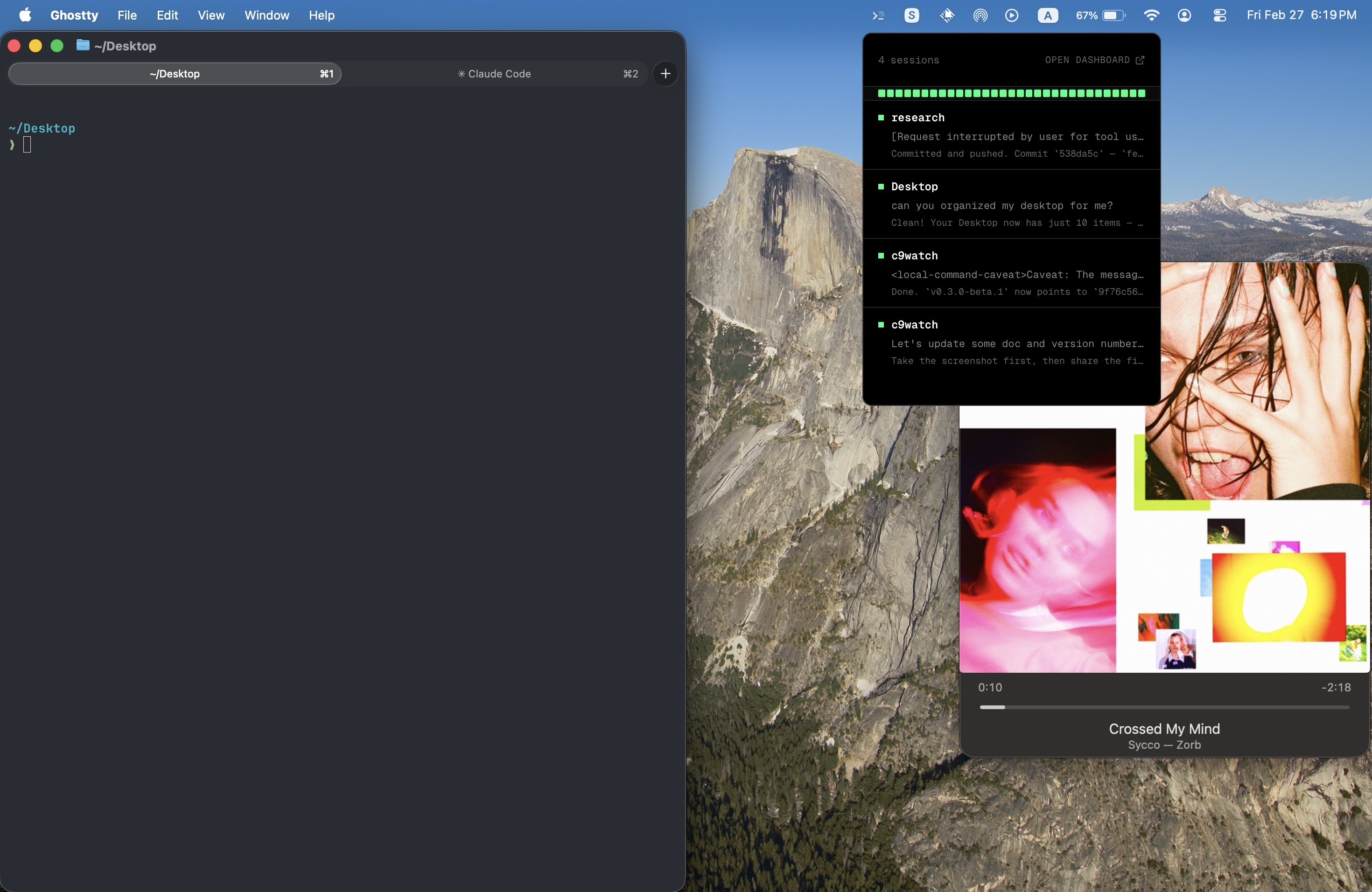
Tray popover -- monitor without opening the dashboard
A quick-glance overlay showing all active sessions and their status directly from the menu bar.
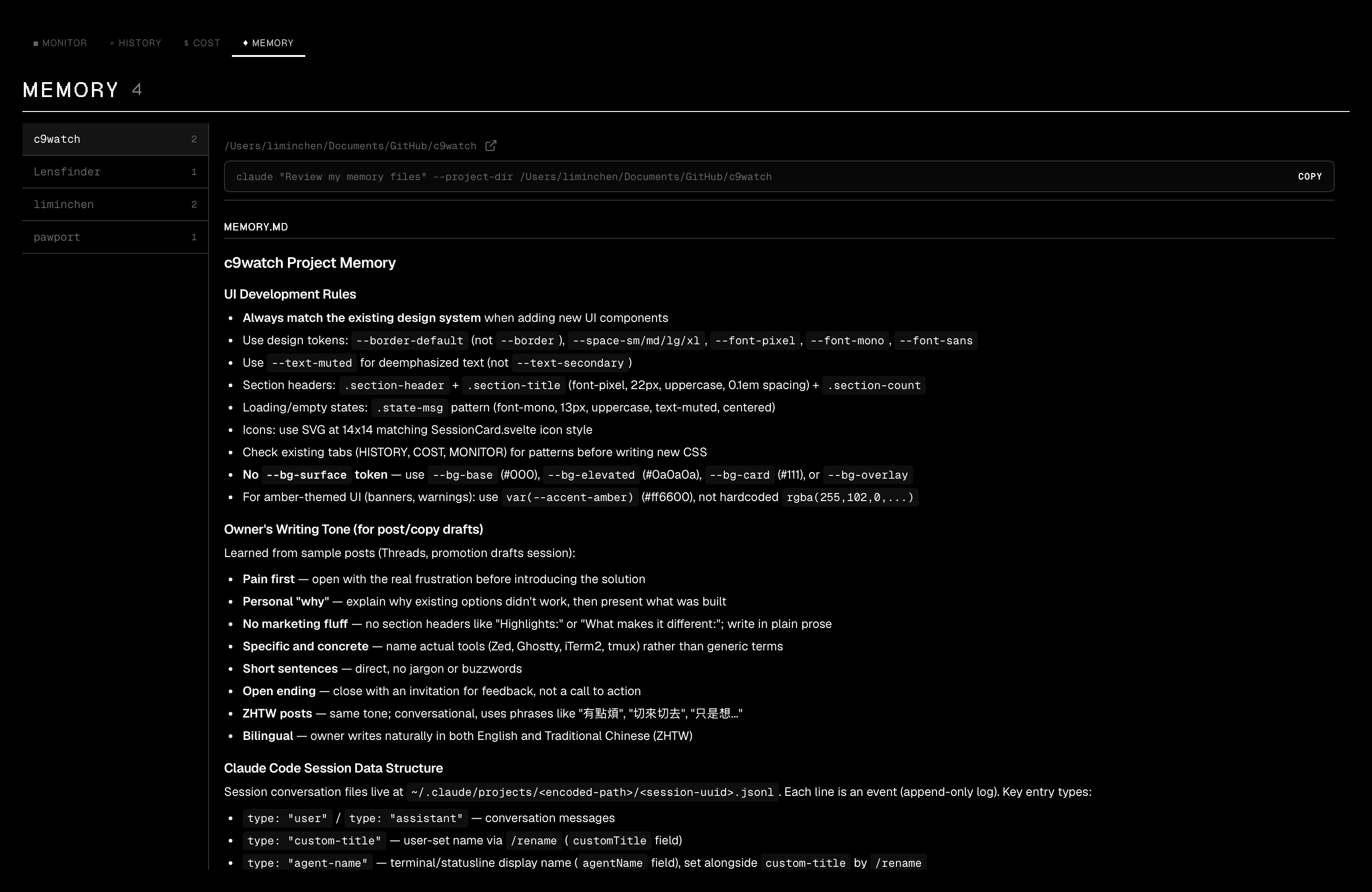
Memory -- browse Claude Code memory files
View and inspect all Claude Code memory files in a two-panel layout with quick access to Claude commands.
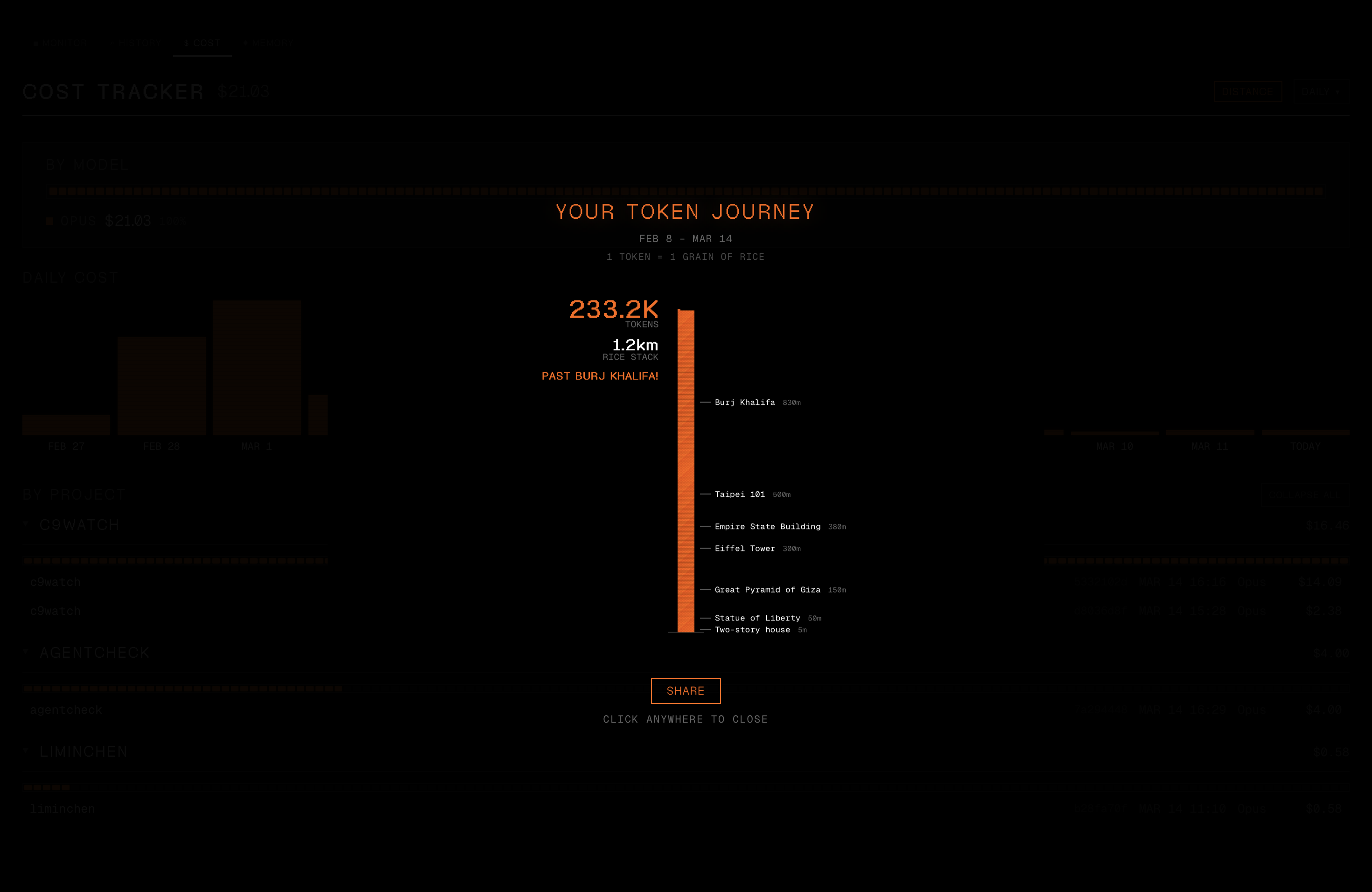
Token distance -- visualize your usage
See your total token usage as a rice stack towering past real-world landmarks. Share the result as an Instagram-ready PNG.
CLI
The same c9watch binary doubles as a CLI for scriptable session management. All output is JSON, designed for piping into jq or consumption by other coding agents.
# List active sessions
c9watch list
c9watch list --project myapp --status Working --compact

# Aggregate status summary
c9watch status

# View a conversation (prefix matching works)
c9watch view abc123 --last 5 --pretty
# Use the provider-scoped key from `c9watch list` when IDs collide
c9watch view codex:<session-id> --last 5

# Browse and search history
c9watch history -n 20
c9watch search "fix the auth bug" --project myapp

# Identify the calling agent's own session
c9watch self

# Stop a session
c9watch stop 12345

# Watch for status changes (NDJSON stream, see docs/cli-events.md)
c9watch watch --interval 2 --compact --changes-only

# Block until a session needs you, finishes, or ends (exit 124 on timeout)
c9watch wait abc123 --until needs-input --timeout 600

# View tasks/todos for a session
c9watch tasks abc123

# Cost breakdown, including per-session lookup
c9watch cost --daily
c9watch cost --session abc12345 --pretty
c9watch cost --session codex:<session-id> --pretty
c9watch cost --session-prefix abc

# PM orchestration (opt-in — see note below): spawn and manage child workers
c9watch spawn --name my-worker --cwd ../my-worktree --append-system-prompt "..."
c9watch send <session-id> --message "do this task"
c9watch workers
c9watch inbox --pretty
PM orchestration is disabled by default. Claude Code and Codex now provide native agent spawning, so c9watch's own PM/worker orchestration is opt-in. The
spawn,send,workers,inbox, andadoptsubcommands (and their dashboard affordances) are hidden in normal builds. Build with the Cargo feature to enable them:cargo build --release --no-default-features --features cli,pm-orchestrationTo also surface the WORKER/PM badges and Workers panel in the dashboard, set
PM_ORCHESTRATION_ENABLED = trueinsrc/lib/feature-flags.tsbefore building the GUI.
Use --pretty on any command for human-readable JSON. The watch command streams newline-delimited JSON events (started, status_changed, stopped) for real-time monitoring.
c9watch ships with a Claude Code skill that teaches Claude how to use the CLI. Install it to let Claude Code monitor sibling sessions, search past work, and coordinate with other agents:
ln -s /path/to/c9watch/skills/c9watch-cli ~/.claude/skills/c9watch-cli
See SKILLS.md for more install options.
Features
- Zero-integration setup -- Works with any terminal or IDE, no plugins or extensions required
- Auto-discovery -- Detects running Claude Code, Codex, Cursor Agent, and Pi sessions automatically. OpenCode (preview) connects to one server you start yourself
- Provider filter -- Switch between All and each agent in Monitor, History, Cost, and Memory
- Attention inbox -- One list of the sessions that wait for you, with a health badge so a stale session does not look live
- While you were away -- Each waiting card shows what it waits for (approval of a named tool, a question, or your next prompt), the last thing the agent said, and what it did since you last looked (files edited, commands run, subagents done). Counted from the transcript on your machine, no AI summary. Activity counts are Claude Code only; other agents show "—"
- Real-time status -- See at a glance which sessions are Working, Need Attention (permission requests or user questions), or Idle
- Status accuracy matrix -- Every agent × situation cell (working, waiting, idle, killed, pid reuse, subagent) is backed by a test; known gaps are listed in docs/accuracy-matrix.md
- Conversation viewer -- Expand any session to view the full conversation with formatted markdown, code blocks, and inline images
- Session control -- Stop sessions, open their parent terminal/IDE, or rename them for easier tracking
- Multi-project view -- Sessions grouped by project with git branch info
- Tray popover -- Click the menu bar icon for a quick-glance overlay with session status indicators and latest messages
- Status notifications -- Get a native macOS notification when a session needs your attention
- Mobile/Web client -- Connect from any browser or mobile device via WebSocket; scan the QR code to monitor sessions remotely
- Session history -- Browse and search all past sessions with instant metadata filter and deep content search; click a result to scroll to and highlight the matching message
- Memory viewer -- Browse and inspect Claude Code and Codex memory files with a two-panel layout and quick Claude command access
- Cost tracker -- Track Claude Code spending, plus Codex and Pi cost data, with daily, per-project, and per-model breakdowns; click any session to preview the conversation; sort by date or cost
- Subscription usage -- Quota meters for Claude Code, Codex, and Cursor in the toolbar and tray, with an elapsed-time marker for each window
- Claude Code hook bridge (opt-in) --
c9watch hooks --installlets Claude Code report permission prompts directly; see docs/claude-hooks.md - CLI for agents --
c9watch list,view,history,search,stop,watch,wait,costcommands for scriptable session management and agent-to-agent monitoring - PM orchestration (disabled by default) -- Spawn, message, and manage child Claude Code "worker" sessions from a parent "PM" session via
c9watch spawn,send,workers,adopt,inbox,tasks. WORKER and PM badges on session cards and a Workers panel in the overlay. Now that Claude Code and Codex spawn agents natively, this is opt-in: build the CLI with--features cli,pm-orchestrationand setPM_ORCHESTRATION_ENABLED = trueinsrc/lib/feature-flags.tsfor the dashboard. Workers run asclaude --bgbackground-pinned sessions, billed against your Pro/Max chat quota (not the separate Agent SDK credit pool that took effect 2026-06-15), falling back to legacy--printmode on older CC. - Subagent visibility -- Detect and display Task-tool subagents spawned inside any session, with click-to-preview transcripts
- Entry animations -- Staggered cascade transitions across tabs and overlay panels for fluid navigation
- Token distance visualizer -- See your token usage as a rice stack towering past 22 real-world landmarks, with animated stacking, native share sheet, and Instagram-ready PNG export
File tree
FAQ
c9watch is a Claude Code plugin with 1 hand-picked skill, indexed on Flowy in the Monitoring category. Install it with the command on its page. It includes c9watch-cli. Its skills do not fire on their own yet. Request auto-invocation to have Flowy route them as you prompt. Free and open source.
- What is c9watch?
- Mac app and JSON CLI to monitor every Claude Code, Codex, Cursor Agent and Pi session on your machine. See which agent needs permission, which is working, and which is idle. Works with any terminal or IDE. Free, open source (MIT).
- How do I install c9watch?
- Run these in Claude Code: npx -y skills add minchenlee/c9watch --agent claude-code. Then prompt normally.
- Does c9watch auto-invoke its skills?
- Not yet. It is indexed on Flowy as a plain plugin. Request auto-invocation on its page and Flowy will route its skills for you as you prompt.
- Is c9watch free?
- Yes. Flowy is free and open source, with nothing gated. You can read every skill in full before you install.
Is this plugin yours?
Claim it with GitHubSubmit a pluginPromote it