

rea
Reverse engineer anything with agents, from app behavior down to native binaries.
420k
 @morluto
Stores your API keys in the OS keychain so Claude Code can use them without seeing the actual values. The model writes a placeholder, and the real key is substituted when the command runs.
Claude Code
> /plugin marketplace add matterhornso/subscribetome> /plugin install stm@subscribetome
GitHub Copilot
$ copilot plugin marketplace add matterhornso/subscribetome$ copilot plugin install stm@subscribetome


Your API keys in the OS keychain. Your AI coding agent uses them — without ever seeing them.
The model writes {{stm:openai:default}}. The real key is swapped in at the moment the command runs. Keys never touch the chat, the transcript, or your logs — they live only in your OS keychain (or, on other platforms, an AES-256-GCM vault).
stm starts as a personal key manager and grows with you: a credential broker so an agent can call HTTP APIs with a key it never sees, and STM Teams — a self-hostable, zero-knowledge server for sharing credentials and attributing usage across a team. Everything is free, open source, local-first, and zero-telemetry.
Claude Code — paste this in:
Set up subscribetome for me using https://github.com/matterhornso/subscribetome
Quit and reopen Claude Code when it's done.
Codex — paste this in:
Set up subscribetome for Codex using https://github.com/matterhornso/subscribetome
Codex will prompt you to trust the new hooks the first time it restarts — press y.
/stm:dashboard
A local web page opens. Pick a service (OpenAI, Anthropic, Stripe, GitHub, …), paste the key. The key goes straight to your OS keychain — never through chat.
Just ask:
Use my OpenAI key to call chat completions with the message "hello"
Claude Code sees a placeholder. The plugin swaps in the real key the instant the command runs.
Substituting a key into a shell command works everywhere, but has a ceiling: for the moment the command runs, the key is a real argument (visible to ps, leakable if the command echoes its own arguments). For HTTP APIs, point the request at the local daemon instead:
curl http://127.0.0.1:<port>/proxy/openai/default/v1/models
stm resolves the credential from the keychain and attaches the real auth on the outbound call to the provider — the key never enters the command's argv, environment, or output. An SSRF guard keeps it on the target's own origin, the response is scrubbed of the key, and every brokered call is a first-class audit event.
stm broker print the base URL + a loopback-only capability token
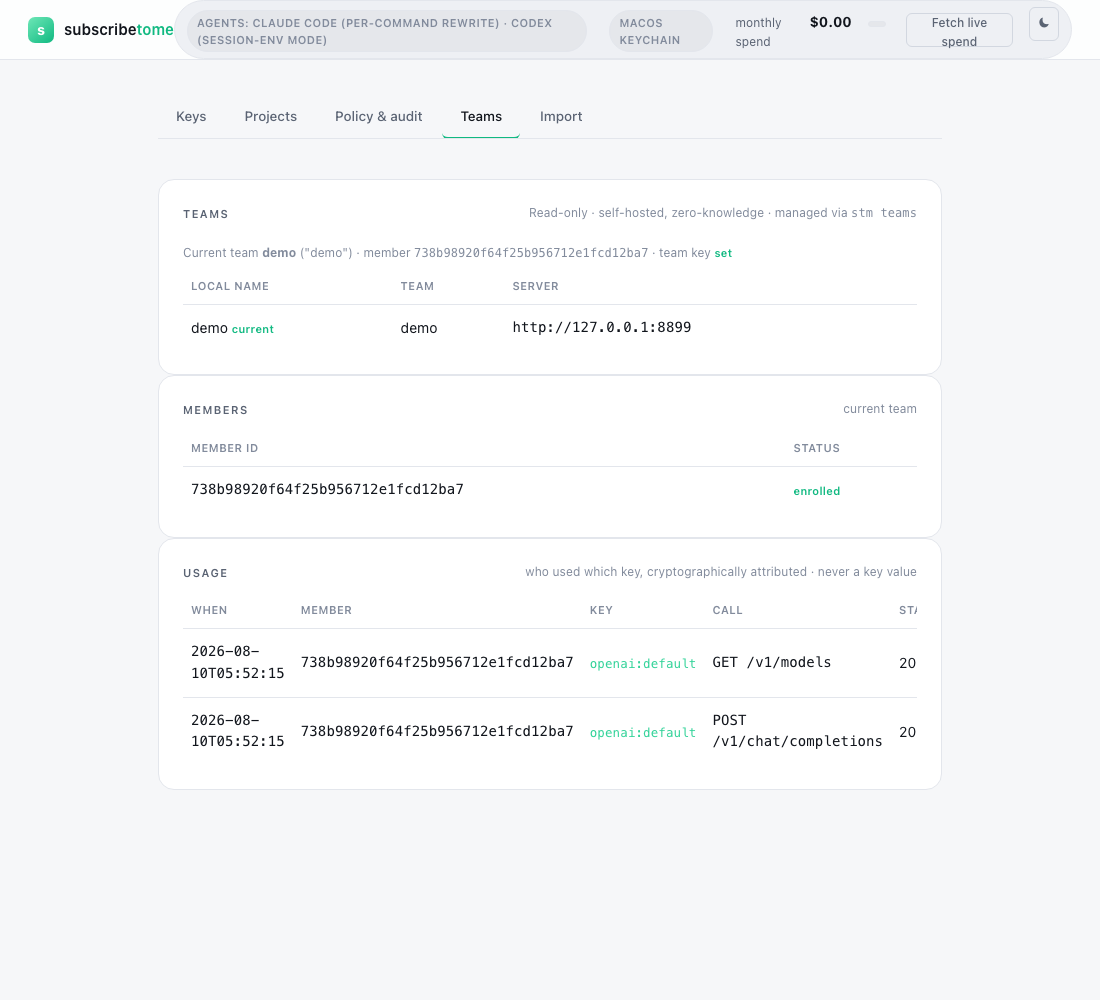
Run your own sync server (stm teams serve); it stores only ciphertext it cannot decrypt. Credentials are encrypted on a member's machine with a team key the server never sees. Members enroll by public key — no shared passphrase is ever passed around — and every usage report is signed, so the team log attributes "who used which key" to a cryptographically-verified member, never a self-asserted name.
In Claude Code, /stm:teams walks the agent through creating or joining a team end-to-end via stm teams quickstart. The whole flow is CLI-driven; the only human step is relaying one short fingerprint/member-id string over a channel you already trust — that's what stops a compromised server from swapping in a team key it controls.
stm teams init          create a team (admin)
stm teams join          join from a member machine
stm teams share <k>     mark a key shared with the team (keys are personal by default)
stm teams push / pull   sync the encrypted vault
stm teams usage         who used which key, cryptographically attributed
A machine can belong to several teams at once (stm teams list / use <name>), and the dashboard has a read-only Teams tab that shows members and the signed usage log.
stm is API-key security for AI coding agents, keychain-first: the real value lives in the OS keychain and the agent works through placeholders. Four Claude Code hooks make it load-bearing — PreToolUse substitutes the key the instant before a command runs; UserPromptSubmit blocks a raw secret pasted into chat; PostToolUse flags output that leaked a key and tells you to rotate it; SessionStart teaches every new session the workflow with no per-project setup.
This beta is scoped to macOS + Claude Code — the runtime hooks that rewrite commands are strongest there. Linux and Windows are experimental (the Bash hook may not fire on native Windows), and Codex is experimental. The broker and the Teams server are plain Bun programs and run anywhere Bun does. Free. Open source. Zero telemetry.
More: DOCS.md — every command, the security model, the broker, Teams, and the Codex surface · docs site · SECURITY.md — the threat model + how to report a vulnerability · CHANGELOG.md · MIT licensed
Contributing & community: CONTRIBUTING.md · CODE_OF_CONDUCT.md · found a security issue? see SECURITY.md (please don't open a public issue)
Install instructions for the AI agent
Claude Code reads this when a user pastes the install prompt above. Humans can skip.
Do these steps in order. Never ask the user for an API key. Never run a command that contains a real key. Never add a key yourself — key entry is out-of-band by design.
uname (or ver on Windows). This beta is supported on macOS; Linux and Windows are experimental — on native Windows (no WSL/git-bash) the Bash hook may not fire, so tell a Windows user this is experimental before continuing.bun --version. If that fails, install Bun with curl -fsSL https://bun.sh/install | bash (or brew install bun on macOS with Homebrew), then re-check.claude plugin marketplace add matterhornso/subscribetomeclaude plugin install stm@subscribetome/stm:dashboard and add API keys in the web page that opens — the keys go straight to their OS keychain and the AI will never see them.Codex install instructions for the AI agent
Codex reads this when a user pastes the Codex install prompt above. Humans can skip.
Do these steps in order. Never ask the user for an API key. Never run a command that contains a real key. Never add a key yourself — key entry is out-of-band by design.
uname (or ver on Windows). Codex support is experimental — tell the user this before continuing.bun --version. If that fails, install Bun with curl -fsSL https://bun.sh/install | bash (or brew install bun on macOS with Homebrew), then re-check.git clone https://github.com/matterhornso/subscribetome.git ~/.subscribetome-src (skip if it already exists; git -C ~/.subscribetome-src pull to update instead).~/.subscribetome-src/bin/stm codex install. This wires up BOTH tracks in ~/.codex/config.toml in one step: the UserPromptSubmit/SessionStart guardrail hooks, and the MCP server that lets Codex call HTTP APIs without the key ever entering its process (stm_http_request).~/.subscribetome-src/bin/stm codex doctor — both tracks should report OK.~/.subscribetome-src/bin/stm dashboard and add API keys in the web page that opens — the keys go straight to their OS keychain and the AI will never see them.Stars on GitHub
Reverse engineer anything with agents, from app behavior down to native binaries.
@morlutoA skill pack for authorized reverse engineering, security research, and penetration testing that routes tasks to the right skill and sets up needed tools on demand. It covers API security assessment and Android APK analysis, among others.
 @zhaoxuya520
Gives an AI agent the step-by-step workflow a senior security analyst follows, covering when to use each technique, what to check first, how to run it and how to verify the result. Covers incident response, forensics, threat intelligence, malware analysis, penetration testing and red teaming.
 @mukul975
Agent skill + stdlib Python service to strip multi-vendor AI provenance marks from text and files, for privacy and hygiene on content you own. The skill is a thin client: it drives the machinery over HTTP, so the agent host needs no Python.
 @guillaumemeyer
Stores your API keys in the OS keychain so Claude Code can use them without seeing the actual values. The model writes a placeholder, and the real key is substituted when the command runs. Install it with the command on its page. Free and open source.
Is this plugin yours?
Claim it with GitHubSubmit a pluginPromote it