
Content
Plugin
ai-video-editor
Open-source, local-first video editor where creators and AI agents edit the same real timeline.

Plugin Signal71/100Solid
maintained100
capable23
documented100
adopted62
Install
$ npx -y skills add MartinDelophy/ai-video-editor --agent claude-code
Stats
850
Stars
115
Forks
Active
Maintenance
JavaScript
Language
MIT
License
2d ago
Last commit
3mo ago
Created
4h ago
Added
Repo: MartinDelophy/ai-video-editor
What's inside
Skill(2 skills)
/develop-timeline-studio-pluginDesign, evaluate, implement, or review image and video generation connectors for Timeline Studio. Use when adding a provider plugin, extracting the generation plugin host or registry, or checking a connector against Timeline Studio's authentication, output, localization, and My/edit-timeline-studioAnalyze images, video, speech, motion, products, and websites; route local vision, audio, depth, tracking, matting, identity, and restoration models; auto-edit, replicate, enhance, caption, voice, assemble, annotate, validate, and export editable Timeline Studio projects and
README
Timeline Studio — Browser AI Video Editor
English | 中文 | 日本語 | 한국어 | Español | Français | Deutsch | Português | ไทย | Tiếng Việt | Русский



Create with Anna
Try the Anna edition for AI-assisted editing and project continuity:
- Describe your edit to Anna, review a plan based on your brief and clip metadata, then apply supported clip ordering and simple 1× video trims.
- Projects and media save automatically to Anna cloud storage and can resume with the same Anna account in another browser. Local project checkpoints provide an additional recovery option.
- Refine the editable multi-track timeline, add AI voiceovers and manual captions, and export MP4 using an available browser encoder.
This desktop preview plans from metadata, without analyzing video frames or audio; local AI features depend on the Anna container’s capabilities.
Responsible use of deep synthesis
This tool uses deep-synthesis technology and is intended solely for technical research and learning.
Users must ensure that they:
- use only facial images or videos of themselves or people who have provided lawful authorization;
- do not create or distribute any illegal, infringing, false, or misleading content;
- do not present generated content as authentic footage or impersonate another person without their consent.
Users are solely responsible for any legal liability arising from violations of these requirements.
Project updates
- 2026-10-13 — Agent relighting and depth-video conversion now reuse the production browser pipeline through WebMCP prepare/start/inspect/cancel. Lighting parameters use shared reviewed, undoable commands; generated depth videos stay in My assets until a separate reviewed insertion. The editing Skill documents the complete workflow and local CLI limits.
- 2026-10-12 — Long-video playback pauses background filmstrip refinement and draws the exact playhead thumbnail without JPEG encoding. Resume prioritizes the latest seek; AAC export preparation copies audio packets without re-encoding or copying the full video into WASM. Visual effects and export settings are preserved. Export now prefers supported hardware encoders and feeds eligible unscaled video frames directly to the compositor, preserving the existing raster path for transforms and effects. Audio encoding and next-frame composition now overlap video submission with a bounded queue. Scrubbing separates decoder/playhead updates from editor reconciliation, preserves marker snapping and commits the exact release position.
- 2026-10-07 — Visual clips now support cuts down to 0.05 seconds, fixing rejected cuts at valid short intro positions such as 0.45 seconds. Trimming, speed changes and project recovery share the same minimum duration. Fixed frozen video playback when entering or leaving the large canvas preview by restoring source timing, playback and frame callbacks on the new video element.
- 2026-10-05 — Depth sampling now uses Fast 8, Standard 16 and Fine 24 samples/s. Fast and Standard use RIFE to output 24 fps while sampling and encoding overlap in a bounded pipeline. Source audio is preserved; completed analysis remains reusable after generation failure. Fixed sampling clocks and reuse of RIFE sessions, pair pixels and tensors reduce redundant interpolation without lowering precision, resolution or sample counts. RIFE now downloads from owned, immutable Hugging Face and ModelScope mirrors with verified checksums, automatic fallback and a shared cache.
- 2026-10-04 — Depth map — Turn video into grayscale depth: near is bright, far is dark. Depth analysis overlaps frame decoding with inference, encodes PNGs in the worker, and throttles UI updates. Depth-map preview and export now interpolate between samples, match trimmed and retimed source timestamps, and reuse decoded images. Depth-map video saved to My assets. Generated depth videos replace their source clips while retaining assets; playback duration follows the visual sequence, fixing zero duration after clearing and reinserting video. Depth videos now include source audio matched to trimming and speed changes; the original video and its sound remain available. Editable depth-assisted relighting adds a lamp-position sphere and hold-to-compare preview, with refreshed frames after timeline dragging. See the public Roadmap for planned work, Releases for shipped changes, and Issues for focused tasks and bugs.
What can it produce?
Explore reproducible before/after examples and editing recipes:
→ AI Video Editing Skills Handbook
Timeline Studio is a local-first AI video editor that runs in the browser. It combines a CapCut-style multi-track timeline with WebGPU AI music and repair, multilingual voiceovers, automatic captions, talking-avatar generation, and deterministic offline export.
Open the editor · Watch on YouTube · Hugging Face Space
Video demo
Auto Edit
Visual analysis, keyframes, captions, and export.
https://github.com/user-attachments/assets/e8327caa-429e-40ff-a7fe-a59e6cf7a464
AI Repair
Timed watermark removal with before/after review.
https://github.com/user-attachments/assets/aea9f5b4-c720-4b0c-9067-5ec124eef982
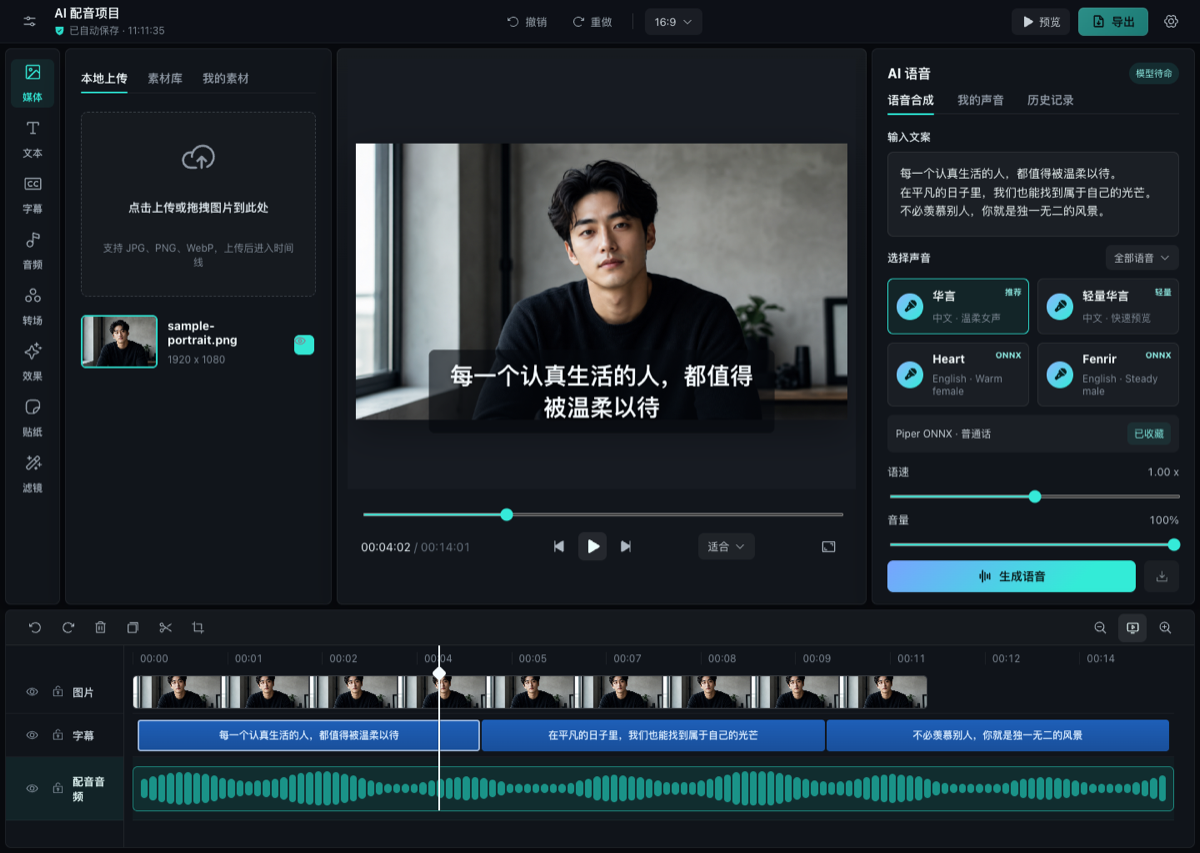
AI Voiceover
https://github.com/user-attachments/assets/304a744e-d620-4380-9c17-19af3726f5a4
AI capabilities
- Multilingual voiceover: Chinese and mixed Chinese/English Hojo TTS Light 80M FP16 reference voices (晴岚 and 若溪), with autoregressive generation on WebGPU and stable waveform decoding on WASM; English Kokoro 82M; and browser Piper voices for German, Spanish, French, Italian, and Brazilian Portuguese.
- Local AI music: Stable Audio 3 Small Q4 ONNX runs through WebGPU with translated free-form prompts, 30/60/90/120-second choices, waveform-aware long-track looping, persistent model caching, and automatic insertion into My Assets.
- Automatic captions: Whisper small q8 ONNX with waveform-aware timing and conservative Chinese recognition cleanup.
- Smart framing: YOLOS tiny subject detection and MODNet portrait matting for smart crop, caption avoidance, and background removal across images and complete videos.
- AI Repair: browser-local MI-GAN watermark/object removal with multiple timed repair regions, plus NanoVSR 644K WebGPU 4× restoration for images and videos with synchronized before/after comparison.
- AI vocal separation: isolate vocals and place the instrumental stem on the music track without leaving the browser workflow.
- Digital human: JoyVASA audio-to-motion and LivePortrait neural rendering with WebGPU, 256px preview and 512px quality paths.
- Local-first inference: large models are lazy-loaded, revision-pinned, and cached by the service worker; supported workflows run without uploading project media to an editing backend.
Resilient model delivery
Browser AI models are mirrored on both Hugging Face and ModelScope. Timeline Studio uses ModelScope first for Chinese interfaces and domestic sessions, uses Hugging Face first elsewhere, remembers the first working source for the current runtime, and automatically falls back to the other source when needed. Cache identities are shared across both providers, so switching routes does not download the same revision twice.
- Stable Audio: Hugging Face · ModelScope
- Voice models: Hugging Face · ModelScope (mixed upstream licenses; see the repository model card)
- Timeline Studio ONNX models: Hugging Face · ModelScope
- Depth Anything V2 Small Q4F16: Hugging Face · ModelScope (Apache-2.0)
- Vocal remover: Hugging Face · ModelScope
Editing and export
- Contiguous main Visuals track plus timed picture-in-picture overlays.
- Direct canvas selection, movement, proportional resize, rotation, masks, filters, effects, animation, speed, and explicit keyframes, plus desktop four-way color grading with fully keyframeable temperature, tint, saturation, hue, wheel saturation, and luminance controls.
- Captions, stickers, voiceover, separated source audio, and music on independent timed tracks.
- CapCut-style snapping, alignment guides, clip menus, split/duplicate/delete, timeline zoom, undo/redo, and portable
.timelineprojects. - Native media playback for a responsive preview; export uses a separate deterministic offline rendering path.
- WebCodecs MP4/WebM composition with shared preview/export geometry, audio mixing, captions, overlays, effects, and MediaRecorder fallback.
- Installable PWA with a cached app shell and multilingual UI.
Agent Skill
The repository includes the AI Video Editing Skill for Codex, Claude Code, Copilot and Gemini CLI, backed by edit-timeline-studio for planning, executing, and verifying editable video timelines.
File tree
FAQ
ai-video-editor is a Claude Code plugin with 2 hand-picked skills for content work, indexed on Flowy. Install it with the command on its page. It includes develop-timeline-studio-plugin, edit-timeline-studio. Its skills do not fire on their own yet. Request auto-invocation to have Flowy route them as you prompt. Free and open source.
- What is ai-video-editor?
- Open-source, local-first video editor where creators and AI agents edit the same real timeline.
- How do I install ai-video-editor?
- Run these in Claude Code: npx -y skills add MartinDelophy/ai-video-editor --agent claude-code. Then prompt normally.
- Does ai-video-editor auto-invoke its skills?
- Not yet. It is indexed on Flowy as a plain plugin. Request auto-invocation on its page and Flowy will route its skills for you as you prompt.
- Is ai-video-editor free?
- Yes. Flowy is free and open source, with nothing gated. You can read every skill in full before you install.
Is this plugin yours?
Claim it with GitHubSubmit a pluginPromote it