
Product
Plugin
scrumboy
Custom Workflows: Shape each project's workflow with customizable columns, colors, and a dedicated Done lane.

Plugin Signal67/100Solid
maintained99
capable14
documented100
adopted56
Install
$ npx -y skills add markrai/scrumboy --agent claude-code
What's inside
Badges





README
Self-hosted project management & issue-tracking solution + instant shareable & customizable boards + realtime collaboration, automation, API access and MCP-compatible client support and zero SaaS lock-in
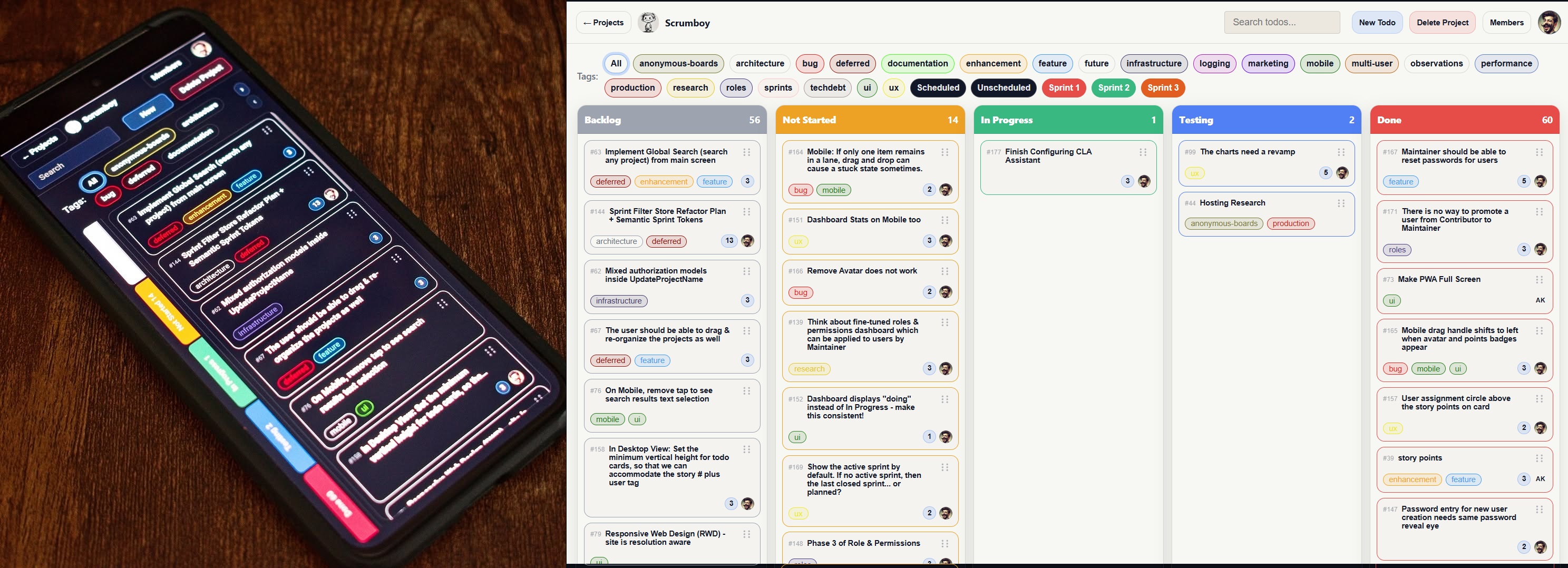
Table of contents
- Quick Start
- Run the official Docker image
- Build locally from source
- Run from source
- Run the Windows executable
- Run the macOS executable
- Build the Android app
- Features
- Modes
- Roles
- System roles (instance-wide)
- Project roles (per project)
- Optional Configuration
- Environment variables
- Encryption key for 2FA/password reset
- SMTP for self-service password reset (optional)
- Email notifications (optional)
- OIDC / SSO login (optional)
- Owner disaster recovery
- TLS / HTTPS (optional)
- PWA / Web Push (optional)
- Integrations & API Access
- MCP (JSON-RPC) for AI agents
- Webhooks (outbound HTTP)
- Export scope
- Import modes
- Documentation
- License and Contributions
Quick Start
Runs in seconds. No setup required.
No .env file, TLS certificates, or encryption key are required to start the app.
Scrumboy creates runtime data under ./data by default. The default SQLite database is ./data/app.db, and SQLite may also create app.db-wal and app.db-shm while the server is running.
Run the official Docker image
Pull ghcr.io/markrai/scrumboy:latest (Docker selects the published architecture for your host):
docker run -d \
  --name scrumboy \
  -p 127.0.0.1:8080:8080 \
  -v scrumboy-data:/data \
  ghcr.io/markrai/scrumboy:latest
The mounted /data volume preserves Scrumboy data across container recreation. Open http://localhost:8080. For Compose using the published image, persistence, backup, and configuration details, see docs/docker.md.
Build locally from source
To build from a local clone instead of pulling the published image:
docker compose up --build
The repository's docker-compose.yml uses build: . and maps ./data to /data.
Open http://localhost:8080.
Run from source
go run ./cmd/scrumboy
Open http://localhost:8080.
Run the Windows executable
Windows users can download the windows-amd64 executable from GitHub Releases. Run it from a dedicated writable folder (for example %USERPROFILE%\Scrumboy); it starts a local Scrumboy server at http://localhost:8080. For exact artifact filenames, checksum and provenance verification, runtime-data location, and other release-install details, see docs/install-from-releases.md.
Run the macOS executable
macOS users can download Apple Silicon or Intel builds from GitHub Releases. These binaries require macOS 12 Monterey or later. Extract and run ./scrumboy from a dedicated writable folder; it starts a local Scrumboy server at http://localhost:8080. Current macOS release binaries are not Apple-signed or notarized. For exact artifact filenames, checksum and provenance verification, runtime-data location, Gatekeeper/quarantine troubleshooting, and other release-install details, see docs/install-from-releases.md.
Build the Android app
Scrumboy includes a native Android client, implemented with Capacitor, under mobile/capacitor. It connects to a running Scrumboy server; it does not replace or start the server. Build it from source. Release builds require HTTPS to that server. Prerequisites, web-payload packaging, Gradle commands, device connection, and optional signing are in docs/android.md.
Features
- Custom Workflows: Shape each project's workflow with customizable columns, colors, and a dedicated Done lane.
- Custom Priority Tiers: each project has ordered, color-coded priority definitions with stable keys; maintainers configure tiers and assign them to todos.
- Realtime Collaboration: Keep project boards synchronized as teammates create, update, and move stories.
- Outbound Webhooks & Integrations: In Full Mode, project webhook URLs registered through the API receive JSON events for story lifecycle changes, assignment, and due-soon reminders, for use in external automation. Delivery is asynchronous and best-effort. See Integrations.
- AI Agent Integration: Connect Claude, Cursor, and other MCP-compatible clients to manage projects and stories through Scrumboy's tools.
- Customizable Tags: Users can inherit and customize tag colors.
- Advanced Filtering: Find stories with instant search, tag suggestions, and searchable sprint filters. Combine filters and keep selections visible as removable pills.
- Sprints: create, activate, close; sprint filter on board; default sprint weeks (1 or 2) per project. Maintainers can disable sprints per project without deleting sprint history or todo assignments, then re-enable them later.
- Due Dates & Deadline Notifications: Give stories optional due dates, spot overdue work on board cards, and sort columns by upcoming due dates. Rule-based reminders email the assignee (requires SMTP configuration and per-user opt-in) and can emit webhook events. See docs/notifications.md.
- Story archival: Archive and restore stories without changing workflow state or history. Archived stories leave board, search, and dashboard reads but stay browseable; restoring requires Maintainer access. Nothing is archived automatically. See API.md.
- Authentication & 2FA: TOTP supported when
SCRUMBOY_ENCRYPTION_KEYis set. - Self-service password reset email (optional, requires SMTP +
SCRUMBOY_ENCRYPTION_KEY+SCRUMBOY_PUBLIC_BASE_URL): see docs/smtp.md. - Audit trail: append-only
audit_eventstable; todo/member/project/link actions logged (see docs/audit-trail.md). - Backup: export/import JSON; merge or replace; scope full or single project. JSON export is not a complete
DATA_DIRdisaster-recovery backup (uploaded wallpapers andaudit_eventsare omitted); see docs/diagrams/scrumboy_deployment_ops.md. - Trello import: migrate an existing Trello board from its JSON export, with a preview before anything is imported (see docs/backup-and-import.md).
- Mobile: Native Android app (Capacitor client; build from source — docs/android.md) with native VoiceFlow on supported devices, or install the PWA from the browser.
- Multi-language Support: English, 简体中文, हिन्दी, Español (Latinoamérica), العربية, Français, বাংলা, Português (Brasil), Bahasa Indonesia, اردو, Русский, Deutsch, 日本語, Kiswahili, Tiếng Việt, Türkçe, 한국어, فارسی, ไทย, Italiano, Bahasa Melayu, Polski, and Українська.
- Anonymous shareable boards: In Full Mode,
/anoncreates a throwaway editable board; Anonymous Mode serves a single no-auth board. These are separate from published read-only boards below. - Public Read-Only Boards: Once the operator enables public projects, Maintainers can publish durable boards through Settings → Sharing; visitors then browse, search, and filter without an account. Unpublishing revokes access. See docs/public-boards.md.
- Optional Public Landing Page: Full Mode deployments can enable a separate English marketing landing page; the workspace moves to
/_appwhile project URLs stay unchanged. Anonymous Mode ignores the flag. - VoiceFlow - deterministic voice commands in the browser; on supported Android devices, AI VoiceFlow adds on-device speech and Gemini Nano planning with confirmation before mutations (see docs/voiceflow.md, docs/enhanced-voiceflow.md).
- Visual Story Wall: Organize sticky notes and stories on a freeform canvas, and connect them visually to map relationships and ideas. Available on desktop.
- Agenda - today's events from subscribed ICS feeds on durable boards (see docs/calendar.md). Requires
SCRUMBOY_ENCRYPTION_KEY. - Todo notes Markdown preview (optional) - markdown / preview tabs in the todo Notes field; optional Mermaid diagrams in fenced mermaid blocks in preview only (see FAQ.md, docs/markdown-and-mermaid.md).
Modes
- Full (
SCRUMBOY_MODE=full, default): Auth can be enabled. First user via bootstrap; then login/session. Backup/export, tags, multi-project. Projects can be user-owned (project_members) or anonymous (shareable by URL):/anon(or/temp) creates a throwaway board and redirects to/{slug}. - Anonymous (
SCRUMBOY_MODE=anonymous): No auth. Landing at/; live deployment at: https://scrumboy.com/
Roles
In full mode, access is governed by two separate role systems: instance-wide system roles (Owner, Admin, User) and per-project roles. System roles do not grant project access; project access comes only from project membership.
System roles (instance-wide)
Owner, Admin, and User control instance-wide capabilities such as user management. Assignment rules and permissions: docs/roles-and-permissions.md.
Project roles (per project)
Project access requires project membership. Per-project roles are Maintainer (full project management), Contributor (limited edits, including body editing on cards assigned to them), and Viewer (read-only). Temporary/anonymous boards use a separate link-based permission model instead of these roles. Details: docs/roles-and-permissions.md.
Optional Configuration
Environment variables
A fresh Scrumboy install needs no environment variables. Set them only when you want to change deployment defaults or turn on optional features (SSO, email, Web Push, TLS, encryption, and similar).
Scrumboy does not automatically load .env files. Inject variables through your shell, process manager, Docker/Compose, or another launcher.
File tree
FAQ
scrumboy is a Claude Code plugin with 1 hand-picked skill, indexed on Flowy in the Product category. Install it with the command on its page. It includes scrumboy-board-operator. Its skills do not fire on their own yet. Request auto-invocation to have Flowy route them as you prompt. Free and open source.
- What is scrumboy?
- Custom Workflows: Shape each project's workflow with customizable columns, colors, and a dedicated Done lane.
- How do I install scrumboy?
- Run these in Claude Code: npx -y skills add markrai/scrumboy --agent claude-code. Then prompt normally.
- Does scrumboy auto-invoke its skills?
- Not yet. It is indexed on Flowy as a plain plugin. Request auto-invocation on its page and Flowy will route its skills for you as you prompt.
- Is scrumboy free?
- Yes. Flowy is free and open source, with nothing gated. You can read every skill in full before you install.
Is this plugin yours?
Claim it with GitHubSubmit a pluginPromote it