
Development
kimi
Use Kimi to explain code, review changes, challenge a design, or work toward a goal — an independent second opinion from a different model family, inside the Claude Code or Codex session you're already in. Latest release · Roadmap · Report an issue · Apache-2.

Plugin Signal82/100Strong
maintained100
capable72
documented100
adopted34
Install on Claude Code
Auto-invoked ships a router so the right skill fires automatically as you prompt. No remembering which skill to call.
Normal is the plain upstream plugin, installed as-is. You invoke its skills yourself.
The plugin> /plugin marketplace add linxule/kimi-plugin-cc> /plugin install kimi@kimi-marketplaceAuto-invocation> /plugin marketplace add flowy-sh/flowy-core> /plugin install flowy-core> /plugin install flowy-kimi
Stats
39
Stars
2
Forks
Active
Maintenance
TypeScript
Language
Apache-2.0
License
2d ago
Last commit
5mo ago
Created
Repo: linxule/kimi-plugin-cc
What's inside
Skill(12 skills)
/kimi-askAsk Kimi a read-only free-form question about the current repository. Use for prose explanations, flow tracing, module comparisons, or conceptual reasoning where Codex should delegate the answer to local kimi-code rather than perform implementation./kimi-cancelCancel an active plugin-managed Kimi job for the current repository. Use only when the user explicitly asks to cancel a Kimi run./kimi-challengeRun a read-only adversarial Kimi challenge review that questions assumptions, design choices, and tradeoffs. Use when the user wants pushback on whether the approach is right, not a defect-only review.
Command(11 commands)
Agent(7 agents)
kimi-askUse this agent when the user wants Kimi to answer a free-form question about the repository in prose — explain a module, trace a flow, compare alternatives, or reason about a concept in context. Choose this agent over kimi-review when the user wants a narrative answer ratherkimi-challengeUse this agent when Claude wants Kimi to run an adversarial review that challenges the implementation approach, design choices, tradeoffs, and assumptions rather than just flagging defects. Choose this agent when the user wants pushback on whether the chosen approach is thekimi-pursueUse this agent ONLY when the user has explicitly asked Kimi to pursue a stated objective AUTONOMOUSLY across multiple turns (experimental goal mode) — a multi-step task the user wants Kimi to drive to completion on its own, not a single bounded edit. This is the plugin's
Hook(1 hook)
Badges



README
Kimi for Claude Code and Codex
Use Kimi to explain code, review changes, challenge a design, or work toward a goal — an independent second opinion from a different model family, inside the Claude Code or Codex session you're already in.
Latest release · Roadmap · Report an issue · Apache-2.0 license
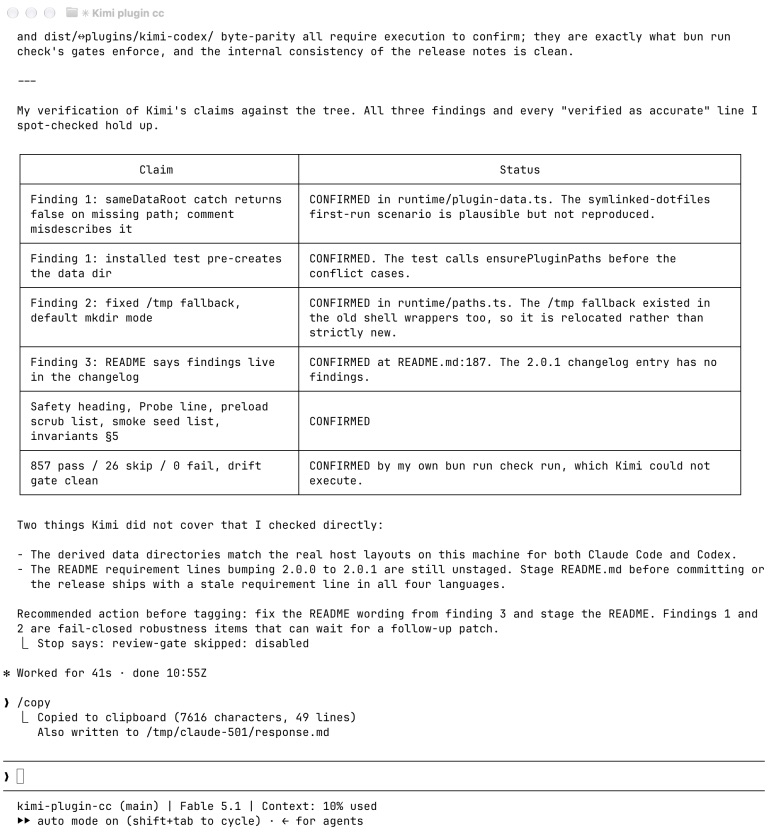
Claude Code runs /kimi:review on this repository — Kimi reviews the diff, and the host verifies each claim against the tree.
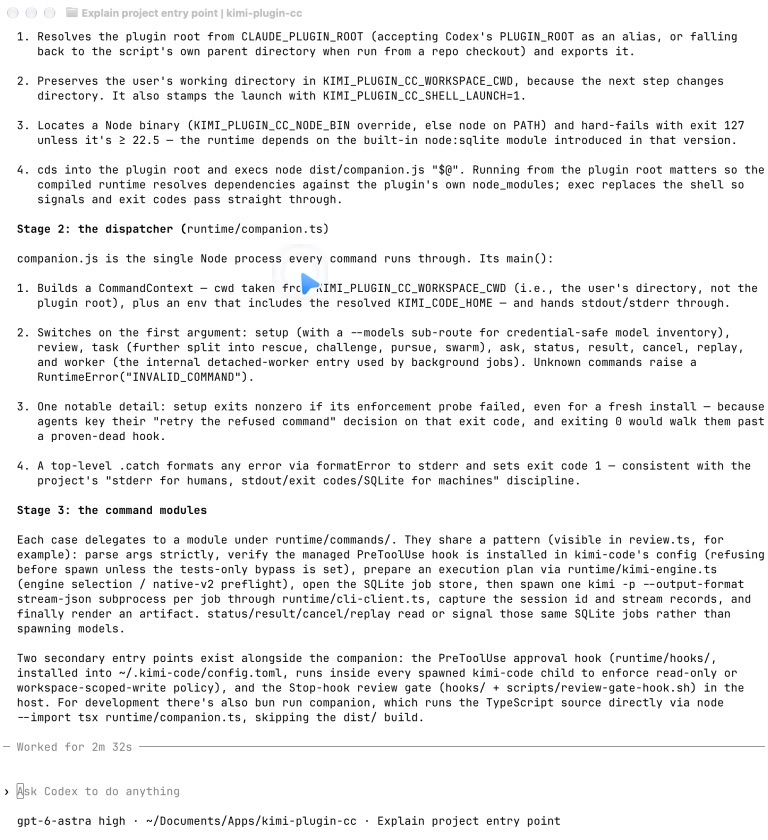
Codex runs $kimi-ask — a read-only explanation of this project's entry point, from the entry shell script to the command modules.
Choose a language below. Each guide opens on this page.
选择语言,展开阅读 · Choisissez votre langue · 言語を選んで開いてください
Use Kimi in your coding tasks
Ask Kimi to explain code, review changes, challenge a design, or make a focused fix. You can use this plugin in Claude Code or Codex.
The plugin runs the Kimi Code CLI on your computer. It uses your Kimi subscription or a provider you configure in Kimi. Calls count against that subscription or API account. Your Claude Code or Codex login stays unchanged. The selected provider receives the prompts and code needed for your task.
Start with a question or a review. Their tool rules allow reading files and deny file writes and shell commands. Other modes can change files. Read the safety limits before asking Kimi to make changes.
Before you install
You need:
- macOS or Linux
- Claude Code or Codex with plugin support
- Node.js 22.5 or newer
- Kimi Code CLI 2.0.2, the recommended version for plugin 2.0.5
Windows is not currently supported. Check your versions in a terminal:
node --version
kimi --version
Use the Kimi Code installation guide if you need the CLI. You do not need Bun or a build step to use this plugin.
We test compatibility with exact CLI versions. A newer CLI may need a newer plugin. See supported versions and upgrades.
Run kimi in your terminal. Use /login for a Kimi subscription, or /provider to set up an API provider. Enter credentials in Kimi, never in the assistant conversation. Exit Kimi when you finish setup. If you set KIMI_CODE_HOME, use the same location for Kimi and the plugin.
Install in Claude Code
Open Claude Code in your project. Enter these commands in Claude Code:
/plugin marketplace add linxule/kimi-plugin-cc
/plugin install kimi@kimi-marketplace
/kimi:setup
/kimi:setup --check
Setup installs a hook that checks Kimi's tool calls against the plugin's rules. The Probe: line should show ok. If it fails, follow the setup guidance below.
Try a question that does not change files:
/kimi:ask Explain how this project's main entry point works.
Install in Codex
Run these commands in your terminal:
codex plugin marketplace add linxule/kimi-plugin-cc
codex plugin add kimi@kimi-marketplace
Open a new Codex task in your project. Ask it to set up the plugin:
Use $kimi-setup to install the safety hook, then check readiness.
The hook checks Kimi's tool calls against the plugin's rules. The Probe: line should show ok. If it fails, follow the setup guidance below. Then try:
Use $kimi-ask to explain how this project's main entry point works.
If you use both Claude Code and Codex, run setup in each. Each app has its own hook in the shared Kimi configuration.
Choose a task
| Task | Claude Code command | Codex skill | File access |
|---|---|---|---|
| Explain code | /kimi:ask | $kimi-ask | Read-only |
| Review code changes | /kimi:review | $kimi-review | Read-only |
| Challenge a design or approach | /kimi:challenge | $kimi-challenge | Read-only |
| Make a focused fix | /kimi:rescue | $kimi-rescue | Can edit your project |
| Review several areas at once | /kimi:swarm | $kimi-swarm | Read-only |
| Prepare edits in parallel | /kimi:swarm --write | $kimi-swarm-write | Only in a temporary Git worktree; returns a patch for you to apply |
| Work toward a goal over several turns | /kimi:pursue | $kimi-pursue | Can edit your project; experimental |
Review and challenge inspect your Git diff. Use ask for general questions about your repository.
Pursue and swarm have time limits. Swarm runs tasks in parallel, so it can use more tokens than a single task.
Claude Code also has an optional review gate. It checks work when Claude finishes a turn and is off by default.
View sessions in Kimi
Plugin sessions use the shared Kimi Code Desktop and kimi web history. New native-v2 sessions receive a readable fallback title that Kimi can replace with a generated title. Manual renames are preserved. For missing older sessions and the native Gen Title action, see session visibility and titles.
Choose a model
New Kimi sessions use your configured default model. You only need to choose a model if you want a different one.
In Claude Code, run /kimi:setup --models. In Codex, ask $kimi-setup to list configured models. This reads your local model list. It does not contact providers or test credentials. A listed model can still fail because of authentication, access, or tool support.
Copy a model alias from the list. Replace provider/model with that alias:
/kimi:review -m 'provider/model' Check error handling in this diff.
In Codex, ask “Use $kimi-review with my configured model named …”. Both apps support model requests in plain language. If several models match, the assistant asks you to choose. It does not guess model IDs or switch models silently after an error.
To test a listed model, run a small task with its alias. This makes a provider call under your account.
A choice for one task does not change your saved default. To change that default, run kimi and use /model.
Resumed sessions keep their previous model unless you pass -m with a different alias. For swarm, -m selects the coordinator's model. Workers may use different models from Kimi's secondary-model settings. See model selection and provider setup.
Check or cancel a task
Use these commands to follow a task:
| Action | Claude Code command | Codex skill |
|---|---|---|
| Check progress | /kimi:status | $kimi-status |
| Read the result | /kimi:result | $kimi-result |
| Cancel work | /kimi:cancel | $kimi-cancel |
Without a job ID, cancel stops the latest running task for this repository. If several tasks are running, check which one you want to stop first. Use cancel rather than interrupting the app so write-swarm can save its patch.
Canceling a task does not undo changes it has already made.
Ask and rescue support resuming a session. For example, /kimi:ask -r Explain the next step. continues your latest ask session. In Codex, ask $kimi-ask to resume it. See the ask options and rescue options.
Update or remove the plugin
Update in Claude Code
Open /plugin, refresh kimi-marketplace, and update kimi. Run /kimi:setup again to update the hook's installation path.
Update in Codex
Run these commands in your terminal:
codex plugin marketplace upgrade kimi-marketplace
codex plugin add kimi@kimi-marketplace
Open a new task and run $kimi-setup again.
Remove the plugin
Remove the app's hook before removing its plugin. In Claude Code, run /kimi:setup --uninstall. In Codex, ask $kimi-setup to uninstall the hook. This leaves the other app's hook in place.
Fix setup problems
If a hook check fails, follow its diagnosis. Run setup for the affected app when instructed. Do not bypass the check.
If you see KIMI_CAPABILITY_NOT_CERTIFIED, update the plugin or use a certified CLI version. Running setup again does not certify a new CLI.
If you see CLI_V2_PLAN_MODE_CONFIGURED, set default_plan_mode to false or remove it from your Kimi config.toml file. Sessions run by this plugin cannot use plan mode.
All refusal codes and their remedies are listed in the refusal-code catalog.
Understand the safety limits
The tool rules for ask, review, challenge, and read-only swarm deny file writes and shell commands. Rescue and pursue can write files in your workspace. Swarm with --write works in a temporary Git worktree. It starts from your latest commit, so it does not include uncommitted changes. It returns a patch without applying it to your project.
The plugin does not commit changes. Review changes before you keep or apply them.
Only use tasks that can write files in repositories you trust. Rescue, pursue, and swarm with --write can run tests and similar commands. These commands execute code from your repository. The hook restricts tool use; it is not an operating-system sandbox.
See safety and limitations, release history, and planned work.
Contribute
Start with the contribution guide. The runtime overview and project contracts explain the implementation.
Every release is cross-reviewed by the agents this plugin orchestrates — Kimi, Claude, and Codex review each other's work on this repository, a practice documented across the changelog.
Contributors need Bun to run bun run check. The detailed engineering documents are in English.
用 Kimi 辅助编程
你可以让 Kimi 解释代码、审查修改、指出设计中的问题,或完成一项范围明确的修复。本插件支持 Claude Code 和 Codex。
插件在你的电脑上调用 Kimi Code CLI,使用你的 Kimi 订阅或在 Kimi 中配置的服务商。调用会消耗相应的订阅额度或产生 API 费用。Claude Code 和 Codex 的登录状态不变。任务所需的提示词和代码会发送给所选服务商。
建议先尝试提问或代码审查。这两类任务允许读取文件,禁止写入文件和执行 shell 命令。其他模式可以修改文件。让 Kimi 动手修改前,请先了解安全限制。
安装前准备
你需要:
- macOS 或 Linux
- 支持插件的 Claude Code 或 Codex
- Node.js 22.5 或更高版本
- Kimi Code CLI 2.0.2,这是插件 2.0.5 的推荐版本
目前不支持 Windows。在终端检查版本:
node --version
kimi --version
如果尚未安装 CLI,请参照 Kimi Code 安装指南。使用本插件不需要 Bun,也不需要编译。
我们按具体 CLI 版本验证兼容性。升级 CLI 后,可能也需要更新插件。参见支持的版本与升级说明。
在终端运行 kimi。Kimi 订阅用户通过 /login 登录;使用 API 的用户通过 /provider 配置服务商。请在 Kimi 中输入凭据,不要发到助手对话中。配置完成后退出 Kimi。如果设置了 KIMI_CODE_HOME,请确保 Kimi 和插件使用同一路径。
在 Claude Code 中安装
在项目目录中启动 Claude Code,然后在 Claude Code 中输入:
/plugin marketplace add linxule/kimi-plugin-cc
/plugin install kimi@kimi-marketplace
/kimi:setup
/kimi:setup --check
Setup 会安装一个钩子,按插件规则检查 Kimi 的工具调用。检查结果中,Probe: 一行应显示 ok。如果失败,请参照下方的安装问题处理说明。
试着问一个不需要修改文件的问题:
/kimi:ask 解释这个项目的主入口如何工作。
在 Codex 中安装
在终端运行:
codex plugin marketplace add linxule/kimi-plugin-cc
codex plugin add kimi@kimi-marketplace
在项目中打开一个新的 Codex 任务,请它完成配置:
使用 $kimi-setup 安装安全钩子,然后检查配置是否可用。
钩子会按插件规则检查 Kimi 的工具调用。检查结果中,Probe: 一行应显示 ok。如果失败,请参照下方的安装问题处理说明。然后试着输入:
使用 $kimi-ask 解释这个项目的主入口如何工作。
File tree
FAQ
kimi is a Claude Code plugin of 12 hand-picked skills with a FLOW.md router. Install it once and the right skill fires as you prompt, with no slash command to remember. It is built for development work. It includes kimi-ask, kimi-cancel, kimi-challenge. Free and open source.
- What is kimi?
- Use Kimi to explain code, review changes, challenge a design, or work toward a goal — an independent second opinion from a different model family, inside the Claude Code or Codex session you're already in. Latest release · Roadmap · Report an issue · Apache-2.
- How do I install kimi?
- Run these in Claude Code: /plugin marketplace add linxule/kimi-plugin-cc then /plugin install kimi@kimi-marketplace. Then prompt normally.
- Does kimi auto-invoke its skills?
- Yes. It ships a FLOW.md router that Flowy's hook fires, so the matching skill runs as you prompt. You never name a skill.
- Is kimi free?
- Yes. Flowy is free and open source, with nothing gated. You can read every skill in full before you install.
Is this plugin yours?
Claim it with GitHubSubmit a pluginPromote it