
MCP Servers
Plugin
rustunnel
The open-source tunnel that scales with you. Don't pay for idle time. Secure, Rust-fast, and Pay-as-you-go.

Plugin Signal63/100Solid
maintained78
capable23
documented100
adopted60
Install
$ npx -y skills add joaoh82/rustunnel --agent claude-code
Stats
658
Stars
49
Forks
Maintained
Maintenance
Rust
Language
AGPL-3.0
License
1mo ago
Last commit
7mo ago
Created
1h ago
Added
What's inside
MCP(1 mcp)
Badges




README
rustunnel

The open-source tunnel that scales with you. Don't pay for idle time. Secure, Rust-fast, and Pay-as-you-go.
Expose local services through a public server over encrypted WebSocket connections with TLS termination, HTTP/TCP proxying, a live dashboard, Prometheus metrics, and audit logging.
You can self-host or use our managed service.
Using an AI agent? rustunnel ships an MCP server — one-click setup for Cursor (then add your API token):

For Claude Code, Claude Desktop, Windsurf, and others, see the agent integration guide or the agent manual at rustunnel.com/agents.md.
Table of Contents
- Hosted service
- Architecture overview
- Requirements
- Local development setup
- Build
- Run tests
- Run the server locally
- Run the client locally
- Git hooks
- Production deployment (Ubuntu / systemd)
- 1 — Install dependencies
- 2 — Build release binaries
- 3 — Create system user and directories
- 4 — Install the server binary
- 5 — Create the server config file
- 6 — TLS certificates (Let's Encrypt + Cloudflare)
- 7 — Set up systemd service
- 8 — Open firewall ports
- 9 — Verify the server is running
- Updating the server
- Docker deployment · full guide
- Client configuration
- Installation
- Setup wizard
- Quick start (CLI flags)
- Machine-readable output (
--json) - Config file
- Token management
- Port reference
- Config file reference (server)
- REST API
- AI agent integration (MCP server)
- OpenClaw skill
- Monitoring
- Roadmap
- Contributing
- License
- Contact
Hosted service
You can use rustunnel without running your own server. We operate a global fleet of public edge servers that you can connect to immediately.
Available regions
| Region ID | Server | Location | Control plane | Status |
|---|---|---|---|---|
eu | eu.edge.rustunnel.com | Helsinki, FI | :4040 | Live |
us | us.edge.rustunnel.com | Hillsboro, OR | :4040 | Live |
ap | ap.edge.rustunnel.com | Singapore | :4040 | Live |
The client auto-selects the nearest region by default. Use --region <id> to connect to a specific one. The legacy address edge.rustunnel.com is a CNAME to eu.edge.rustunnel.com and will continue to work for backward compatibility.
Getting an auth token
Sign up for a free account at rustunnel.com — no waiting list, no manual approval.
- Create an account at rustunnel.com
- Go to Dashboard → API Keys and create a token
- Copy the token — it is shown only once
Plans:
| Plan | Price | Tunnels | Custom subdomains | TLS/HTTPS |
|---|---|---|---|---|
| Free | $0 | Up to 3 | — | ✓ |
| Pay-as-you-go | $3/mo minimum + $0.10/GB | Unlimited | ✓ | ✓ |
| Self-host | Free (run your own server) | Unlimited | ✓ | ✓ |
The free plan is a great way to get started. Upgrade to pay-as-you-go from your dashboard whenever you need custom subdomains or unlimited tunnels.
Quick start with the hosted server
Once you have a token, run the setup wizard:
rustunnel setup
# Region [auto / eu / us / ap / self-hosted] (default: auto): (press Enter)
#   Selecting nearest region… eu 12ms · us 143ms · ap 311ms · → eu (Helsinki, FI) 12ms
#   Server set to: eu.edge.rustunnel.com:4040
# Auth token: <paste your token>
Then expose a local service:
# HTTP tunnel — auto-selects the nearest region
rustunnel http 3000

# Connect to a specific region
rustunnel http 3000 --region eu

# Custom subdomain
rustunnel http 3000 --subdomain myapp

# TCP tunnel — e.g. expose a local database
rustunnel tcp 5432

# UDP tunnel — e.g. expose a game server
rustunnel udp 27015

# P2P tunnel — expose a service to another rustunnel client
rustunnel p2p 27015 --name my-game --secret "shared-secret"

# P2P tunnel — connect to a peer's service
rustunnel p2p 8000 --target my-game --secret "shared-secret"
The client prints the public URL as soon as the tunnel is established:
  Selecting nearest region… eu 12ms · us 143ms · ap 311ms → eu (Helsinki, FI) 12ms
✓ tunnel open  https://abc123.eu.edge.rustunnel.com
Architecture overview
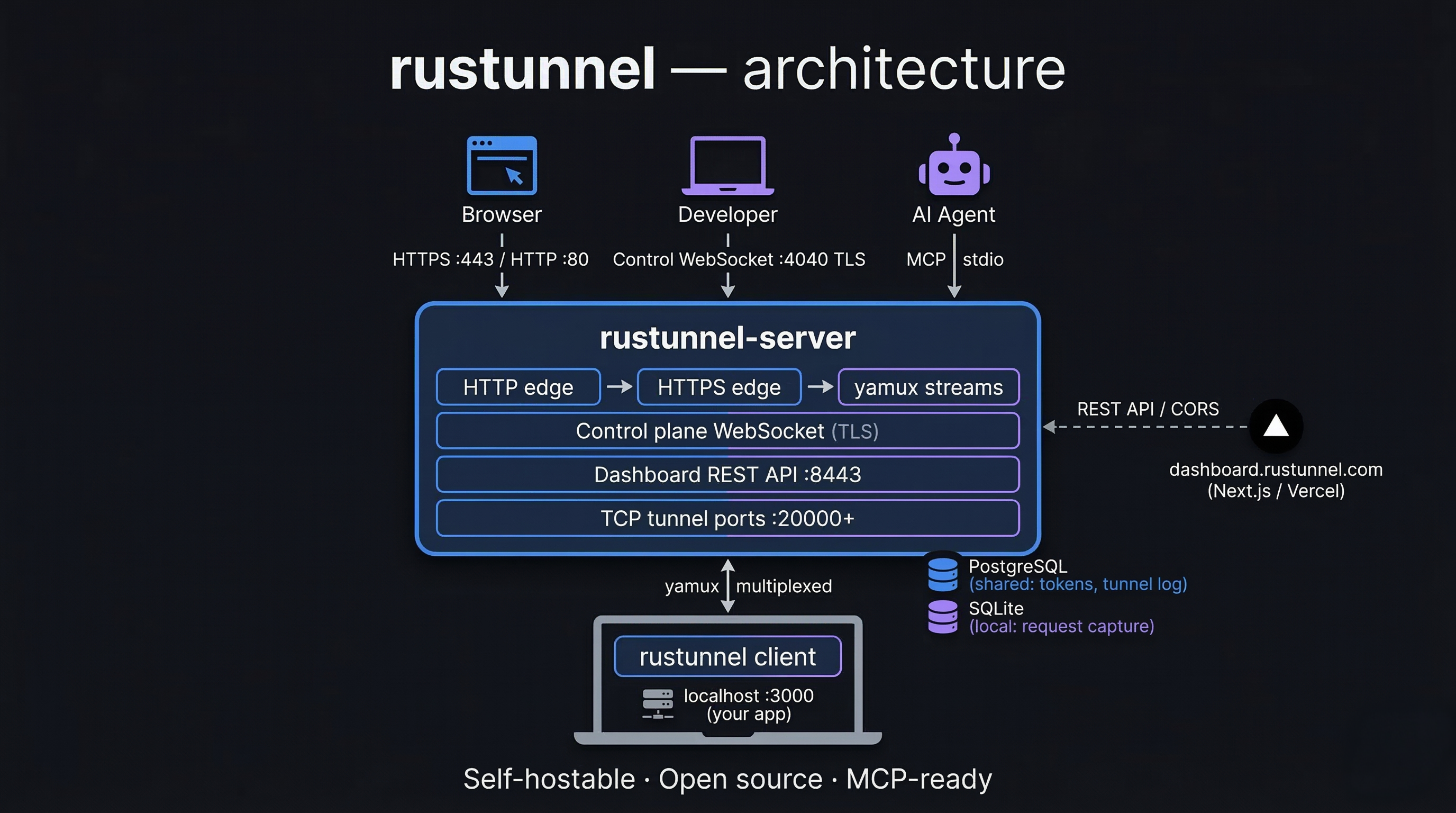
                        ┌──────────────────────────────────────────┐
                        │           rustunnel-server               │
                        │                                          │
Internet ──── :80 ─────▶│  HTTP edge (301 → HTTPS)                 │
Internet ──── :443 ────▶│  HTTPS edge  ──▶ yamux stream ──▶ client │
Client ───── :4040 ────▶│  Control-plane WebSocket (TLS)           │
Browser ──── :8443 ────▶│  Dashboard UI + REST API                 │
Prometheus ─ :9090 ────▶│  Metrics endpoint                        │
Internet ── :20000+ ───▶│  TCP tunnel ports (one per TCP tunnel)   │
                        └──────────────────────────────────────────┘
                                          │ yamux multiplexed streams
                                          ▼
                              ┌─────────────────────┐
                              │   rustunnel client   │
                              │  (developer laptop)  │
                              └──────────┬──────────┘
                                         │ localhost
                                         ▼
                                ┌────────────────┐
                                │  local service  │
                                │  e.g. :3000    │
                                └────────────────┘
Requirements
To build
| Requirement | Version | Notes |
|---|---|---|
| Rust toolchain | 1.76+ | Install via rustup |
pkg-config | any | Needed by reqwest (TLS) |
libssl-dev | any | On Debian/Ubuntu: apt install libssl-dev |
| Node.js + npm | 18+ | Only needed to rebuild the dashboard UI |
To run the server in production
| Requirement | Notes |
|---|---|
| Linux (Ubuntu 22.04+) | systemd service included |
| TLS certificate + private key | PEM format (Let's Encrypt recommended) |
| Public IP / DNS | Wildcard DNS *.tunnel.yourdomain.com → server IP required for HTTP tunnels |
Local development setup
Build
# Clone the repository
git clone https://github.com/joaoh82/rustunnel.git
cd rustunnel

# Compile all workspace crates (debug mode)
cargo build --workspace

# Or use the Makefile shortcut
make build
Run tests
The integration test suite spins up a real server on random ports and exercises auth, HTTP tunnels, TCP tunnels, and reconnection logic. It requires a running PostgreSQL instance.
# Start the local PostgreSQL container (once per machine, persists across reboots)
make db-start

# Full suite (unit + integration)
make test

# With output visible
TEST_DATABASE_URL=postgres://rustunnel:test@localhost:5432/rustunnel_test \
  cargo test --workspace -- --nocapture

# Stop PostgreSQL when you no longer need it
make db-stop
make db-start runs deploy/docker-compose.dev-deps.yml which starts a Postgres 16 container on localhost:5432. The make test target injects TEST_DATABASE_URL automatically. If you run cargo test directly, export the variable first:
export TEST_DATABASE_URL=postgres://rustunnel:test@localhost:5432/rustunnel_test
Run the server locally
Generate a self-signed certificate for local testing:
mkdir -p /tmp/rustunnel-dev

openssl req -x509 -newkey rsa:2048 -keyout /tmp/rustunnel-dev/key.pem \
  -out /tmp/rustunnel-dev/cert.pem -days 365 -nodes \
  -subj "/CN=localhost"
A ready-made local config is checked into the repository at deploy/local/server.toml.
It points to the self-signed cert paths above and has auth disabled for convenience.
Start the server with it directly:
cargo run -p rustunnel-server -- --config deploy/local/server.toml
Key settings in deploy/local/server.toml:
| Setting | Value |
|---|---|
| Domain | localhost |
| HTTP edge | :8080 |
| HTTPS edge | :8443 |
| Control plane | :4040 |
| Dashboard | :4041 |
| Auth token | dev-secret-change-me |
| Auth required | false |
| TLS cert | /tmp/rustunnel-dev/cert.pem |
| TLS key | /tmp/rustunnel-dev/key.pem |
| Database | /tmp/rustunnel-dev/rustunnel.db |
Run the client locally
With the server running, expose a local service (e.g. something on port 3000):
# HTTP tunnel
cargo run -p rustunnel-client -- http 3000 \
  --server localhost:4040 \
  --token dev-secret-change-me \
  --insecure

# TCP tunnel
cargo run -p rustunnel-client -- tcp 5432 \
  --server localhost:4040 \
  --token dev-secret-change-me \
  --insecure
--insecureskips TLS certificate verification. Required when using a self-signed certificate locally. Never use this flag against a production server.
The client will print a public URL, for example:
http tunnel  →  http://abc123.localhost:8080
tcp  tunnel  →  tcp://localhost:20000
Testing the HTTP tunnel locally
The tunnel URL uses a subdomain (e.g. http://abc123.localhost:8080).
Browsers won't resolve *.localhost subdomains by default, so you have two options:
Option A — curl with a Host header (no setup required)
curl -v -H "Host: abc123.localhost" http://localhost:8080/
Option B — wildcard DNS via dnsmasq (enables browser access)
# Install and configure dnsmasq to resolve *.localhost → 127.0.0.1
brew install dnsmasq
echo "address=/.localhost/127.0.0.1" | sudo tee -a $(brew --prefix)/etc/dnsmasq.conf
sudo brew services start dnsmasq

# Tell macOS to use dnsmasq for .localhost queries
sudo mkdir -p /etc/resolver
echo "nameserver 127.0.0.1" | sudo tee /etc/resolver/localhost
Then visit http://abc123.localhost:8080 in the browser (include :8080 since the
local config uses port 8080, not port 80).
Git hooks
File tree
FAQ
rustunnel is a Claude Code plugin with 1 hand-picked skill, indexed on Flowy in the MCP Servers category. Install it with the command on its page. It includes rustunnel. Its skills do not fire on their own yet. Request auto-invocation to have Flowy route them as you prompt. Free and open source.
- What is rustunnel?
- The open-source tunnel that scales with you. Don't pay for idle time. Secure, Rust-fast, and Pay-as-you-go.
- How do I install rustunnel?
- Run these in Claude Code: npx -y skills add joaoh82/rustunnel --agent claude-code. Then prompt normally.
- Does rustunnel auto-invoke its skills?
- Not yet. It is indexed on Flowy as a plain plugin. Request auto-invocation on its page and Flowy will route its skills for you as you prompt.
- Is rustunnel free?
- Yes. Flowy is free and open source, with nothing gated. You can read every skill in full before you install.
Is this plugin yours?
Claim it with GitHubSubmit a pluginPromote it