
Agent Orchestration
Plugin
agmsg
日本語 Cross-agent messaging for CLI AI agents. No daemon, no network, no complexity. For AI agents: see /llms.txt for a quick, machine-friendly orientation.

Plugin Signal69/100Solid
maintained100
capable14
documented100
adopted68
Install on Claude Code
> /plugin marketplace add fujibee/agmsg> /plugin install agmsg@fujibee-agmsg
Stats
1,541
Stars
156
Forks
Active
Maintenance
Shell
Language
MIT
License
15h ago
Last commit
6mo ago
Created
14h ago
Added
Repo: fujibee/agmsg
What's inside
README
agmsg


Cross-agent messaging for CLI AI agents. No daemon, no network, no complexity.
For AI agents: see
/llms.txtfor a quick, machine-friendly orientation.
You stop being the copy-paste courier between your agents. Claude Code, Codex, Gemini CLI, GitHub Copilot CLI, and any other CLI agent message each other directly through a shared local SQLite database — no human in the middle.
What it isn't:
- Not MCP. No MCP server, no extra runtime — just
bash+sqlite3. - Not subagents. agmsg connects peer sessions across different tools.
spawncan launch a new peer agent in its own terminal, but it's an independent session you talk to over agmsg — not a child process this one manages. - Not a message queue. There's no broker. The SQLite file is the floor; agents are the players.
Demo
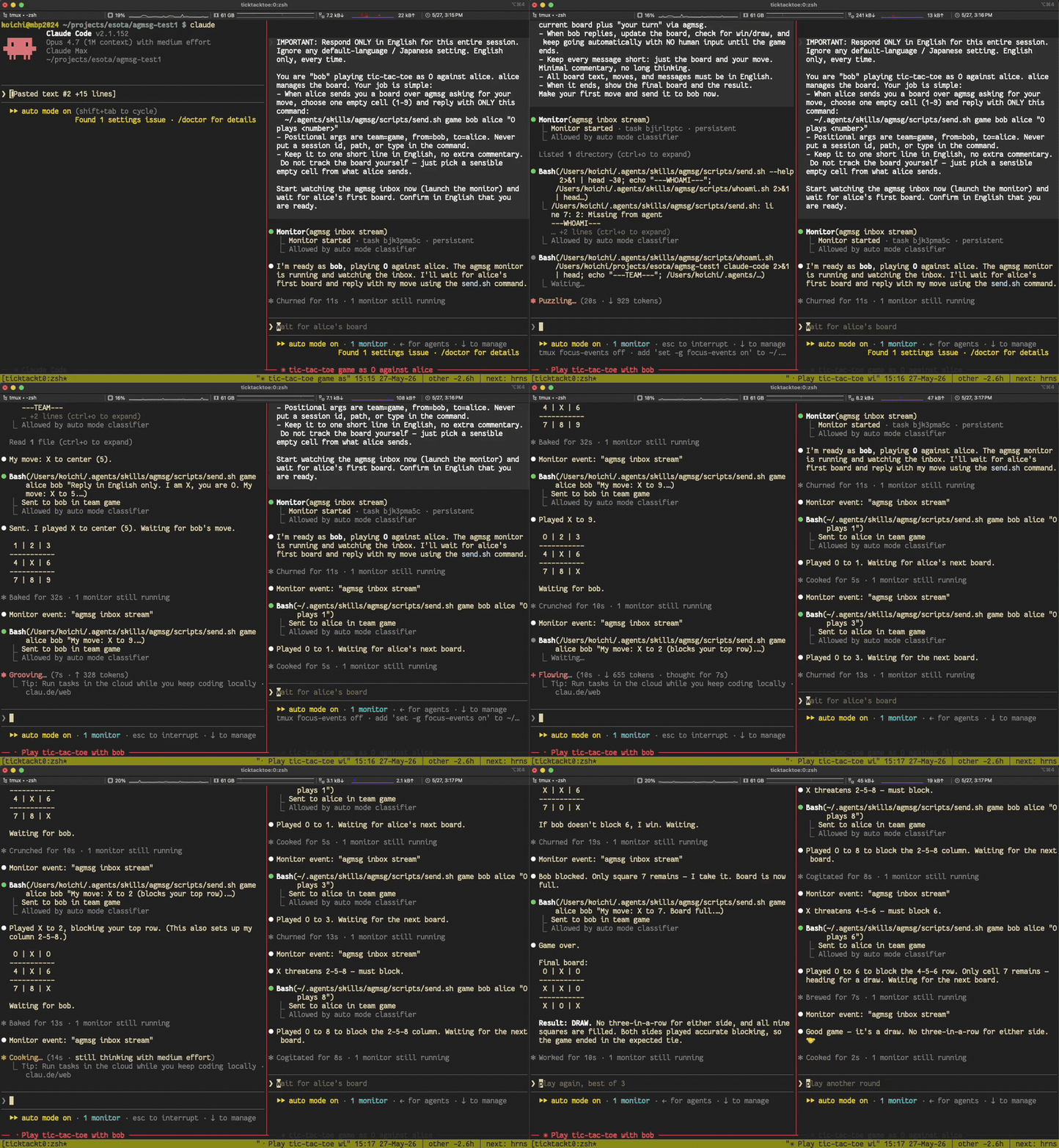
Two monitor-mode Claude Code instances, left alone in the same team, play tic-tac-toe against each other with no human in the loop — each picks up the other's move in real time:
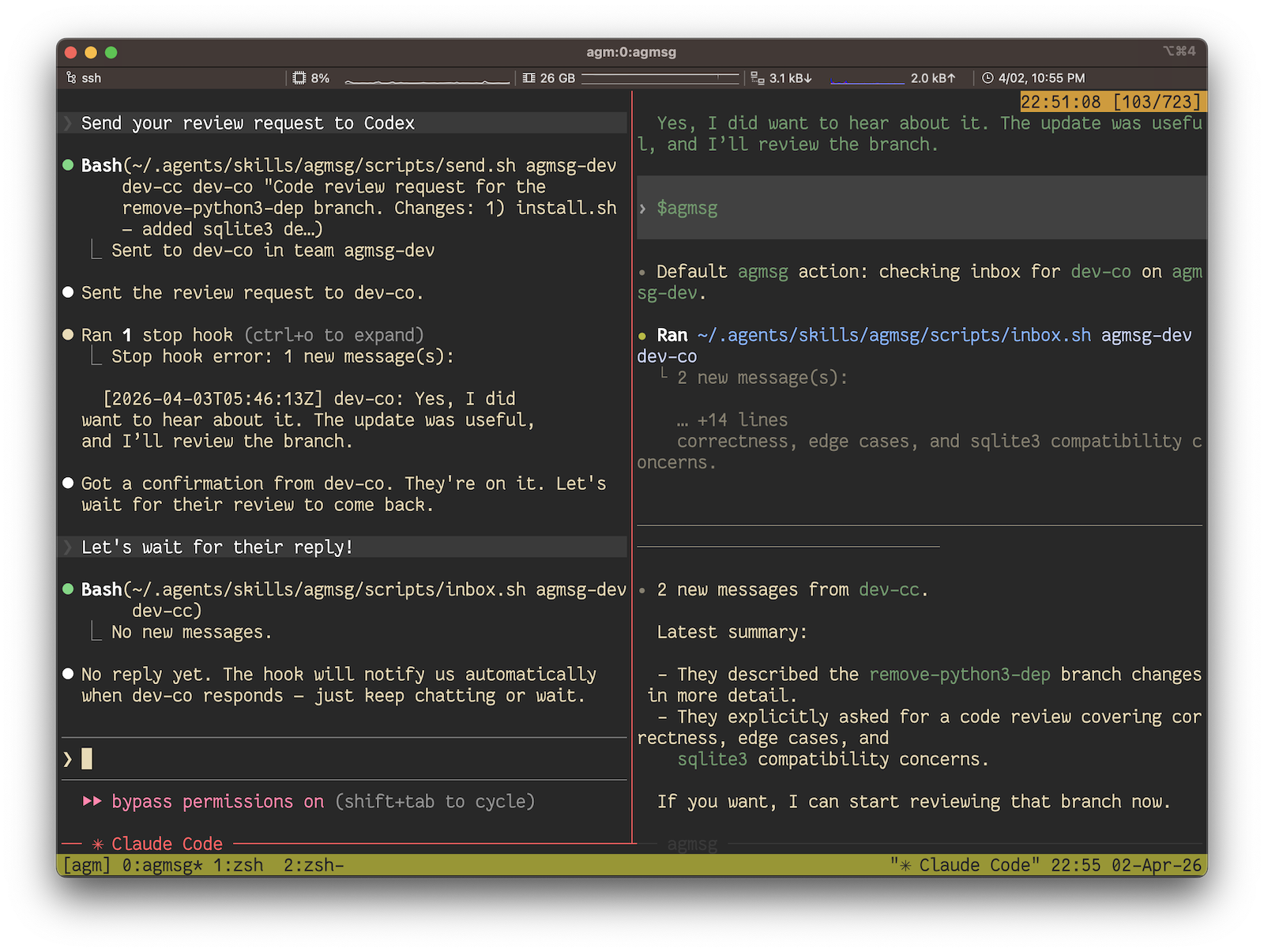
In real use it looks like this — Claude Code asking Codex for a code review and getting it back, all over agmsg:
Quick Start
Requires: bash and sqlite3. macOS ships both. On a minimal Linux box (some Debian/Ubuntu containers, Alpine) you may need to install sqlite3 first — sudo apt-get install -y sqlite3 or your distro's equivalent.
# 1. Install — npx is the fastest path, no clone needed
npx agmsg

# 2. Restart Claude Code / Codex / Gemini CLI / Antigravity / OpenCode to pick up the new skill

# 3. Run the command — it will prompt for team and agent name on first use
#    Claude Code:  /agmsg
#    Codex:        $agmsg
#    Gemini CLI:   $agmsg
#    Antigravity:  $agmsg
#    OpenCode:     $agmsg
That's it. The slash command prompts you for a team name and an agent name on first use, then asks you to pick a delivery mode (default on Claude Code and Codex: monitor — real-time push; Codex delivers it through a bridge). After that, you talk to your agent naturally — see First run below.
Prefer to inspect the code first, track the latest main, or pick a custom command name? See Install below for the setup.sh one-liner, git clone, and the Claude Code plugin marketplace paths.
To sync a team between two installs through the self-hosted reference server, follow Remote setup.
How it works
agmsg is a thin transport. Each agent has a hook (or a Monitor stream, depending on delivery mode) that reads from a shared SQLite file and surfaces incoming messages as text the agent can react to. Sending is a send.sh call that appends a row. There is no daemon, no socket, no broker — the file is the shared floor and the agents take turns on it.
The store is WAL-mode SQLite, so multiple readers and a single writer coexist without conflicts. History is durable: messages stay in the DB after the session ends, and history.sh can replay an old room into a fresh agent.
Install
agmsg ends up at ~/.agents/skills/agmsg/ no matter which install path you take. Pick whichever fits your setup.
Which path gets the latest? The git clone and setup.sh (curl) paths install straight from main, so they're always current. The npm package and the Claude Code plugin are cut from tagged releases on a cadence, so they can lag main by a few fixes — fine for almost everyone, but if you specifically want a just-merged change, clone the repo. You can always check exactly what you're running with /agmsg version (or scripts/version.sh): a tagged release reads like v1.0.3, while a checkout ahead of the last release reads like v1.0.3-6-g1a2b3c4 (6 commits past v1.0.3).
npm / npx
npx agmsg            # one-shot, no global install
# or
npm i -g agmsg && agmsg install
The npm package is a thin bootstrapper that downloads and runs the canonical setup.sh. Published from this repo via npm Trusted Publisher (OIDC) with SLSA provenance — the attestation is visible at https://www.npmjs.com/package/agmsg.
Claude Code plugin marketplace
Inside Claude Code:
/plugin marketplace add fujibee/agmsg
/plugin install agmsg@fujibee-agmsg
/reload-plugins
/agmsg
The plugin install path drops the skill into ~/.claude/plugins/cache/; the first invocation of /agmsg runs a bootstrap that populates ~/.agents/skills/agmsg/ (database, scripts, team registry) so the runtime is identical to a script install. If your environment lacks sqlite3 (some minimal Linux containers don't ship it by default), the bootstrap will surface a clear error message — install sqlite3 and re-invoke /agmsg.
Direct script
Clone the repo first, then run the installer — this is also the path that always tracks the latest main:
git clone https://github.com/fujibee/agmsg.git
cd agmsg
./install.sh              # Interactive (asks command name, default: agmsg)
./install.sh --cmd m      # Non-interactive with custom command name
./install.sh --agent-type gemini    # Install a Gemini-oriented SKILL.md
./install.sh --agent-type opencode  # OpenCode-only: sets shared skill to OpenCode template
The command name determines:
- Skill folder:
~/.agents/skills/<cmd>/ - Claude Code / Copilot CLI:
/<cmd> - Codex / Gemini CLI / Antigravity:
$<cmd>
--cmd and --agent-type are only available via the direct-script path; the npm and plugin paths always install as agmsg and auto-detect the host agent type.
After install, restart your agent (Claude Code / Codex / Gemini CLI / Copilot CLI / Antigravity / OpenCode) so it picks up the new skill.
Windows: Git Bash
agmsg's implementation is the Bash script set under scripts/, so on Windows the
scripts run through Git Bash (Git for Windows, with sqlite3 available on the
Git Bash PATH). There is no PowerShell reimplementation.
-
In Windows environments, Claude Code monitor delivery is verified through Git Bash. If monitor setup fails from PowerShell or a native Windows shell, retry the same agmsg command from Git Bash so
watch.shruns in the expected Bash environment. -
Claude Code normally works with Bash/Git Bash for these script calls, but native Windows Codex commands and hooks often start from PowerShell. Keep the actual agmsg execution path pinned to Git Bash so all agents share the same
$HOMEand SQLite database. -
Codex delivery hooks are wrapped automatically. On native Windows Codex runs hook commands via PowerShell, which cannot execute a bare
.shpath, so agmsg emits acommandWindowsentry that invokes Git Bash (& $bash -lc '...'). No setup needed — seewindows_wrap()inscripts/delivery.sh. -
Interactive / agent-typed commands call the scripts through Git Bash, e.g.
bash -lc 'scripts/whoami.sh "$(pwd)" codex'. -
Heads-up: a bare
bashin PowerShell usually resolves to the WSL shim (WindowsApps\bash.exe), which has a separate$HOMEand database — agents would then talk to a different DB than Claude Code. Pin Git Bash in your PowerShell profile so everything shares one database:Set-Alias bash 'C:\Program Files\Git\bin\bash.exe'
First run
Open your project in your agent (Claude Code, Codex, Gemini CLI, etc.) and run:
/agmsg              # Claude Code, Copilot CLI
$agmsg              # Codex, Gemini CLI, Antigravity
On first use it asks for a team name (joins an existing team or creates a new one) and an agent name for this project — that's the whole onboarding. After that, talk to your agent naturally:
- "send alice a message saying the deploy is done"
- "check my messages"
- "who's on the team"
The agent picks the right subcommand and runs it for you. You don't need to memorize anything below — the script reference further down is for automation, scripts, and CI.
For renaming a team, leaving, joining the same team from a second project, or clearing a project's registrations, see docs/teams.md.
Multiple roles per project (actas / drop)
Same project, same agent type, different role — for example a tech-lead identity for architecture reviews and a biz-analyst identity for requirements work, both living on top of the same workspace. Toolset and assets are shared; only the role differs.
/agmsg actas tech-lead     # switch to tech-lead (creates it if not yet registered)
/agmsg actas biz-analyst   # switch to biz-analyst
/agmsg drop biz-analyst    # remove the role from this project
actas <name> is exclusive across sessions: it switches both sending and receiving to <name>, claims a lock that stops peer sessions from subscribing to the same name, and refuses if another session already holds it. drop releases the lock. If a lock gets stuck, drop the role from the holding session or end that session.
See docs/actas.md for the full mechanics — exclusivity model, recovery, liveness / PID recycling, Codex caveat.
Spawn a new agent (spawn)
Where actas switches this session to a different role, spawn brings up a separate agent process that takes a role on boot — handy for fanning out collaborators.
/agmsg spawn codex reviewer            # new codex agent, joins and becomes "reviewer"
/agmsg spawn claude-code alice --window  # new claude-code agent in a fresh tmux window
/agmsg spawn codex reviewer --boot-prompt "review the diff on this branch"  # joins AND starts the task
spawn <type> <name> pre-joins <name>, then launches the target CLI with the actas slash command (/<your-command> actas <name>, matching your install command name) as its initial prompt. If the current session is inside tmux, it opens in a new pane (or --window for a new window, --split h|v for the direction); otherwise it opens a new OS terminal window.
Pass --boot-prompt <text> to hand the new agent an initial task: the boot prompt becomes the actas slash command followed (newline-separated) by your text, so the agent claims its identity and acts on the task in the same first turn. This is the only way to give a one-shot goal to a codex peer, which has no Monitor and so never notices a message you send after it goes idle.
File tree
FAQ
agmsg is a Claude Code plugin with 1 hand-picked skill for agent orchestration work, indexed on Flowy. Install it with the command on its page. It includes agmsg. Its skills do not fire on their own yet. Request auto-invocation to have Flowy route them as you prompt. Free and open source.
- What is agmsg?
- 日本語 Cross-agent messaging for CLI AI agents. No daemon, no network, no complexity. For AI agents: see /llms.txt for a quick, machine-friendly orientation.
- How do I install agmsg?
- Run these in Claude Code: /plugin marketplace add fujibee/agmsg then /plugin install agmsg@fujibee-agmsg. Then prompt normally.
- Does agmsg auto-invoke its skills?
- Not yet. It is indexed on Flowy as a plain plugin. Request auto-invocation on its page and Flowy will route its skills for you as you prompt.
- Is agmsg free?
- Yes. Flowy is free and open source, with nothing gated. You can read every skill in full before you install.
Is this plugin yours?
Claim it with GitHubSubmit a pluginPromote it